jsonschema covers six drafts, but format checks stay switched off
An implementation of the JSON Schema specification for Python
At a glance
- What is it?
- jsonschema is a Python implementation of JSON Schema validation, with full support from Draft 3 to Draft 2020-12 and lazy validation that can report every error at once. Its Python floor is 3.12, and installing the format extra does not turn format checking on by itself.
- Who is it for?
- jsonschema fits a Python service that already speaks JSON Schema and needs the newest draft, references between schemas, and a validator whose error objects it can walk programmatically. It does not fit an interpreter older than 3.12 or a build that needs format checking switched on implicitly.
- Can I use it commercially?
- Yes. MIT is a permissive licence: you can use, modify and sell software built on it, as long as you keep its copyright and licence notices.
- Is it still maintained?
- Yes. The repository received new commits within the last day.
- What is it written in?
- Mainly Python, according to GitHub's language statistics.
Answers come from the project's GitHub data, last synced on November 13, 2026, and from our analysis. They are not legal advice.
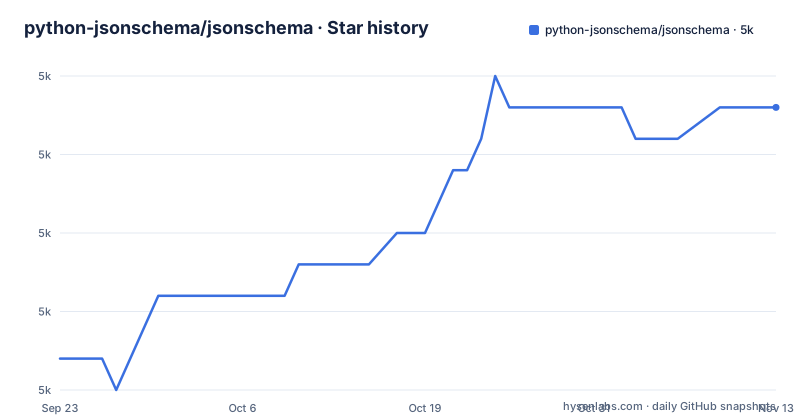
Star history
- python-jsonschema/jsonschema4,994 ★ · +8
| Repository | 2026-09-23 | 2026-11-13 |
|---|---|---|
| python-jsonschema/jsonschema | 5k | 5k |
8 Stars in the last 51 days, measured from the daily GitHub snapshot. Compare with other projects
Editorial analysis
validate() stops at the first error, iter_errors walks all of them
The entry point is a single function. Given an instance and a schema, it either returns without complaint or raises:
>>> from jsonschema import validate

>>> # A sample schema, like what we'd get from json.load()
>>> schema = {
...     "type" : "object",
...     "properties" : {
...         "price" : {"type" : "number"},
...         "name" : {"type" : "string"},
...     },
... }

>>> # If no exception is raised by validate(), the instance is valid.
>>> validate(instance={"name" : "Eggs", "price" : 34.99}, schema=schema)
Pass the same instance with a price of `"Invalid"` and the type keyword produces the failure, in the documented example as `ValidationError: 'Invalid' is not of type 'number'`. That raise-on-first-error behaviour is the reason for the second feature: lazy validation through `iter_errors`, which can iteratively report all validation errors, plus programmatic querying of which properties or items failed. A form that shows errors next to fields needs that second path, since a single exception tells you about one field.
Installing the format extra does not switch format checks on
There are two extras, and both exist for `format` validation: `format` and `format-nongpl`. They are installed like any other extra:
$ pip install jsonschema'[format]'The warning that follows them is the part that catches people out. The mere presence of those dependencies, or even the specification of `format` checks in a schema, does not activate format checks, as the specification itself requires. Installing the extra gets you the validators; turning the behaviour on is a separate, explicit step, and the details live in the format validation chapter of the documentation.
The consequence is a schema full of `"format": "email"` that accepts nonsense, quietly, because the keyword is being treated as an annotation rather than a constraint. That is the specification's behaviour rather than a bug in the implementation, but it means a team can ship a schema that reads like validation and is not validating anything until someone finds the switch.
The two format extras differ in three packages
Both extras pull the same family of validators, which is the shape of the format keyword: a hostname checker `fqdn`, `idna>=0.3` for internationalised names, `isoduration`, `jsonpointer>1.13`, `rfc3339-validator` for timestamps, `uri_template`, and `webcolors` for named colours. The difference is narrow and specific.
`format` requires `rfc3987>=1.3` and `webcolors>=1.11`. `format-nongpl` requires `rfc3986-validator>0.1.0` and `rfc3987-syntax>=1.1.0` instead of `rfc3987`, and raises the colour floor to `webcolors>=24.6.0`. The name says why: the non-GPL variant swaps the URI validator for a pair of packages so the licence of the dependency chain is not GPL. If you are choosing between them, that is the whole decision, plus a higher webcolors floor. Both extras exist only for format validation, so a project that never uses `format` can skip both.
Python 3.12 is the floor, and the version comes from the tags
The packaging metadata is unambiguous: `requires-python = ">=3.12"`, with classifiers for 3.12, 3.13, 3.14 and 3.15, and implementations listed as CPython and PyPy. The operating system classifier is OS Independent, so the platform is not the constraint, the interpreter is. A service pinned to 3.11 cannot install the current release from this metadata at all.
The build side explains how a library with a moving version number gets published. The build backend is hatchling, with `hatch-vcs` and `hatch-fancy-pypi-readme`, and `[tool.hatch.version]` sets `source = "vcs"`, which means the version is derived from the repository tags rather than written in the file. `version` and `readme` are both listed as dynamic. The practical effect for consumers is that the version you install reflects a tag, and the readme you see on the package index is generated from `README.rst` through the fancy-pypi-readme plugin.
Four runtime dependencies carry the drafts and the references
The dependency list is short and each name describes a job: `attrs>=22.2.0`, `jsonschema-specifications>=2023.03.6`, `referencing>=0.28.4` and `rpds-py>=0.25.0`. The specification package is where the meta-schemas for each draft live, and the referencing package is the resolution machinery behind `$ref` and friends, which is what makes a schema split across files workable.
Supporting six drafts is the feature that shows up in that list. Full support is claimed for Draft 2020-12, Draft 2019-09, Draft 7, Draft 6, Draft 4 and Draft 3, each with its own validator class, which is what lets a codebase validate an old third-party schema and a new internal one with the same library. Note that the floors are all recent even though Draft 3 dates from the early days of the specification: the constraint is on the machinery, not on how old the schema you are validating is.
Two command line entry points, and the readme points at the other project
For command line use the readme sends you elsewhere: it can be used from the command line by installing check-jsonschema, a separate project. The package metadata, meanwhile, declares its own script entry point, `jsonschema = "jsonschema.cli:main"`, so an installed copy also puts a `jsonschema` command on the path. Two front ends to the same library, and the prose only describes one of them.
The rest of the top level explains the documentation and tooling side. The readme is `README.rst` rather than Markdown, with `docs/` and `.readthedocs.yaml` feeding the documentation site at python-jsonschema.readthedocs.io, `CHANGELOG.rst` and `CONTRIBUTING.rst` in reStructuredText, and `COPYING` for the MIT licence. There is a `json/` directory for data, a `noxfile.py` for the test sessions, a `uv.lock` for reproducible tooling installs, and both `.pre-commit-config.yaml` and `.pre-commit-hooks.yaml`, which means the project ships its own hooks for consumers to run.
Tests run on every supported interpreter through nox
Contributing means running the suite across the interpreters the project supports. If you have `nox` installed, perhaps via `pipx install nox` or your package manager, running `nox` in the directory of your source checkout runs the test suite on all of the versions of Python jsonschema supports. If you do not have all of those interpreters, the guidance is to add nox's `--no-error-on-missing-interpreters` option. The tests live in the `jsonschema.tests` package, and running them on a single version with your favourite test runner is explicitly allowed.
Benchmarks are a separate session. They are built on `pyperf`, and they run with:
$ nox -s perfThat shape has a cost for contributors: a one-line change is checked against up to four CPython versions plus PyPy, which is a heavier local setup than a single test run. The upside is that the draft support claimed in the readme is exercised on every version the project claims to support. The last push to `main` was on 2026-11-02 and the most recent release tag is v4.26.0 from 2026-01-07.
Editorial conclusion
jsonschema fits a Python service that already speaks JSON Schema and needs the newest draft, references between schemas, and a validator whose error objects it can walk programmatically. It does not fit an interpreter older than 3.12 or a build that needs format checking switched on implicitly. Before adopting, confirm your interpreter version, decide deliberately whether you want format validation and which extra to install, and use iter_errors rather than validate() wherever the errors are shown to a person.
Frequently asked questions
how to install jsonschema
Install it from PyPI with `pip install jsonschema`. Two extras exist for format validation and are installed as `pip install jsonschema'[format]'` or the `format-nongpl` variant. The packaging metadata requires Python 3.12 or newer, with classifiers through 3.15 on CPython and PyPy.
how to use jsonschema python
Import `validate` and pass an instance and a schema: `validate(instance={"name" : "Eggs", "price" : 34.99}, schema=schema)`. If no exception is raised the instance is valid. Where you need every error rather than the first, use the lazy `iter_errors` API, which can iteratively report all validation errors.
what is jsonschema
jsonschema is an implementation of the JSON Schema specification for Python. It claims full support for Draft 2020-12, Draft 2019-09, Draft 7, Draft 6, Draft 4 and Draft 3, lazy validation that can iteratively report all errors, and programmatic querying of which properties or items failed validation.
jsonschema is not of type object
That message comes from the `type` keyword in the schema. In the documented example, validating an instance whose price is the string "Invalid" against a schema declaring `"price" : {"type": "number"}` raises `ValidationError: 'Invalid' is not of type 'number'`. A message naming 'object' means the schema declared that type for the instance it received.
Official sources
Add this badge to your README
If you maintain this project, the badge below links readers to this analysis and shows its maintenance status from the daily GitHub snapshot. Paste the markdown into your README; add ?metric=license or ?metric=stars to the image URL for a different field.

[](https://hysenlabs.com/projects/python-jsonschema-jsonschema)Star history chart for your README
[](https://hysenlabs.com/projects/python-jsonschema-jsonschema)Was this useful?