python-mode's only release tag is a 2013 beta, and its README discusses version 0.15.0
Vim python-mode. PyLint, Rope, Pydoc, breakpoints from box.
At a glance
- What is it?
- A Vim plugin that turns Vim into a Python environment: seven lint and format tools were replaced by one and the submodule count went from thirteen to three, the recommended install for one plugin manager tracks a development branch, the project's own description still names one of the tools that was removed, the test framework is cloned from the network at build time, and a configuration file for a removed tool is still in the root.
- Who is it for?
- python-mode fits someone who wants Python editing inside Vim and is willing to read the help file, and it is a poor fit for anyone who needs a versioned, installable plugin. Four things to check.
- Can I use it commercially?
- Yes, with conditions. LGPL-3.0 is a weak copyleft licence: you can use it inside commercial and closed-source software, but if you distribute changes to its own files, you must publish those changes under the same licence.
- Is it still maintained?
- Yes. The repository last received commits 174 days ago.
- What is it written in?
- Mainly Vim Script, according to GitHub's language statistics.
Answers come from the project's GitHub data, last synced on November 13, 2026, and from our analysis. They are not legal advice.
Star history
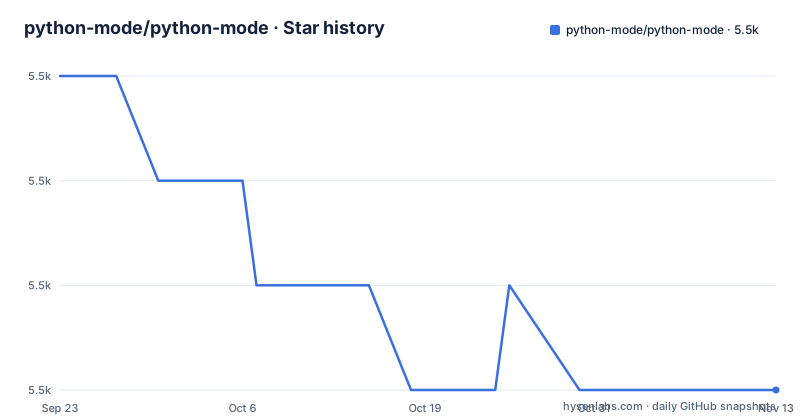
- python-mode/python-mode5,463 ★ · -3
| Repository | 2026-09-23 | 2026-11-13 |
|---|---|---|
| python-mode/python-mode | 5.5k | 5.5k |
-3 Stars in the last 51 days, measured from the daily GitHub snapshot. Compare with other projects
Editorial analysis
One release tag from 2013, and a README that talks about version 0.15.0
The release list for this repository has a single entry, and it is a beta from December 2013 whose title describes Python 3 support being added.
The README, meanwhile, refers to a version 0.15.0 as the point at which a change landed. It also uses dated markers for the other two changes it flags, one in 2017 and one in 2019.
So there are two numbering systems in one file. Either the 0.15 line was never cut as a release, or it was cut and the tags are not in this repository, and the single tag that is visible is a pre-release from before both changes. A reader who wants to install a specific version has one GitHub release to choose from, and it predates the version the README's own changelog markers refer to.
The more recent commit is dated 2026-05-24, so the branch is being worked on. What a user gets by tracking the branch is the current state of a plugin whose published history stops in 2013.
The README's own second line is an italic sentence on its own: the project needs contributors. That sits above the documentation links, before any feature is described, and it is the clearest signal in the file about what a user is signing up for.
The version scheme is not the only loose end. There is a configuration file for version bumping at the root, which means the project bumps its own version in a file, and that bump is what would eventually be tagged.
One of the four install routes pins a development branch
Five installation routes are documented, and only the vim-plug one names a branch.
The manual route clones the repository and copies files into a directory in the home folder, then rebuilds the help tags. The Vim package route clones into the standard packages directory. The pathogen route clones into a bundle directory and requires two calls in the configuration file. The NeoBundle route adds one line with a filetype condition.
The vim-plug route is the odd one:
Plug 'python-mode/python-mode', { 'for': 'python', 'branch': 'develop' }It names the repository's default branch explicitly. So a user who picks vim-plug gets a moving branch rather than a tag, which means their editor configuration tracks whatever the branch is that day, and a regression appears as a plugin update with no version to roll back to.
The other routes clone the default branch too, so the distinction is thinner than it looks. What differs is whether the clone brings the submodules.
That distinction is the important one, and the README leads with it. A note dated 2017 explains that the project moved from hard-coding third-party libraries into its own code to using submodules, and that anyone who has already cloned without them must run a submodule update inside the plugin folder. New users are told to clone with the recursive flag instead. Every git clone command in the file carries that flag.
There is also a platform footnote: Windows users need a core setting enabled for symbolic links.
The documented default Python version is not the one the compose file falls back to
Four specific interpreter versions are supported, and the project names two different defaults for them.
The feature list says the plugin supports 3.10.13, 3.11.9, 3.12.4 and 3.13.0. A separate section repeats the same four and marks the last one as the default.
The testing section then describes a script that runs with the default Python version, and annotates it with 3.13.0. So the documented default is the newest of the four.
The compose file disagrees. Its build argument is a two-segment version with a fallback:
- PYTHON_VERSION=${PYTHON_VERSION:-3.11}So a contributor who brings the stack up with no environment variable set is testing against 3.11, not 3.13, and the log line the test script prints will say so. The two services in that file both use the same fallback.
The form of the version differs too. The compose fallback is a minor version, the commented-out example in the same block is a full patch version, and the supported list is four full patch versions. The container image is built from a base named by that value, and the image file carries a comment saying that for one of the newer interpreters you should use the full patch version if the short one does not work. So the exact interpreter matters and the defaults are loose.
The project description still names one of the seven tools that was removed
The repository's one-line description reads: a Vim plugin providing a linter, a refactoring library, documentation lookup and breakpoints.
Three of those four are current. The linter named in that description is not. It is one of seven tools that a later version replaced, and the list of seven is given in the README twice, in the note and again in the requirements section: a static checker, a style checker, a complexity checker, that same linter, a docstring style checker, a linter aggregator, and an automatic formatter.
So the summary a user sees in a search result, in a package listing or in their own plugin manager describes a capability the project deliberately removed, and it names it first.
The removal itself is the best-documented change in the file. From a version the README gives as 0.15.0, the seven were replaced by a single tool, and the consequences are quantified: the submodule count went from thirteen to three, which the README says reduces clone size and improves maintenance, and the plugin's own performance improves. A migration guide is linked for the details.
The three remaining submodules are named, and they are not linters: a refactoring library, a tool-configuration helper, and a TOML parser. So the plugin still bundles the heavyweight piece it cannot replace, and the piece it can replace went from seven to one, installed outside the repository.
Thirteen submodules became three, and the removed tool's config file is still in the root
The submodule migration left two artefacts in the tree, and both are visible in a directory listing.
The first is a configuration file for one of the seven removed tools, sitting at the repository root next to the plugin's own directories. The tool it configures is not in the requirements any more. It is a configuration file for the linter aggregator, and it survived the change that removed the aggregator.
The second is a note in the requirements section about the replacement tool. It says the new linter is installed separately with the package manager, and points at a script whose name says it verifies the installation. So the plugin's linting depends on something the repository does not contain and cannot install, and the verification is a shell script the user runs.
The root also keeps a small Vim configuration file named for debugging, a logo image, a changelog, an authors file, a licence copy, a version-bump configuration, and two Docker files. The Vim plugin directories are all there: the plugin directory, the autoload directory, the filetype plugin directory, the syntax directory, an after directory, a documentation directory, and a directory named for the plugin's own Python package.
The main README is also lowercase while the changelog, the licence copy and the authors file are uppercase, which is a small sign of a file that has been renamed at least once.
The test framework is cloned from the network while the image is built, with a retry
The testing setup is a container build, and the build downloads the test framework rather than pinning it.
The image installs a terminal editor, a version control client and two other system packages, then installs a coverage tool and the new linter. It copies the plugin into a work directory, creates a Vim package directory, and symlinks the plugin into it. It then copies two configuration files out of the test directory into the container's home, one for the plugin and one that is a full editor configuration, and touches two empty files that the tests appear to use as markers.
Then the framework:
RUN mkdir -p /root/.vim/pack/vader/start && \
    git clone --depth 1 https://github.com/junegunn/vader.vim.git /root/.vim/pack/vader/start/vader.vim || \
    (cd /root/.vim/pack/vader/start && git clone --depth 1 https://github.com/junegunn/vader.vim.git vader.vim)
A shallow clone with no reference named, so the framework version is whatever the default branch is on the day the image is built. And a fallback: if the first clone fails, which is what happens when the target directory already exists, it changes into the parent and clones into vader.vim from there, the same target by a relative path.
So a test run depends on an unpinned network fetch, and the fallback path targets the same directory as the first attempt. Neither is fatal and both are visible in the file.
The test script itself is generated during the build by echoing a shell script into place, and it prints the interpreter version and the editor version before running the suite. Two comments in the image file explain that the official base image is used instead of an earlier one and that a version manager is no longer needed, which means the environment variables the compose file still sets for it are left over.
Two compose services are the same block twice, and the troubleshooting text stops mid-word
The compose file defines two services and one of them is a copy of the other with two lines changed.
Both build from the same context with the same Dockerfile and the same build argument and the same fallback version. Both mount the repository at the same path. Both set the same four environment values, and both carry the same commented-out example of pinning a specific patch version. What differs is the command: one runs the test script, the other starts a shell, and the shell service additionally opens an interactive terminal.
That duplication is a maintenance cost rather than a bug. Four environment values and a build argument exist twice, so a change to the test environment has to be made twice and the two services can drift. The cost is low today because the block is short; it doubles with every variable added.
The leftover environment value is worth naming. One of the four is a configure option for a Python build from source, and the image file says in a comment that a version manager is no longer needed because the official base image is used instead. So a variable that only means something to a source build is still being set in both services, for a build process the image has moved on from.
Editorial conclusion
python-mode fits someone who wants Python editing inside Vim and is willing to read the help file, and it is a poor fit for anyone who needs a versioned, installable plugin. Four things to check. The only release tag is a beta from 2013, so there is no published version to pin and the vim-plug route tracks a development branch. The external tool the plugin shells out to is installed separately rather than bundled, so a machine without it has working highlighting and no working lint. The supported Python list names four specific patch releases ending at 3.13, so a newer interpreter is not on the project's supported list. And the documentation is read inside the editor, which is a real advantage and also means the only complete reference is a file you have to already have installed.
Frequently asked questions
What is python-mode?
A Vim plugin that turns the editor into a Python development environment: syntax highlighting, virtualenv support, running Python from a leader key, breakpoints, improved indentation, Python motions and operators, improved folding, a lint command with an autofix variant, documentation search, refactoring, completion and go-to-definition. Its documentation is read inside the editor.
How do I install python-mode?
Five routes are documented: Vim's own package structure, pathogen, vim-plug, NeoBundle and a manual copy into ~/.vim. Every git clone command among them uses the recursive submodules flag, which matters because the project moved its bundled libraries into submodules in 2017. Windows users also need a core setting enabled for symbolic links.
What does python-mode require?
Vim 7.3 or newer with Python 3 support, plus the large-feature build of Vim if you want one lint-related setting. Its only external Python tool now is a linter and formatter installed separately, which replaced seven earlier tools and reduced the bundled submodules from thirteen to three.
How is python-mode tested?
Through a container environment with a compose file offering one service that runs the suite and a second that opens a shell, both built from the same Dockerfile. The supported interpreters are four specific patch releases, and the image symlinks the plugin into a Vim package path and replaces the editor configuration with the test one.
Is python-mode still maintained?
The most recent commit is dated 2026-05-24 and the only release tag is a pre-release from December 2013. The README's second line states that the project needs contributors, and the recommended install for one plugin manager tracks the development branch rather than a tag.
Official sources
Add this badge to your README
If you maintain this project, the badge below links readers to this analysis and shows its maintenance status from the daily GitHub snapshot. Paste the markdown into your README; add ?metric=license or ?metric=stars to the image URL for a different field.

[](https://hysenlabs.com/projects/python-mode-python-mode)Star history chart for your README
[](https://hysenlabs.com/projects/python-mode-python-mode)Was this useful?