Rakudo compiler: MoarVM, JVM, and JavaScript backends
🦋 Rakudo – Raku on MoarVM, JVM, and JS
At a glance
- What is it?
- Rakudo compiles Raku programs for MoarVM, the JVM, and JavaScript, but backend feature sets differ. It is best suited to language implementers, distribution maintainers, and developers who need source-level control over a Raku runtime.
- Who is it for?
- Rakudo is appropriate for Raku compiler development, backend experimentation, and source distributions that control their own runtime stack. It is a poor fit for a normal application developer who only needs modules and documentation, since the README directs those users to Rakudo Star instead.
- Can I use it commercially?
- Yes. Artistic-2.0 is a permissive licence: you can use, modify and sell software built on it, as long as you keep its copyright and licence notices.
- Is it still maintained?
- Yes. The repository received new commits within the last day.
- What is it written in?
- Mainly Raku, according to GitHub's language statistics.
Answers come from the project's GitHub data, last synced on November 7, 2026, and from our analysis. They are not legal advice.
Star history
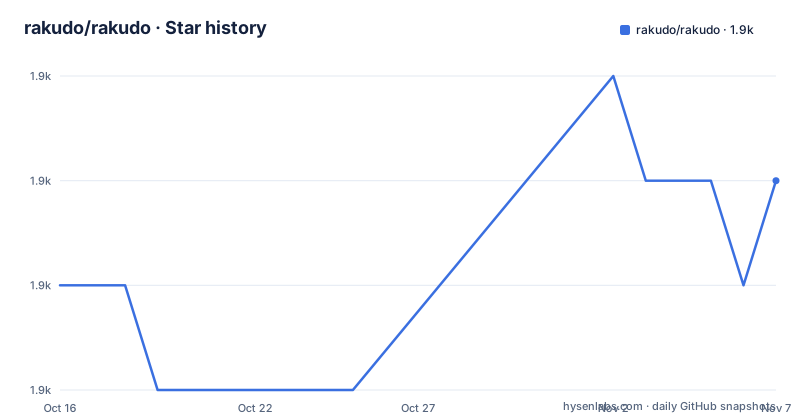
- rakudo/rakudo1,910 ★ · +1
| Repository | 2026-10-16 | 2026-11-07 |
|---|---|---|
| rakudo/rakudo | 1.9k | 1.9k |
1 Stars in the last 22 days, measured from the daily GitHub snapshot. Compare with other projects
Editorial analysis
Rakudo's compiler and backend boundaries
Rakudo addresses the practical problem of executing Raku programs across different virtual-machine environments. Raku needs a compiler rather than only a standalone interpreter: Rakudo translates Raku source into code and runtime structures consumed by its selected backend. According to the README, Rakudo is the primary implementation of the Raku language and has `moar`, `jvm`, and `js` backends.
That does not make the three targets interchangeable. The README explicitly warns that each backend has a different set of features. A program or implementation detail that works under one backend cannot automatically be assumed to work under the others. For an engineering team, the backend decision is therefore part of compatibility planning, not merely a packaging preference.
The repository contains the compiler itself. Based on the directory layout, it includes configuration, build support, generated code, library files, tests, JavaScript package metadata, documentation, and language tooling. It does not include the modules and documentation normally supplied by a complete Raku distribution. That boundary makes Rakudo narrower than the name of the language might suggest. This is source for compiler and distribution work, while Rakudo Star is the project named by the README as the appropriate download for users seeking a complete Raku environment.
How Configure.pl builds Rakudo
The documented build process starts with Perl's `Configure.pl`, followed by `make` or `make install`. Configuration options select the desired backends and can also trigger downloads and source builds of supporting runtimes. For MoarVM, `--gen-moar` builds MoarVM and `--gen-nqp` builds NQP. The JVM configuration uses `--gen-nqp` because Java supplies the virtual machine, while JDK 1.9 or higher is required.
Options passed with `--moar-option` are forwarded to MoarVM's own `Configure.pl`. This creates a two-stage configuration chain. Rakudo's configure script receives a MoarVM setting such as `--compiler=clang`, and the MoarVM build receives that option. The README also documents exact compiler selection with `--cc` and forwards optimization or debugging settings without requiring changes to the Rakudo command.
More than one backend can be built under the same prefix by listing backend names after `--backends`. `ALL` selects `moar`, `jvm`, and `javascript`. The first backend in the list receives the `rakudo` name as a symlink. MoarVM and JVM builds are also installed under separate names, `rakudo-m` and `rakudo-j`. This arrangement avoids forcing every build invocation to target the same runtime, although it does not remove backend compatibility differences.
The generated NQP and runtime installation directory depends on the selected `--prefix`. Automatic generation can therefore change the filesystem layout before Rakudo itself is installed. Operators who require controlled paths should consult INSTALL.md before choosing options.
Installing a MoarVM-backed Rakudo build
For a first documented build, choose the MoarVM backend and allow Rakudo's configuration process to obtain fresh MoarVM and NQP trees. Run this from a checkout of the Rakudo repository:
perl Configure.pl --gen-moar --gen-nqp --backends=moarThe README states that MoarVM and NQP are downloaded, built, and installed under the selected prefix before `Configure.pl` exits. At this point configuration alone is not the complete installation. Build and install Rakudo so it can run outside the source directory:
make
make install
The README says `make install` installs locally by default, so administrator privileges are not required in that default arrangement. A user running Rakudo from outside the checkout needs this installation step rather than relying only on files in the build directory.
This repository is not the same thing as a complete Raku distribution. The README directs users who need modules or documentation to the latest Rakudo Star package. Building this repository therefore makes sense when the compiler or backend is the target of the work. It does not by itself satisfy an application setup that assumes the standard module collection is present.
For platform-specific prerequisites and known constraints, the README points to INSTALL.md and CAVEATS.md rather than embedding the complete matrix in its main instructions.
Running Roast as the first documented check
The README's first concrete verification workflow is the Roast specification suite. A complete source checkout should already contain Roast as `t/spec`. If that directory is absent, the documented command places a Roast checkout there:
cd $YOUR_RAKUDO_SRCDIR
git clone https://github.com/Raku/roast.git t/spec
The repository's `.gitignore` contains an entry for content under `t/spec`, so the test suite is kept outside the normal tracked source set. A full run is documented, but the README warns that it takes a long time. For a narrower initial check, invoke `make` with one Roast test file:
make t/spec/S03-operators/comparison.tUsing `make` is not optional convenience in this example. The README states that individual spectests require it because of the tooling used to run them. This provides a first real use of the configured build without introducing an undocumented Raku program, command-line flag, or file format.
If the source checkout does not include Roast, the clone command addresses that specific missing dependency. It does not document how to install a complete runtime outside the source tree, nor does it state that passing one test proves equivalent support across all three backends. Backend acceptance criteria still need to account for the feature differences stated in the README.
JVM and JavaScript build constraints
The JVM backend requires JDK 1.9 or higher. Its documented setup begins with:
perl Configure.pl --gen-nqp --backends=jvmThe README calls out a specific JVM build failure: `java.lang.OutOfMemoryError: Java heap space`. Its documented response is to pass memory options through the NQP runner or through `JAVA_OPTS`. The examples include modifying the `nqp-j` or `nqp-j.bat` executable found in the installation or `install/bin` directory, or setting an environment variable:
export JAVA_OPTS="-Xmx51200000000"This is a build-time operational constraint. Memory limits depend on the machine and workload, and the README does not present either value as universally sufficient. It gives the larger `JAVA_OPTS` example as an alternative when the Java heap is exhausted.
For the JavaScript backend, `ALL` includes `javascript`, but the main README does not document a separate JavaScript prerequisite or first-use command. The `package.json` identifies `rakudo-js` as private and declares Artistic 2 metadata, but it points its repository and bug fields to the NQP repository. That makes the package file insufficient as a standalone Rakudo build guide. Engineers targeting JavaScript must consult the repository's detailed build documentation and should not infer an npm installation workflow from this package file.
Rakudo Star versus a source compiler checkout
The clearest documented alternative to building this repository is downloading Rakudo Star. Both concern Raku, but they serve different layers. Rakudo is the compiler source with separately selected virtual-machine backends. Rakudo Star is described as a package containing more than the bare compiler, including modules and documentation that are absent from this repository.
For application development, that package is the documented destination. A developer who needs `zef` modules, language documentation, and a normal distribution should not assume those pieces are supplied by a fresh Rakudo checkout. The README does not enumerate the complete contents or dependency policy of Rakudo Star, so it cannot support claims about exact versions or upgrade behavior.
A source checkout is the better fit when the work involves `Configure.pl`, backend selection, NQP, MoarVM integration, compiler testing, or changes to Rakudo itself. It also creates more responsibility. The operator must understand prerequisites, runtime generation, installation paths, memory settings, and the Roast test layout. These are not interchangeable installation methods. They represent choosing between a complete language distribution and a compiler integration project.
The repository is not archived, and the last push was on 2026-10-16. The listed releases also include 2026.09, 2026.08, and 2026.07, but release labels alone do not guarantee that every backend receives identical functionality. Changes should be checked in `docs/ChangeLog` for backend-specific additions or regressions.
Licensing and maintenance boundaries for Rakudo
Rakudo is distributed under the Artistic License 2.0, with the full license stored in the repository's `LICENSE` file. The README identifies The Raku Foundation as the copyright holder for 2008 through 2026. The JavaScript package metadata also declares Artistic 2, although its repository metadata points to NQP rather than replacing the top-level repository identity.
License review should therefore use Rakudo's root `LICENSE`, particularly when source files or artifacts from related components enter a distribution. This article does not interpret how the license applies to a particular commercial product; that requires checking the actual files and dependency set involved.
Maintenance activity is visible. The repository is not archived, its last push was on 2026-10-16, and three releases are listed for July, August, and September 2026. Still, upgrade planning should not be reduced to checking whether a new version exists. Rakudo sits above NQP and, for MoarVM, above MoarVM itself. Changes in those layers can affect builds and runtime behavior. The README also states that backend feature sets differ, so an upgrade tied to one runtime cannot establish compatibility for all backends without separate examination.
Editorial conclusion
Rakudo is appropriate for Raku compiler development, backend experimentation, and source distributions that control their own runtime stack. It is a poor fit for a normal application developer who only needs modules and documentation, since the README directs those users to Rakudo Star instead. Before adoption, check INSTALL.md, CAVEATS.md, and the documentation for the selected backend, then verify the intended backend supports every language feature the project requires.
Frequently asked questions
Which runtimes can Rakudo compile Raku for?
Rakudo has `moar`, `jvm`, and `js` backends. The README warns that each backend has a different set of features, so target compatibility must be checked separately.
Does the Rakudo repository include all Raku modules and documentation?
No. The repository contains the Rakudo compiler itself, while the README directs users who want a fuller Raku environment to the latest Rakudo Star package.
How do I build Rakudo for the JVM?
Install JDK 1.9 or higher, then run `perl Configure.pl --gen-nqp --backends=jvm`, followed by the build and installation steps. The README notes that JDK 1.9 or higher is required.
Official sources
Add this badge to your README
If you maintain this project, the badge below links readers to this analysis and shows its maintenance status from the daily GitHub snapshot. Paste the markdown into your README; add ?metric=license or ?metric=stars to the image URL for a different field.

[](https://hysenlabs.com/projects/rakudo-rakudo)Star history chart for your README
[](https://hysenlabs.com/projects/rakudo-rakudo)Was this useful?