react-native-tvos for Apple TV and Android TV apps
React Native repo with additions for Apple TV and Android TV support.
At a glance
- What is it?
- react-native-tvos is a full React Native fork that adds Apple TV and Android TV platform support. It is intended for developers who want one React Native codebase to target mobile and TV without installing the upstream and TV packages together.
- Who is it for?
- Adopt react-native-tvos when an existing React Native application must ship to Apple TV or Android TV and its release line can follow a corresponding public React Native release. Do not add it beside the core `react-native` package, and do not assume it is suitable if the application needs multiple native platform targets in one Podfile.
- Can I use it commercially?
- Yes. MIT is a permissive licence: you can use, modify and sell software built on it, as long as you keep its copyright and licence notices.
- Is it still maintained?
- Yes. The repository last received commits 1 day ago.
- What is it written in?
- Mainly C++, according to GitHub's language statistics.
Answers come from the project's GitHub data, last synced on November 7, 2026, and from our analysis. They are not legal advice.
Star history
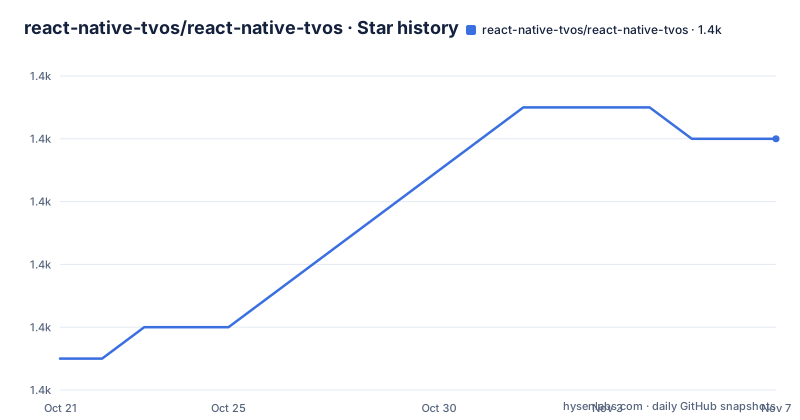
- react-native-tvos/react-native-tvos1,430 ★ · +7
| Repository | 2026-10-21 | 2026-11-07 |
|---|---|---|
| react-native-tvos/react-native-tvos | 1.4k | 1.4k |
7 Stars in the last 17 days, measured from the daily GitHub snapshot. Compare with other projects
Editorial analysis
Why react-native-tvos exists for mobile and TV teams
react-native-tvos addresses a gap outside the upstream React Native repository: maintained Apple TV and Android TV changes, along with the matching `react-native-tvos` npm package. The README describes this repository as a full fork of React Native rather than a small platform package added beside the standard runtime. The goal is to make existing React Native applications work on TV with few or no JavaScript changes, which suits teams that already use React Native and want mobile and living-room releases from a shared codebase.
The project covers both Apple TV and Android TV. Its `RNTester` application supports iOS, Apple TV, Android and Android TV, while repository changes include TV-specific podspecs and an Xcode project. That breadth is useful for organizations maintaining several screen classes, but it does not mean every application dependency is automatically compatible. Native modules still need suitable implementations and packaging for the destination TV platform.
There is one hard package boundary. An existing project must replace its `react-native` dependency with the `react-native-tvos` package, and the README states that `react-native-tvos` and the core `react-native` package cannot be used simultaneously. This makes react-native-tvos a fork selection rather than an optional dependency. It is also not appropriate for a project that must retain an unrelated second React Native package in the same installation.
The documented minimum operating system versions differ by destination. They are tvOS 15.1 for Apple TV, Android API level 24 for releases later than 0.77, and Android API level 22 for the 0.77 releases. iPhone and iPad applications require iOS 15.1. These floors must be checked before changing an application that still supports older devices.
How the fork connects React Native to both TV platforms
The fork follows public React Native releases. Its version format is `0.xx.x-y`, where `xx` identifies the originating React Native core release and `y` is additional versioning from this repository. That relationship matters during upgrades because the fork is intended to preserve the familiar React Native codebase while carrying separate TV changes. It also means version selection cannot be based only on the newest tag shown on a package site.
For Apple TV, the repository changes React Native podspecs so that an application Podfile contains one target, either an iOS target or a tvOS target. The project does not document simultaneous mobile and TV native targets in the same application Podfile. The maintained `template-tv` reflects this boundary and provides `run-tvos`, `build-tvos` and `log-tvos` commands for Apple TV and Android TV development.
Android uses a different delivery path. Since React Native 0.71, the fork says its Android prebuilt archives are published to Maven under the `io.github.react-native-tvos` group instead of being included in the npm package. The `@react-native/gradle-plugin` has been updated to detect those Android dependencies correctly. Based on the repository layout and README, the JavaScript package supplies React Native source and tooling while native binaries are resolved through platform-specific build systems.
Hermes is enabled by default on Apple TV and Android TV. Beginning with release 0.81.0-0, a precompiled React Native core framework is available for iOS and tvOS, with debug and release variants. Builds using it also require the precompiled `ReactNativeDependencies` framework and Hermes engine framework, which the README says are included in React Native core releases rather than distributed separately. This arrangement reduces source compilation for those artifacts but adds framework compatibility requirements to the native build.
Installing the TV package for an existing React Native project
For an existing application, the README directs developers to replace the `react-native` import in `package.json` with an npm alias for `react-native-tvos`. The `@latest` tag selects the latest published release according to the README. A lockfile should then be regenerated using the project's package manager so dependency resolution reflects the replacement.
The exact JSON entry is:
"react-native": "npm:react-native-tvos@latest"After changing the dependency, the developer must ensure the old core `react-native` package is absent from the same project. The README specifically warns against globally installing either `react-native` or `react-native-tvos`, since that arrangement can produce linker errors such as `ld: library not found for -lPods-TestApp-tvOS`.
The fork identifies Yarn as its recommended package manager. Its repository configuration uses `[email protected]`, although individual application projects may have different requirements. React Native documentation, the core changelog, and the wiki remain relevant because this README covers only TV-specific differences. Upgrade review should therefore combine the fork's release information with the upstream release notes rather than treating the package as an isolated product.
Creating and running a first Community CLI TV project
For a new Community CLI application, the README points to `@react-native-tvos/template-tv`. The template supports Apple TV and Android TV and extends the Community CLI with TV-specific run, build and log commands. Its initialization command should be run outside an existing Node project.
The following creates a project named `TVTest`, enters it, and starts it on the Apple TV Simulator:
npx @react-native-community/cli@latest init TVTest --template @react-native-tvos/template-tv
cd TVTest
npx react-native run-tvos --simulator "Apple TV"
The simulator command requires macOS and an installed Apple TV simulator, as stated in the README. An Android TV emulator is not interchangeable with that command. The documentation shown here does not include the complete Android TV emulator invocation.
Teams using Expo should follow Expo's separate "Building Expo apps for TV" guide for project setup, supported modules and limitations. The README says Expo continuous native generation can produce projects capable of building either mobile or TV apps, taking advantage of support for both platform families in this fork. That does not remove Expo's own module restrictions.
For TV-specific TypeScript work, the repository says it adds TV component and API declarations under `types/public`. This improves editor and static type coverage, but it does not verify runtime behavior of native dependencies.
Controlling Fabric and precompiled Apple TV frameworks
The fork implements React Native's New Architecture, identified in the README as Fabric, in the same manner as the core repository. Teams can use it, but the documentation provides an explicit escape hatch when an application behaves incorrectly. For Apple TV, the New Architecture is disabled during CocoaPods installation with an environment variable. This reinstalls dependencies under the opt-out configuration rather than changing JavaScript code.
The documented Apple TV command is:
RCT_NEW_ARCH_ENABLED=0 bundle exec pod installFor Expo applications, the README instead refers users to Expo's documentation for disabling the New Architecture in an existing project. On Android TV, the relevant setting is committed in `android/gradle.properties`, followed by a clean rebuild. The documented property change is:
-newArchEnabled=true
+newArchEnabled=false
This opt-out is a troubleshooting path, not evidence that either architecture is always preferable. Its presence tells teams that native compatibility can still affect adoption. A clean native rebuild is especially important on Android because Gradle configuration can otherwise remain stale.
Apple TV builds using the precompiled core framework have a narrower dependency contract. They require `ReactNativeDependencies` and Hermes as well. The documentation says both are included in React Native core releases and are not separately distributed. Version alignment is therefore part of the build decision: mixing a fork release with frameworks built for another React Native release cannot be justified from the README.
Upgrade, licensing, and operational limits of the fork
Each fork release derives from a public React Native release, so an upgrade is not merely a package substitution. The application needs to account for upstream changes, TV-specific fork changes, native dependencies, podspec configuration and Android Maven artifacts. The repository's `CHANGELOG.md` and the upstream React Native changelog are the documented places to review those differences. The README does not document a rollback procedure, compatibility matrix for individual native modules, or an automated migration path between releases.
The repository is not archived, and its last push was on 2026-10-14. That indicates recent repository activity, but it does not prove compatibility with any particular app. Recent releases include prerelease-style and fork-specific versions, including `v0.88.0-0rc2`, `v0.86.3-0` and `v0.87.1-1`, which reinforces the need to read the version notes rather than install indiscriminately.
The repository and its root `package.json` identify the project under the MIT license. Anyone redistributing code or artifacts should review the repository `LICENSE` and associated dependency terms. This article does not provide legal advice or claim that MIT licensing removes native module, platform, or third-party dependency obligations.
The clearest wrong-tool cases are an application requiring both iOS and tvOS native targets in one Podfile, a project that must keep core `react-native` installed alongside this fork, and a TV app whose native modules have no tvOS or Android TV implementation. The repository's aim is low JavaScript churn, not removal of native compatibility work.
Editorial conclusion
Adopt react-native-tvos when an existing React Native application must ship to Apple TV or Android TV and its release line can follow a corresponding public React Native release. Do not add it beside the core `react-native` package, and do not assume it is suitable if the application needs multiple native platform targets in one Podfile. Verify the selected `react-native-tvos` version against the target React Native release, configure `Podfile` or Gradle dependencies as required, and confirm that every native module used by the application has TV support before treating the application as ready for TV.
Frequently asked questions
How do I install react-native-tvos in an existing React Native project?
Replace the `react-native` dependency with `"react-native": "npm:react-native-tvos@latest"`. The core `react-native` package and `react-native-tvos` cannot be used simultaneously.
Does react-native-tvos support both Apple TV and Android TV?
Yes. The repository adds Apple TV and Android TV support, and its `RNTester` app supports iOS, Apple TV, Android and Android TV.
Can I disable the React Native New Architecture for react-native-tvos?
The README documents an opt-out for Apple TV with `RCT_NEW_ARCH_ENABLED=0 bundle exec pod install`. On Android TV, set `newArchEnabled=false` in `android/gradle.properties` and perform a clean rebuild.
Official sources
Add this badge to your README
If you maintain this project, the badge below links readers to this analysis and shows its maintenance status from the daily GitHub snapshot. Paste the markdown into your README; add ?metric=license or ?metric=stars to the image URL for a different field.

[](https://hysenlabs.com/projects/react-native-tvos-react-native-tvos)Star history chart for your README
[](https://hysenlabs.com/projects/react-native-tvos-react-native-tvos)Was this useful?