ReactiveUI 26: source-generated MVVM for .NET, with a choice between two reactive type flavours
A composable, cross-platform MVVM framework for .NET inspired by functional reactive programming. It moves mutable state out of the user interface, keeps each feature's logic in one readable place, and makes applications easier to test. Supports WPF, WinForms, WinUI, .NET MAUI, Avalonia, Uno Platform, Blazor and Android.
At a glance
- What is it?
- ReactiveUI is a cross-platform MVVM framework for .NET built on reactive streams. Recent versions write property, command and binding code at build time, and the package set splits into a default flavour and a System.Reactive flavour whose types are not interchangeable.
- Who is it for?
- ReactiveUI suits .NET teams that think in streams and want properties, commands and bindings written by the compiler, across WPF, WinUI, MAUI, Blazor and Android. It is a harder sell if you are stuck on an older C# language version, or if you cannot decide up front between the default flavour and the System.Reactive flavour.
- Can I use it commercially?
- Yes. MIT is a permissive licence: you can use, modify and sell software built on it, as long as you keep its copyright and licence notices.
- Is it still maintained?
- Yes. The repository received new commits within the last day.
- What is it written in?
- Mainly C#, according to GitHub's language statistics.
Answers come from the project's GitHub data, last synced on November 14, 2026, and from our analysis. They are not legal advice.
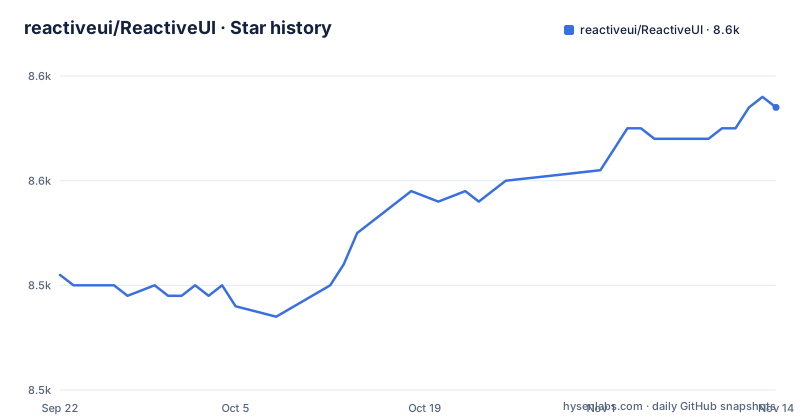
Star history
- reactiveui/ReactiveUI8,557 ★ · +16
| Repository | 2026-09-22 | 2026-11-14 |
|---|---|---|
| reactiveui/ReactiveUI | 8.5k | 8.6k |
16 Stars in the last 53 days, measured from the daily GitHub snapshot. Compare with other projects
Editorial analysis
Properties and commands are written by source generators during the build
A view shows data that changes, so it must learn when a value changes. Done by hand, every property needs a field and a setter that raises a change notification, and every command needs a property wrapping a method. ReactiveUI writes that code while the project builds, using two source generators that the packages bring in for you: ReactiveUI.SourceGenerators writes reactive properties and commands, and ReactiveUI.Binding writes the code behind WhenAnyValue, ToProperty and the view bindings.
To use them you declare the view model as a partial class that derives from ReactiveObject and mark members with attributes such as Reactive. The cost of this style is that the class must be partial, and the generated code only appears after a build, so an editor that has not built the project may show missing members.
WhenAnyValue returns a stream, and the generated command follows it
In the login example, WhenAnyValue watches UserName and Password and returns a stream, an IObservable of bool that emits a new value each time either property changes. ToProperty then keeps IsValid equal to the latest value of that stream.
On build, the generators fill in the rest. Setting UserName or Password raises the change notification. The body of IsValid and its helper field appear. A LogInCommand property is created, holding a command that is an ICommand which also reports each result as a stream. It runs the LogInAsync method and is enabled only while the stream emits true. The generator drops the Async suffix from the name, so a method called LogInAsync becomes LogInCommand. Then you bind the properties and the command to the view with Bind and BindCommand.
Partial properties with initial values need C# 14
The README states a language requirement in one line: partial properties with an initial value need C# 14, which is the default language version for .NET 10. The example declares UserName as a partial string property with an initial value of string.Empty, marked with the Reactive attribute.
The consequence is that the property-style generation shown in the first example is tied to a recent compiler. A project that targets an older .NET version, or pins an older language version, has to either raise the language version or fall back to writing the property pattern differently. Check the source generators documentation, which lists every attribute and option, before you convert a large existing code base to this style.
Five packages, and the platform package pulls in the rest
ReactiveUI is a set of packages, and you install the one for your UI framework. The core ReactiveUI package gives you ReactiveObject, ReactiveCommand, activation, routing and schedulers, built on ReactiveUI.Primitives, and it brings ReactiveUI.Core and ReactiveUI.Binding. ReactiveUI.Core holds the parts both flavours share and brings ReactiveUI.SourceGenerators. ReactiveUI.Binding provides WhenAnyValue, Bind, OneWayBind, BindCommand, ToProperty, ObservableAsProperty and view location.
dotnet add package ReactiveUI.WPFA class library that holds only view models installs plain ReactiveUI. You normally never add the generator packages yourself. The practical effect is a short dependency list in your project file, with the transitive packages doing the work.
The two flavours share an API but not their reactive types
ReactiveUI ships in two flavours with the same API that differ in the reactive types visible in it. The default flavour uses ReactiveUI.Primitives, the project's own library of streams, operators and schedulers, with types such as RxVoid, ISequencer and Signal of T. It does not depend on System.Reactive, so an app ships fewer assemblies.
The second flavour exposes System.Reactive types: Unit, IScheduler and Subject of T. Its packages carry a Reactive suffix, for example ReactiveUI.WPF.Reactive, and its types live in the ReactiveUI.Reactive namespace, so a file using ReactiveObject or ReactiveCommand from it adds a using ReactiveUI.Reactive line. Choose the System.Reactive flavour when you must mix with existing code that uses System.Reactive. Switching later means changing packages, namespaces and the types in your signatures.
Bindings are generated, which makes them safe for trimming and Native AOT
ReactiveUI runs WhenAnyValue, Bind, OneWayBind, BindCommand, ToProperty and view location on ReactiveUI.Binding. Its source generator writes the code for each binding at build time, and nothing looks up a property by name at run time. That makes the bindings safe to trim and to publish with Native AOT, which reflection-based binding cannot promise.
The ReactiveUI package imports the ReactiveUI.Binding namespace for you, so binding calls need no using directive. If you are moving from an earlier version, the binding migration guide matters: it covers the calls that need an Unsafe twin and the behaviour that changed. Do not assume that code written against an older release compiles and behaves the same after upgrading to 26.
Supported platforms, and a gap between the description and the package table
The repository description lists WPF, WinForms, WinUI, .NET MAUI, Avalonia, Uno Platform, Blazor and Android as supported. The flavour table names concrete packages for WPF, WinForms, WinUI, Maui, Blazor and AndroidX, each with a Reactive twin. Avalonia and Uno Platform packages do not appear in that table, so for those two the installation guide is the place to confirm the exact package name.
The recent releases are 26.0.0 on 2026-10-03, 26.0.1 on 2026-10-04 and 25.1.1 on 2026-09-28, and the last push was on 2026-10-31. The license is MIT. The version numbers have moved from 25 to 26 within a week, which means a major version bump arrived with a fix release immediately behind it, so wait for the follow-up patch before upgrading a production app.
Editorial conclusion
ReactiveUI suits .NET teams that think in streams and want properties, commands and bindings written by the compiler, across WPF, WinUI, MAUI, Blazor and Android. It is a harder sell if you are stuck on an older C# language version, or if you cannot decide up front between the default flavour and the System.Reactive flavour. Before adopting, pick the flavour, confirm your UI framework has a matching package, and read the binding migration guide if you are upgrading.
Frequently asked questions
what is reactive ui
ReactiveUI is a composable, cross-platform model-view-viewmodel framework for .NET, inspired by functional reactive programming, that moves mutable state out of the user interface and improves testability.
What is reactive programming?
In this project it means functional reactive programming, a paradigm that lets you abstract mutable state away from user interfaces and express a feature in one readable place, using streams that emit values over time.
reactiveui vs communitytoolkit mvvm
The ReactiveUI README does not compare the two. What it states about ReactiveUI is that it models state as streams, generates properties, commands and bindings at build time, and comes in two reactive-type flavours.
Official sources
Add this badge to your README
If you maintain this project, the badge below links readers to this analysis and shows its maintenance status from the daily GitHub snapshot. Paste the markdown into your README; add ?metric=license or ?metric=stars to the image URL for a different field.

[](https://hysenlabs.com/projects/reactiveui-reactiveui)Star history chart for your README
[](https://hysenlabs.com/projects/reactiveui-reactiveui)Was this useful?