RxAndroid binds one Scheduler to Android's Looper, and its last release is from 2022
RxJava bindings for Android
At a glance
- What is it?
- RxAndroid is the thin Android binding layer for RxJava 3: a Scheduler for the main thread and for any Looper you hand it. The catch is not the API, it is that the newest published artifact is 3.0.2 from November 2022 while the repository itself keeps taking commits.
- Who is it for?
- RxAndroid is the right answer when you have already chosen RxJava 3 and need its emissions to land on the main thread or on a Looper you own, and it is small enough to read in one sitting. It is the wrong answer if you want lifecycle-aware disposal, LiveData or Flow bridges, or Android bindings beyond the scheduler, because none of that is in this module.
- Can I use it commercially?
- Yes. Apache-2.0 is a permissive licence: you can use, modify and sell software built on it, as long as you keep its copyright and licence notices.
- Is it still maintained?
- Yes. The repository last received commits 12 days ago.
- What is it written in?
- Mainly Java, according to GitHub's language statistics.
Answers come from the project's GitHub data, last synced on November 13, 2026, and from our analysis. They are not legal advice.
Star history
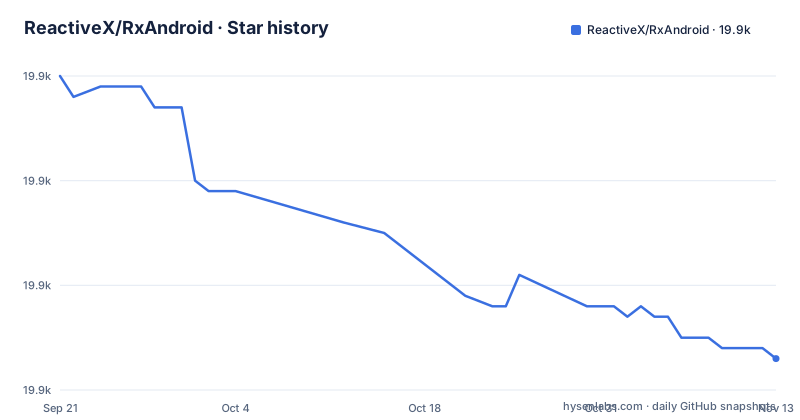
- ReactiveX/RxAndroid19,893 ★ · -27
| Repository | 2026-09-21 | 2026-11-13 |
|---|---|---|
| ReactiveX/RxAndroid | 19.9k | 19.9k |
-27 Stars in the last 53 days, measured from the daily GitHub snapshot. Compare with other projects
Editorial analysis
One class does the work: a Scheduler over a Looper
Read the scope sentence closely, because it is unusually honest about what this module is. RxAndroid adds the minimum classes to RxJava that make reactive components in Android applications work, and more specifically it provides a Scheduler that schedules on the main thread or on any given Looper. That is the whole inventory: a scheduler, pointed at an Android message loop.
Everything else you associate with reactive Android lives elsewhere. There is no lifecycle binding here, no disposal strategy tied to a destroyed Activity, no bridge to LiveData or to Kotlin Flow, and no operator library, because operators and Observables come from RxJava itself. If your architecture needs a subscription to die with a screen, or a Flow operator, you either write that adapter or take it from another library. The README does not claim any of these features and does not point at where they would be, so treat the module as one layer, not a framework.
The smallness cuts both ways. There is very little here to read, learn, or debug, and correspondingly little to configure. The API surface you are adopting is AndroidSchedulers, and the rest of the behaviour you inherit from the RxJava version your build resolves.
Two coordinates, and the README tells you to own the second one
The dependency block is four lines and carries an instruction that matters more than the coordinates themselves:
dependencies {
    implementation 'io.reactivex.rxjava3:rxandroid:3.0.2'
    // Because RxAndroid releases are few and far between, it is recommended you also
    // explicitly depend on RxJava's latest version for bug fixes and new features.
    // (see https://github.com/ReactiveX/RxJava/releases for latest 3.x.x version)
    implementation 'io.reactivex.rxjava3:rxjava:3.1.5'
}
So a correct build declares two artifacts under io.reactivex.rxjava3, and the project is telling you to pin RxJava yourself rather than inherit whatever version arrives transitively. The reason given is the release cadence, which section three comes back to.
What this costs you is version ownership. One coordinate would be easy to reason about; two means your app now tracks an RxJava version and an RxAndroid version, and a mismatch between them is a decision you have to make and re-make on every upgrade. The README points at the RxJava releases page for the current 3.x.x version rather than pinning a rule, so the number in your build file is one you have to refresh by hand. Both artifacts are on search.maven.org under the same group, which is where you verify a coordinate before you trust a blog post's copy of it.
The newest published artifact is 3.0.2, released on 2022-11-09
The release list is short and dated. Version 3.0.2 and version 3.0.1 were both published on 2022-11-09, hours apart, and 3.0.0 arrived on 2020-02-14. The default branch is 3.x and the last push to the repository is dated 2026-11-02, so commits are still landing while the last tag a Maven consumer can resolve is nearly four years old.
That gap is the single most important fact about depending on this module, and the project states the reason itself: because RxAndroid releases are few and far between, you should also explicitly depend on RxJava's latest version for bug fixes and new features.
The consequence is a decision you have to make consciously. A team that wants to fix an issue in the binding layer is now looking at building from source or using the development snapshot, because there is no newer release to try. A team that only calls AndroidSchedulers.mainThread() and AndroidSchedulers.from(looper) is in a comfortable position, since those two entry points are the part least likely to need patching. Either way, do not read the absence of releases as an absence of work: the commits in the default branch are not reachable through Maven Central.
The snapshot coordinate is 3.1.0-SNAPSHOT, a different line from the 3.0.2 you can resolve
Development builds are available from Sonatype's snapshot repository, and the block is collapsed in the README behind a details element:
repositories {
    mavenCentral()
    maven {
        url 'https://oss.sonatype.org/content/repositories/snapshots/'
    }
}

dependencies {
    implementation 'io.reactivex.rxjava3:rxandroid:3.1.0-SNAPSHOT'
}
Read the version numbers together. The stable coordinate is 3.0.2, the recommended RxJava is 3.1.5, and the snapshot is 3.1.0-SNAPSHOT, a version line that has no matching release. Adopting the snapshot is therefore a move to a different numbering line, not a patch on top of 3.0.2, and the README does not say what changed between them or which RxJava version the snapshot expects.
The deeper issue is that a SNAPSHOT artifact is mutable by definition. The same coordinate can return different bytes on Tuesday than it did on Monday, with no version change to record in your build file, and CHANGES.md in the repository is the only changelog named in the tree. For a library that other people's release builds depend on, that is a poor fit; for a team that has pinned a commit and rebuilds on demand, it is workable. Pick one deliberately, and never let a snapshot reach a release pipeline without pinning to a specific build.
Observing on the main thread is the case the samples open with
The first sample replaces the AsyncTask pattern with a subscription, and the point of the file is the thread each operator controls:
Observable.just("one", "two", "three", "four", "five")
    .subscribeOn(Schedulers.newThread())
    .observeOn(AndroidSchedulers.mainThread())
    .subscribe(/* an Observer */);
Two different threads are in play and they are not interchangeable. subscribeOn(Schedulers.newThread()) is what executes the Observable, and AndroidSchedulers.mainThread() is where results arrive through onNext. Both are set in the same chain, and the README states the outcome in one sentence: the Observable executes on a new thread and emits on the main thread.
For a reader coming from AsyncTask, the thing to internalise is that the main-thread guarantee lives in one operator. AndroidSchedulers.mainThread() is a Scheduler instance like any other, and it composes with the rest of the RxJava chain rather than wrapping your callback. The cost of the abstraction is that a long-running chain now has two thread declarations in it, and the README does not document a way to inspect which thread a given stage will emit on.
AndroidSchedulers.from(looper) turns the main thread into one case of a general idea
The second sample states the general form: binding asynchronous communication to an Android message loop, or Looper, and the main-thread case is a specialisation of it. The call is AndroidSchedulers.from with a Looper you already hold:
Looper backgroundLooper = // ...
Observable.just("one", "two", "three", "four", "five")
    .observeOn(AndroidSchedulers.from(backgroundLooper))
    .subscribe(/* an Observer */)
Emissions then arrive on whichever thread is running that Looper, which is how you get results onto a message loop other than the main one without leaving RxJava. The sample leaves the Looper acquisition as a comment, and the README does not fill it in: it does not say who creates the Looper, whether it must stay alive for the life of the subscription, or what happens to emissions posted to a Looper that has stopped. Those are your questions to answer in your own code, and a subscription that outlives its Looper is the failure mode to guard against.
This is the part of the module that generalises, and it is why the sample set is worth reading even if you only ever use the main-thread version. Two entry points, one of which is parameterised by a platform handle rather than hardcoded.
Building from source is three commands, and the details live in the RxJava wiki
If you need an artifact that Maven Central does not have, the build is a Gradle wrapper invocation:
$ git clone [email protected]:ReactiveX/RxAndroid.git
$ cd RxAndroid/
$ ./gradlew build
That is the entire build section, and it points onward to the RxJava Getting Started page for anything more involved. Consequence: if you need a customised build, a different publishing destination, or extra dependencies in the module, the README does not carry those instructions and you are reading another project's wiki to get there. For most consumers this is the right shape, since the module is meant to be consumed as a coordinate, but it does mean a fork is a real project rather than a config tweak.
The repository layout matches that intent. The library itself is in rxandroid/, runnable examples are in sample-app/, and the Gradle files sit at the top level next to gradlew and gradlew.bat. CHANGES.md, CONTRIBUTING.md and RELEASING.md are the maintenance files, and support runs through the RxJava Google Group, the rx-android tag on StackOverflow, and GitHub Issues for bugs, which is where an issue against a 2022 release will land. The licence is Apache-2.0, copyright 2015 The RxAndroid authors.
Editorial conclusion
RxAndroid is the right answer when you have already chosen RxJava 3 and need its emissions to land on the main thread or on a Looper you own, and it is small enough to read in one sitting. It is the wrong answer if you want lifecycle-aware disposal, LiveData or Flow bridges, or Android bindings beyond the scheduler, because none of that is in this module. Before you commit, check which RxJava version your build actually resolves against the rxandroid 3.0.2 coordinate, then add your own explicit RxJava dependency, because the last published RxAndroid release is 3.0.2 from 2022-11-09.
Frequently asked questions
Difference between RxJava and RxAndroid?
RxJava is the general reactive library. RxAndroid is the Android binding layer that adds the minimum classes to RxJava, which means a Scheduler that schedules on the main thread or on any given Looper.
What is RxJava used for?
In this setup, RxJava carries the reactive machinery and RxAndroid points it at Android's threads. Because RxAndroid releases are few and far between, the README recommends also depending explicitly on the latest RxJava version for bug fixes and new features.
What is RxJava and how is it used in Android development?
You declare an Observable and choose where it runs and where its results are delivered, instead of using AsyncTask. The sample chains subscribeOn(Schedulers.newThread()) with observeOn(AndroidSchedulers.mainThread()), so the source runs on a new thread and onNext fires on the main thread.
Official sources
Add this badge to your README
If you maintain this project, the badge below links readers to this analysis and shows its maintenance status from the daily GitHub snapshot. Paste the markdown into your README; add ?metric=license or ?metric=stars to the image URL for a different field.

[](https://hysenlabs.com/projects/reactivex-rxandroid)Star history chart for your README
[](https://hysenlabs.com/projects/reactivex-rxandroid)Was this useful?