js-recall: the Recall network monorepo, and the two applications inside it
JS/TS monorepo for the Recall network
At a glance
- What is it?
- js-recall is the JavaScript and TypeScript monorepo for the Recall network, built with Turborepo and pnpm workspaces. It holds a multi-chain trading simulator API and a competitions web app, plus a dozen shared packages, and it has been shaped by AI assisted development to the point where the Cursor configuration and agent prompt library are part of the documented workflow.
- Who is it for?
- Adopt js-recall if you are building on the Recall network and want the trading simulator API, the competitions app and the shared packages in one workspace with changesets, shared lint rules and type checking wired up. Do not expect it to be a general purpose starter, since its tooling assumes the Recall domain and its AI assisted workflow assumes Cursor.
- Can I use it commercially?
- Not without permission. GitHub finds no licence file in the repository, and without a licence all rights are reserved by default: you may read the code but not reuse it. Check the README, or ask the authors, before using it.
- Is it still maintained?
- No. The owners have archived the repository on GitHub, so it is read-only and no longer receives changes.
- What is it written in?
- Mainly TypeScript, according to GitHub's language statistics.
Answers come from the project's GitHub data, last synced on November 7, 2026, and from our analysis. They are not legal advice.
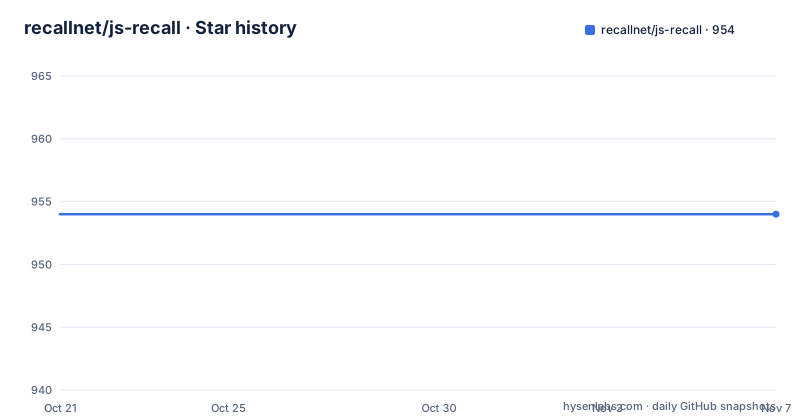
Star history
- recallnet/js-recall954 ★ · +0
| Repository | 2026-10-21 | 2026-11-07 |
|---|---|---|
| recallnet/js-recall | 954 | 954 |
0 Stars in the last 17 days, measured from the daily GitHub snapshot. Compare with other projects
Editorial analysis
One workspace for the API, the competitions app and the shared code
The repository contains packages and applications for Recall, written in JavaScript and TypeScript, and it is structured as a monorepo using Turborepo and pnpm workspaces for package management and build orchestration.
The layout is the fastest way to understand the project. The root holds the workspace configuration and the two applications:
js-recall/
├── apps/                  # Application packages
│   ├── api/                # Multi-chain trading simulator API
│   └── comps/              # Competitions web application
├── packages/              # Shared packages
│   ├── conversions/        # Unit conversion utilities (atto, etc.)
│   ├── db/                 # Database schema and repositories
│   ├── eslint-config/      # Shared ESLint configuration
│   ├── fonts/              # Shared font resources
│   ├── load-test/          # Load testing suite (Artillery)
│   ├── rewards/            # Rewards calculation system
│   ├── services/           # Business logic services
│   ├── staking-contracts/  # Staking contract interfaces
│   ├── test-utils/         # E2E test utilities and helpers
│   ├── typescript-config/  # Shared TypeScript configuration
│   └── ui2/                # Modern UI component library
The split between apps/ and packages/ is the usual one, and the package list is unusually domain specific. Staking contract interfaces, a rewards calculation system, unit conversion utilities for atto units, and a load testing suite built on Artillery are not the contents of a generic starter template. They describe a trading and rewards product.
The homepage is app.recall.network, and the published npm packages include @recallnet/sdk, @recallnet/network-constants and @recallnet/mcp.
Turborepo and pnpm workspaces do the orchestration
The build system is the reason a monorepo of this size stays workable, and the root package.json shows exactly how it is wired.
The root package is named recall-monorepo at version 0.0.0 and every script delegates to Turborepo: build runs turbo build, dev runs turbo dev with a concurrency of 20, lint runs turbo lint, and check-types runs turbo check-types. The test scripts are split into three layers, turbo run test, turbo run test:integration and turbo run test:e2e, which is a more honest test taxonomy than a single test command.
Package management is pnpm, pinned through the packageManager field to [email protected], with the lockfile committed and a pnpm-workspace.yaml at the root. The dev dependencies show the shared tooling: the workspace packages @recallnet/eslint-config and @recallnet/typescript-config are referenced as workspace:*, so a change to the shared lint or TypeScript rules propagates across every package in one version bump.
Two more tools close the loop. Husky is wired to the prepare script, so git hooks install on install, and lint-staged runs prettier and eslint --fix on staged JavaScript and TypeScript files and prettier on staged JSON, Markdown and YAML. Formatting and linting therefore happen at commit time rather than in review, which is the difference between a monorepo whose checks people fight and one they ignore.
The engines field requires Node 20 or newer, and Turbo itself is pinned at 2.x with TypeScript 5.7 and ESLint 9.
Prerequisites and the first build
The README lists three prerequisites: Node.js 20 or newer, pnpm 9.12.3 or higher, and Git. There is no global tool to install beyond that, because the pnpm version is pinned in package.json and the repository ships its own configuration for ESLint, Prettier, TypeScript and Changesets.
The install sequence is three steps. Clone and enter the repository:
git clone https://github.com/recallnet/js-recall.git
cd js-recall
Install the dependencies:
pnpm installAnd build every package:
pnpm buildThat last command is where the monorepo structure pays off or does not. With Turborepo, the build graph is derived from the workspace dependencies, so a package only rebuilds when something it depends on changed. In a workspace where packages/services depends on packages/db and packages/ui2, that means an edit in the UI library does not force a rebuild of the trading simulator API.
The repository also ships a docker-compose.yml for local development, and the file states in its first line that it is a test compose file not intended for production use. It brings up an anvil instance from the Foundry image with a chain id of 31337 and a one second block time, a postgres:17-alpine database with a named volume, and the api service built from a Dockerfile inside apps/api:
services:
  anvil:
    image: ghcr.io/foundry-rs/foundry:latest
    container_name: recall-anvil
    restart: always
    networks:
      - recall-network
    ports:
      - "8545:8545"
    entrypoint:
      ["anvil", "--host", "0.0.0.0", "--chain-id", "31337", "--block-time", "1"]
    healthcheck:
      test:
        ["CMD", "cast", "block-number", "--rpc-url", "http://localhost:8545"]
      interval: 5s
      timeout: 5s
A local chain with fast block times and a Postgres instance is a sensible way to develop against something that behaves like the real thing without touching a live network.
Running the two applications and the shared UI library
Each package carries its own usage instructions, and the README gives quick starts for the two applications. The API is the multi-chain trading simulator:
cd apps/api
pnpm dev
And the competitions web application:
cd apps/comps
pnpm dev
From the root, `pnpm dev` runs all packages in development mode with a concurrency of 20, which is the fast path when you are changing shared code and want everything hot.
The shared UI library is published as @recallnet/ui2 and is imported by path within the package:
import { Button } from "@recallnet/ui2/components/button";That import shape is worth noticing. The entry point is a component subpath rather than a single barrel export, which keeps the bundle small when you only need one component, and it is consistent with the package description in the tree as a modern UI component library. The package is described in the README as @recallnet/ui2 with modern UI components.
The compose file shows how the applications are wired together in that local environment. The api service is built from apps/api/trade-simulator-docker/Dockerfile and gets its database from a DATABASE_URL pointing at the postgres service, with the API listening on port 3000 and a separate metrics port on 3003, both overridable through environment variables. The comps service is built from apps/comps/Dockerfile and receives the API base URL and a wallet connect project id as build arguments, which tells you the competitions app is a Next.js application configured at build time.
Changesets, coverage and the definition of done
Version management runs on Changesets, and the three commands are separate on purpose. `pnpm changeset` creates a new changeset, which is a file describing a change and its bump level. `pnpm version-packages` applies those changesets and updates package versions. `pnpm publish-packages` publishes to the registry. The .changeset directory at the root holds the pending changesets, and the build process publishes with a postpublish step that pushes the tags.
This is the mechanism that lets packages in one repository version independently, which matters here because the published packages are separate npm artifacts: @recallnet/sdk, @recallnet/network-constants and @recallnet/mcp all carry their own version numbers.
The quality tooling is broader than the usual build and lint. Beyond turbo lint, there are separate format and format:check tasks, a check-types task, and three test tasks for unit, integration and end to end work. Coverage has its own path: test:coverage runs the coverage suite and coverage:report invokes a script at scripts/coverage-report.js, with coverage:all running both in sequence. There is a coverage.config.json at the root and a typedoc.base.json for API documentation, along with docs:build and docs:check tasks that run through Turborepo as well.
The contribution rule is short. Pull requests are accepted, changes should follow the coding standards and include appropriate tests, and the README asks that README edits conform to the standard-readme specification, which the repository carries a compliance badge for.
The IDE configurations are also part of the repository, with settings for VSCode, Cursor and Zed, so a new contributor gets the same editor behaviour as the rest of the team.
The AI assisted workflow is documented, not hidden
What is unusual about js-recall is how much of the README is about working with an AI coding agent.
The project is described as optimized for development using Cursor, and the repository includes .cursorrules so the assistant behaves consistently across the team. There is an Agent Mode Configuration section explaining that a .agent/ directory is git-ignored and used by Cursor Agent for task tracking, development plans, contextual information and specifications. The best practices ask for Agent mode on complex features and refactors, for development plans in .agent/developer_plan.md, for specifications in .agent/spec.md, for GitHub issues to be referenced in generated specs for traceability, and for plans to be reviewed and approved before implementation.
There is then a library of example prompts: use the gh CLI to read an issue and create a spec, review the current branch and write a PR description, create a phased development plan, explain how the authentication flow works in the codebase, and suggest test cases including unit, integration and edge cases.
The repository root reinforces this with AGENTS.md and CLAUDE.md files, plus a .cursor/ directory, so the instructions are available to more than one assistant tool.
Whether this is good practice is not the question here. The question for an engineer evaluating the repository is whether the workflow is reproducible, and this one is written down, reviewable and versioned with the code, with the human approval step called out explicitly.
Licence, versions and the gap between releases and commits
The repository gives inconsistent licensing information: the README says MIT OR Apache-2.0, while the root package.json says MIT AND Apache-2.0. Those expressions are different, so do not assume the root manifest and README grant the same choice. Check the specific package terms and resolve the discrepancy with the rights holders before redistribution.
The version picture needs care. The published packages are all at 0.0.x: @recallnet/sdk at 0.0.14, @recallnet/network-constants at 0.0.11 and @recallnet/mcp at 0.0.8, and all three were released on 2025-06-20 within a minute of each other. The root package is at version 0.0.0, which is the convention for a workspace root that is never published.
Those releases are more than a year older than the last push, which was on 2026-08-12. Work continued on the main branch after those releases, but the repository is now archived and read-only.
That is not necessarily a problem, since an internal monorepo does not have to publish on every commit, but it does mean the published npm versions are not a reliable guide to the current state of the code. If you are consuming @recallnet/sdk rather than working in the monorepo, the published artifact is what you get, and its date is 2025-06-20.
Editorial conclusion
Adopt js-recall if you are building on the Recall network and want the trading simulator API, the competitions app and the shared packages in one workspace with changesets, shared lint rules and type checking wired up. Do not expect it to be a general purpose starter, since its tooling assumes the Recall domain and its AI assisted workflow assumes Cursor. Before you fork, check the node and pnpm versions, note that the published packages are at 0.0.x with the last releases on 2025-06-20 while the last push was on 2026-08-12, and resolve the discrepancy between the README and root package license expressions before redistributing.
Frequently asked questions
What are the prerequisites for working on js-recall?
Node.js 20 or newer, pnpm 9.12.3 or higher, and Git. The pnpm version is pinned in package.json through the packageManager field, and the repository ships its own ESLint, Prettier, TypeScript and Changesets configuration.
How do I clone and build the js-recall monorepo?
Clone the repository with git clone https://github.com/recallnet/js-recall.git, run pnpm install in the root, and then pnpm build, which delegates to Turborepo.
Which applications does js-recall contain?
Two. apps/api is a multi-chain trading simulator API and apps/comps is a trading competitions web application, and each has its own README with detailed usage instructions.
How does js-recall handle versioning across packages?
It uses Changesets. The commands are pnpm changeset to create a changeset, pnpm version-packages to apply version updates and pnpm publish-packages to publish to the registry.
What licence does js-recall use?
The README states MIT OR Apache-2.0, (c) 2025 Recall Contributors, and the root package.json declares the licence as MIT AND Apache-2.0.
Official sources
Add this badge to your README
If you maintain this project, the badge below links readers to this analysis and shows its maintenance status from the daily GitHub snapshot. Paste the markdown into your README; add ?metric=license or ?metric=stars to the image URL for a different field.

[](https://hysenlabs.com/projects/recallnet-js-recall)Star history chart for your README
[](https://hysenlabs.com/projects/recallnet-js-recall)Was this useful?