uTLS: parroting stops at the ClientHello and the compatibility table admits it
Fork of the Go standard TLS library, providing low-level access to the ClientHello for mimicry purposes.
At a glance
- What is it?
- A fork of Go's crypto/tls that exposes the ClientHello so a client can look like something else on the wire. The documentation is unusually candid about where that stops: parroting covers the ClientHello and nothing after it, the eight browser parrots come with a table of what crypto/tls cannot offer, and the README warns twice that it may be out of date.
- Who is it for?
- uTLS is for a specific problem: a Go client whose ClientHello is distinctive enough to be filtered, usually in anti-censorship tooling where the author states the concern is blocking with small collateral damage. It is a library, not a proxy, so you still own the connection and the terms of the service you are talking to.
- Can I use it commercially?
- Yes. BSD-3-Clause is a permissive licence: you can use, modify and sell software built on it, as long as you keep its copyright and licence notices.
- Is it still maintained?
- Yes. The repository last received commits 6 days ago.
- What is it written in?
- Mainly Go, according to GitHub's language statistics.
Answers come from the project's GitHub data, last synced on November 14, 2026, and from our analysis. They are not legal advice.
Star history
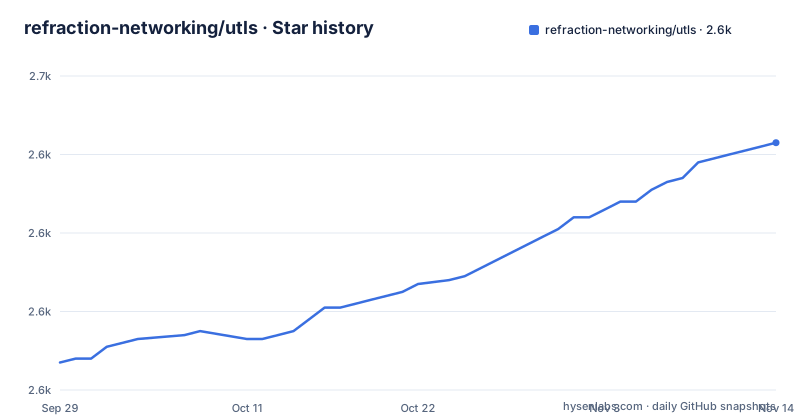
- refraction-networking/utls2,643 ★ · +56
| Repository | 2026-09-29 | 2026-11-14 |
|---|---|---|
| refraction-networking/utls | 2.6k | 2.6k |
56 Stars in the last 46 days, measured from the daily GitHub snapshot. Compare with other projects
Editorial analysis
The README says Go 1.21 is enough and the module file says 1.26
Two places in this repository state the minimum Go version and they do not match.
The README states a minimum Go version of 1.21. The module file declares `go 1.26`. The README figure is the lower of the two, which means a project that pins itself to the older version in prose is free to build against a newer toolchain that it never tested, and a user who trusts the README and installs 1.21 will find the module directive disagreeing with them.
The module file also carries a `retract` block, which is unusual to see in a dependency's own manifest and is worth reading closely:
retract (
	v1.4.1 // #218
	v1.4.0 // #218 panic on saveSessionTicket
)
Two versions are retracted and both cite the same issue number. Only one of them explains why: v1.4.0 is annotated as panicking on `saveSessionTicket`. v1.4.1 carries the issue reference and nothing else, so a reader has to open the tracker to learn what that release did wrong.
Taken together these three details say the same thing about how the project is versioned. Retractions with per-version reasons exist, so the failure modes are tracked, but the prose floor and the module floor have drifted apart.
For reference, the recent release tags are annotated rather than bare: v1.8.0 with no note, v1.8.1 as bug fixes, and v1.8.2 as a security update.
Each parrot comes with a table saying what crypto/tls cannot produce
The parroting feature ships a compatibility table for eight browsers, and it is the most useful part of the documentation because it is the part that says no.
| Parrot | Ciphers | Signature | Unsupported extensions | | --- | --- | --- | --- | | Chrome 62 | no | no | ChannelID | | Chrome 70 | no | no | ChannelID, Encrypted Certs | | Chrome 72 | no | no | ChannelID, Encrypted Certs | | Chrome 83 | no | no | ChannelID, Encrypted Certs | | Firefox 56 | very low | no | None | | Firefox 65 | very low | no | MaxRecordSize | | iOS 11.1 | low | no | None | | iOS 12.1 | low | no | None |
Two patterns are visible. Every Chrome entry lists at least one extension that crypto/tls cannot offer, and Encrypted Certs is added from Chrome 70 onward, so the newer the Chrome you imitate the more you are missing. Firefox 56 and both iOS rows list no unsupported extensions, while Firefox 65 lists MaxRecordSize. The Firefox and iOS rows also report nonzero cipher compatibility risk unless the documented weak-cipher condition applies.
The footnotes matter. The Ciphers column is described in the document as a very rough guesstimate of the likelihood that unsupported things will be echoed back by the server in the wild and visibly break the connection, so `no` means safe and `very low` means a small but nonzero chance. The iOS rows carry a second footnote instead: no risk if `utls.EnableWeakCiphers()` is called before using it.
Each parrot also has a TLS Fingerprint ID linked to an external fingerprint database, which gives you a way to confirm what you are emitting rather than assuming the parrot matches.
The forced-offer caveat names the condition under which parroting is safe
Two caveats follow the parroting section, and the first is a hard constraint rather than a hedge.
The project is forced to offer ciphersuites and TLS extensions that are not supported by crypto/tls. The reason given for why that is not fatal is specific: if you fully control the server, you can turn the unsupported things off on the server side. So the parrot is a client-side approximation of a browser that a real server would negotiate differently, and the documented way to close the gap is to be the server.
The second caveat is a scope limit that deserves more attention than it gets: parroting could be imperfect, and there is no parroting beyond ClientHello.
That single sentence bounds the whole feature. What you control is the first message of the handshake. Everything after it, the certificate the server presents, the key schedule, the record layer, the negotiated parameters as the client actually uses them, is stock crypto/tls. A parroted Chrome 83 handshake does not behave like Chrome 83 after the ClientHello, and the table above only describes the ClientHello. Anyone evaluating this for fingerprint resistance should hold that boundary in mind, because a distinguisher that reads later messages is outside what the library claims to address.
The README also links a paper on the parrot is dead attack, which concerns side channels in TLS mimicry, and asks readers to report any found that approaches practicality at line speed.
Randomizing every connection is itself a fingerprint, so the documented workflow is generate then reuse
This is the part of the design that runs against intuition, and the documentation is unusually careful about it.
Randomized fingerprints pick ciphersuites and extensions at random and in random order, and the project notes that all the ciphersuites and extensions used this way are fully supported by uTLS, which it describes as a solid moving target without compatibility or parrot-is-dead risks. On its own that sounds like the answer.
Then the caveat: there is a small chance that a generated fingerprint will not work, so you may want to keep generating until a working one is found and then keep reusing the working fingerprint, to avoid the suspicious behavior of constantly changing fingerprints.
So the documented procedure is two-phase. Generate candidates, test each one against the real server, keep the first that works, and reuse it from then on. Changing your fingerprint on every connection, which is what the word randomized suggests, is identified as a liability rather than a protection.
The strong recommendation that goes with it is to use multiple fingerprints including randomized ones rather than relying on a single one, and `utls.Roller` is the component that does the reuse automatically.
The entry points are two lines:
uTlsConn := tls.UClient(tcpConn, &config, tls.HelloRandomized)// oldConn is an old connection that worked before, so we want to reuse it
// newConn is a new connection we'd like to establish
newConn := tls.UClient(tcpConn, &config, oldConn.ClientHelloID)The second line is the reuse mechanism, and it works by reading the ClientHello ID off the connection that already worked.
ALPN has three separate randomized variants because its presence is itself a signal
ALPN gets its own treatment because whether or not the extension is present changes the fingerprint as much as which value it carries.
There are two additional identifiers beyond the general randomized mode, `HelloRandomizedALPN` and `HelloRandomizedNoALPN`, and they exist to force the presence or the absence of the Application-Layer Protocol Negotiation extension. Including ALPN is recommended but explicitly not required, and the general randomized mode may or may not include it.
The reason for the split becomes clear in the next sentence. If you do use ALPN, you will want to correctly handle the potential application layer protocols, which are likely h2 or http/1.1. So choosing the NoALPN variant is not a simplification, it is a commitment: you have selected an absence, and something else in your stack now has to speak whatever protocol the server expects.
That is the pattern across the whole feature. Every knob that looks like an obvious improvement, adding an extension, enabling another cipher, varying the fingerprint per connection, has a matching knob for removing it, because a fingerprint is the whole set and its absences are part of it.
Beyond ALPN, the documented use of the low-level access is to read and write all bits of the ClientHello message, to read fields of `ClientHandshakeState` including ServerHello and MasterSecret, and to read the keystream, which the documentation notes can be used to write something into the ciphertext.
The custom handshake recipe is four steps and the last sentence is cut off
For the case where neither a parrot nor a randomized fingerprint fits, there is a manual path, and the recipe is complete even though the paragraph under it is not.
The four steps are: pass `HelloCustom` to `UClient()` to get an empty config; fill in the TLS header fields `UConn.Hello.{Random, CipherSuites, CompressionMethods}` if needed, or keep the defaults; configure and add TLS extensions to `UConn.Extensions`, which will be marshaled in order; and set Session and SessionCache as needed.
The sentence that follows begins, if you need to manually control all the bytes on the wire, certainly not recommended, you can set `UConn.HandshakeSta`. It stops there, mid-identifier.
The ordering guarantee in step three is the useful part of the recipe. Extensions are marshaled in the order they were added, which is what you need when reproducing a specific layout, and it is the reason the manual path exists at all rather than a config struct.
The warning attached to the truncated sentence is worth taking at face value. Manually controlling every byte on the wire is the most powerful thing this library offers and also the easiest way to construct a handshake the server will reject.
For completeness, the root of the repository contains `logo.png` and `logo_small.png`, and both a `.travis.yml` and a `.github/` directory, so a legacy CI configuration is still committed alongside the GitHub Actions workflow the README badge points at.
The tree is the standard library's TLS source plus FIPS 140 and BoGo shims
The file list is the clearest evidence for what it costs to maintain a fork of `crypto/tls`.
Almost every standard library TLS filename is here: `handshake_client.go`, `handshake_client_tls13.go`, `handshake_server.go`, `handshake_server_tls13.go`, `handshake_messages.go`, `key_agreement.go`, `key_schedule.go`, `prf.go`, `ticket.go`, `cache.go`, `alert.go`, `auth.go`, `cipher_suites.go`, and both TLS 1.2 and 1.3 variants of the handshake files. The fork carries the server side too, not just the client. The additions are marked with a `u_` prefix, such as `u_alias.go` and `u_clienthello_json.go`, the latter being a JSON description of ClientHello variants that the parrot dictionary is built from.
Two sets of files stand out. `defaults.go` sits beside `defaults_boring.go` and `defaults_fips140.go`, with `fips140_test.go` and an `fipsonly/` directory alongside them, so the fork is carrying Go's FIPS 140 mode support rather than ignoring it. And there are two BoGo shim test files, `bogo_shim_unix_test.go` and `bogo_shim_notunix_test.go`, which is the Chromium TLS test suite run as a harness with an explicit platform split.
The feature files match the documented feature set: `ech.go` for Encrypted Client Hello, `quic.go`, and a `dicttls/` directory that holds the parrot definitions. The examples directory mirrors the same three: `examples/ech/`, `examples/tls-resumption/` and `examples/old/`.
The dependency list is short, which is what you would expect from something that claims to be a fork rather than a wrapper. It pulls brotli and klauspost/compress for compression, and the golang.org/x crypto, net and sys modules. The TLS logic is not a dependency, because it is the fork.
The stated reason for writing the whole thing in Go rather than reusing something else is stated in the contribution guidance: the fork exists to give low-level access that the standard library does not offer, and the motivating concern comes from the anti-censorship community, where the authors say their tools could be trivially blocked on ClientHello with relatively small collateral damage.
Editorial conclusion
uTLS is for a specific problem: a Go client whose ClientHello is distinctive enough to be filtered, usually in anti-censorship tooling where the author states the concern is blocking with small collateral damage. It is a library, not a proxy, so you still own the connection and the terms of the service you are talking to. Two things to settle before depending on it. Read the parrot compatibility table and pick an entry whose unsupported-extension column you can live with, because crypto/tls genuinely cannot produce what that browser sends. And read the README's own warning that it may not keep up, then use godoc as the reference, because the documented minimum Go version there is 1.21 while the module declares 1.26.
Frequently asked questions
What is uTLS and what does it do differently from crypto/tls?
It is a fork of Go's crypto/tls. The handshake is still performed by crypto/tls; this library only changes the ClientHello part of it and provides low-level access to that message. Read and write access to all bits of the ClientHello, read access to ClientHandshakeState fields including ServerHello and MasterSecret, and keystream access are among the capabilities it adds.
Which Go version do I need to build uTLS?
The two statements in the repository disagree. The README states a minimum Go version of 1.21, while go.mod declares go 1.26. Treat the module file as the authority, since that is what the toolchain enforces at build time, and treat the README figure as stale.
What are the limitations of uTLS browser parroting?
Two, both stated in the documentation. The library is forced to offer ciphersuites and extensions that crypto/tls does not support, which is only harmless if you control the server and turn those things off server side. And parroting could be imperfect, with no parroting beyond ClientHello, so nothing after the first handshake message is being mimicked.
How do I reuse a randomized uTLS fingerprint that already worked?
Pass the ClientHello ID of the connection that worked into UClient for the new connection. The documentation recommends keeping generating fingerprints until one works and then reusing it, because constantly changing fingerprints is itself suspicious behavior, and it recommends using multiple fingerprints rather than a single one. utls.Roller performs the reuse automatically.
Which browsers does uTLS have parrots for?
Eight entries, each with a linked TLS Fingerprint ID: Chrome 62, 70, 72 and 83; Firefox 56 and 65; and iOS 11.1 and 12.1. The compatibility table records that every Chrome entry lists extensions crypto/tls cannot offer, ChannelID on 62 and ChannelID plus Encrypted Certs from 70 onward, while the Firefox and iOS rows list none but carry a nonzero cipher risk.
Official sources
Add this badge to your README
If you maintain this project, the badge below links readers to this analysis and shows its maintenance status from the daily GitHub snapshot. Paste the markdown into your README; add ?metric=license or ?metric=stars to the image URL for a different field.

[](https://hysenlabs.com/projects/refraction-networking-utls)Star history chart for your README
[](https://hysenlabs.com/projects/refraction-networking-utls)Was this useful?