cargo-modules pins thirteen rust-analyzer crates to one exact version, and 0.27.0 has no GitHub release
Visualize/analyze a Rust crate's internal structure
At a glance
- What is it?
- A cargo plugin that prints a crate's module tree, its internal dependency graph and its orphaned source files, with visibility coloured by scope and a cycle detector behind a flag. It is built on rust-analyzer's libraries rather than on a parser of its own, and thirteen of those dependencies are pinned with exact version operators.
- Who is it for?
- cargo-modules is worth installing if you have inherited a large Rust crate and want to see its shape, its visibility boundaries and its dead files in one pass, and it is not a tool to adopt for continuous enforcement in CI without checking something first. Three things to look at.
- Can I use it commercially?
- Yes, with conditions. MPL-2.0 is a weak copyleft licence: you can use it inside commercial and closed-source software, but if you distribute changes to its own files, you must publish those changes under the same licence.
- Is it still maintained?
- Yes. The repository received new commits within the last day.
- What is it written in?
- Mainly Rust, according to GitHub's language statistics.
Answers come from the project's GitHub data, last synced on November 15, 2026, and from our analysis. They are not legal advice.
Star history
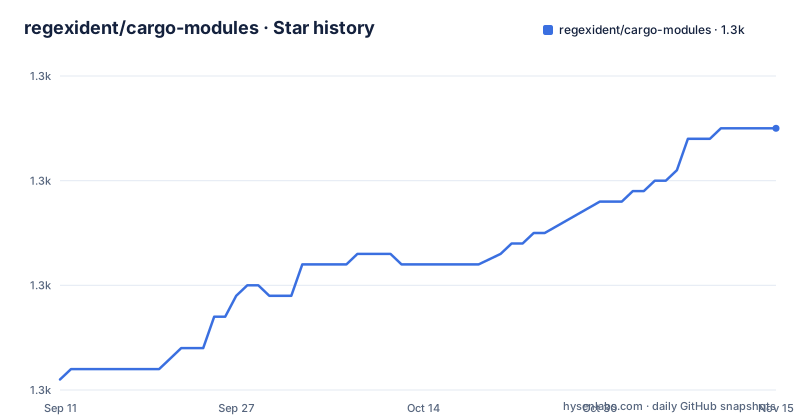
- regexident/cargo-modules1,285 ★ · +24
| Repository | 2026-09-11 | 2026-11-15 |
|---|---|---|
| regexident/cargo-modules | 1.3k | 1.3k |
24 Stars in the last 65 days, measured from the daily GitHub snapshot. Compare with other projects
Editorial analysis
Thirteen dependencies pinned with exact operators, and a build profile override
The manifest is where the interesting engineering decision sits, and it is not a decision about module trees.
The tool does not parse Rust itself. It is built on rust-analyzer's libraries, and thirteen of them are required with exact version operators rather than the caret ranges everyone else uses. Twelve are held at one version, one at an older one, and a comment above the block labels them as required by the library. Every one of them is a workspace crate from the same project, which is why they move in lockstep upstream and why the plugin has to move with them.
The block is sorted by comment as much as by name: the ordinary dependencies first, then a section explicitly labelled as minimal versions, then a section labelled as security fixes. That last section pins a URL parsing crate at a fixed release with an advisory identifier in a trailing comment, and pins an offset crate and a thread local crate with issue numbers. So the dependency list doubles as a changelog of fixes the author did not want to lose.
Then the build profile. There is a second development profile that inherits the normal one and raises the optimisation level to two with debug information kept on, and the compiler library that dominates compile time is set to inherit that profile specifically. Somebody measured which crate was making the loop slow and wrote it down.
Visibility is the unit of display, and four colours encode the scope rules
The tree output is not a file listing. Every line carries a visibility, a keyword, a name, and any test attributes, and the visibility is the part the tool colours.
Four scopes, four colours. Green for items visible to everything, which is the fully public marker. Yellow for items visible to the current crate. Orange for items visible to a named parent path. Red for items visible to the current module, which is also what you get when the marker is simply absent, since restricted visibility is the default in Rust.
The keyword itself is printed in a different colour to separate it from the name, and test-guarded items and test functions get their attributes printed next to them in two further colours.
So the output answers a question a plain file listing cannot: not what exists, but who can see it. A tree where the whole upper level is yellow tells you the crate keeps its internals crate-private, and a deep chain of red names tells you the opposite. That is the feature the tool is actually for.
Colour is opt-out through an environment convention rather than a flag. If the terminal supports colour and the variable for disabling it is not set in the environment, the output is coloured. There is no command line switch in the documented help for turning colour off, which means a script that captures the output needs to set the environment variable rather than pass an option.
A subcommand was flattened, and the compatibility note is still in the file
It installs as a cargo plugin with one command, and then exposes three subcommands:
cargo install cargo-modulesA structure tree, a dependency graph, and an orphan detector for source files in the crate's directory that nothing links to.
The graph one carries a note that the shown form is equivalent to a two word command from version 0.12.0 and earlier, where the subcommand was a generate verb with a graph argument. So the interface was flattened at some point, and the note preserves the old spelling for anyone who has it in a script.
That note is worth reading for a second reason. The crate version is 0.27.0, and the rename it documents happened around 0.12 or 0.13. Which means roughly fourteen minor versions of history are compressed into one compatibility sentence, and the interface has been reshaped at least once since.
The three commands share an option set, and the visible part of it is worth noting for what it implies rather than what it lists. There are flags to restrict processing to the library, to name a specific binary, to select a package, and to turn the default feature off or all features on, plus a verbose flag and a feature related flag whose name is cut off in the printed help. Restricting by binary is the important one: a crate with several binaries has several module graphs, and a tree of the whole workspace is a different question from a tree of one program.
So this is not only a whole workspace tool. It can be pointed at one binary in one package.
The cycle detector is behind a flag, and the file says what it does when it finds one
The graph command checks for the presence of a specific flag, and when it is present it searches the directed graph for cycles and returns an error. The sentence describing that behaviour is cut off partway through.
Still, the design is visible and it is a good one. Cycle detection is not on by default, which means the default output is a picture rather than a report, and a project with a legitimate mutual reference between modules does not fail its build over a graph tool.
The graph itself is a directed graph library's representation rendered as text, with the option to write it out in the DOT format that Graphviz consumes. The file's own example pipes the output through DOT into an SVG renderer, which is the shortest useful path from the tool to something you can put in a wiki.
The node format is a box with two compartments: the visibility and keyword on the first line, the item's path on the second. And the colour scheme here has one more level than the tree's four, because the crate's own root module gets its own colour, so a dependency from inside your crate is distinguishable from a dependency on something you do not control.
The orphan command treats every unlinked file as dead, which is a heuristic
The third command detects source files sitting in a crate's directory that nothing links to. That is a genuinely useful thing to check on a project nobody has touched in a year, and it is also the one command whose answer you should not take at face value.
A file does not have to be reachable through the module tree to matter. Build scripts are compiled as their own target and live beside the library. Files included by a macro at compile time are not referenced by a module path. Integration tests and examples are separate targets. A file can be included by string at runtime.
The tool does not claim to know that, and the file does not discuss it. What it does is draw a line at the module graph, which is a defensible definition of unreachable, and then leave the judgement to you.
So treat the output as a review list rather than a delete list. Two of the three commands describe what exists and how it is scoped; this one describes what the compiler will not compile. That is a different kind of claim and it deserves different handling.
Version 0.27.0, no releases, and a toolchain floor written into the manifest
The metadata is specific in ways that matter for adoption.
The crate version is 0.27.0. The edition is the 2024 edition, and the minimum compiler version is declared as 1.95.0. That floor is well above what most Rust projects assume, which means installing this tool into an older toolchain requires a newer compiler than the code you are inspecting.
The licence is the Mozilla Public License, file level copyleft, which is a different thing from the permissive licences most cargo plugins use. For a build-time tool that never ships into your artefact it rarely matters. If you vendor it into something you distribute, it does.
The documentation points at the generated API docs on the documentation server rather than a book, and the description differs slightly between the manifest and the readme: the manifest says it shows a tree-like overview of a crate's modules, the readme says it visualises and analyses a crate's internal structure. Neither is wrong; the manifest is the narrower claim.
There is no published release on the repository hosting side at all, despite a version number in the twenties. So the release trail for this project is the package registry and the changelog file, not the releases page, and the two can drift apart without anyone noticing.
The root of the repository is small and conventional: a changelog, a contributing guide, a dependency update bot configuration, the manifest, a lock file, the licence file, the readme, a documentation directory, a source directory and a tests directory.
The examples run against fixture projects inside the test suite
The documented examples are not hypothetical. Each one names a directory under the tests folder and links to the source file that produces the output.
The tree example changes into a fixture project and runs the structure command with a flag that includes test-gated items, and the output shown is a five line tree containing a trait, three nested modules with a union inside the deepest one, and a test module holding a single test function.
That fixture is doing something specific. Every visibility scope in the documentation appears exactly once: fully public on the trait, crate level on two modules, restricted to a named parent on the union, and self on the deepest module and the test function. So the example is a test of the colour mapping as much as a demonstration of the tree.
The graph example does the same job by pointing at another fixture, and mentions a checked in DOT file as the raw output for the one shown.
So the documentation and the test suite share fixtures, which means the examples cannot silently rot the way a hand written transcript can. If the tree format changes, the fixture output changes with it and the readme has to follow, because what the readme shows is what the tests assert.
That is a small practice with a large payoff, and it is the reason the output format in this readme can be trusted as current rather than remembered.
Editorial conclusion
cargo-modules is worth installing if you have inherited a large Rust crate and want to see its shape, its visibility boundaries and its dead files in one pass, and it is not a tool to adopt for continuous enforcement in CI without checking something first. Three things to look at. The pinned dependency block, because thirteen libraries are held at exact versions and the manifest overrides the optimisation level for one of them, which means the crate's build cost is tied to the compiler version as well. The orphan command, because treating every file missing from the module tree as dead is a heuristic, not a verdict. And the maintenance signal: the crate version is far ahead while the repository has published no releases at all.
Frequently asked questions
What does cargo-modules do?
It is a cargo plugin with three subcommands: one prints a crate's module hierarchy as a tree with each item's visibility, one prints its internal dependencies as a graph with the option to emit DOT for Graphviz, and one detects source files in the crate's directory that nothing in the module tree links to.
How do I install cargo-modules?
Through cargo, with a single install command for the plugin. The manifest declares a minimum compiler version of 1.95.0 and the 2024 edition, so an older toolchain needs upgrading before the tool will build. The documentation on the registry is generated API reference rather than a guide.
How do I turn off colours in cargo-modules output?
By setting the environment variable that conventionally disables colour in your environment before running the command. The file describes colour as conditional on terminal support and on that variable being unset, and the documented command help shows only the help flag, with no colour switch on the command line.
Does cargo-modules detect circular module dependencies?
Only when you pass the flag that asks for it. When that flag is present the dependency command searches the directed graph for cycles and returns an error if it finds one. Without the flag the graph is a picture rather than a check, so a project with a legitimate mutual reference does not fail on it.
Can cargo-modules analyse one binary instead of the whole workspace?
Yes. The subcommands share flags to restrict processing to the library, to name a specific binary, to select a package, and to change which features are active. That matters for a crate with several binaries, where each is a separate module graph.
Official sources
Add this badge to your README
If you maintain this project, the badge below links readers to this analysis and shows its maintenance status from the daily GitHub snapshot. Paste the markdown into your README; add ?metric=license or ?metric=stars to the image URL for a different field.

[](https://hysenlabs.com/projects/regexident-cargo-modules)Star history chart for your README
[](https://hysenlabs.com/projects/regexident-cargo-modules)Was this useful?