rehype-pretty-code highlights fenced blocks with Shiki, in place
Beautiful code blocks for Markdown or MDX.
At a glance
- What is it?
- rehype-pretty-code is a rehype plugin that turns the fenced code blocks in a Markdown or MDX document into highlighted blocks, using Shiki and its VS Code theme model, and it ships as one package in a pnpm and turbo monorepo with examples for SvelteKit, Astro, Next.js and a plain CDN build. The package is MIT licensed and the repository runs Biome, vitest and changesets.
- Who is it for?
- rehype-pretty-code is the right choice for a documentation site that already builds Markdown or MDX through a unified pipeline, because it does the highlighting at build time with the same engine and themes an editor uses, so the colours in the docs match the colours in the reader's editor.
- Can I use it commercially?
- Yes. MIT is a permissive licence: you can use, modify and sell software built on it, as long as you keep its copyright and licence notices.
- Is it still maintained?
- Yes. The repository last received commits 4 days ago.
- What is it written in?
- Mainly TypeScript, according to GitHub's language statistics.
Answers come from the project's GitHub data, last synced on November 7, 2026, and from our analysis. They are not legal advice.
Star history
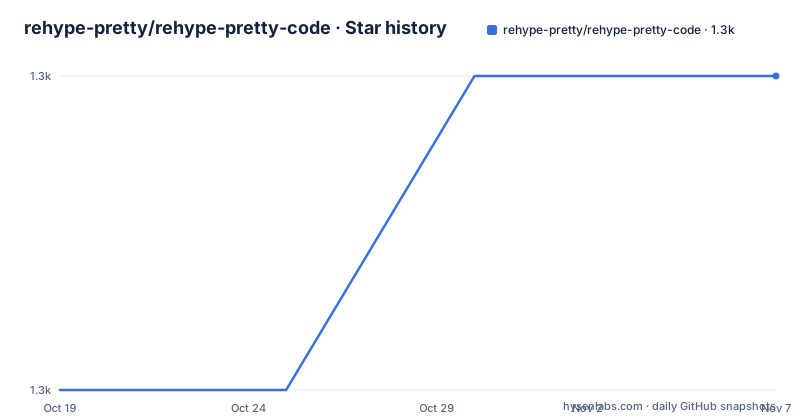
- rehype-pretty/rehype-pretty-code1,318 ★ · +1
| Repository | 2026-10-19 | 2026-11-07 |
|---|---|---|
| rehype-pretty/rehype-pretty-code | 1.3k | 1.3k |
1 Stars in the last 19 days, measured from the daily GitHub snapshot. Compare with other projects
Editorial analysis
Highlighting happens at build time, in the pipeline
The project describes itself as beautiful code blocks for your MD and MDX docs, and the mechanism is a rehype plugin. That placement decides what it can do. A rehype plugin runs after the Markdown has been parsed and the HTML tree has been built, so it works on the element that carries the code fence rather than on the raw text, which is what lets it attach titles, line numbers, highlighted lines and a filename to an individual block. It also means the plugin is part of a unified pipeline, and the four integration examples in the repository are exactly the four ways people build one, with SvelteKit, Astro, Next.js and a plain CDN page that runs the transformation in the browser. The distinction between the build time and the browser matters, because a Shiki highlight at build time is free for the reader while the same highlight at request time is work on every page view, and a browser build trades that for a slower first paint.
Shiki is the engine, and the themes are editor themes
The repository topics name the two libraries that matter, shiki and vscode, and Shiki appears in the development dependencies of the monorepo at version 4 or newer. Shiki is a syntax highlighter that uses the same TextMate grammars and colour themes that an editor uses, which is why the result looks like a screenshot of VS Code rather than like a generic blog highlighter, and why a theme swap is a one line change rather than a stylesheet rewrite. The cost of that fidelity is the size of the grammars, since the grammars for a hundred languages are larger than the highlighter itself, and the reason the package is versioned with care is that a Shiki major release can change the token output and with it the markup your custom CSS targets. The vocabulary in the topics also tells you the intended audience, which is people who want their documentation to look like their editor and who are willing to own the theme.
One package in a monorepo with a deliberate toolchain
The repository is a pnpm workspace with turbo, and the root package is a private monorepo named @rehype-pretty/monorepo, with the published plugin living under packages/. The scripts show the whole loop. Build and dev are turbo tasks, test is vitest with the --run flag, and there is a separate markdown lint with markdownlint-cli2 that skips node_modules and test directories. Formatting and linting are both done by Biome, with the format script using --error-on-warnings and the lint script applying unsafe fixes, and there is a separate format:markdown script for the prose. Type checking is a turbo task, and the reset.d.ts file at the root pulls in @total-typescript/ts-reset, which is the trick of making the built-in array and object types behave the way the plugin's authors want, since that is the usual friction when a library narrows the standard types. Versions are managed with changesets, with a separate version and publish script pair, and the package requires Node 20 or newer and pnpm 9 or newer.
Four examples, four different constraints
The examples/ directory has one directory per integration, and the set is the fastest way to understand what the plugin needs from a host. The sveltekit example is a full application with the plugin wired into the content pipeline. The astro example does the same for a site that assembles its pages from Markdown and MDX. The next example is a plain page under examples/cdn/index.html, which is the interesting one, because it shows the plugin running in a browser rather than at build time, with the highlighting happening on the client. The next example is the Next.js integration. The difference between those four is not cosmetic. The build time examples put the cost in the build and ship static HTML with the tokens already applied, while the CDN example puts the cost in the reader's browser and needs the grammars there, which is why the bundle is bigger and the first paint is slower. A site that has to work without a build step has no choice but the second, and a site that builds has the first for free.
The feature set is in the documentation site
The README is short by design, and the full documentation lives at rehype-pretty.pages.dev, which the README links as the website. What the repository itself shows is the shape of the project rather than the surface of the plugin. The site directory is absent from the top-level list, and the docs/ directory is present, along with the examples and the packages. The repository also carries a .changeset/ directory for the pending release notes, a .git-blame-ignore-revs file, which is the convention for excluding formatting commits from the blame of a file, and a .markdownlint.json with an .npmrc and a .vscode/ directory. The recent releases tell you the pace, with 0.14.3 on 2026-03-03, 0.14.4 on 2026-07-06 and 0.14.5 on 2026-07-25, and the last push was on 2026-07-25, so the 0.14 line has been moving steadily through the year with a short gap between the March and July releases.
Where it fits, and where a rehype plugin cannot reach
The limitation is architectural and worth stating plainly, because it decides the answer for a lot of projects. A rehype plugin runs inside a unified pipeline, so the plugin only affects documents that pass through one. A Markdown file on GitHub, a README in a repository, or a page served by a host that does not run a rehype build will show an unhighlighted code block, and no configuration of this plugin will change that. The second limit is that the plugin is about blocks, not about the page, so it is one part of a documentation design rather than a theme for it. The third is the dependency weight, since the grammars are the heavy part and a site that only shows two or three languages can be configured to load only those. The alternative approach is the one the plugin is an alternative to, which is a client-side highlighter that runs in the reader's browser, and the trade between them is the same one the examples make visible, build time cost against reader cost, with the plugin clearly on the build time side.
Editorial conclusion
rehype-pretty-code is the right choice for a documentation site that already builds Markdown or MDX through a unified pipeline, because it does the highlighting at build time with the same engine and themes an editor uses, so the colours in the docs match the colours in the reader's editor. It is the wrong tool for a plain Markdown file rendered by GitHub or by a static host that does not run a rehype pipeline, since a rehype plugin only runs where rehype runs, and it is the wrong tool if your site is not already on unified, because the integration cost is higher than the benefit. Before you adopt it, look at the examples directory for the framework you use, since the four examples cover SvelteKit, Astro, a CDN build and Next.js, and pin the version, because the 0.14 line has been moving every few months.
Frequently asked questions
What does rehype-pretty-code do?
It is a rehype plugin that turns the fenced code blocks in a Markdown or MDX document into highlighted blocks, using Shiki and its VS Code themes. Because it runs in the unified pipeline after the HTML tree is built, it works on the code block element rather than on the raw text.
Which frameworks does rehype-pretty-code support?
The repository carries four integration examples, for SvelteKit, Astro, Next.js and a plain CDN page that runs the transformation in the browser. The docs site at rehype-pretty.pages.dev has the full guides.
How is the rehype-pretty-code repository built and tested?
It is a pnpm workspace with turbo, and the root package is a private monorepo. Build and dev are turbo tasks, tests run on vitest, formatting and linting are done by Biome, markdown is linted with markdownlint-cli2, type checking is a turbo task, and releases are managed with changesets. The package requires Node 20 or newer and pnpm 9 or newer.
What is the current version of rehype-pretty-code?
The recent releases are 0.14.3 on 2026-03-03, 0.14.4 on 2026-07-06 and 0.14.5 on 2026-07-25, with the last push to the repository on 2026-07-25. The package is MIT licensed.
Official sources
Add this badge to your README
If you maintain this project, the badge below links readers to this analysis and shows its maintenance status from the daily GitHub snapshot. Paste the markdown into your README; add ?metric=license or ?metric=stars to the image URL for a different field.

[](https://hysenlabs.com/projects/rehype-pretty-rehype-pretty-code)Star history chart for your README
[](https://hysenlabs.com/projects/rehype-pretty-rehype-pretty-code)Was this useful?