ProgressHUD's description claims 5000+ animations and the README's enum has 22 cases
ProgressHUD is a lightweight and easy-to-use HUD for iOS. Over 5000+ animations.
At a glance
- What is it?
- An iOS heads-up-display library shipping two maintained major lines at once, where 15.x is SwiftUI and 14.x is UIKit. Setup is one view modifier, appearance is configured through process-wide static properties, and the manual install route copies the SwiftUI sources, which is the wrong line for a UIKit project.
- Who is it for?
- ProgressHUD fits an iOS app that needs a status overlay and wants one call to start, since the SwiftUI path is a single modifier on the root view and every subsequent call is static. Three things to decide before adopting it.
- Can I use it commercially?
- Yes. MIT is a permissive licence: you can use, modify and sell software built on it, as long as you keep its copyright and licence notices.
- Is it still maintained?
- Yes. The repository last received commits 63 days ago.
- What is it written in?
- Mainly Swift, according to GitHub's language statistics.
Answers come from the project's GitHub data, last synced on November 15, 2026, and from our analysis. They are not legal advice.
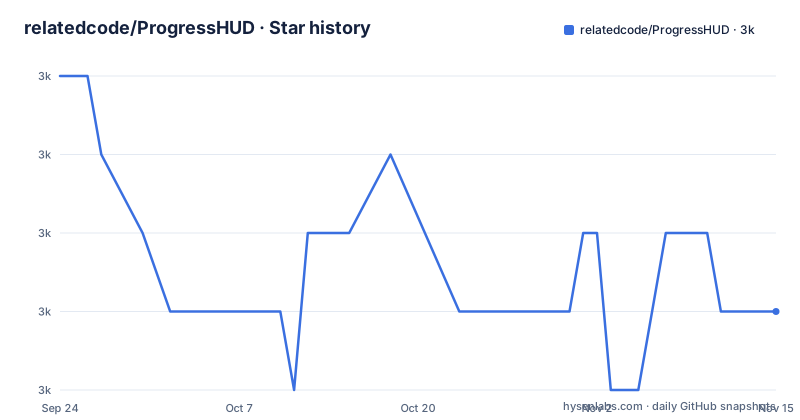
Star history
- relatedcode/ProgressHUD2,966 ★ · -3
| Repository | 2026-09-24 | 2026-11-15 |
|---|---|---|
| relatedcode/ProgressHUD | 3k | 3k |
-3 Stars in the last 52 days, measured from the daily GitHub snapshot. Compare with other projects
Editorial analysis
Two major lines are maintained at once, and 14.x got a patch after 15.0.2 shipped
One note in the overview decides which version you need: 15.x is SwiftUI, and for UIKit you use the 14.x releases. That is a major version split by UI framework, not by feature, and it means the project carries two supported lines rather than one.
The release history shows both lines moving in the same period. On 2026-08-02 there are two releases, 15.0.2 in the morning and 14.1.5 in the early afternoon, so the UIKit maintenance line was patched about ninety minutes after the SwiftUI line shipped its own patch. Then 15.0.3 followed on 2026-09-13.
The version numbers do not carry a suffix saying which framework they belong to. 14.1.5 and 15.0.2 are both plain tags, and the mapping between tag and framework exists only in that one sentence of the README.
For a project deciding what to pin, this is the first thing to resolve. A SwiftUI app on 15.x gets the current line; a UIKit app has to stay on 14.x and accept that its fixes arrive on a different schedule, as the same-day pair of releases demonstrates.
Three package manifests, two source directories, and a manual route that picks the wrong line
The root directory holds three manifest files: `Package.swift`, `Package-SwiftUI.swift` and `Package-UIKit.swift`. The split is expressed three times over, once as a default manifest and once for each UI framework, and the source lives in two directories, `ProgressHUD/` and `SwiftUI/`.
The documented install routes are two. The first is Swift Package Manager, done through Xcode's interface: open the project, use the Add Package Dependencies menu, paste the repository URL, choose a version, and add the package.
The second is manual, and its wording is the trap. The README says to copy all the `.swift` files from the `SwiftUI/Sources` folder into your Xcode project. That folder is the SwiftUI line. A UIKit project following the manual instruction against the default branch copies 15.x sources into a UIKit codebase, which is precisely the combination the version note warns against.
There is no version guidance attached to the manual route at all, and no podspec anywhere in the root, so a project that previously installed this as a CocoaPod has no scripted path forward described here.
The description advertises over 5000 animations; the enum in the README has 22
The repository description says the library has over 5000 plus animations. The README's own enumeration of the predefined animation types is a single `CaseIterable` enum with twenty-two cases: none, activityIndicator, ballVerticalBounce, barSweepToggle, circleArcDotSpin, circleBarSpinFade, circleDotSpinFade, circlePulseMultiple, circlePulseSingle, circleRippleMultiple, circleRippleSingle, circleRotateChase, circleStrokeSpin, dualDotSidestep, horizontalBarScaling, horizontalDotScaling, pacmanProgress, quintupleDotDance, semiRingRotation, sfSymbolBounce, squareCircuitSnake and triangleDotShift.
Twenty-two cases is the catalogue a developer can select from, and because the enum is `CaseIterable` it is also the set a picker can be built from. That is two orders of magnitude away from the figure in the description, so the two numbers are describing different things, or one of them is simply stale.
The second enum, `LiveIcon`, is smaller still, with three cases: succeed, failed and added. Those three names are worth holding on to, because they are the bridge to the naming problem in the next section.
Everything else in the library is a variation on those twenty-two shapes, a colour, a size, or a status symbol, so the surface is narrower than the description implies.
Four spellings for two ideas: succeed and success, failed and error, dismiss and remove
The usage examples list a lot of calls, and reading them together exposes duplicated vocabulary.
For the two outcomes there are four names. `ProgressHUD.succeed()` and `ProgressHUD.succeed("Some text...", delay: 1.5)` take an optional message and an optional delay, while `ProgressHUD.success("Success message")` and `ProgressHUD.error("Error message")` take a message and are named after the status rather than the past tense. The four calls that can appear together look like this:
ProgressHUD.succeed("Some text...", delay: 1.5)
ProgressHUD.failed("Some text...")
ProgressHUD.success("Success message")
ProgressHUD.error("Error message")
`ProgressHUD.failed()` and `ProgressHUD.failed("Some text...")` sit next to those, so succeed pairs with success and failed pairs with error, and nothing in the README explains what separates the two families or why the `LiveIcon` enum carries only the succeed, failed and added spellings.
For dismissal there are two names as well, `ProgressHUD.dismiss()` and `ProgressHUD.remove()`.
Two other signatures are worth reading carefully. Progress takes either a bare fraction, `ProgressHUD.progress(0.15)`, or a label followed by one, `ProgressHUD.progress("Loading...", 0.42)`, so the label goes first and the position second in the labelled form. And the symbol calls take SF Symbol names, `ProgressHUD.symbol(name: "box.truck")` and `ProgressHUD.symbol("Some text...", name: "sun.max")`, which means a custom image has to go through the image customisation properties instead.
Appearance is set through process-wide statics, so two screens cannot differ
The customisation section lists what can be changed and how, and the how is the same for every item: an assignment to a static property on the `ProgressHUD` type.
The properties are `animationType`, `colorHUD`, `colorBackground`, `colorAnimation`, `colorProgress`, `colorStatus`, `mediaSize`, `marginSize`, `fontStatus`, `imageSuccess` and `imageError`. The banner has its own five, `colorBanner`, `colorBannerTitle`, `colorBannerMessage`, `fontBannerTitle` and `fontBannerMessage`. Sizes are plain numbers, with `mediaSize` set to 100 and `marginSize` to 50 in the examples, and fonts are system fonts with a size and a weight.
None of this is a parameter on the calls shown in the usage section, and none of it is scoped to a view or a screen. The configuration is a set of globals, which means the appearance of a HUD is decided by whatever ran last before it was presented.
That is a reasonable design for a library whose whole purpose is to be called from anywhere without passing a configuration object around, and it is a constraint for anything that needs two different presentations in one app, such as a full-screen blocking wait in one flow and a light status line in another. The README does not discuss the trade.
iOS 17 and Xcode 15, and no CocoaPods route is documented
The requirements are two lines: iOS 17.0 or newer, and Xcode 15.0 or newer. There is no stated Swift version requirement and no device or simulator matrix beyond the iOS floor.
Against that floor the README documents exactly two ways in: Swift Package Manager through Xcode's Add Package Dependencies menu, and copying source files by hand. A third route is absent, and it is a route people look for on a library of this age and with this name, because there is no podspec in the root directory and no CocoaPods section in the README.
That matters more for the 14.x line than the 15.x one. Anyone migrating an existing UIKit app that integrated this as a pod is now in the 14.x branch with only the package manager and a manual copy documented, and the manual copy instruction names the SwiftUI sources folder rather than the other source directory.
The SwiftUI setup itself is the shortest in this batch. There is no configuration object and no initialisation call:
import SwiftUI

@main
struct MyApp: App {
    var body: some Scene {
        WindowGroup {
            ContentView()
                .progressHUD()
        }
    }
}
You add the `.progressHUD()` modifier to your root view inside a `WindowGroup`, and the library is live for the rest of the process, with every subsequent call static.
No CI directory, no tests directory, and the version lives in a text file
The root directory is short enough to read in one pass: `.gitignore`, `CHANGELOG.md`, `LICENSE`, the three package manifests, `ProgressHUD/`, `README.md`, `SwiftUI/` and `VERSION.txt`.
Two things are missing that a library with fifteen major versions would usually carry. There is no `.github/` directory, so no visible workflow configuration, and no `tests/` directory. Whether the library is tested somewhere else is not stated in the README.
Two files do carry the process. `VERSION.txt` at the root is where the version lives for the repository itself, and `CHANGELOG.md` is what the What's New section sends you to for detail, with the wording that detailed changes are in the change log. The README itself holds only a one line pointer, so the release history lives outside the document most people read.
The licence is MIT with `Copyright (c) 2026 Related Code`, and the homepage field in the repository metadata points at `starter.page`, a site builder product rather than a documentation page for this library. That is the value stored there; the README links no project website of its own, only the package repository URL for the package manager step.
Editorial conclusion
ProgressHUD fits an iOS app that needs a status overlay and wants one call to start, since the SwiftUI path is a single modifier on the root view and every subsequent call is static. Three things to decide before adopting it. Pick your line deliberately, because the repository maintains 14.x for UIKit and 15.x for SwiftUI simultaneously, and the manual install route copies the SwiftUI sources, so a UIKit project following it verbatim gets the wrong major version. Configure appearance through the static properties knowing they are process-wide, which means two screens cannot present a HUD with different colours or sizes. And note that the only documented distribution routes are Swift Package Manager and copying source files, since there is no podspec in the repository.
Frequently asked questions
What is ProgressHUD?
An MIT licensed HUD library for iOS that presents short alerts and status overlays. Its 15.x line is SwiftUI and its 14.x line is UIKit. Setup in SwiftUI is a single `.progressHUD()` modifier on the root view, after which calls are static, including banner, animate, succeed, failed, progress, symbol, success, error, added, dismiss and remove.
How do I install ProgressHUD?
Either through Swift Package Manager, by opening the project in Xcode, using Add Package Dependencies, pasting `https://github.com/relatedcode/ProgressHUD.git` and choosing a version, or manually by copying all the `.swift` files from the `SwiftUI/Sources` folder into the Xcode project. There is no podspec in the repository root and no CocoaPods route in the README.
How do I change the appearance of ProgressHUD?
By assigning static properties on the ProgressHUD type: animationType, colorHUD, colorBackground, colorAnimation, colorProgress, colorStatus, mediaSize, marginSize, fontStatus, imageSuccess and imageError, plus five banner specific colours and fonts. These are process wide settings rather than per call parameters, so two presentations cannot differ.
Which iOS versions does ProgressHUD require?
iOS 17.0 or newer, with Xcode 15.0 or newer. The README states no Swift version requirement and no other platform or device matrix beyond that iOS floor.
Official sources
Add this badge to your README
If you maintain this project, the badge below links readers to this analysis and shows its maintenance status from the daily GitHub snapshot. Paste the markdown into your README; add ?metric=license or ?metric=stars to the image URL for a different field.

[](https://hysenlabs.com/projects/relatedcode-progresshud)Star history chart for your README
[](https://hysenlabs.com/projects/relatedcode-progresshud)Was this useful?