Picocli fits a whole CLI framework in one Java source file, but its newest release is from April 2025
Picocli is a modern framework for building powerful, user-friendly, GraalVM-enabled command line apps with ease. It supports colors, autocompletion, subcommands, and more. In 1 source file so apps can include as source & avoid adding a dependency. Written in Java, usable from Groovy, Kotlin, Scala, etc.
At a glance
- What is it?
- Picocli is a Java library for building command line applications with annotations, subcommands, TAB completion and GraalVM native image support. This review covers the single-file design, the parsing features that set it apart, and where the README stops.
- Who is it for?
- Choose picocli when you are writing a Java, Kotlin, Groovy or Scala command line tool that needs nested subcommands, grouped options or shell completion, and you value being able to drop one source file into your project. Look elsewhere if you need an interactive shell as the main interface, because that route runs through the separate JLine modules.
- Can I use it commercially?
- Yes. Apache-2.0 is a permissive licence: you can use, modify and sell software built on it, as long as you keep its copyright and licence notices.
- Is it still maintained?
- Yes. The repository last received commits 102 days ago.
- What is it written in?
- Mainly Java, according to GitHub's language statistics.
Answers come from the project's GitHub data, last synced on November 25, 2026, and from our analysis. They are not legal advice.
Star history
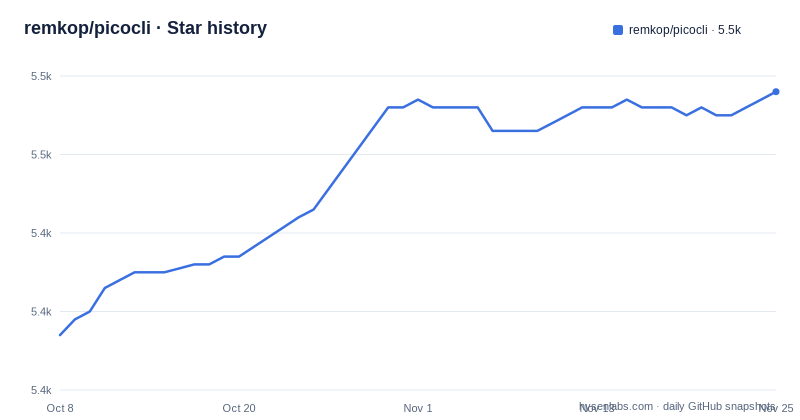
- remkop/picocli5,458 ★ · +31
| Repository | 2026-10-08 | 2026-11-25 |
|---|---|---|
| remkop/picocli | 5.4k | 5.5k |
31 Stars in the last 48 days, measured from the daily GitHub snapshot. Compare with other projects
Editorial analysis
The whole parser ships as one source file you can copy into your project
Picocli is built in a single file so you can include it in source form. The reason is stated directly: users can run picocli-based applications without requiring picocli as an external dependency. A tool distributed as a jar then carries no extra library for its users to resolve.
The cost of the idea is on the other side. A source copy is a fork of the parser at that moment. The repository publishes a jar to Maven Central under the group info.picocli, and its releases page is where newer versions appear, so a copied file does not update itself. If you take the source route, you own the job of noticing bug fixes in later versions.
The floor is low. The library requires at minimum Java 5, while being designed to make Java 8 lambdas easy to use. The README says it is tested on all Java versions between 5 and 18-ea inclusive. The repository has separate test projects named picocli-tests-java567, picocli-tests-java8, picocli-tests-java9plus and picocli-tests-jpms-modules, which is where to look for module-system behavior.
Annotate a class, implement Runnable or Callable, and one line runs the command
The model is annotation first. You annotate your class and picocli initializes it from the command line arguments, converting the input to strongly typed data. A programmatic API sits beside the annotations API for cases where the structure of the command is only known at run time.
The README claims a command, or a subcommand, can be executed with a single line of code. To get there, either implement `Runnable` or `Callable`, or put the business logic of your command in a `@Command`-annotated method. The second form means one method can be a subcommand without its own class.
Subcommands follow the git style, and they nest: sub-subcommands are supported in the same way. Any option prefix style is accepted, and POSIX-style grouped short options are handled. Custom type converters cover types the library does not know, and interactive password options read secrets from the console without echoing them on the command line.
The project also says picocli makes it easy to follow the Command Line Interface Guidelines published at clig.dev. That is a claim about design intent.
Named options and positional parameters are separate, each strongly typed
Picocli distinguishes named options from positional parameters, and allows both to be strongly typed. This matters when you read your own code a year later. An option is something like `-v` or `--output`. A positional parameter is the unnamed argument at an index, such as a file name at the end of a command.
Multi-valued fields can specify an exact number of parameters or a range. The README gives `0..*` and `1..2` as arity examples. Map options accept the familiar `-Dkey1=val1 -Dkey2=val2` form, where both key and value can have their own types, so a `Map<String, Integer>` field works as you would hope.
Two features exist for debugging and for scale. Parser tracing helps with troubleshooting, so you can see how picocli read an argument list. Argument files, written as @-files, let an application handle very long command lines by reading the arguments from a file instead of the shell.
The usage help and version help are generated, tailored through annotations, and use ANSI colors where possible. Where possible is the operative phrase: a terminal without color support gets plain output.
Argument groups encode mutually exclusive and mutually dependent options
The README names three features as unique to picocli: negatable options, advanced quoted values and argument groups. Argument groups are the heaviest of the three. They can declare mutually exclusive options, mutually dependent options, option sections in the usage help, and repeating composite arguments. The README shows the shape of the last one as `([-a=<a> -b=<b> -c=<c>] (-x | -y | -z))...`.
In plain terms, you can say that either -x, -y or -z is required together with an optional set of -a, -b and -c, and that the pair of sets may repeat. The validation lives in the annotations, so the parser rejects an invalid combination before your business logic runs.
For applications whose needs go past the annotations, there are two escape hatches. The `@Spec` annotation gives access to the picocli command object model. And an application can implement custom parameter processing for option parameters if the built-in logic is insufficient.
The README links the argument groups chapter of the manual at picocli.info; read it before promising users a particular error message.
Native image support depends on an annotation processor that Graal-enables the jar
Picocli applications can be compiled ahead of time to a GraalVM native image, distributed as a single executable file. The README claims extremely fast startup time and lower memory requirements, and gives no numbers, so treat both as qualitative.
The mechanism is an annotation processor that automatically Graal-enables your jar during compilation. The repository has a picocli-codegen module and a picocli-codegen-tests-java9plus directory.
That is the reason the description calls picocli GraalVM-enabled. Picocli-based applications can still run on the JVM; the README says they can run on and off it. If you choose the native route, the build gets a second step and your Java code gains a native-image toolchain dependency, even though picocli itself does not.
Anyone planning to ship a native executable should confirm in the picocli.info native image chapter that every feature they use is covered.
Completion scripts cover bash and zsh, and JLine modules handle interactive shells
Picocli applications can offer TAB autocompletion that interactively shows which options and subcommands are available. When an option has `completionCandidates` or an `enum` type, completion can also suggest option values.
The README names two shells for generated completion scripts: bash and zsh. It names no others, so a team whose users run fish or PowerShell has to check the manual before promising them completion.
A different need is a long-running program with its own prompt. For that, the repository ships picocli-shell-jline2 and picocli-shell-jline3, two modules containing JLine `Completer` implementations for building interactive shell applications. The split follows the two JLine major versions, so you pick the module that matches the JLine you already use.
A one-shot command line tool that runs and exits needs only the generated script. An application that keeps a session open and reads commands in a loop should look at the JLine module. The README treats these as two distinct products, and mixing them up is the usual reason to hunt for features that live in the other one.
Spring Boot, Micronaut, Quarkus, Guice and CDI each get a different level of support
Picocli applications can integrate with dependency injection containers, and the support is uneven by design. The Micronaut microservices framework has built-in support for picocli. Quarkus has a Command Mode with Picocli extension. Those two are maintained by their own frameworks, not by the picocli repository.
Spring is handled in the repository. The picocli-spring-boot-starter module includes a `PicocliSpringFactory` and Spring Boot auto-configuration, so Spring dependency injection works inside a picocli command line application. For Guice and for containers that comply with CDI 2.0 (JSR 365), the user manual carries examples instead of a module.
The practical rule: for Spring Boot, add the starter; for Micronaut or Quarkus, use what the framework supplies and read its guide; for Guice or CDI, copy the pattern from the manual. A search for picocli vs spring shell finds a different decision altogether, because Spring Shell is a framework for building shells inside Spring.
The latest release is 4.7.7 from April 2025, and the README still tests only through Java 18-ea
The release list shows v4.7.7 published on 2025-04-19, v4.7.6 on 2024-05-08 and v4.7.5 on 2023-08-26. About a year separates each of them. The README names 4.7.7 as the latest, with release notes for 4.0, 3.0 and 2.0 as older reference points.
The repository is not archived, and the last push landed on 2026-08-16, which is later than the last tag. Work after v4.7.7 sits on the main branch without a release, so a project that wants those changes must build from source. The root holds both pom.xml and build.gradle, along with bnd.bnd for OSGi metadata, and a gradlew wrapper.
The README also quotes its Java compatibility as 5 through 18-ea, a range written long before the release dates above. For a new project on a recent JDK, run your own test suite against 4.7.7 instead of relying on that line. The licence is Apache-2.0, and RELEASE-NOTES.md in the repository root is the place to read what changed between versions.
Editorial conclusion
Choose picocli when you are writing a Java, Kotlin, Groovy or Scala command line tool that needs nested subcommands, grouped options or shell completion, and you value being able to drop one source file into your project. Look elsewhere if you need an interactive shell as the main interface, because that route runs through the separate JLine modules. Before adopting it, check the picocli.info manual for your target Java version, since the README's tested range ends at Java 18-ea and the newest release is 4.7.7 from April 2025.
Frequently asked questions
What is picocli?
Picocli is a modern library and framework written in Java with both an annotations API and a programmatic API. It features usage help with ANSI colors, TAB autocompletion and nested subcommands, all in a single source file.
How do I use picocli?
Annotate your class and picocli initializes it from the command line arguments, converting input to strongly typed data. Implement Runnable or Callable, or put the logic in a @Command-annotated method, and the command runs with a single line of code.
What is the difference between an option and a parameter in picocli?
Picocli distinguishes named options from positional parameters, and both can be strongly typed. Multi-valued fields can set an exact number of values or a range such as 0..* or 1..2.
Official sources
Add this badge to your README
If you maintain this project, the badge below links readers to this analysis and shows its maintenance status from the daily GitHub snapshot. Paste the markdown into your README; add ?metric=license or ?metric=stars to the image URL for a different field.

[](https://hysenlabs.com/projects/remkop-picocli)Star history chart for your README
[](https://hysenlabs.com/projects/remkop-picocli)Was this useful?