Playwriter: Playwright Snippets Run Against Your Own Logged-In Chrome Through an Extension, a CLI and Persistent Sessions
Chrome extension & CLI to let agents control your browser. Runs Playwright snippets in a stateful sandbox. Available as CLI or MCP
At a glance
- What is it?
- Playwriter lets an agent drive the Chrome you already use, with your logins and extensions, by running Playwright code in a stateful sandbox from a CLI or MCP. The trade is that the agent works inside your real profile, and tabs, sessions and cleanup have rules you need to know.
- Who is it for?
- Playwriter suits people who want an agent to work inside their own Chrome profile, with existing logins, using the full Playwright API from a CLI or MCP. It does not suit anyone who wants isolation from their real accounts.
- Can I use it commercially?
- Yes. MIT is a permissive licence: you can use, modify and sell software built on it, as long as you keep its copyright and licence notices.
- Is it still maintained?
- Yes. The repository last received commits 2 days ago.
- What is it written in?
- Mainly HTML, according to GitHub's language statistics.
Answers come from the project's GitHub data, last synced on November 14, 2026, and from our analysis. They are not legal advice.
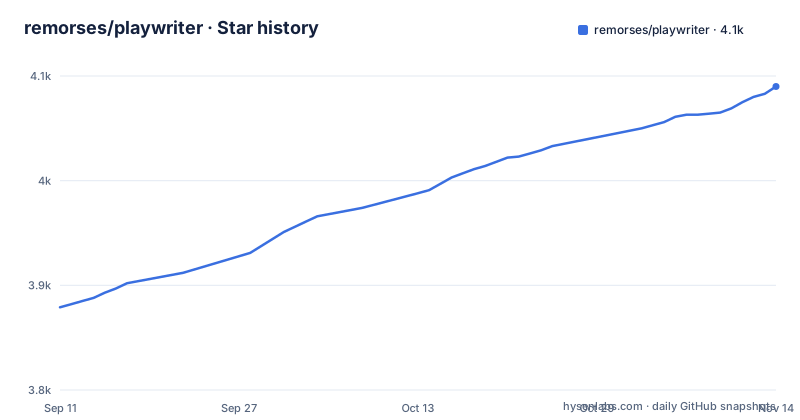
Star history
- remorses/playwriter4,090 ★ · +211
| Repository | 2026-09-11 | 2026-11-14 |
|---|---|---|
| remorses/playwriter | 3.9k | 4.1k |
211 Stars in the last 64 days, measured from the daily GitHub snapshot. Compare with other projects
Editorial analysis
It attaches to your running Chrome, so the agent inherits every login in that profile
The pitch is stated against other browser MCPs. According to the README, other tools spawn a fresh Chrome with no logins, no extensions, a high chance of being flagged by bot detectors, and double the memory. Playwriter instead connects to your running browser through one Chrome extension, with the full Playwright API available and everything you are already logged into.
That is the benefit and the exposure in one sentence. An agent driving this setup can reach any site your profile is signed in to, including email, banking or work tools, with the same cookies you would use. Nothing in the project description limits which tabs a script may act on beyond the connection step. The practical rule is to decide which profile you attach it to. A separate Chrome profile with only the accounts the task needs gives you most of the benefit with far less to lose.
The setup is an extension click, a global npm install and a skill for the agent
Installation has four steps. Install the extension from the Chrome Web Store. Click the extension icon on a tab, which turns green when the tab is connected. Install the CLI and run a first command:
npm i -g playwriter
playwriter -s 1 -e 'state.page = await context.newPage(); await state.page.goto("https://example.com")'
Then install the skill so the agent knows how to use the tool:
npx -y skills add https://playwriter.dev -g -yThe green icon is a per-tab step, so a tab you have not enabled is not something the extension has attached to. There is a second route that avoids your everyday browser: playwriter browser start starts Chrome for Testing or Chromium with the bundled Playwriter extension, and you can pass a path to a browser binary. That path trades the logged-in profile for a clean one.
Sessions hold isolated state, tabs are shared, and there is no default page
The quick start creates a stateful sandbox and then runs code in it:
playwriter session new  # creates stateful sandbox, outputs session id (e.g. 1)
playwriter -s 1 -e 'console.log(await snapshot({ page: state.page }))'
playwriter -s 1 -e 'await state.page.locator("aria-ref=e5").click()'
Each session has isolated state, while browser tabs are shared across sessions. Variables in scope include context, state, which persists between calls, cloud for local CLI sessions, require, importModule and native import. The README is blunt that there is no default page: you create your own tab and store it in state, or find one the user already opened by its URL.
The consequence of shared tabs is that context.pages() lists tabs opened by other sessions too. A script that grabs the first page may act on someone else's tab, so match by exact URL. If connections misbehave, playwriter session reset with an id is the documented fix.
Single quotes around -e are required, or bash will mangle your JavaScript
Code is passed on the command line with -e. The README's tip is to always use single quotes for the -e argument, so that bash does not interpret the dollar sign, backticks or backslashes inside your JavaScript, and to use double quotes for strings within the code. For longer scripts, a multiline form uses a dollar-prefixed single-quoted string.
This matters more for agents than for people. An agent that wraps its snippet in double quotes will have selectors such as dollar-double-dollar eval calls rewritten by the shell, and the failure looks like a JavaScript error rather than a quoting error. Some of the README's own examples use double quotes around the whole snippet, so there are two styles in the documentation, and the single-quote advice is the one stated as the rule. If your agent keeps failing on selectors, check quoting before anything else.
Tab groups keep concurrent agents readable, and the default group is green
Local extension sessions use a Chrome tab group named playwriter by default, and remote-control sessions put their tabs in a group called remote. You can name groups yourself, using a short single word such as docs, shop, test or scrape:
playwriter session new --tab-group scrape --tab-group-color grey
playwriter session new --tab-group agent1 --tab-group-color blue
playwriter session new --tab-group agent2 --tab-group-color pink
The accepted colors are grey, blue, red, yellow, green, pink, purple, cyan and orange. Without a color it is derived from the name, and the default local playwriter group stays green. A long scrape can sit in its own group that the user moves to a new window, and new tabs from that session follow the group. This is organization, not isolation: separate groups do not stop one session from touching another group's tabs through the shared tab list.
await using closes the connection but leaves your tabs open unless you ask otherwise
Node programs should call connectViaExtension instead of posting to the session endpoint themselves:
import { connectViaExtension } from 'playwriter'

await using connection = await connectViaExtension({
  tabGroup: 'email-check',
  tabGroupColor: 'grey',
})
At the end of the scope, await using calls close, which disconnects the Chrome DevTools Protocol connection and deletes the session. It does not close tabs. You must close every tab your script opens, using await using page or page.close(), or pass closeTabsOnEnd as true so that close also closes the tabs this connection opened, and never other sessions' tabs. Without await using, call connection.close() in a finally block.
Leaving a tab open is also a feature, since a later process can reuse it by connecting to the same group. If the extension runs in more than one browser or profile, selectBrowser receives every connected browser, with fields such as the browser name and the signed-in email, and returns the one to use.
The repository bundles a Playwright submodule, and the extension is still at 0.0.170
The repository is a pnpm workspace with extension, playwriter, website, docs and skills directories, plus a playwright directory that comes from a git submodule. The bootstrap script initializes submodules, installs dependencies, generates the injected files and builds playwright-core. Anyone building from source has to run that sequence before the CLI builds. The root package.json leaves its license field empty, while GitHub reports MIT.
The recent releases are [email protected] and [email protected], both on 2026-10-20, and [email protected] on 2026-10-07. The extension number being 0.0.170 and the CLI being 0.9.0 means neither has reached 1.0, and a release check script verifies that extension and CLI versions agree. Pin versions in any automation. The last push was on 2026-10-27. There is also an MCP.md in the root for the MCP route, which the description mentions alongside the CLI.
Editorial conclusion
Playwriter suits people who want an agent to work inside their own Chrome profile, with existing logins, using the full Playwright API from a CLI or MCP. It does not suit anyone who wants isolation from their real accounts. Run it on a profile you can afford to expose, and close the tabs your scripts open.
Frequently asked questions
What is Playwright used for in Playwriter?
Playwriter runs Playwright snippets in a stateful sandbox against your own Chrome, with the full Playwright API available. You can use it from a CLI or as an MCP server.
How is Playwriter different from other browser MCPs?
The README says other browser MCPs spawn a fresh Chrome with no logins or extensions, while Playwriter connects to your running browser through one Chrome extension.
Does Playwriter close the tabs my script opens?
Not by default. Closing the connection deletes the session but leaves tabs open unless you close them or pass closeTabsOnEnd as true.
Official sources
Add this badge to your README
If you maintain this project, the badge below links readers to this analysis and shows its maintenance status from the daily GitHub snapshot. Paste the markdown into your README; add ?metric=license or ?metric=stars to the image URL for a different field.

[](https://hysenlabs.com/projects/remorses-playwriter)Star history chart for your README
[](https://hysenlabs.com/projects/remorses-playwriter)Was this useful?