Kokoro-FastAPI: choosing the right image tag for an OpenAI-style Kokoro-82M speech server
Dockerized OpenAI-compatible wrapper for Kokoro-82M text-to-speech w/multiplatform CPU, AMD, NVIDIA GPU PyTorch; multi-speaker, clone-tuning, caption timestamps, SSML, optional readalong web UI
At a glance
- What is it?
- remsky/Kokoro-FastAPI wraps the Kokoro-82M text-to-speech model in a Dockerized FastAPI service with an OpenAI-compatible speech endpoint. The work for a new user is picking the correct image for your GPU generation, and knowing which platforms get no image at all.
- Who is it for?
- Kokoro-FastAPI is a good fit if you want a self-hosted text-to-speech server that existing OpenAI client code can call, and you can match an image tag to your hardware. It is a weaker fit on Apple Silicon, where there is no GPU image, and on AMD, where ROCm support is marked experimental.
- Can I use it commercially?
- Yes. Apache-2.0 is a permissive licence: you can use, modify and sell software built on it, as long as you keep its copyright and licence notices.
- Is it still maintained?
- Yes. The repository last received commits 1 day ago.
- What is it written in?
- Mainly Python, according to GitHub's language statistics.
Answers come from the project's GitHub data, last synced on November 21, 2026, and from our analysis. They are not legal advice.
Star history
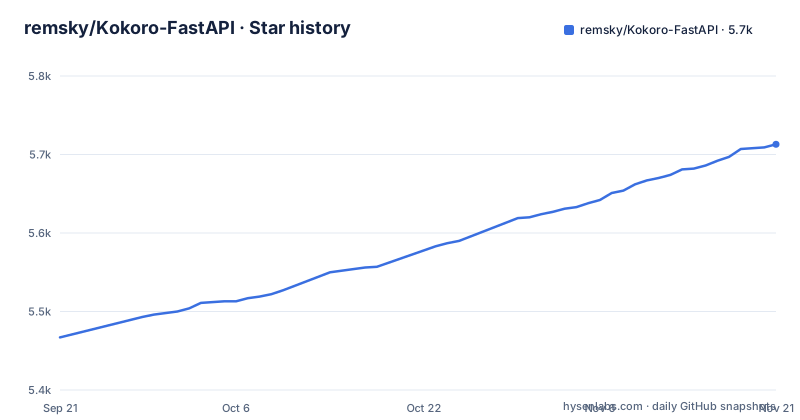
- remsky/Kokoro-FastAPI5,713 ★ · +246
| Repository | 2026-09-21 | 2026-11-21 |
|---|---|---|
| remsky/Kokoro-FastAPI | 5.5k | 5.7k |
246 Stars in the last 61 days, measured from the daily GitHub snapshot. Compare with other projects
Editorial analysis
The NVIDIA image depends on your card generation, because CUDA 12.6 and 12.8 wheels drop different GPUs
Three NVIDIA commands exist and they differ only in tag. The plain gpu:latest image ships cu126 and is labelled for GTX 900-series through RTX 40. RTX 50-series and Blackwell cards need gpu:latest-cu128, which ships cu128. A comment in pyproject.toml explains why this is a separate extra instead of the default: cu128 wheels carry sm_120 kernels but drop Maxwell and Pascal, so making cu128 the default would strand older cards. On arm64 NVIDIA hardware such as Jetson and GH200 the same gpu:latest tag applies, and it ships cu129. The pyproject pins torch==2.8.0+cu126 on x86_64 and torch==2.8.0+cu129 on aarch64 for the gpu extra. If you pull the wrong tag on a mismatched card, the container starts but the GPU kernels will not match, so read your card's generation before you run anything.
docker run --gpus all -p 8880:8880 ghcr.io/remsky/kokoro-fastapi-gpu:latestdocker run --gpus all -p 8880:8880 ghcr.io/remsky/kokoro-fastapi-gpu:latest-cu128Apple Silicon gets no GPU image, and AMD support is marked experimental
The Docker GPU image is CUDA only and will not run on an M1, M2 or M3 Mac. With Docker on a Mac you are told to use the CPU image, and for native MPS acceleration on the Apple GPU you must run directly through uv with the macOS script, with no image involved. AMD is handled by a separate ROCm image, labelled experimental and available for linux/amd64 only. It needs the /dev/kfd and /dev/dri devices passed through to the container. The consequence is that two of the three major GPU families have a caveat attached. A Mac user wanting speed has to install uv and run a script on the host, and an AMD user on arm64 has no image at all.
docker run --device=/dev/kfd --device=/dev/dri -p 8880:8880 ghcr.io/remsky/kokoro-fastapi-rocm:latest./start-gpu_mac.shThe :latest tag is available, but the project asks you to pin a release
The prebuilt multi-arch images bake the models in, so the first start does not need a separate model download. Even so, the quick start says outright that :latest is available but you should pin to a release tag for stable usage. That advice has weight: the three newest releases are v0.9.0 on 10 September 2026, v0.9.1 on 28 October 2026 with security bumps and fixes for IME and MPS, and v0.9.2 on 30 October 2026 for stability, request handling and voice sorting. A new tag two days after the previous one means :latest can change under a running deployment. Note also that pyproject.toml declares version 0.10.0-rc1, ahead of the newest release, so the default branch is already working toward a later version. And gpu:latest is the same image as gpu:latest-cu126, so pinning one pins the other. The CPU and NVIDIA CUDA images are published for both linux/amd64 and linux/arm64, which means a Raspberry Pi class board or a cloud Arm instance can pull the CPU image, while the ROCm image stays amd64 only. For a repeatable setup, write the release tag into your compose file or your run command, and read CHANGELOG.md in the repository before moving to a newer tag, since the release titles already mention a normalizer rework in v0.9.0 and voice tuning changes that can alter how text is spoken.
docker run -p 8880:8880 ghcr.io/remsky/kokoro-fastapi-cpu:latestDocker Compose builds from source, and the compose directory you enter decides the hardware
The compose route is different from docker run, because it clones the repository and builds locally. You pick the hardware by the directory you enter: docker/gpu for NVIDIA, docker/cpu for CPU, and docker/rocm for AMD, which is experimental and amd64 only. The repository's package.json has shortcut scripts that wrap the same compose files, such as gpu:build, gpu:up and gpu:down, with matching cpu and rocm scripts. This path includes the UI in the full setup and, per the configuration guide, covers the choice between image and build, the volume mounts and the environment variables. The cost is time and disk, since you build instead of pulling. Run it from the repository root afterwards.
git clone https://github.com/remsky/Kokoro-FastAPI.git
cd Kokoro-FastAPIcd docker/gpu # For NVIDIA GPU support
# or cd docker/cpu # For CPU support
# or cd docker/rocm # For AMD GPU (ROCm, experimental, amd64 only)
docker compose up --buildRunning directly through uv needs espeak-ng and a separate model download
Without Docker, you install astral-uv and clone the repository. You also install espeak-ng on the system if you want it as a fallback for unknown words and sounds. The note about it is candid: the upstream libraries may attempt to handle this themselves, but results have varied. Then you run the model download script at docker/scripts/download_model.py if you have not already, because the baked-in models belong to the images and a direct run has no such luxury. The start scripts come in CPU and GPU flavours for Linux and macOS as shell scripts, and for Windows as PowerShell scripts, and they run with hot-reload. The pyproject.toml requires Python 3.10 or newer, and on Windows it adds pyopenjtalk-plus as a platform-specific dependency.
./start-cpu.sh OR
./start-gpu.sh.\start-cpu.ps1 OR
.\start-gpu.ps1Only the speech endpoint is described as OpenAI compatible, and the key is a placeholder
Existing OpenAI client code works by pointing it at the local server. The snippet sets base_url to http://localhost:8880/v1 and passes an api_key of not-needed, so the server performs no key check in this example. The request uses model kokoro and a voice string that can mix voicepacks, af_sky+af_bella, and streams the response into output.mp3. Once running, the interactive API documentation is at http://localhost:8880/docs and the web interface is at http://localhost:8880/web. Because the api_key is a placeholder and the example talks to localhost over plain HTTP, exposing port 8880 beyond your own machine means you must add your own authentication and TLS in front, for instance in a reverse proxy, since the example gives you neither. The repository also ships a tests setup for the web interface, with a unit test script and a Playwright end-to-end script, which suggests the UI is covered separately from the API. The compatibility claim covers the Speech endpoint only. Anything else in the OpenAI API, such as chat or embeddings, is outside what this service claims to offer, and client code that calls other endpoints will not find them here.
from openai import OpenAI

client = OpenAI(
    base_url="http://localhost:8880/v1", api_key="not-needed"
)

with client.audio.speech.with_streaming_response.create(
    model="kokoro",
    voice="af_sky+af_bella", #single or multiple voicepack combo
    input="Hello world!"
  ) as response:
      response.stream_to_file("output.mp3")
Voices, captions and phonemes go beyond the plain OpenAI interface, but quality per language is not stated
The feature list reaches past a basic wrapper. Languages are English (US and GB), Spanish, French, Hindi, Italian, Japanese, Brazilian Portuguese and Mandarin Chinese. Voices can be mixed and given aliases as weighted combinations, multi-speaker generation works inline, and SSML is supported. Captions can be generated per word or per chunk with timestamps, and there are phoneme endpoints that turn text into phonemes or phonemes into audio. Custom voicepacks come from the Inno Clone-Tuner project, which matches the inno-kokoro==0.2.0 dependency. An optional WebUI offers read-along for long generations. Nothing in the feature list compares output quality across the eight languages, so test your own language and voice before committing to it for production audio. The headline claim of generating hours of speech in minutes is the project's own statement and carries no hardware or benchmark detail.
Exact dependency pins make a shared Python environment a poor home for it
The dependency list mixes loose bounds with exact pins. It fixes uvicorn==0.54.0, pydantic==2.10.4, scipy==1.14.1, spacy==3.8.5, kokoro==0.9.4 and misaki[en,ja,ko,zh]==0.9.4, while transformers must sit at >=5.5.0,<6. The en-core-web-sm spaCy model is installed from a URL on GitHub, so a direct run needs network access to github.com at install time. Installing this into an environment that already holds other machine learning packages is likely to produce version conflicts, so give it its own uv-managed environment, which is exactly what the start scripts are for. The repository also carries Kubernetes and DigitalOcean deployment guides plus SillyTavern and Open WebUI integration guides under docs, and a charts directory, for people running it as a shared service. A list of community projects already use it as a backend: Home Assistant integrations such as wyoming_openai and openai_tts, app store templates for Umbrel and Unraid, GPUStack and jetson-containers, reader and audiobook tools such as openreader, epub_to_audiobook and audiobook-creator, assistants such as xiaozhi-esp32-server and agent-cli, and browser extensions such as kokoro-extension. Those are separate projects maintained by other people, so the compatibility of each with your version is theirs to confirm. The examples directory holds runnable scripts, including stream_tts_playback.py, captioned_speech_example.py, simul_speaker_test.py and ab_split_test.py, plus a debug.http file for sending requests by hand.
Editorial conclusion
Kokoro-FastAPI is a good fit if you want a self-hosted text-to-speech server that existing OpenAI client code can call, and you can match an image tag to your hardware. It is a weaker fit on Apple Silicon, where there is no GPU image, and on AMD, where ROCm support is marked experimental. Pin a release tag instead of :latest, because the project shipped three releases between September and October 2026.
Frequently asked questions
How do I install Kokoro-FastAPI?
The quickest way is docker run with a prebuilt image: ghcr.io/remsky/kokoro-fastapi-cpu:latest for CPU or ghcr.io/remsky/kokoro-fastapi-gpu:latest for NVIDIA, on port 8880. You can also use Docker Compose from docker/gpu, docker/cpu or docker/rocm, or run directly through uv with the start scripts.
What is Kokoro-FastAPI?
It is a Dockerized FastAPI wrapper for the Kokoro-82M text-to-speech model with an OpenAI-compatible speech endpoint. It supports CPU, NVIDIA GPU and experimental AMD ROCm images, multi-speaker voice mixing, SSML and timestamped captions.
Does Kokoro-FastAPI run on Apple Silicon?
The Docker GPU image is CUDA only and will not run on Apple Silicon. Use the CPU image under Docker, or run natively through uv with ./start-gpu_mac.sh for MPS acceleration.
Official sources
Add this badge to your README
If you maintain this project, the badge below links readers to this analysis and shows its maintenance status from the daily GitHub snapshot. Paste the markdown into your README; add ?metric=license or ?metric=stars to the image URL for a different field.

[](https://hysenlabs.com/projects/remsky-kokoro-fastapi)Star history chart for your README
[](https://hysenlabs.com/projects/remsky-kokoro-fastapi)Was this useful?