ChameleonUltra: read, write and decrypt is the capability, and the authorisation is yours
The new generation chameleon based on NRF52840 makes the performance of card emulation more stable. And gave the chameleon the ability to read, write, and decrypt cards.
At a glance
- What is it?
- An open-source hardware and firmware project for an RFID reader, writer and card emulator built on a wireless microcontroller, shipping board design, device firmware and a host-side client from one repository under the GNU General Public License. Its front page is a reseller list followed by a link to a wiki, and its real documentation lives in a second repository that the README footnotes at the bottom.
- Who is it for?
- Use this if you are researching RFID card protocols against hardware and cards you own, because a device that reads, writes and decrypts under your control is what makes that research repeatable. Three boundaries to hold.
- Can I use it commercially?
- Yes, with conditions. GPL-3.0 is a copyleft licence: if you distribute software that includes it, you must release that software's source code under the same licence. Running it internally without distributing it does not trigger that obligation.
- Is it still maintained?
- Yes. The repository last received commits 4 days ago.
- What is it written in?
- Mainly C, according to GitHub's language statistics.
Answers come from the project's GitHub data, last synced on November 15, 2026, and from our analysis. They are not legal advice.
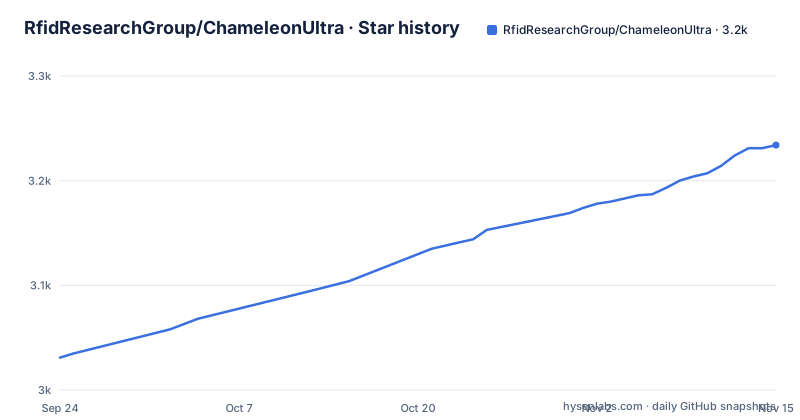
Star history
- RfidResearchGroup/ChameleonUltra3,234 ★ · +203
| Repository | 2026-09-24 | 2026-11-15 |
|---|---|---|
| RfidResearchGroup/ChameleonUltra | 3k | 3.2k |
203 Stars in the last 52 days, measured from the daily GitHub snapshot. Compare with other projects
Editorial analysis
The first thing on the page is a shopfront
The top-level heading of the README is a list of authorised resellers. Seven of them, across four countries, each with a city, a country and a link.
That is the first thing a visitor reads. Not what the device is, not how it works, what it costs and where to obtain one.
Two of the seven entries are in the same country, and the entry for Singapore is the project's own storefront on a large marketplace rather than an independent reseller. One reseller's link points at a product page filed under a different brand name, so the page it sends you to is not branded consistently with the rest of the list.
For an open-source hardware project this is an unusual choice, and there is a sound reason for it. The device is physical. Until you have one in your hand, the firmware is irrelevant, so the front page has to answer the where-to-get-one question before anything else is useful. That reasoning holds.
What it does not do is answer the question the very next heading asks.
The section that should describe the device redirects to a wiki
The second heading is a question, asking what the device is and how to use it.
The answer is one sentence, telling you to read the documentation elsewhere, with a link to a wiki.
So the page describes nothing. Not the radio, not the card types it works with, not the interfaces it exposes, not the firmware layout, not the wiring. Not one of those appears.
That is unusual for a firmware repository, and it is the shape of this one. The community and the commerce live here; the engineering reference lives somewhere else.
The device's own description does exist, but in the repository's metadata rather than on its page, and it is three clauses long. A wireless microcontroller from one semiconductor vendor. More stable card emulation than the previous generation. And the ability to read, write and decrypt cards.
That last clause is the one to read carefully rather than quickly, and it is where the authorisation question for this entire project sits.
The decrypt capability is where the boundary lives
The project states plainly that the device can read, write and decrypt cards. It also states that it emulates them, and that the improvement over the previous generation is stability rather than new capability.
Take those three verbs seriously. Writing to and decrypting a card you do not own, or on a system you are not authorised to test, is not research. It is fraud or trespass depending on where you are, and the tooling described here is capable enough that the distinction is the only thing between a lab bench and an incident.
Which makes authorisation the first question to ask about this project rather than a closing thought, and the README never asks it.
What the page offers instead is a set of links. Four compatible applications, five tutorial videos, two community servers.
One of those videos is titled as a walkthrough for cloning a card. It is on the list because it is genuinely useful, and it is useful against your own card or a card you have written permission to work with.
Prefer the community channels to the videos for anything you intend to repeat. The page carries its own warning that recorded instructions may have changed since filming, which is the right caveat and, for the cloning material, the one that actually matters.
The documentation lives in a second repository, footnoted at the bottom
The last line of the README is a note that if you are looking for the documentation repository, it is over here, linking a separate repository under the same organisation.
The formatting is six hash marks, which renders as the smallest heading available, positioned at the very bottom, after the reseller list, the application list, the videos and the community links.
So a project whose technical documentation lives in another repository has added a footnote about that fact, rendered as the least prominent element it could choose and placed after everything else.
There is also a documentation directory inside this repository. So documentation could be in three places: that directory, a wiki, and a second repository. The usage section points at the wiki, and the final line points at the second repository. Neither is signposted from the top of the page.
That is worth knowing before concluding the project is undocumented. It is thoroughly documented. It is just documented somewhere else, in a way the front page does not make obvious, and the project is aware of the problem, which is why the note exists.
Firmware, board design and the host client share one repository and one licence
The repository root holds five substantive directories: documentation, firmware, hardware design files, resources, and the host-side software.
Putting board design and firmware in the same place as the client that talks to the board is unusual and mostly good for this kind of project. A reader looking for the schematic finds it next to the code that drives the chip, and a change to one is reviewable against the other in a single pull request. That matters more here than in a pure software project, because the two halves have to agree about pin assignments and memory layout.
It also means one licence covers all of it. The project is under version three of the GNU General Public License, so the hardware design files are under it as well.
That is a deliberate choice and it has consequences a commercial derivative has to think about: the board files are covered, and the copyleft obligation attaches to them.
The supporting files are the conventional set for a project of this size: an authors file, a changelog, a contributing guide, a licence, an editor configuration, and a hosted forge configuration directory.
So the repository is properly organised. It is simply not organised around explaining the device, which is the job it leaves to two other places.
A release tag named dev, published in 2023, sits at the top of the list
The release list holds three entries. Two are ordinary numbered version tags from the last two years.
The third is a tag named `dev`, with a release title describing it as a development release, dated 2023. It is listed first, despite being the oldest of the three by about three years.
That is the signature of a continuously built branch published as a release artefact. The tag acquires a version-like entry in the release list and then stays there indefinitely. It is harmless as a download, but it means the release list is not a clean version history, and anyone scanning it for the current build has to work out which entry is a branch and which are releases.
A second timing detail: the newest numbered tag is roughly three months older than the last commit to the default branch. So the working tree sits ahead of every published version.
That is normal for a firmware project and worth knowing if you are chasing a bug, because the fix you want may be in the tree rather than in a release.
The gap between the two numbered releases is about ten months, which is slow for firmware and consistent with a device whose software changes when the board does.
People are guessing which hardware revision they own
The repository names one device generation and one wireless microcontroller. The searches attached to the product name suggest something messier than that.
Several hardware revisions are being asked about by number, alongside comparisons between those revisions and against two other tools, one of which is the widely known alternative reader for the same job.
So the naming is the friction. The front page calls the device one thing, the firmware carries its own independent version numbering, and the application ecosystem adds its own versions on top. Three numbering systems, no compatibility table on the page to reconcile them.
That is an ordinary hardware-project problem and the usual fix is a short table mapping board revision to firmware version to supported cards. This project does not have one where a buyer would look.
Meanwhile the front page does its other job well. Seven resellers with a city and a country each, four named third-party applications with their platform requirements stated inline, and a written warning that the video tutorials may no longer be accurate.
Both facts together describe a project where the engineering is real and reasonably well documented elsewhere, and the public page is optimised for the two questions a buyer actually arrives with.
Editorial conclusion
Use this if you are researching RFID card protocols against hardware and cards you own, because a device that reads, writes and decrypts under your control is what makes that research repeatable. Three boundaries to hold. Everything here is only legitimate against cards and premises you own or have written permission to test, because the decrypt capability makes an unauthorised target a matter of fraud or trespass rather than curiosity. Work from the current documentation rather than the tutorials, which the project itself warns may be stale. And establish which hardware revision and which firmware version you actually have, because the project names one generation while the ecosystem is asking about several, and there is no compatibility table on the front page to settle it.
Frequently asked questions
What does the Chameleon Ultra do?
The repository describes it as a new generation chameleon device built on the NRF52840 wireless microcontroller, which makes card emulation more stable than before and gives the device the ability to read, write and decrypt cards.
what is chameleon ultra
A chameleon device based on the NRF52840 wireless microcontroller that emulates cards and can read, write and decrypt them. The README itself does not describe the device and instead points you to a wiki.
Where do I buy a Chameleon Ultra?
The README's opening section lists seven authorised distributors by city and country, alongside the project's own store on a large marketplace. Two of the entries are in the same country, and one reseller's link points at a product page filed under a different brand name.
Where is the technical documentation for Chameleon Ultra?
Not on the README. Its usage section links a wiki, and the last line of the page points to a separate documentation repository in the same organisation. A documentation directory also exists inside this repository, so there are three possible locations.
What applications are listed as compatible with Chameleon Ultra?
Four: a desktop graphical client, a Bluetooth tool, an iOS app marked as beta, and an app for a Linux-based phone operating system. Three of the four are developed outside the device project organisation, and two are restricted to a single platform.
Official sources
Add this badge to your README
If you maintain this project, the badge below links readers to this analysis and shows its maintenance status from the daily GitHub snapshot. Paste the markdown into your README; add ?metric=license or ?metric=stars to the image URL for a different field.

[](https://hysenlabs.com/projects/rfidresearchgroup-chameleonultra)Star history chart for your README
[](https://hysenlabs.com/projects/rfidresearchgroup-chameleonultra)Was this useful?