iOS-OCR-Server: Apple's Vision framework answering HTTP requests from an iPhone
An iOS OCR Server Using Apple’s Vision Framework
At a glance
- What is it?
- A Swift project that turns an iPhone into a local OCR endpoint on port 8000, handing recognition to Apple's Vision framework instead of shipping a model. The JSON contract is the solid part; the App Store only install path, the missing authentication and the foreground only host are not.
- Who is it for?
- This is a good fit for a team that already owns iPhones and wants pages recognised on hardware sitting in the room, and a poor fit for anything unattended or anything that must be built from source. Recognition quality comes from Apple's framework, so the parts worth reviewing are the JSON contract and the LAN exposure.
- Can I use it commercially?
- Yes. MIT is a permissive licence: you can use, modify and sell software built on it, as long as you keep its copyright and licence notices.
- Is it still maintained?
- Yes. The repository last received commits 17 days ago.
- What is it written in?
- Mainly Swift, according to GitHub's language statistics.
Answers come from the project's GitHub data, last synced on October 23, 2026, and from our analysis. They are not legal advice.
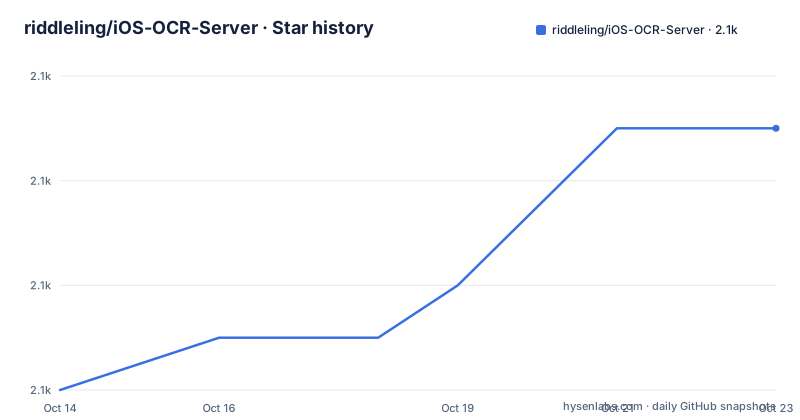
Star history
- riddleling/iOS-OCR-Server2,097 ★ · +5
| Repository | 2026-10-14 | 2026-10-23 |
|---|---|---|
| riddleling/iOS-OCR-Server | 2.1k | 2.1k |
5 Stars in the last 9 days, measured from the daily GitHub snapshot. Compare with other projects
Editorial analysis
Vision does the recognition; the repository ships the HTTP shell
The recognition engine belongs to the operating system, not to this repository. The project describes itself in one line as an iOS OCR server using Apple's Vision Framework. The primary language is Swift, and the top level of the tree holds OcrServer.xcodeproj/ and OcrServer/, so the code you can read is the transport layer plus whatever Vision call sits behind it. Nothing else appears at the top level: no model weights, no vendor SDK, no bundled server binary and no dependency manifest of any kind.
Four declared topics match that shape: `http-server`, `ios`, `ocr` and `vision-framework`. There is no container recipe, no service unit and no Python service in the listing. The first four numbered steps of the usage flow describe the whole lifecycle: the app launches by itself, it puts an IP address on screen, a device on the same network reaches that address, and an upload comes back as JSON. Recognition happens wherever the phone happens to be sitting, and the phone is the only host in the design.
One consequence deserves naming early. Because the engine is Apple's, accuracy for a given script is decided by the OS version installed on the handset, not by any version of this code. You cannot improve recognition by improving the repository.
First call: POST one PNG to the upload endpoint on port 8000
There is no installer script to run. The acquisition line in the README is a single App Store link, so a first run means installing the app on an iPhone, letting it start the server, and pointing a client at the address it displays. The shortest complete path is one curl call from a laptop on the same network.
curl -H "Accept: application/json" \
  -X POST http://<YOUR IP>:8000/upload \
  -F "[email protected]"
Three details are load bearing. The request is a POST rather than a GET. The form field is named `file`. And the `Accept: application/json` header is what asks for the structured response instead of whatever the browser test page shows. The host is a placeholder in this example and a concrete address in the next one, where 10.0.1.11 stands in for the value your phone puts on screen.
import requests

url = "http://10.0.1.11:8000/upload"  # Replace with your IP address
file_path = "01.png"

with open(file_path, "rb") as f:
    files = {"file": f}
    headers = {"Accept": "application/json"}
    response = requests.post(url, files=files, headers=headers)

print("status code:", response.status_code)
The response opens like this:
{
  "success": true,
  "message": "File uploaded successfully",
  "ocr_result": "Hello\nWorld",
  "image_height": 648,
  "image_width": 1247,
  "ocr_boxes": [
`ocr_result` is the joined text, and in this sample the two recognised words are joined by a newline rather than a space, which matters if the string goes straight into a line oriented parser. `image_height` and `image_width` describe the frame the coordinates live in, 648 by 1247 pixels here. The `ocr_boxes` array follows, one entry per detected region. For a human check with no client code at all, the README also points the same address at a web browser.
Bounding boxes arrive twice, once axis aligned and once rotated
Every entry in `ocr_boxes` describes one text region twice. The first description is flat: x and y give the top-left origin in pixels, w and h give the width and height. The first region in the sample sits at 429.6554479416482 with a height of 72 pixels. The second description is the `rect` object holding four corners, `topLeft_x` through `bottomLeft_y`, and the documentation is explicit that it preserves the original orientation and is not axis aligned. That tells you a detected line of text can be tilted inside its own box.
Here is what a skim misses. The drawing example shipped in the same file never reads `rect`. It recomputes an axis-aligned box from the flat numbers and draws that instead:
x2, y2 = x + w, y + h
draw.rectangle([x, y, x2, y2], outline=(255, 0, 0), width=line_thickness)
So the sample overlay sits loose on any slanted line of text, and the four corner values that would fix the overlay are returned by the server and thrown away by the example. Anyone reusing that script on a photographed page should switch to the corner coordinates. The label the example paints uses a font sized at a quarter of the box height through `max(10, int(box_h_px * 0.25))`, with a floor of 10pt so small regions still get a caption.
No token, no header, no documented authentication on the LAN endpoint
The request path carries no credentials. The curl call sets one header, `Accept: application/json`, and the Python call sets that same header. There is no token in the URL, no Authorization header, no shared secret, and no setup step that would mint one.
Put that beside the claim on the project line and the shape of the trade-off comes clear. The stated benefit is no cloud dependency, unlimited usage and privacy in the sense that the image never travels to a remote vendor. That part holds. What it does not cover is the hop from your laptop to the phone, which every example makes over plain HTTP, the Python call to `http://10.0.1.11:8000/upload` being the clearest case, so the page image crosses the local network unencrypted to any host that can reach the address the app is showing.
Trust therefore lands on the network rather than on the application. Anyone on the same Wi-Fi who learns the address can upload a file and read back the recognised text, and no mechanism for narrowing that is described. No failure taxonomy is given either: no list of accepted image formats, no size ceiling, no stated behaviour for a request with a missing `file` field. Client side handling differs too. The short upload example passes no timeout at all, while the drawing example sends the same call with `timeout=60`.
Guided Access and a lit screen are the price of the host device
Step 5 of the usage flow is the operational instruction that matters most: enable Guided Access on iOS and keep the screen on so the app runs continuously without interruption. Guided Access is the mode that pins the handset to one app, and the two instructions together say the server stays in the foreground for as long as you want it answering.
No background mode, wake helper or relaunch agent is described anywhere. If the phone locks, reboots or is force quit, the only recovery is to open the app again by hand. There is no fixed address either. The value the app displays depends on the network it has joined, so a client written against a hardcoded host such as the 10.0.1.11 in the sample breaks the moment the handset moves to a different Wi-Fi network.
That decides where the design belongs. It fits a desk, a bench, or a tethered handset beside a scanner, on power, with the screen left lit. It does not fit a closet, a rack or an overnight batch run. Heat, battery wear and a permanently lit display are the operator's costs, and none of them are addressed in the documentation.
The tree ships an Xcode project that no document builds
The repository is a normal Xcode project, and the documentation never builds it. OcrServer.xcodeproj/ and OcrServer/ sit at the top level next to .gitattributes and .gitignore, the images/ folder, and six README files covering English, Japanese, Korean, French, Traditional Chinese and Simplified Chinese. Anyone can read the Swift.
What no document gives is a clone step, a build command, a scheme name or a signing profile. The single delivery path written down is the App Store listing, which is also the homepage recorded for the repository. That leaves a gap for anyone who wants to audit the server or change how it behaves. The sources are visible, yet the binary cannot be reproduced from what is published here.
The numbering moves in small steps: v1.3.8 is dated 2026-05-24, v1.3.9 is dated 2026-05-28, four days later, and v1.4.0 is dated 2026-10-06. Nothing is written down about what changed in any of them, and the README offers no upgrade instructions either. The code is under an MIT licence, so it can be read, changed and redistributed on those terms, and the last push landed on 2026-10-06, the same day as v1.4.0.
What a desktop or cloud OCR server would change
The comparison the README does not make is the useful one, because two other approaches exist for the same job and this project takes a distinct position on each.
A hosted OCR endpoint takes the image off your network and answers over the internet. The difference here is where the image sits: it stays on the handset, and only the LAN hop is exposed. You trade a vendor's per-call accounting and its retention policy for the authentication gap described above.
Hosting the same recognition code on a Mac moves the host without changing the contract. Vision ships with the operating system rather than living in this repository, so the call that produces `ocr_boxes` is not tied to the handset, and an HTTP layer wrapped around it would keep a stable address while dropping the Guided Access, screen-on and battery constraints. This repository offers no such path: no desktop target, no container image, no build script, only the App Store. For a one-off human check the project's own answer is simpler still, the browser page at the displayed address, which needs no client code at all.
Editorial conclusion
This is a good fit for a team that already owns iPhones and wants pages recognised on hardware sitting in the room, and a poor fit for anything unattended or anything that must be built from source. Recognition quality comes from Apple's framework, so the parts worth reviewing are the JSON contract and the LAN exposure. Before adopting it, confirm that a tethered phone can sit with its screen lit under Guided Access, and that every host sharing that network is one you trust with the documents it scans.
Frequently asked questions
How do I install iOS-OCR-Server, and can I build it from source?
The only install path written down is the App Store listing for OCR Server, id6749533041. The tree does contain OcrServer.xcodeproj/ and OcrServer/, but no document gives a clone, build or signing step, so the binary cannot be reproduced from what is published.
Does iOS-OCR-Server need an internet connection or an API key?
No key, account or sign-up step appears anywhere in the usage flow. The phone and the client must share a network, because the app publishes an IP address on screen rather than a public hostname.
What does the iOS-OCR-Server upload endpoint return?
A JSON object carrying `success`, `message`, `ocr_result`, `image_width`, `image_height` and an `ocr_boxes` array. Each array entry holds the recognised text, its origin and size in pixels, and four corner coordinates under `rect`.
Why does iOS-OCR-Server stop answering when the phone screen locks?
The usage flow instructs you to enable Guided Access and keep the screen on so the app runs continuously without interruption. No background mode, wake helper or automatic relaunch is described.
How does iOS-OCR-Server handle tilted or skewed text?
Each region keeps four corner coordinates in `rect`, which the documentation says preserve the original orientation and are not axis aligned. The drawing example shipped alongside ignores those corners and paints an axis-aligned rectangle from the flat origin and size instead.
Can I self-host iOS-OCR-Server on macOS or Linux instead of an iPhone?
Nothing in the repository documents a desktop or container target, only an Xcode project and an App Store listing. Since the recognition engine is Apple's framework rather than a file in this repository, the same call could be hosted elsewhere, but that would be a port rather than a configuration change.
Official sources
Add this badge to your README
If you maintain this project, the badge below links readers to this analysis and shows its maintenance status from the daily GitHub snapshot. Paste the markdown into your README; add ?metric=license or ?metric=stars to the image URL for a different field.

[](https://hysenlabs.com/projects/riddleling-ios-ocr-server)Star history chart for your README
[](https://hysenlabs.com/projects/riddleling-ios-ocr-server)Was this useful?