SecurityAdvisories has no PHP in it, and its checks never run on install
:closed_lock_with_key: Security advisories as a simple composer exclusion list, updated daily
At a glance
- What is it?
- Roave SecurityAdvisories is a Composer package with no API and no classes, whose entire content is a generated set of version constraints that make the resolver refuse known-vulnerable versions. Its default branch is named latest, its check runs on require and update but never on install, and the repository description says daily while the build badge points at an hourly workflow in another repository.
- Who is it for?
- SecurityAdvisories is worth adding to a PHP project as a development-time guard because it costs nothing at runtime and turns the resolver into a security check, and it is honest about being unusable as a library. Two things to understand before you rely on it.
- Can I use it commercially?
- Yes. MIT is a permissive licence: you can use, modify and sell software built on it, as long as you keep its copyright and licence notices.
- Is it still maintained?
- Yes. The repository last received commits 2 days ago.
- What is it written in?
- GitHub does not report a main language for this repository.
Answers come from the project's GitHub data, last synced on November 22, 2026, and from our analysis. They are not legal advice.
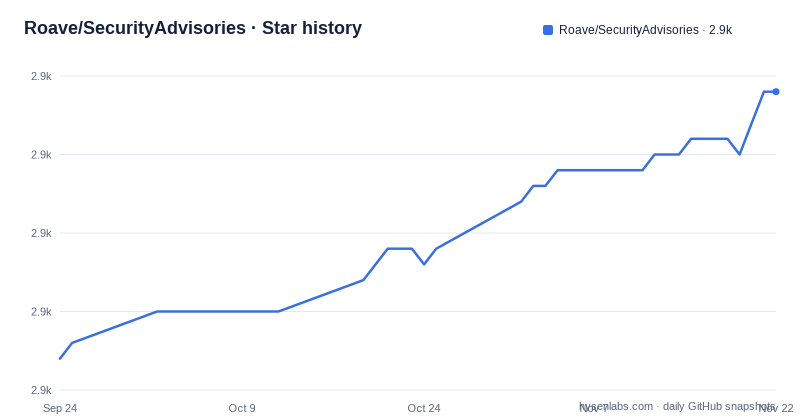
Star history
- Roave/SecurityAdvisories2,934 ★ · +17
| Repository | 2026-09-24 | 2026-11-22 |
|---|---|---|
| Roave/SecurityAdvisories | 2.9k | 2.9k |
17 Stars in the last 59 days, measured from the daily GitHub snapshot. Compare with other projects
Editorial analysis
The default branch is named latest and there is no PHP in the repository
Look at what the repository actually contains. Nine entries: an attributes file, a .github directory, an ignore file, a Travis configuration file, a licensing file, the readme, a security policy, a document addressed to people living in Russia, and the package manifest. There is no source directory and no PHP file anywhere, which is why the repository's language field comes back empty. That is not an omission; the readme states it as the design. This package does not provide any API or usable classes, and its only purpose is to prevent installation of software with known and documented security issues. The payload is the constraint list inside the manifest, and the branch it lives on is named latest rather than main or master, matching the dev-latest version the package is required under.
The checks run on require and update and never on install
This is the single most important sentence in the file and it is easy to skim past. The checks are only executed when adding a new dependency with the require command or when running an update. Deploying an application with a valid lock file, and installing from that lock file, will not trigger any security version checking at all. So the guard protects the moment a developer changes their dependencies and protects nothing about what gets shipped. That is a defensible division of labour, since a lock file is supposed to be reviewed, but it has two consequences worth stating. A lock file created before the guard was added carries whatever it carried. And a pipeline whose only step is installing from a lock file gains nothing from having this package in the development requirements.
The only manual audit is a dry run that changes nothing
If you want to know whether your current constraints would pass, the documented method is to run an update in dry-run mode without doing anything. The readme names the specific invocation, an update of this package with the dry-run switch, and calls it an effective way to manually trigger a security version check. That is a neat trick and it has an obvious limitation: you have to remember to run it. It is not a scheduled check, it is not a continuous integration step, and it does not exist in the repository as anything you can wire up, because there is no code to wire up. If you want this in your pipeline rather than in a developer's habits, the readme does not describe how.
The build is hourly in another repository, the description says daily
The cadence is stated twice and the two statements do not agree. The repository description says the exclusion list is updated daily. The badge in the readme points not at this repository's own workflows but at a query for a workflow named Hourly build inside a separate repository, the builder that generates the list. So the thing that actually produces the constraints runs on a different schedule in a different place, and the two numbers a reader can see are a day and an hour. Neither is wrong on its own; the daily figure is a reasonable summary of the staleness you should expect. But the badge is the one that tells you where the work happens, and it is in a repository you have to go and find.
There will never be a tagged version and that is argued not apologised for
The stability section is short and takes a position. This package can only be required in its development version, and there will never be stable or tagged versions because of the nature of the problem being targeted: security issues are in fact a moving target, and locking your project to a specific tagged version of the package would not make any sense. The argument is sound, and it has a real cost that the readme does not dwell on. Your lock file will contain a development constraint on a package whose entire job is to be current, so any build that insists on reproducing from a lock file will reproduce a frozen view of the advisory data. The repository has no releases, which at least means the policy and the release history agree with each other.
The two packages it blocks in the example are names that no longer exist
The demonstration of the mechanism is two commands that are documented to fail:
composer require symfony/symfony:2.5.2
composer require zendframework/zendframework:2.3.1
Both are package names from around 2015. The first is the monolithic Symfony distribution that was later split into individual components, and the second is the Zend Framework package name that was abandoned in favour of a different vendor namespace. Neither identifier describes a package you would install today, so the example no longer demonstrates a realistic case, even though the mechanism it shows is unchanged. This is worth knowing because the example is the first thing a new reader looks at to decide whether the package will do what they need.
Two political documents and a Travis config share the root with the manifest
The first two sections of the readme are not about the package. One is a message addressed to people living in Russia, with a link to a document inside this repository. The other is a section offering support for Palestine, and its content is a link to a document hosted in somebody else's repository. Neither is harmful, and both are stated plainly, but they occupy the position a reader expects a package description to be in. Alongside them at the root sits a Travis configuration file, in a repository with no PHP to test and whose build runs in a different repository entirely. The remaining files are conventional. The net shape is a nine entry repository holding one generated manifest, four documents, and a CI configuration for a project that has nothing to build here.
Editorial conclusion
SecurityAdvisories is worth adding to a PHP project as a development-time guard because it costs nothing at runtime and turns the resolver into a security check, and it is honest about being unusable as a library. Two things to understand before you rely on it. It protects dependency resolution, not deployment, so an install from a lock file is never checked and a lock file produced before the guard was added will carry whatever it carried. And it will never have a tagged version, so your lock file will pin a development constraint on purpose; if your build requires reproducibility, decide whether that trade is acceptable before adding it.
Frequently asked questions
What are the Roave SecurityAdvisories, and are they an advisory feed?
Not a feed. It is a Composer package with no API and no usable classes, whose only purpose is to prevent installation of software with known and documented security issues. It is not a vendor advisory portal, not a CVE database, and not a list you read; it is a set of constraints the package resolver enforces.
How do you install SecurityAdvisories?
Require it as a development dependency using the Composer require command with the development version named latest. The readme also gives the equivalent manifest change: add the package at that same version to the require-dev section. It is only suited for installation in the root of your deployable project.
Does SecurityAdvisories check dependencies during deployment?
No. The checks only execute when adding a new dependency with require or when running an update. Deploying with a valid lock file and installing from that lock file will not trigger any security version checking, so the guard protects dependency resolution rather than what gets shipped.
How can I trigger a SecurityAdvisories check manually?
Run an update with the dry-run switch on this package without doing anything. The readme names that invocation and calls it an effective way to trigger a security version check. It is a manual trigger, so it has to be run deliberately.
Where does SecurityAdvisories get its vulnerability data?
From two upstream sources: the FriendsOfPHP security advisories repository, and the GitHub Advisory Database filtered to the Composer ecosystem. The generated constraint list itself is produced by a separate builder repository, which the readme links for a workflow named Hourly build.
Official sources
Add this badge to your README
If you maintain this project, the badge below links readers to this analysis and shows its maintenance status from the daily GitHub snapshot. Paste the markdown into your README; add ?metric=license or ?metric=stars to the image URL for a different field.

[](https://hysenlabs.com/projects/roave-securityadvisories)Star history chart for your README
[](https://hysenlabs.com/projects/roave-securityadvisories)Was this useful?