LearningHumanoidWalking: PPO locomotion for humanoids in MuJoCo
Training a humanoid robot for locomotion using Reinforcement Learning
At a glance
- What is it?
- This repository is the research code behind three papers on reinforcement learning for humanoid walking, with environments for the JVRC robot and the Unitree H1, a MuJoCo simulation layer, per-robot YAML configuration, and a documented procedure for adding a robot of your own.
- Who is it for?
- Adopt this repository if you are working on reinforcement learning for bipedal locomotion and want a working PPO setup on the JVRC robot or the Unitree H1 rather than starting from a blank MuJoCo environment. Do not adopt it as a general robotics library, because it is the artefact of three specific papers with their own environments and reward structures.
- Can I use it commercially?
- Yes. BSD-2-Clause is a permissive licence: you can use, modify and sell software built on it, as long as you keep its copyright and licence notices.
- Is it still maintained?
- Activity is slowing. The repository last received commits 6 months ago.
- What is it written in?
- Mainly Python, according to GitHub's language statistics.
Answers come from the project's GitHub data, last synced on November 7, 2026, and from our analysis. They are not legal advice.
Star history
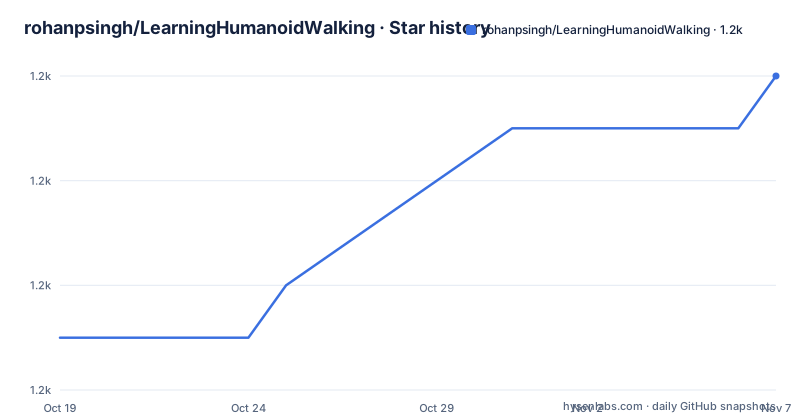
- rohanpsingh/LearningHumanoidWalking1,234 ★ · +5
| Repository | 2026-10-19 | 2026-11-07 |
|---|---|---|
| rohanpsingh/LearningHumanoidWalking | 1.2k | 1.2k |
5 Stars in the last 19 days, measured from the daily GitHub snapshot. Compare with other projects
Editorial analysis
Three papers, one codebase
The repository exists because of published work, and it says so at the top: code for the papers Robust Humanoid Walking on Compliant and Uneven Terrain with Deep Reinforcement Learning, Learning Bipedal Walking for Humanoids with Current Feedback, and Learning Bipedal Walking On Planned Footsteps For Humanoid Robots.
The authors are Rohan P. Singh with colleagues at the Autonomous Robot Systems Laboratory at AIST, including Mitsuharu Morisawa, Mehdi Benallegue, Zhaoming Xie, Pierre Gergondet, Rafael Cisneros and Fumio Kanehiro. The citations section at the end of the README gives the full bibliographic entries, and the three are attributed to different tasks: omnidirectional walking, simulating the back-emf effect and other randomizations, and walking on planned footsteps.
That matters for anyone reading the code, because the same codebase serves three different research questions. The current feedback paper is about modelling the physical behaviour of the motors, which is a simulation fidelity question. The planned footsteps paper is about a footstep planner, which is a task structure question. And the uneven terrain paper is about terrain and disturbance, which is a reward and domain randomisation question.
The primary language is Python, the licence is BSD-2-Clause, and the project is not archived, with the last push on 2026-05-03.
The directory layout separates simulation from policy
The README gives a rough outline of the repository, and it is explicitly framed as something that might be useful for adding your own robot.
LearningHumanoidWalking/
├── envs/                      <-- Environment implementations
│   ├── common/
│   │   ├── base_humanoid_env.py   <-- Base class for all humanoid environments
│   │   ├── mujoco_env.py          <-- MuJoCo simulation wrapper
│   │   └── robot_interface.py     <-- Robot state/control abstraction
│   ├── jvrc/                      <-- JVRC robot environments
│   └── h1/                        <-- Unitree H1 robot environment
├── tasks/                     <-- Task definitions (rewards, termination)
├── rl/                        <-- Reinforcement learning
├── robots/                    <-- Robot abstractions (PD control, stepping logic)
├── models/                    <-- MuJoCo model files
└── tests/                     <-- Test suite
The separation is the interesting part. The common/ directory holds the three pieces every humanoid environment needs: a base class for the environments, a wrapper around the MuJoCo simulation, and a robot interface that abstracts state and control. The per-robot directories then contain only what is specific to that machine.
The rl/ directory holds the reinforcement learning code, the robots/ directory holds the low-level abstractions such as PD control and the stepping logic that turns high-level actions into joint targets, and the tasks/ directory holds the reward and termination definitions, which are per-paper rather than per-robot. The models/ directory holds the MuJoCo model files.
The environment is therefore assembled from a robot, a task and a policy algorithm, and any of the three can be replaced independently. That is what makes the repository usable as a starting point rather than only as a way to reproduce three specific results.
Three abstractions do the heavy lifting
The Key abstractions section names three things, and each is a good place to start reading the code.
BaseHumanoidEnv provides the common functionality for humanoid environments: observation history, action smoothing and reset logic. Action smoothing in particular is not a detail, because a policy that outputs joint targets every control step produces jerky motion, and the smoothing coefficient is a tunable that lives in the configuration rather than in the code.
BaseTask is the interface for task implementations, with the methods reset, step, calc_reward and done. A task is therefore a self-contained thing that knows how to reset the scenario, advance one step, score the outcome and decide when the episode is over, and a task can be paired with any robot.
The third is the reward functions, and the choice to make them explicit parameter functions in tasks/rewards.py is the one to note. Writing the reward as named functions with explicit parameters rather than as inline expressions inside the step function means each term can be tested on its own, and the reward weights in the configuration become a list of numbers that map onto a list of named functions.
That is a small design decision with a large effect on whether a research codebase survives contact with a new experiment, and it is the same reason the configuration file exposes the weights as a dictionary rather than as constants in the code.
Four environments and two commands
The requirements are Python 3.10 or later and the uv package manager, and the setup is one command:
$ uv syncThe environments are named in a table, and there are four. The basic standing task is h1, the basic walking task is jvrc_walk, the stepping task using footsteps is jvrc_step, and there is a cartpole swing-up. The cartpole is described as a minimal swing-up task for testing the RL pipeline, with the goal of swinging the pole from hanging down to balancing upright, and it has its own example command with the hyperparameter flags spelled out:
$ uv run run_experiment.py train --env cartpole --n-itr 500 --std-dev 0.15 --learn-std --entropy-coeff 0.01 --minibatch-size 256 --max-traj-len 500 --no-mirrorThe general training command takes a log directory, a process count and an environment name:
$ uv run run_experiment.py train --logdir <path_to_exp_dir> --num_procs <num_of_cpu_procs> --env <name_of_environment>There is a note attached to it that is worth knowing before you run anything large. Setting RAY_ADDRESS= ensures Ray starts a new local cluster instead of connecting to an existing one, which is the difference between your run being yours and your run being appended to something already running on the machine.
To play a trained policy, the eval command takes the directory of the actor and the checkpoint:
$ uv run run_experiment.py eval --logdir <path_to_actor_pt>The README also notes that you could write a rollout script specific to each environment, which is the natural next step when you want to record a video of a policy rather than a training curve.
Configuration is YAML, one file per robot
Environment behaviour is configured through YAML files in envs/<robot>/configs/, and the example in the README is the parameter set you would tune first.
# Simulation
sim_dt: 0.001              # Physics timestep
control_dt: 0.025          # Control loop period
obs_history_len: 1         # Observation history length
action_smoothing: 0.5      # Action filtering coefficient

# Task parameters
task:
  goal_height: 0.80        # Target standing height
  swing_duration: 0.75     # Gait swing phase duration
  stance_duration: 0.35    # Gait stance phase duration

# Reward weights (sum to 1.0)
reward_weights:
  foot_frc_score: 0.225
  foot_vel_score: 0.225
Two ratios in that file describe the whole design. The physics timestep is a millisecond and the control loop runs every twenty-five milliseconds, so the policy acts at forty hertz while the simulator runs at a kilohertz, which is the standard arrangement for a learned controller on a dynamic robot. And the reward weights are normalised to sum to one, which makes them comparable across tasks and keeps a change of scale from silently changing the balance between the terms.
The gait parameters are in the task section rather than the robot section, because a swing duration and a stance duration describe the gait, and the gait is a property of the task you are solving rather than of the machine you are solving it on.
Adding a robot, in four steps
The repository's most reusable feature is the documented procedure for adding a robot, and the README is careful to say the outline might be useful for adding your own robot.
You create an envs/<robot>/ directory containing gen_xml.py for MJCF generation from URDF, a configs/base.yaml with the configuration, and a <robot>_env.py with the environment class. That last file is where the model enters the simulation, and generating the MJCF from a URDF is what lets you use a robot model that already exists rather than hand-writing the XML.
You then inherit from BaseHumanoidEnv and implement a small set of methods:
class MyRobotEnv(BaseHumanoidEnv):
    def _get_default_config_path(self) -> str: ...
    def _build_xml(self) -> str: ...
    def _setup_robot(self) -> None: ...
    def _setup_spaces(self) -> None: ...
    def _get_robot_state(self) -> np.ndarray: ...
    def _get_external_state(self) -> np.ndarray: ...
The split of responsibilities is visible in the names. The state methods say what the policy observes, the external state method says what the simulation can see but the policy cannot, and the setup methods cover the robot and the action and observation spaces.
Third, you register the environment in envs/__init__.py with an entry in the ENVIRONMENTS dictionary mapping a name to the class and its name. And fourth, you run the tests:
uv run pytest tests/ -vThe README closes this section with the results, the ascending stairs, the descending stairs and the walking on curves clips, which are the outcomes the whole structure exists to produce.
The dependency stack and the test tooling
The pyproject file describes a research code stack, and the versions are pinned hard.
The runtime dependencies are dm-control at 1.0.24 or later, imageio with the ffmpeg extra for video recording, intel-openmp, mujoco pinned at exactly 3.4.0, ray at exactly 2.40.0, tensorboard, torch at exactly 2.5.1, and transforms3d. The exact pins on MuJoCo, Ray and PyTorch are the meaningful part: a physics engine or a distributed training library that moves underneath you changes the numbers of every experiment, so the pin is what makes a result reproducible.
The build backend is hatchling, and the wheel ships the rl, envs, tasks and robots packages, which tells you which parts are meant to be importable.
The development group is pre-commit, pytest with pytest-timeout, and ruff. The pytest configuration sets the test paths, the file and function naming patterns, disables two plugins with a dash prefix that is not obviously launch_testing and launch_ros, and registers a slow marker for tests you can deselect with -m. That plugin disabling is a small sign of a codebase that also runs on real robot hardware.
Ruff is configured with a line length of 120 and an explicit rule selection covering pycodestyle, Pyflakes, pyupgrade, bugbear, simplify, isort and two type-checking block rules, with three specific rules ignored, and the isort configuration treats rl, envs, tasks and robots as first-party.
The releases are sparse. There is v0.0.1, the initial release from 2025-02-19, and v1.0.0 from 2025-02-25, which is what you would expect from a research repository that versioned once the first paper's results were in place.
Editorial conclusion
Adopt this repository if you are working on reinforcement learning for bipedal locomotion and want a working PPO setup on the JVRC robot or the Unitree H1 rather than starting from a blank MuJoCo environment. Do not adopt it as a general robotics library, because it is the artefact of three specific papers with their own environments and reward structures. Before you start, read the paper that matches your task, since the three use different reward designs, and set up the environment with uv sync and the cartpole task first, because the README describes it as a minimal swing-up task for testing the RL pipeline.
Frequently asked questions
What is LearningHumanoidWalking?
It is the research code for three papers on reinforcement learning for humanoid walking, by Rohan P. Singh and colleagues at AIST, covering robust walking on uneven terrain, bipedal walking with current feedback, and walking on planned footsteps. The licence is BSD-2-Clause.
How do I install and train in LearningHumanoidWalking?
You need Python 3.10 or later and the uv package manager, then run uv sync. Training is uv run run_experiment.py train with a log directory, a process count and an environment name, and setting RAY_ADDRESS= makes Ray start a new local cluster rather than connect to an existing one.
Which environments does LearningHumanoidWalking support?
Four: h1 for the basic standing task on the Unitree H1, jvrc_walk for basic walking, jvrc_step for the stepping task using footsteps, and cartpole, a minimal swing-up task for testing the RL pipeline.
How do I add my own robot to LearningHumanoidWalking?
Create an envs/<robot>/ directory with a gen_xml.py for MJCF generation from URDF, a configs/base.yaml and a <robot>_env.py, inherit from BaseHumanoidEnv implementing the state, setup and XML methods, register the environment in envs/__init__.py, and run the tests with uv run pytest tests/ -v.
How is the reward function structured in LearningHumanoidWalking?
The reward functions are explicit parameter functions in tasks/rewards.py so that they can be tested, and the weights live in the per-robot YAML configuration under reward_weights, normalised so that they sum to 1.0, with terms such as foot_frc_score and foot_vel_score.
Official sources
Add this badge to your README
If you maintain this project, the badge below links readers to this analysis and shows its maintenance status from the daily GitHub snapshot. Paste the markdown into your README; add ?metric=license or ?metric=stars to the image URL for a different field.

[](https://hysenlabs.com/projects/rohanpsingh-learninghumanoidwalking)Star history chart for your README
[](https://hysenlabs.com/projects/rohanpsingh-learninghumanoidwalking)Was this useful?