ByeDPI Manager: a Windows front end for ByeDPI and ProxiFyre
Мини утилита для запуска ByeDPI + ProxiFyre под Windows
At a glance
- What is it?
- ByeDPI Manager is a small C# utility that starts ByeDPI with the right strategy and routes traffic either through ProxiFyre or the Windows system proxy. It is a convenience wrapper, not a new filtering technique, and the ProxiFyre mode depends on a kernel level driver that has to be installed first.
- Who is it for?
- ByeDPI Manager is worth installing for Windows users who already run ByeDPI by hand and want the strategy arguments, the routing switch and the traffic selection in one window, and for users who want the strategy picker to find a working argument set instead of guessing.
- Can I use it commercially?
- Yes, with conditions. GPL-3.0 is a copyleft licence: if you distribute software that includes it, you must release that software's source code under the same licence. Running it internally without distributing it does not trigger that obligation.
- Is it still maintained?
- Yes. The repository last received commits 9 days ago.
- What is it written in?
- Mainly C#, according to GitHub's language statistics.
Answers come from the project's GitHub data, last synced on November 7, 2026, and from our analysis. They are not legal advice.
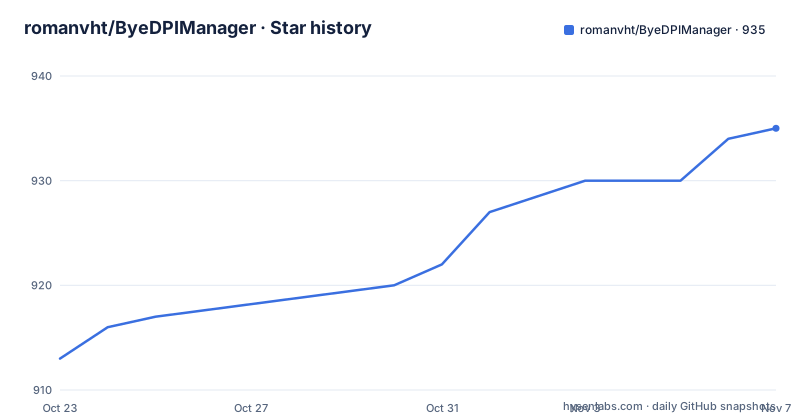
Star history
- romanvht/ByeDPIManager935 ★ · +22
| Repository | 2026-10-23 | 2026-11-07 |
|---|---|---|
| romanvht/ByeDPIManager | 913 | 935 |
22 Stars in the last 15 days, measured from the daily GitHub snapshot. Compare with other projects
Editorial analysis
ByeDPI Manager orchestrates two other programs rather than filtering traffic itself
The repository description is a mini utility for launching ByeDPI with routing through ProxiFyre or the Windows system proxy. That sentence is the whole product definition, and reading it carefully matters. ByeDPI Manager does not implement any DPI circumvention logic of its own. It is a graphical front end that starts the ciadpi.exe process with a chosen set of arguments, decides how the traffic is routed, and lets you pick which applications take part.
The primary language is C#, the project targets Windows, and the licence is GPL-3.0. The GPL matters more here than it would for a typical desktop utility. If you redistribute a modified build, or ship it inside a larger product, the copyleft terms reach your own project as well. For a personal tool on one machine that is irrelevant. For a bundled distribution it is a decision to make before you start.
The repository structure backs up the orchestrator framing. There is a bdmanager.csproj at the root, source under src/, a locale/ directory suggesting a translated user interface, a proxytest/ folder with test material, a screens/ folder with the interface screenshot, and build-release.ps1 at the root for packaging. The documentation is also translated, with Russian, English and Turkish versions of the README, which suggests the intended audience is primarily Russian speaking users of Windows who need to get past blocked resources.
The audience, in other words, is a Windows user who already knows what a DPI filter is and wants the two moving parts assembled correctly, rather than a developer evaluating a new protocol.
ProxiFyre mode needs Windows Packet Filter, and that is where the setup cost sits
The requirements section lists three things. Windows 7 SP1 or later with .NET Framework 4.8 is the baseline. For the ProxiFyre mode specifically, you also need ProxiFyre, Windows Packet Filter, and the Visual C++ Redist 2022. ByeDPI itself is the third entry on the list. ProxiFyre and Windows Packet Filter are separate upstream projects, and the manager does not bundle them unless you take the all-in-one archive.
Windows Packet Filter is the significant dependency here, and the documentation treats it as a given. It is what allows ProxiFyre to work at the network level, and the troubleshooting section says that if you have connection problems, check that Windows Packet Filter is installed correctly. The all-in-one archive ships it as an MSI named in the following shape:
Windows.Packet.Filter.*.x64.msiThe manager itself also asks for permission. The activation step says that on first run a request appears for access to the network for ProxiFyre, and you click Allow. The strategy testing step does the same for ciadpi.exe. In practice that means a UAC prompt, and it means the manager runs with more privilege than an ordinary desktop app. For a user on a locked down corporate machine, that is a real blocker rather than a configuration detail.
The routing tab offers three choices, and the documentation names them as ProxiFyre, which is the default, System proxy, and Disabled. Each has a different blast radius. The system proxy setting affects the machine's proxy configuration rather than selected applications, while the ProxiFyre route works with the list of applications you nominate. Picking the wrong one changes which traffic is affected, so the choice is worth being deliberate about.
The Arguments field is where the strategy lives, and the picker fills it for you
The ByeDPI tab has an Arguments field where you type or paste a strategy. That is the whole configuration surface for the DPI side, and the documentation assumes you either already have one or want the manager to find one.
The strategy picker lives on a tab named in Russian as a beta, and the flow is explicit. Go to the tab, press Start, allow the network access request for ciadpi.exe the first time, and wait for the test to finish. When it completes, the Log window lists the strategies that succeeded in more than 50 percent of attempts. You highlight the best one with the mouse, copy it with Ctrl+C, go back to the ByeDPI tab, and paste it into the Arguments field with Ctrl+V.
The 50 percent threshold is worth noting because it is the only quality filter the tool applies. A strategy that clears half the test sites is presented as a candidate, with no ranking beyond what the log shows and no attempt to combine or refine the arguments.
If you want to control what is tested, the proxytest folder is where that happens. Two files are named in the documentation: sites.txt, where you add your own sites for testing, and cmds.txt, where you add your own strategies to check. That is a useful escape hatch, because the default test set is whatever ships in the folder and may not reflect the sites you actually care about.
One subtlety in the interaction between strategies and routing is documented in the configuration section. The local SOCKS5 proxy IP and port are set on the ByeDPI tab. If a strategy already contains the -i or --ip flag, or -p or --port, the values from the strategy are used, and only the missing parameters are added at launch. So a strategy you paste can override the port you configured.
The all-in-one archive and the separate install produce the same tool by different routes
Two installation paths are documented, and the difference is entirely about who assembles the pieces. The first is described as recommended for beginners, and it uses a single archive. You go to the releases page, download the file All_In_One_w64.zip, extract all of it to a folder of your choice, for example C:\APPS\ByeDPIManager, then open the redist folder inside the archive and install two applications from it: Windows Packet Filter, which is needed for ProxiFyre, and the Visual C++ Redistributable 2022.
The second path is for experienced users who want to manage the components separately. You download the Manager, ByeDPI and ProxiFyre individually, install Windows Packet Filter and the Visual C++ Redistributable 2022 yourself, unpack the components into convenient folders, and then point the manager at the binaries. The ByeDPI tab wants the correct path to ciadpi.exe, and the section labelled Routing to ProxiFyre wants the path to proxifyre.exe.
That path pointing is the real difference between the two routes. With the archive, the manager finds its dependencies in a known layout. With the separate install, you own the layout and the manager cannot work until both paths are correct.
A small warning applies to anyone building from source rather than downloading. The download step names the archive All_In_One_w64.zip, while the release build section describes the generated file as All_in_One_w64.zip. The two differ in capitalisation, and Windows file systems are case insensitive, so a built archive and a downloaded one may look identical while a script comparing names would not treat them as equal.
Building the release means staging four dependencies by hand under redist
The build is a PowerShell script rather than a CI download, and the documentation is honest about what has to be staged first. You need Windows, a .NET SDK that supports the net48 project target, and the .NET Framework 4.8 Developer Pack.
The dependencies are not fetched by the build. They are placed in a redist folder in the project root, laid out like this:
redist/
  libs/
    byedpi/
      ciadpi.exe
    proxifyre/
      ...файлы ProxiFyre
  redist/
    VC_redist.x64.exe
    Windows.Packet.Filter.*.x64.msi
With that in place, the release is produced by running this from the project root:
powershell -NoProfile -ExecutionPolicy Bypass -File .\build-release.ps1The script builds the project in the Release configuration and creates two files in the release folder. The first is ByeDPI Manager.exe, the manager on its own. The second is All_in_One_w64.zip, which contains the manager together with its dependencies and libraries. The proxytest folder is taken from the project itself, while the libs and the installers come from the local redist folder. That split tells you which artefacts are versioned and which are assembled by hand, and it means a fork cannot rebuild a release without sourcing the same upstream binaries.
The GitHub Actions directory at the root of the repository suggests there is automation around the build as well, though the documentation does not describe what it publishes. The FodyWeavers.xml file in the root indicates the use of the Fody IL weaving tool during compilation, which is a common way to handle assembly weaving in .NET desktop projects.
System proxy mode and a missing driver are the two ways this tool fails on a real machine
The troubleshooting section is short and it names four checks. If the program does not start, confirm that .NET Framework 4.8 is installed. If blocking circumvention does not work, try a different strategy. If there are connection problems, check that Windows Packet Filter is installed correctly. And make sure that antivirus or a firewall is not blocking the program.
That last one is telling. A tool that starts local processes, opens a loopback SOCKS5 proxy and installs a network filter driver will trip endpoint protection on a managed machine, and the README is telling you to exclude it rather than the tool doing anything to stay quiet about itself. Expect to need an exception.
The second failure mode is quieter. If the strategy arguments are wrong, or the strategy picker was run against sites that do not represent the resources you care about, the tool will report success while doing nothing useful. The 50 percent threshold and the per-application selection list both default to narrow choices, and the documentation does not describe any verification beyond the log output.
There is also a scope limit worth stating plainly. ByeDPI Manager is Windows only, needs the .NET Framework 4.8, and in its default ProxiFyre mode needs a driver installed. It is not a general purpose proxy client, and it is not a tool for platforms other than Windows. The system proxy mode is the lightest option, since it avoids the driver entirely, but it also applies the proxy at machine level rather than per application, which changes which traffic is affected.
Three releases in five weeks, and the last push was on 2026-10-01
The repository is not archived and the last push was on 2026-10-01, so the project is receiving changes. The release list shows three versions inside a short window: v1.1.0 on 2026-08-31, v1.1.1 on 2026-09-19, and v1.1.2 on 2026-10-01. The gap between the last release and the last push is the same day, which indicates the final tag was cut from the tip of the branch.
That is a fast cadence for a desktop utility, and it has a practical consequence. Because the versions are incrementing quickly and the project is a wrapper around upstream tools, the manager can break when ByeDPI or ProxiFyre change their command line or their file layout, and the fix will arrive as a new numbered release rather than a patch to an existing one. Users of the all-in-one archive get a fixed set of upstream binaries, so the archive can be self consistent even when the newest manager expects a newer dependency.
The maintenance cost therefore sits in the archive rather than in the code. A user who wants current upstream binaries takes the separate install and accepts the path configuration, while a user who wants a single self consistent download takes the archive and accepts whatever upstream versions it was built with. Neither option lets the manager update its dependencies on its own, and the documentation describes no rollback procedure or configuration migration between versions.
For a GPL-3.0 project, there is one further consideration: if you fork it, the copyleft obligations travel with your fork, and the manual is maintained by a separate community project rather than in this repository, so changes to the workflow need to be tracked in two places.
Editorial conclusion
ByeDPI Manager is worth installing for Windows users who already run ByeDPI by hand and want the strategy arguments, the routing switch and the traffic selection in one window, and for users who want the strategy picker to find a working argument set instead of guessing. It is the wrong tool if you are not on Windows, if you cannot install Windows Packet Filter, or if you expect the manager itself to change how traffic is filtered, since it only orchestrates two other programs. Before adopting it, confirm that .NET Framework 4.8 is present, check whether your security policy allows the Windows Packet Filter driver, and note that the archive name differs in case between the download step and the build script.
Frequently asked questions
What are the system requirements for ByeDPI Manager?
Windows 7 SP1 or later with .NET Framework 4.8. The ProxiFyre mode additionally needs ProxiFyre, Windows Packet Filter and the Visual C++ Redist 2022.
How do I install ByeDPI Manager?
Download All_In_One_w64.zip from the releases page, extract it to a folder, then install Windows Packet Filter and the Visual C++ Redistributable 2022 from the redist folder inside the archive. An experienced user can instead install the Manager, ByeDPI and ProxiFyre separately and point the manager at ciadpi.exe and proxifyre.exe.
What routing modes does ByeDPI Manager support?
The Routing tab offers ProxiFyre, which is the default, System proxy, and Disabled. With ProxiFyre you nominate the applications that should go through the proxy.
How does the strategy picker in ByeDPI Manager work?
On the strategy selection tab you press Start and allow the network access request for ciadpi.exe. When the test finishes, the Log window lists the strategies that succeeded more than 50 percent of the time, and you copy one into the Arguments field on the ByeDPI tab.
Can I change which sites and strategies are tested?
Yes. The proxytest folder contains sites.txt for the sites to test and cmds.txt for the strategies to check, and you can add your own entries to both files.
Official sources
Add this badge to your README
If you maintain this project, the badge below links readers to this analysis and shows its maintenance status from the daily GitHub snapshot. Paste the markdown into your README; add ?metric=license or ?metric=stars to the image URL for a different field.

[](https://hysenlabs.com/projects/romanvht-byedpimanager)Star history chart for your README
[](https://hysenlabs.com/projects/romanvht-byedpimanager)Was this useful?