sora-editor: a code editor widget for Android that keeps its own text layout
A multifunctional Android code editor library. (aka CodeEditor)
At a glance
- What is it?
- sora-editor is an Android code editor library whose editor view renders text itself rather than hosting a WebView, with incremental syntax highlighting, TreeSitter and TextMate support, and a language-server module for analysis.
- Who is it for?
- sora-editor fits an Android app that needs a real code editing surface, a termux-style client or an in-app IDE, and a team willing to wire up a language server for diagnostics and completion. It is a poor fit if you want a read-only code view, since a WebView plus a syntax highlighter library is much less work, and it is a poor fit if you cannot ship the native dependencies, since the oniguruma and TreeSitter parts are native code.
- Can I use it commercially?
- Yes, with conditions. LGPL-2.1 is a weak copyleft licence: you can use it inside commercial and closed-source software, but if you distribute changes to its own files, you must publish those changes under the same licence.
- Is it still maintained?
- Yes. The repository last received commits 1 day ago.
- What is it written in?
- Mainly Java, according to GitHub's language statistics.
Answers come from the project's GitHub data, last synced on November 6, 2026, and from our analysis. They are not legal advice.
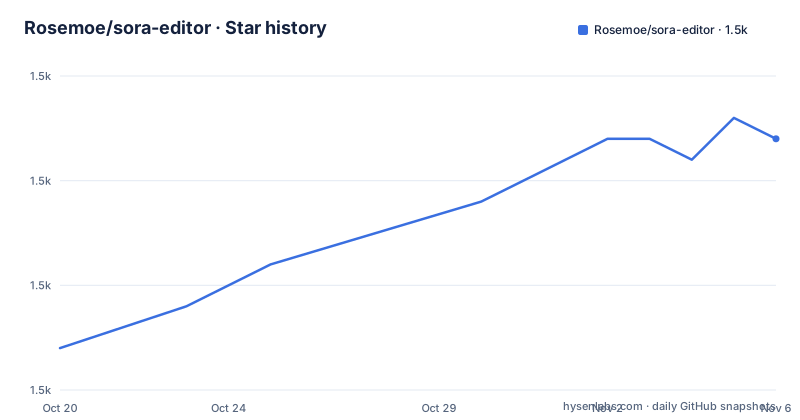
Star history
- Rosemoe/sora-editor1,462 ★ · +10
| Repository | 2026-10-20 | 2026-11-06 |
|---|---|---|
| Rosemoe/sora-editor | 1.5k | 1.5k |
10 Stars in the last 17 days, measured from the daily GitHub snapshot. Compare with other projects
Editorial analysis
A code editor as a library, not an app
sora-editor is a multifunctional Android code editor library, also known as CodeEditor, and the description is a cool and optimized code editor on the Android platform. It is a library rather than an application, and the README is explicit that it is a Work In Progress, still developing slowly, with issues and pull requests welcome.
The reason to build this rather than embed a WebView with a highlighting library is the editor behaviour. A code editor is not a document renderer. It needs a caret, a selection that spans lines, undo and redo that behaves per edit rather than per document, search and replace, auto indent, and a layout that can show a very long line without falling over. Those are the things a TextView and a WebView both do badly, and the repository's structure suggests where the effort goes: an editor directory for the view and its layout, an editor-lsp directory for the language server protocol side, and separate language modules.
The library is published on Maven Central as io.github.rosemoe/editor, so a consumer adds a Gradle dependency rather than vendoring the source. The README links a Quickstart Guide and a full documentation site, with an editor overview, a reference for XML attributes and a separate documentation repository under the project-sora organisation.
The project is licensed LGPL-2.1, with the notice stating that the library is free software and can be redistributed and modified under the terms of the GNU Lesser General Public License version 2.1 or later. The copyright line reads 2020-2026 Rosemoe. The last push was on 2026-10-15 and the recent releases are 0.24.6 from 2026-06-10, 0.24.5 from 2026-03-17 and 0.24.4 from 2026-01-17.
Incremental highlighting, and two parser engines to choose from
The feature list is a checklist with everything ticked, and the two entries that carry the most weight are the first and the last.
Incremental syntax highlight means the highlighter re-parses only what changed when you type, rather than re-tokenising the whole document. On a large file, re-highlighting everything on every keystroke is the difference between an editor that feels immediate and one that does not, and it is the single most performance-sensitive decision in a code editor.
The last entry is TextMate and TreeSitter support, and that is the extensibility mechanism. TextMate is the grammar format used by TextMate and by editors built on it, which means a large body of existing grammars can be used. TreeSitter is a parser generator with incremental parsing built in, which is why it pairs so naturally with an incremental highlighter.
Those two are not equivalent. TreeSitter needs a compiled parser for each language, and it is what the language-monarch module is for. TextMate needs a grammar file, and the language-textmate module handles that. The library directory listing shows language-java, language-monarch, language-textmate and language-treesitter as separate modules, plus an editor-bom directory, which is a bill of materials so a consumer can align the versions of the editor, the language modules and the LSP module without picking them individually.
The rest of the checklist covers the editor features: auto-completion with code snippets, auto indent, code block lines, scale text, undo and redo, search and replace, auto wordwrap, show non-printable characters, diagnostic markers, text magnifier, sticky scroll, highlight bracket pairs, and an event system.
Two of those deserve a note. Diagnostic markers are how the language server reports errors and warnings as inline underlines, which means the editor is not just colouring text but integrating with a real analysis backend. And sticky scroll keeps the enclosing scope visible while you scroll through a long function, which is a small feature that noticeably changes how usable a small screen is for code.
The LSP module, and what a check needs before it works
The editor-lsp module is what turns the library from a text widget into something a developer can actually work in, because it is the language server protocol side.
The LSP model is worth understanding because it changes what your app has to do. Instead of shipping a parser and a completion engine, you ship a language server process and the editor talks to it. The server does the analysis and sends back diagnostics, completions and symbols, and the editor renders them. The advantage is that the same server binaries work in a desktop IDE, so a user switching between your app and IntelliJ gets the same results.
The cost is a process and a protocol. There is an editor-lsp directory in the repository and a language server has to be packaged, shipped and started, and it has to speak the protocol over whatever transport the module uses.
The oniguruma-native directory is the other native dependency, and it exists because TextMate grammars are regular expressions, and Oniguruma is the regular expression engine that TextMate grammars are written against. Implementing that engine is not a reasonable thing for an editor library to do, so the library links the native library instead. That means the artifact is not pure Java, and an app using the TextMate path has to ship native libraries for each ABI it supports.
The build reflects that structure. There is a build-logic directory, which is where the convention plugins live, an app directory which is the demo application, a .gitmodules file for the submodules, gradle.properties and settings.gradle.kts for the Gradle setup, and renovate.json for dependency updates. The build is Kotlin DSL, with build.gradle.kts at the root. The .idea directory is checked in, and the CI workflow is a gradle.yml one.
The demo app is where most of the screenshots come from, and the two images in the README, one of the general appearance and one of the auto-completion popup, are that app rather than the library alone.
The artifact is published on Maven Central under the coordinate io.github.rosemoe/editor, and the version tracks the release series:
io.github.rosemoe/editorThe community around it, and where the docs live
A project like this lives or dies on the people who use it, and sora-editor has a visible community. There is a Telegram group and an official QQ group, and the README links the QQ group with its number, 734652304, while the badge in the header points at a second QQ group, ff69b4. The README is translated into four languages, English, Simplified Chinese, Spanish and Japanese, with a note that the statements in the other languages may not be up to date.
The documentation is split across three places, and the split is worth understanding. The quickstart guide is the on-ramp, the documentation site at project-sora.github.io/sora-editor-docs is the reference, and the documentation repository is a separate GitHub project under the project-sora organisation, so the docs can be updated without touching the library source. The reference includes a page for XML attributes, which tells you that the editor is configured through XML layout attributes rather than through a programmatic API.
That XML configuration model is the one design decision here that surprises people coming from a Jetpack Compose or a plain Android View. An editor widget is configured by XML attributes, the way you would configure a TextView, which means the editor can be laid out in an XML layout file and themed through the same mechanism as the rest of an app's resources. For a library whose main competitors are WebView wrappers, that is a genuine difference in how you integrate it.
The acknowledgements mention JetBrains, which allocated free open-source licences for IDEs such as IntelliJ IDEA to the project. That is a detail about the author's own tooling rather than about the library, but it does explain the shape of the feature list, since an author who works in IntelliJ knows exactly which editor behaviours matter.
The contributors are credited with a contributrocks badge rather than a list, which is a common convention in the Android community for a project with a broad contributor base.
The cost of the dependency tree, and the LGPL boundary
The first limitation is the size of what you are adopting. This is not a single view class. It is the editor, the LSP module, a bill of materials, and one or more language modules, plus native code for Oniguruma if you take the TextMate path, and compiled parsers if you take the TreeSitter path. A team that wanted a read-only code viewer has taken on a large dependency to get something a WebView and a highlighter library would do in an afternoon.
The second limitation is the project status. The README says Work In Progress, that the project is still developing slowly, and the version is 0.24.x. It has been in development for years with the same warning, and the version numbering has moved on steadily, so the pace is real but slow. The wording of the warning is itself ambiguous, since a long-lived project at 0.24 is either stable in practice or a project that has never committed to a 1.0.
The third limitation is the native code. Oniguruma and the TreeSitter parsers are per-ABI native libraries, so an app supporting a wide range of Android devices ships several of them, and that is a build-pipeline concern that the library does not solve for you.
The fourth is the licence boundary. LGPL-2.1 is the copyleft designed for libraries, and it means that if you modify the library itself and distribute the result, you owe the source of your modifications. Linking to it from an application that is not a derivative is the normal case, but the moment you start patching the editor view for your own needs, the boundary question becomes a legal one rather than a technical one. Worth settling before you fork it, and worth noting that the library ships a LICENSE file with the full notice.
On maintenance, the repository is not archived, the last push was on 2026-10-15, and the release history shows a 0.24.x line moving every few months.
Editorial conclusion
sora-editor fits an Android app that needs a real code editing surface, a termux-style client or an in-app IDE, and a team willing to wire up a language server for diagnostics and completion. It is a poor fit if you want a read-only code view, since a WebView plus a syntax highlighter library is much less work, and it is a poor fit if you cannot ship the native dependencies, since the oniguruma and TreeSitter parts are native code. Before adopting, read the editor overview and the XML attributes reference in the documentation, and check the module layout in the repository, because the language support is split into separate Gradle modules that you pick from rather than one artifact.
Frequently asked questions
What is sora-editor?
It is a multifunctional Android code editor library, also known as CodeEditor, published on Maven Central as io.github.rosemoe/editor. It provides a code editing surface with incremental syntax highlighting, auto-completion, auto indent, undo and redo, search and replace, diagnostic markers, sticky scroll and an event system, and the project states it is a work in progress that is still developing slowly.
Which syntax highlighting engines does sora-editor support?
Both TextMate and TreeSitter. The repository has separate language-textmate and language-treesitter modules, plus language-java and language-monarch, and an editor-bom directory that acts as a bill of materials for aligning the editor, language and LSP module versions.
What is the editor-lsp module for?
It is the language server protocol side of the library, which is what lets the editor show diagnostic markers and power completion and navigation by talking to a language server process rather than shipping its own parser and engine. The project also ships an oniguruma-native module, because TextMate grammars are regular expressions and Oniguruma is the engine they are written against.
What licence is sora-editor released under?
The GNU Lesser General Public License version 2.1 or later, with the copyright line reading 2020-2026 Rosemoe. The notice says the library is free software and can be redistributed and modified under those terms, and a LICENSE file is included in the repository.
Official sources
Add this badge to your README
If you maintain this project, the badge below links readers to this analysis and shows its maintenance status from the daily GitHub snapshot. Paste the markdown into your README; add ?metric=license or ?metric=stars to the image URL for a different field.

[](https://hysenlabs.com/projects/rosemoe-sora-editor)Star history chart for your README
[](https://hysenlabs.com/projects/rosemoe-sora-editor)Was this useful?