llama-agents offers four doors to the same workflow
Llama Agents + Workflows are an event-driven, async-first, step-based way to control the execution flow of AI applications like agents.
At a glance
- What is it?
- LlamaIndex's Python framework for document-centric agents, built on an event-driven library where steps are decorated async functions. The same code can be a function call, a REST service, or a deployment, and the examples directory shows which durability backend each choice implies.
- Who is it for?
- Adopt llama-agents if your document pipeline is in-process Python that has outgrown a script, and you want branching, persistence and failure recovery without adopting a DSL or a workflow vendor. Do not adopt it to replace document understanding, since OCR, structured extraction, classification and splitting are delegated to LlamaParse as steps.
- Can I use it commercially?
- Yes. MIT is a permissive licence: you can use, modify and sell software built on it, as long as you keep its copyright and licence notices.
- Is it still maintained?
- Yes. The repository last received commits 1 day ago.
- What is it written in?
- Mainly Python, according to GitHub's language statistics.
Answers come from the project's GitHub data, last synced on November 15, 2026, and from our analysis. They are not legal advice.
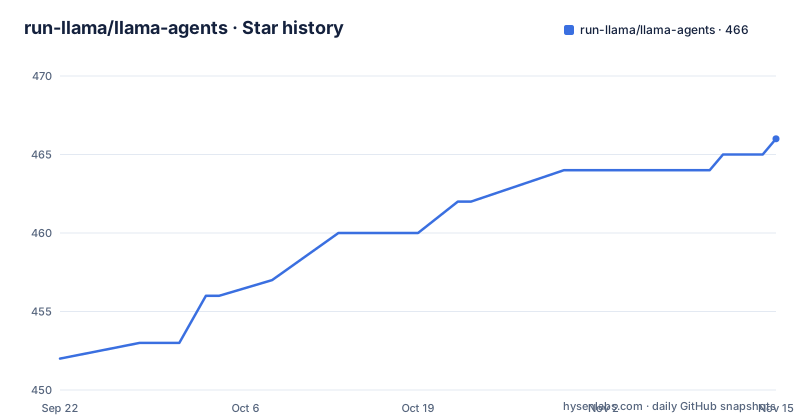
Star history
- run-llama/llama-agents466 ★ · +14
| Repository | 2026-09-22 | 2026-11-15 |
|---|---|---|
| run-llama/llama-agents | 452 | 466 |
14 Stars in the last 54 days, measured from the daily GitHub snapshot. Compare with other projects
Editorial analysis
The same workflow, four levels of ceremony
The escalation ladder is the clearest statement of intent in the project. Start as a function you call from a script. Wrap it in a server when you need an API. Connect a coordination backend when you need durability. Turn on replication when you need to scale.
Each rung is a separate package rather than a flag. `llama-index-workflows` is the library, with minimal dependencies, installable into anything and callable with `await workflow.run(...)`. `llama-agents-server` wraps any workflow as a REST API with streaming, persistence and human-in-the-loop support, dropping into an existing Starlette or FastAPI application or running standalone. `llama-agents-client` is the matching async client for calling workflows from other services. And `llamactl` is the command line tool for building and deploying whole agent applications.
The stated reason the framework exists at its core is portability. The same workflow code is meant to drop into a notebook while you are prototyping, into a FastAPI app for the product, or into a customer's locked-down environment when their documents cannot leave it.
That is the difference between a library and a platform, and it is why the repository ships so much example code rather than a service.
Steps are async functions with a decorator
The programming model is deliberately small. Steps are async Python functions that emit and consume events, and branching, looping, parallelising, state persistence and failure recovery are all expressed in plain Python. There is no DSL.
The smallest complete workflow is this:
from workflows import Workflow, step
from workflows.events import StartEvent, StopEvent

class HelloWorkflow(Workflow):
    @step
    async def greet(self, ev: StartEvent) -> StopEvent:
        return StopEvent(result=f"Hello, {ev.name}")
A class inherits from `Workflow`, a method carries the `@step` decorator, the event type in the signature says what it consumes and the return type says what it emits. Returning a `StopEvent` ends the run and carries the result out.
For a server, the same workflow object is registered by name:
from llama_agents.server import WorkflowServer

server = WorkflowServer()
server.add_workflow("greet", HelloWorkflow())
The name in `add_workflow` is the name the API exposes, so the two decisions, how the workflow behaves and how it is addressed, stay separate.
Install is `pip install llama-index-workflows`. Durability is described as pluggable at this level: save and resume runs from a file, or connect to a database.
The problem is Python that refuses to become a service
The README is unusually concrete about who this is for and what hurts. Document workflows are messy: you are stitching together OCR, language models, structured extraction, classification, custom validation and human review into pipelines that have to run reliably in production. The steps are slow and the payloads are heavy.
The specific obstacle is named too. A lot of the work is in-process Python, meaning embedding models, image analysis, vision calls and custom heuristics that do not want to be a microservice. Standing up durable orchestration for that kind of workload is a project in its own right, so most teams end up shoving the pipeline into a side process nobody else wants to integrate with.
That sentence is the design brief. An orchestration layer that lives in the same process as the work removes the integration problem, and the event model removes the need to describe the pipeline in a separate language. The cost of that choice is that nothing about this is language-neutral, and the examples in the repository are Python notebooks.
The other half of the brief is scale. The README frames the range from parsing five contracts in a notebook to running a million invoices a month behind a customer's firewall, and claims the same library follows you across both without a rewrite.
llamactl covers init, serve and deployments
The third door is the deployment path, and it is a separate package with four commands in its quick start:
uv tool install llamactl
llamactl init
llamactl serve
llamactl deployments create
The CLI is described as covering building and deploying agent applications end to end: initialise from a starter, develop locally with hot reload, then deploy. The deployment targets named are LlamaParse, AWS Bedrock AgentCore, and your own infrastructure.
What gets deployed is not restricted to one shape. Agents can be headless workflow services, MCP servers, or full-stack applications with a user interface. That third option is why the repository has a `web` layer and Docker assets as well as Python packages.
There are prebuilt templates available through the CLI as the recommended starting point rather than an empty project.
The tool is installed with `uv tool install`, which pins it as a standalone binary in its own environment rather than into a project virtualenv. That is a sensible choice for a deployment tool that is not a library dependency, and it means the CLI version is managed separately from whatever your application pins.
The examples directory is a list of backends
The most informative directory in the repository is `examples/`, because the names map one to one onto the decisions you have to make.
`durable_workflows.ipynb` covers durability, and a dedicated `dbos/` directory shows one specific backend wired in. `k8s-otel/` is the Kubernetes and OpenTelemetry path. `observability/` is separate again, which suggests the tracing story is not folded into the durable path. `server/` and `client/` cover the two sides of the REST deployment, `docker/` the container route, and `document_agents/` plus `document_processing.ipynb` the document workloads themselves.
Three notebooks are worth calling out because they describe capability rather than plumbing. `streaming_internal_events.ipynb` covers streaming the workflow's internal events, which is what a live dashboard needs. `state_management_with_vector_databases.ipynb` puts workflow state in a vector database rather than a key-value store. And `eval_driven_prompt_refinement.ipynb` describes iterating on prompt quality, with a `feature_walkthrough.ipynb` alongside it as the general tour.
The consequence for a reader is practical. If your plan involves Kubernetes or a DBOS backend, you can read that example before writing anything, rather than discovering after the fact whether the state model suits you.
Nine packages share one type-check floor of 3.10
This is a Python monorepo with a Node package.json sitting next to it, and the division of labour is clean.
The Python root project is the workspace itself, named for being a monorepo workspace for the LlamaIndex Workflows packages. It requires Python 3.10 or newer and carries the tooling dependencies: ruff for linting and formatting, a type checker, pre-commit, and a pytest stack with asyncio support, coverage, timeouts and xdist for parallel runs.
The part worth knowing is the editor configuration. A block of execution environments lists each package by path and pins the same Python version, 3.10, for all of them: the workflows package, the client, the server, a utils package, a core package, a control plane, an appserver, the CLI and the AgentCore integration. So type errors surface against the oldest supported interpreter regardless of the interpreter you are editing with, which is the correct default and a deliberate one.
Release versions move independently per package. The most recent tags are workflow version 2.25.0, the agents package at 0.12.7 and the operator at 0.11.3, all published on the same day, which is what a monorepo with changesets produces when packages release independently.
Node is here for versioning, not for the framework
The presence of a `package.json` in a Python agent framework is usually a sign of a JavaScript front end. Here it is not.
The manifest is private, names the workspace, and carries three scripts: one that runs `pnpm changeset` before a commit to record a version bump, one that runs a dev CLI command to apply those version changes, and one that runs another dev command to publish with a tag. The single development dependency is the Changesets CLI, and the package manager is pinned to an exact pnpm version with a hash.
That is the whole Node footprint: a version bookkeeping tool. Everything that executes is Python, and the packages are built with hatchling.
Elsewhere in the repository the same pattern repeats. There is a `pyproject.toml` at the root with an `uv.lock`, an `.pre-commit-config.yaml`, a `.prettierrc` and a `.taplo.toml` for TOML formatting, an `AGENTS.md` and a `CLAUDE.md`, plus `architecture-docs/` and `charts/` directories that suggest the design decisions are written down rather than only in commit messages.
For a project of this size that is a reasonable amount of ceremony to see in the root, and none of it is required to run a workflow.
LlamaParse is a step, not the framework
The last section of the README draws a boundary that is easy to misread. LlamaParse is what the heavy document primitives are for: OCR, structured extraction, classification and splitting. Plug them into your workflow as steps, let LlamaParse handle document understanding, and keep your agent code focused on orchestration, business logic and review.
So this is not a document understanding system that happens to orchestrate. It is an orchestration framework that expects you to call out for the understanding, and the expectation is that you call LlamaParse.
That has a practical consequence for anyone evaluating it offline. The examples that make this framework pleasant, document agents and document processing, are the same examples that need a hosted document service, while the workflow machinery underneath is plain async Python with minimal dependencies.
Human review is the other piece worth noting. It appears in the problem statement as one of the things you are stitching together, and again in the server package as human-in-the-loop support, which is where a review step belongs in this architecture: as a pause in a workflow rather than as a separate queue outside it.
Editorial conclusion
Adopt llama-agents if your document pipeline is in-process Python that has outgrown a script, and you want branching, persistence and failure recovery without adopting a DSL or a workflow vendor. Do not adopt it to replace document understanding, since OCR, structured extraction, classification and splitting are delegated to LlamaParse as steps. Verify two things before you start. Pick the durability story first, because the example directories show that choice is made per backend rather than configured later. Then check the type-check floor, since the monorepo pins every package's editor environment to Python 3.10 even though the metadata allows a wider range.
Frequently asked questions
What is llama-agents?
An open-source Python framework for building and shipping document-centric agents, built on Agent Workflows. Steps are async Python functions that emit and consume events, so branching, looping, parallelising, persisting state and recovering from failures are written in plain Python with no DSL.
How do I install llama-agents?
The library path is pip install llama-index-workflows, then define a workflow and await workflow.run(...). The deployment CLI is separate and installed with uv tool install llamactl, which keeps it out of your project environment.
How do I expose a workflow as an API?
Use llama-agents-server, which wraps any workflow as a REST API with streaming, persistence and human-in-the-loop support. It drops into an existing Starlette or FastAPI app or runs standalone, and llama-agents-client is the matching async client.
Where does LlamaAgents do OCR and document parsing?
It does not. The heavy document primitives, including OCR, structured extraction, classification and splitting, are what LlamaParse is for. You plug them into your workflow as steps and keep your own code on orchestration, business logic and review.
What can llamactl deploy?
Agent applications end to end: initialise from a starter, develop with hot reload, then deploy to LlamaParse, AWS Bedrock AgentCore, or your own infrastructure. The result can be a headless workflow service, an MCP server, or a full-stack application with a user interface.
Official sources
Add this badge to your README
If you maintain this project, the badge below links readers to this analysis and shows its maintenance status from the daily GitHub snapshot. Paste the markdown into your README; add ?metric=license or ?metric=stars to the image URL for a different field.

[](https://hysenlabs.com/projects/run-llama-llama-agents)Star history chart for your README
[](https://hysenlabs.com/projects/run-llama-llama-agents)Was this useful?