three-man-team spawns two subagents and calls the updates it insists are mandatory
A structured 3-agent AI dev team — Architect, Builder, Reviewer. Built from production use. Token-optimized. Works with Claude Code, VS Code, Cursor, and any AI that supports context files.
At a glance
- What is it?
- A shell-and-markdown package that splits work into an Architect, a Builder and a Reviewer inside a single Claude Code session. Its most interesting files are the ones that manage the installation: a manifest the Architect generates for itself, a version registry committed to the repository, and a checkpoint described as mandatory that still waits for your confirmation.
- Who is it for?
- three-man-team fits someone who already works in Claude Code and wants a written process rather than better prompting, and the parts worth stealing are the handoff discipline and the five token rules, both of which are plain text you can copy into a project you already run.
- Can I use it commercially?
- Yes. MIT is a permissive licence: you can use, modify and sell software built on it, as long as you keep its copyright and licence notices.
- Is it still maintained?
- Yes. The repository last received commits 160 days ago.
- What is it written in?
- Mainly Shell, according to GitHub's language statistics.
Answers come from the project's GitHub data, last synced on November 15, 2026, and from our analysis. They are not legal advice.
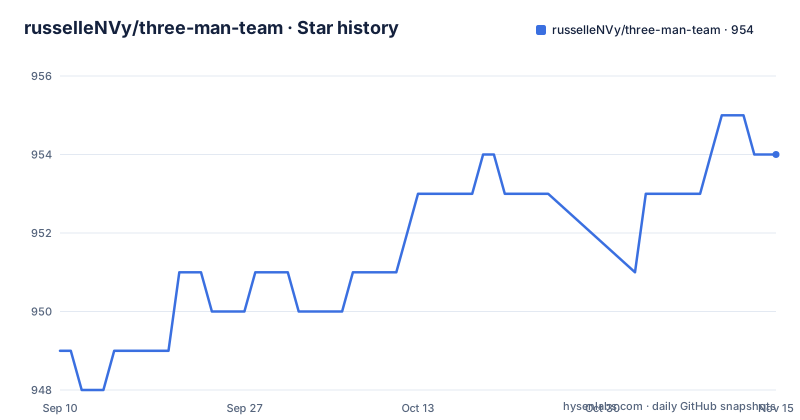
Star history
- russelleNVy/three-man-team954 ★ · +5
| Repository | 2026-09-10 | 2026-11-15 |
|---|---|---|
| russelleNVy/three-man-team | 949 | 954 |
5 Stars in the last 66 days, measured from the daily GitHub snapshot. Compare with other projects
Editorial analysis
Three agents, one session, and no window switching
The architecture claim is that you do not run three conversations. One Claude Code session does everything: the Architect is your main agent, and when work is ready to build, Arch spawns Bob as a subagent through Claude Code's Agent tool, then spawns Richard the same way when Bob is finished. The division of labour is stated as a pipeline where nothing is skipped: the Architect plans and writes the brief, the Builder reads it, shows a plan, builds and hands off to the Reviewer, the Reviewer either clears it or sends it back, and the Architect deploys only with the go-ahead of the person who owns the project. That last step is the one that matters most in practice, since it is the only place a human other than the operator can stop a release. The personas are defaults, not identities: Architect, Builder and Reviewer ship as Arch, Bob and Richard, and Arch renames them during setup to whatever you want. The reasoning for three rather than one or five is on the page too, that a solo agent drifts because nobody catches a wrong turn, that larger teams generate coordination overhead, and that three is the minimum for a review that means something and the maximum before the team starts managing itself instead of the work.
The roles are files you copy into each project
There are two install shapes and both end the same way. Per project, which the page recommends, you clone the repository straight into your project and run setup:
git clone https://github.com/russelleNVy/three-man-team.git .claude/skills/three-man-teamcd .claude/skills/three-man-team && ./setupGlobally, you clone into the Claude skills folder once, run setup there, and then for every project you want it in you copy the template folder across:
cp -r ~/.claude/skills/three-man-team/templates/project-folder/. /path/to/your/project/
cd /path/to/your/project
After that you open Claude Code and paste a single line:
You are the Architect on this project. Please read new-setup.md.So the unit of installation is a directory of text files, and the instruction to the model is one sentence that points at another file. Two template sets exist: `templates/project-folder/` arrives with the three named personas written out and ready, with a section telling each one who it is that you are expected to edit, and `templates/generic/` is the same structure with `[CUSTOMIZE]` placeholders for building personas from scratch or installing globally. Setup prints the exact commands to run and the prompt to paste, and hands the rest to the agent.
v1.3.0 replaced a VERSION file with a manifest the agent writes
The most recent release reorganised how the installation describes itself. Four changes are listed. Arch now generates a `manifest.md` at first-time setup, and the page calls it the single source of truth for the install: the team names, the role filenames, the handoff directory, the repository and the branch. The separate `VERSION` file was retired, with the version now living in that manifest. The version check no longer calls the GitHub API and instead reads a version registry at `releases/latest.json`. And Arch reads your actual files before walking through any change rather than guessing at your setup. That last one is the design decision that makes the rest work, because a generated manifest plus a file check is what allows an update to say that a change applies to you without knowing anything about your project in advance. The registry being a file in the repository rather than a network call also means the check can work without a network connection, at the cost of learning about a new release only when the repository itself is updated.
A mandatory checkpoint that still asks permission
The auto-update section states two rules that sit oddly together. Critical updates are described as mandatory checkpoints, on the grounds that they ship structural changes such as the manifest file that later updates depend on, so skipping one leaves the install in a state nothing else expects. Non-critical updates are your choice. And then the section closes by saying that you decide what to apply and when, and that nothing changes without your confirmation, illustrated by Arch announcing an available update and offering to read the actual files to say what applies. Read strictly, mandatory describes the checkpoint rather than the edit: the walkthrough happens before any other work, and the file changes still wait for you. That is a reasonable reading and a slightly confusing one, since a user who reads only the word mandatory may expect an install that refuses to start on an out-of-date manifest. If that matters to you, it is the first thing to test with a throwaway project, because the version that records your setup is the same version whose absence the system calls critical.
Five token rules, written into a file the model reads first
Every session starts with the same five lines, baked into `CLAUDE.md`:
Is this in a skill or memory?   → Trust it. Skip the file read.
Is this speculative?            → Kill the tool call.
Can calls run in parallel?      → Parallelize them.
Output > 20 lines you won't use → Route to subagent.
About to restate what user said → Delete it.
They are behavioural rather than architectural, and the fourth one is the interesting one, since routing unused output to a subagent converts context cost into a delegation. The token-optimizer skill ships with every install and loads itself through that same file, so no manual wiring is needed. For bash output the page points at a separate tool, RTK, which compresses the output of find, ls and grep before it reaches the model's context, and the claim is that the bash layer and the behaviour layer together are where real savings compound. That is an assertion rather than a measurement, since nothing on the page reports a before and after figure, so the discipline is worth adopting on its own terms rather than on the strength of the number. The full version of the discipline is in the documentation, and a complete worked example from problem to deploy is in the examples directory as a sprint walkthrough.
A portable description over Claude-specific plumbing
The repository description says the team works with Claude Code, VS Code, Cursor and any AI that supports context files, and there is a real sense in which that holds: the product is a set of markdown instructions plus a shell script, and instructions are portable. The mechanics are less portable. Both install paths put files under a `.claude/skills/` directory, and the Builder and Reviewer are spawned with Claude Code's Agent tool, so the parts that make the team a team rather than three documents depend on one vendor's subagent mechanism. Read the two claims together and the fair summary is that the role files travel and the orchestration does not. The rest of the repository is small and readable: a `setup` script with no file extension, a committed `releases/` directory holding the version registry, `CLAUDE.md`, `METHODOLOGY.md`, an `INSTALL.md` separate from the readme, a changelog, documentation and examples including a session-start document. The page also carries a commercial pitch between the feature list and the problem statement: pre-built teams for developers, marketers and content creators, behind a waitlist.
Editorial conclusion
three-man-team fits someone who already works in Claude Code and wants a written process rather than better prompting, and the parts worth stealing are the handoff discipline and the five token rules, both of which are plain text you can copy into a project you already run. It does not fit someone who wants three separate conversations or a tool-agnostic setup, because the Builder and the Reviewer are spawned with one vendor's subagent tool and the install paths are its skills directory. Four things to check before you adopt it: whether the update checkpoint fits your workflow, since a critical update is described as mandatory and the same section says nothing changes without your confirmation; whether the role files fit your project, since the default personas arrive as ready-made text you are expected to rewrite; what happens when you update, since the manifest records your team names, role filenames, handoff directory, repository and branch and later releases depend on it; and whether the token savings are real, since the page argues for them and measures nothing. There is a paid Pro version behind a waitlist on the same page. The license is MIT, the newest release is v1.3.0 from June 8, 2026, and the last commit is dated the next day.
Frequently asked questions
What is three-man-team?
A set of agent instruction files that split development work into an Architect, a Builder and a Reviewer. Arch runs in your Claude Code session and spawns Bob and Richard as subagents, so you do not open three windows, and the Architect deploys only with the project owner's go-ahead.
How do I install three-man-team?
Per project, clone the repository into `.claude/skills/three-man-team` and run `./setup` there. Globally, clone once into `~/.claude/skills/three-man-team`, run setup, then copy `templates/project-folder/` into each project you want it in and paste a one-line prompt into Claude Code.
What changed in three-man-team v1.3.0?
Arch generates a `manifest.md` at first setup holding the team names, role filenames, handoff directory, repository and branch, the separate VERSION file was retired, and the version check reads a `releases/latest.json` registry instead of calling the GitHub API.
How does three-man-team save tokens?
Five rules are written into `CLAUDE.md`: trust what is already in a skill or memory instead of re-reading files, kill speculative tool calls, parallelise independent calls, route output over twenty lines you will not use to a subagent, and delete any restatement of what the user just said.
Does three-man-team work outside Claude Code?
The role files do. The install paths are `.claude/skills/` directories, and the Builder and the Reviewer are spawned with Claude Code's Agent tool, so the orchestration depends on that harness even though the descriptions are portable to any tool that reads context files.
Official sources
Add this badge to your README
If you maintain this project, the badge below links readers to this analysis and shows its maintenance status from the daily GitHub snapshot. Paste the markdown into your README; add ?metric=license or ?metric=stars to the image URL for a different field.

[](https://hysenlabs.com/projects/russellenvy-three-man-team)Star history chart for your README
[](https://hysenlabs.com/projects/russellenvy-three-man-team)Was this useful?