cargo fuzz: a cargo subcommand that drives libFuzzer
Command line helpers for fuzzing
At a glance
- What is it?
- cargo-fuzz is a cargo subcommand that gives a Rust crate a fuzzing workflow, from project scaffolding and target creation to running libFuzzer, minimising a crash into a minimal reproducer and measuring coverage. It also carries a hard set of platform limits, since libFuzzer needs LLVM sanitizer support, which means x86-64 or Aarch64 on a Unix-like system with a nightly compiler.
- Who is it for?
- Adopt cargo fuzz if you maintain a Rust library that parses untrusted input, because the setup cost is one command and the shrink tooling turns a crash into something you can paste into a test. Do not adopt it on Windows, on a 32 bit target, or anywhere the nightly toolchain is not available, since those limits come from libFuzzer and are not going away.
- Can I use it commercially?
- Yes. Apache-2.0 is a permissive licence: you can use, modify and sell software built on it, as long as you keep its copyright and licence notices.
- Is it still maintained?
- Yes. The repository last received commits 95 days ago.
- What is it written in?
- Mainly Rust, according to GitHub's language statistics.
Answers come from the project's GitHub data, last synced on October 23, 2026, and from our analysis. They are not legal advice.
Star history
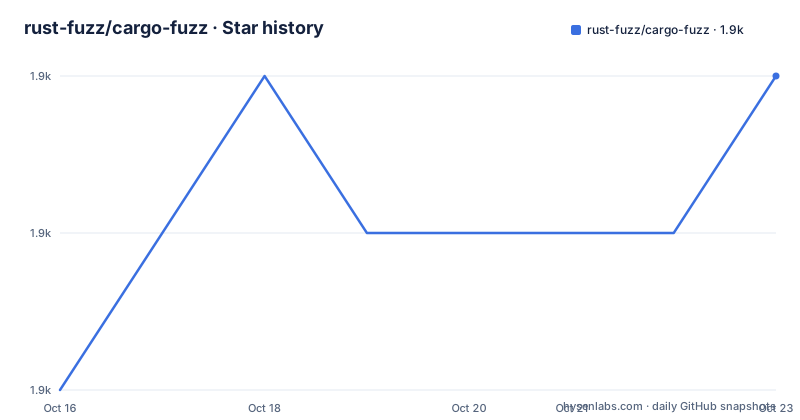
- rust-fuzz/cargo-fuzz1,918 ★ · +2
| Repository | 2026-10-16 | 2026-10-23 |
|---|---|---|
| rust-fuzz/cargo-fuzz | 1.9k | 1.9k |
2 Stars in the last 7 days, measured from the daily GitHub snapshot. Compare with other projects
Editorial analysis
Fuzzing as a cargo subcommand
The README describes the project in one line, a cargo subcommand for fuzzing with libFuzzer, and the heading of the page gives the command itself, cargo fuzz.
That framing is the whole design. Fuzzing a Rust project with libFuzzer normally means writing a C or Rust harness by hand, wiring up the sanitizer flags, and managing where the corpus and the crash artefacts live. cargo-fuzz takes that machinery and exposes it as cargo subcommands, so the workflow sits next to the cargo commands you already run.
The commands are the surface area, and there are seven of them.
cargo fuzz init initializes a cargo fuzz project for your crate. cargo fuzz add <target> creates a new fuzzing target. cargo fuzz run <target> runs a fuzzing target and finds bugs, which is the command you will run most of the time. cargo fuzz fmt <target> <input> prints the std::fmt::Debug output for a test case, and the README notes it is useful when your fuzz target takes an Arbitrary input. cargo fuzz tmin <target> <input> minimises a failing input to the smallest input that causes that failure, for easier debugging. cargo fuzz cmin <target> minimises your corpus of input files. And cargo fuzz coverage <target> generates coverage information on the fuzzed program.
The project is written in Rust, the crate is cargo-fuzz, and the version in the manifest is 0.13.2, with the recent releases being 0.12.0 from 2024-02-20, 0.13.1 from 2025-06-27 and 0.13.2 from 2026-06-09. The last push was on 2026-07-20.
The platform limits come from libFuzzer, not from cargo
The installation section is where a candidate adopter should stop and read, because the constraints are hard.
$ cargo install cargo-fuzzThe note that follows explains the rest. libFuzzer needs LLVM sanitizer support, so this only works on x86-64 and Aarch64, and only on Unix-like operating systems, not Windows. It also needs a nightly compiler, since it uses some unstable command-line flags. And you will need a C++ compiler with C++11 support.
Those four requirements are not arbitrary. The sanitizer runtime is what makes libFuzzer fast, and the sanitizers are only wired up for the two 64 bit architectures where the LLVM coverage instrumentation is best supported. The nightly requirement comes from the unstable flags the sanitizer driver needs, and the C++ compiler requirement is because the libFuzzer runtime library itself is C++.
So the tool is usable on Linux and macOS on Apple Silicon, and on the 64 bit ARM boards that are increasingly common. It is not usable on Windows at all, and the README says so directly rather than leaving you to discover it from a linker error.
For a team on Windows, the workaround is a Linux or macOS machine or a container, and it is worth deciding that before the first target is written.
The workspace question has two answers
The one piece of configuration the README calls out is where the fuzz directory lives, and it has two answers.
If your crate uses cargo workspaces, you add the fuzz directory to workspace.members in the root Cargo.toml. The fuzz directory can either be a part of an existing workspace, which is the default, or it can be an independent workspace, and if the latter is desired you use cargo fuzz init --fuzzing-workspace=true.
The distinction is worth understanding rather than copying. A fuzz target is a separate binary that links your library and drives it with arbitrary input. Making it a member of your main workspace means it inherits the workspace's dependency versions, its feature flags and its build profile, which is usually what you want, since you want the fuzz target to build the same code your users get. Making it independent isolates it, which is what you want when the fuzzing build needs different settings, or when you do not want a nightly-only dependency set to constrain your stable workspace.
The repository layout reflects the simplicity of the tool. There is a src/ directory for the subcommand implementation, a tests/ directory, a Cargo.lock, a CHANGELOG.md, a CONTRIBUTING.md, and the two licence files. The manifest itself is a workspace with a single member, the crate root, and the dependency list is short and tells you what the tool actually does: clap for argument parsing, cargo_metadata so it can read your workspace, anyhow for error handling, tempfile for the temporary directories it uses, toml for reading and writing manifest fragments, rustc_version and current_platform to detect what the toolchain and the host support, and rayon with num_cpus, which is where the parallelism for corpus minimisation comes from.
That last pair is the detail that makes cargo fuzz cmin practical. Minimising a corpus is a parallel search, and the tool spends cores on it.
tmin and cmin are the commands you will actually keep
The subcommands that read as conveniences are in fact the reason to adopt the tool, and it is worth being clear about which is which.
cargo fuzz run finds crashes. That is libFuzzer's job, and cargo-fuzz's contribution is to make the build and the artefact handling automatic. What comes out of a run is a crash file, and a crash file produced by a fuzzer is typically large, because the fuzzer mutates a seed corpus and the input that finally triggers the bug is often padded with irrelevant bytes.
cargo fuzz tmin <target> <input> fixes that. The README describes it as: found a failing input, minify it to the smallest input that causes that failure, for easier debugging. The result is an input small enough to read, which is the difference between a bug report that says the parser panics on a large file and one that says it panics on these eleven bytes.
cargo fuzz cmin <target> is the corpus level version, minimising your corpus of input files. The two are related but do different jobs, and people often reach for the wrong one first. tmin shrinks one failing input, cmin shrinks the set of inputs the fuzzer starts from.
And cargo fuzz fmt <target> <input> sits alongside them for the same reason. If your fuzz target takes an Arbitrary input, printing the std::fmt::Debug output for a test case shows you the structured value the fuzzer actually produced, not just the bytes. When the target decodes a message format, that debug output is usually the fastest route to the bug.
The trio together is the difference between a fuzzer that finds a crash and a fuzzer that gives you a regression test you can put in your test suite.
The trophy case and where the licence leaves you
Two closing sections of the README are worth a look, one for the project's culture and one for the terms.
The trophy case is a repository with a list of bugs found by cargo fuzz and others, and the README asks whether cargo fuzz and libFuzzer found a bug for you, and to add it to the trophy case. That is a small thing that says a lot about how the project is run. Fuzzing finds real bugs in other people's code, and a public list of them is both a demonstration of value and a way of giving credit to the projects that took the report seriously.
The licence section is explicit that cargo-fuzz is distributed under the terms of both the MIT license and the Apache License, Version 2.0, with the details in LICENSE-APACHE and LICENSE-MIT. The licence field in the repository's own metadata records the same dual grant as MIT OR Apache-2.0, and the Cargo manifest matches. Two permissive licences, either of which you can satisfy on its own, is the arrangement most Rust projects use and is the easiest possible position for a tool you run in CI.
The documentation arrangement is worth a note too. The full documentation lives in the Rust Fuzz Book, and the README says you can also always find the full command-line options that are available with --help, which is the sensible pairing for a tool whose options change with the version of libFuzzer it wraps.
Editorial conclusion
Adopt cargo fuzz if you maintain a Rust library that parses untrusted input, because the setup cost is one command and the shrink tooling turns a crash into something you can paste into a test. Do not adopt it on Windows, on a 32 bit target, or anywhere the nightly toolchain is not available, since those limits come from libFuzzer and are not going away. Verify first that your target platform has LLVM sanitizer support, that the fuzz directory is wired into your workspace the way your project expects, and that a crash reduced with cargo fuzz tmin actually reproduces before you commit it as a regression test.
Frequently asked questions
How do I install cargo-fuzz?
Run cargo install cargo-fuzz. The README notes that libFuzzer needs LLVM sanitizer support, so it only works on x86-64 and Aarch64, only on Unix-like operating systems and not Windows, and it needs a nightly compiler and a C++ compiler with C++11 support.
How do I set up a fuzzing project for a crate that uses cargo workspaces?
Add the fuzz directory to workspace.members in the root Cargo.toml. The fuzz directory can be part of an existing workspace, which is the default, or an independent one, in which case you initialise it with cargo fuzz init --fuzzing-workspace=true.
What is the difference between cargo fuzz tmin and cargo fuzz cmin?
cargo fuzz tmin <target> <input> minimises a single failing input to the smallest input that still causes the failure, for easier debugging, while cargo fuzz cmin <target> minimises the corpus of input files used to seed the fuzzer.
Which licence does cargo-fuzz use?
It is distributed under the terms of both the MIT licence and the Apache Licence, Version 2.0, with the details in the LICENSE-APACHE and LICENSE-MIT files. The Cargo manifest records the same grant as MIT OR Apache-2.0.
Official sources
Add this badge to your README
If you maintain this project, the badge below links readers to this analysis and shows its maintenance status from the daily GitHub snapshot. Paste the markdown into your README; add ?metric=license or ?metric=stars to the image URL for a different field.

[](https://hysenlabs.com/projects/rust-fuzz-cargo-fuzz)Star history chart for your README
[](https://hysenlabs.com/projects/rust-fuzz-cargo-fuzz)Was this useful?