Clippy: 800 lints, ten categories, and the CI variable that fails builds on rustc warnings too
A bunch of lints to catch common mistakes and improve your Rust code. Book: https://doc.rust-lang.org/clippy/
At a glance
- What is it?
- Clippy is Rust's lint collection, shipped as the cargo clippy subcommand and the clippy-driver binary, with over 800 lints sorted into ten categories whose default levels the project fixes for you. Its CI story changed at Cargo 1.97, and its restriction group is deliberately left switched off.
- Who is it for?
- Clippy is the right default for any Rust workspace that already passes its own build, and the right default for CI once you decide whether a warning should be fatal at all. Teams that want strictness should reach for clippy::correctness and one or two pedantic lints they have agreed on, not for the restriction group as a whole, because its lints may contradict other lints and may have no alternative suggestion.
- Can I use it commercially?
- Yes. Apache-2.0 is a permissive licence: you can use, modify and sell software built on it, as long as you keep its copyright and licence notices.
- Is it still maintained?
- Yes. The repository received new commits within the last day.
- What is it written in?
- Mainly Rust, according to GitHub's language statistics.
Answers come from the project's GitHub data, last synced on November 14, 2026, and from our analysis. They are not legal advice.
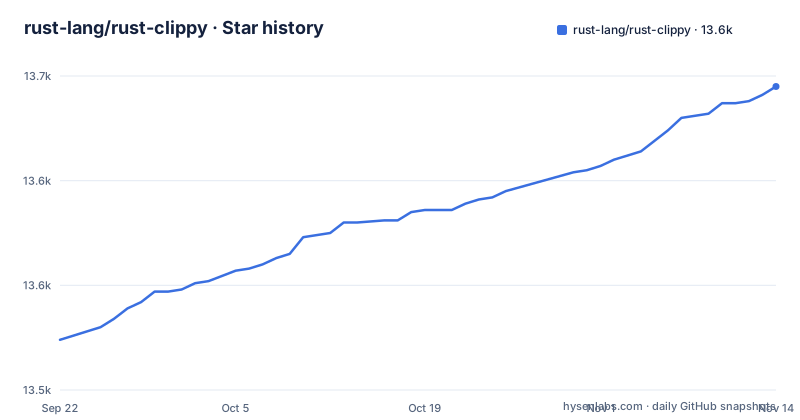
Star history
- rust-lang/rust-clippy13,645 ★ · +121
| Repository | 2026-09-22 | 2026-11-14 |
|---|---|---|
| rust-lang/rust-clippy | 13.5k | 13.6k |
121 Stars in the last 53 days, measured from the daily GitHub snapshot. Compare with other projects
Editorial analysis
CARGO_BUILD_WARNINGS=deny also fails you on rustc's own warnings
The switch that replaced -D warnings is the sharpest edge in the CI story. Before Cargo 1.97, the usual way to make warnings fatal was to pass the flag through to the linter:
cargo clippy -- -D warningsThe newer variable has the benefit of not invalidating build caches, and is therefore the one to prefer going forward:
CARGO_BUILD_WARNINGS=deny cargo clippyThe catch is scope. That setting causes the build to fail if any warning at all is found, and the set includes warnings emitted by rustc itself, dead_code among them. A repository carrying a pre-existing rustc warning nobody has cleaned up starts failing its pipeline the moment this line is added, with nothing in the output pointing at Clippy as the reason. To make an error out of Clippy warnings only, put an attribute in the source such as #![deny(clippy::all)], or pass -D clippy::all on the command line, and swap clippy::all for whichever category you actually target.
cargo clippy --fix quietly widens itself to --all-targets
Automatic fixing takes one flag, and that flag carries a second one inside it:
cargo clippy --fix--fix implies --all-targets, and the stated effect is that it can fix as much code as it can. The consequence is scope you never asked for. Because all targets are pulled in, the rewrites reach past the library or binary you were working on and land in tests, examples and benchmarks as well. A run started to tidy a single module can also rewrite test and example code, and the diff you get back mixes that churn with the change you actually meant to make. Run it on a clean branch and read the whole diff rather than the first few files. When you want the widening to be explicit, the documented CI form states both flags:
CARGO_BUILD_WARNINGS=deny cargo clippy --all-targets --all-featurescargo clippy -p example still walks your path dependencies
Naming one package does not confine the run to that package. As with cargo check, the lint pass includes dependencies that are members of the workspace, path dependencies included:
cargo clippy -p exampleSo a crate you selected explicitly can still surface findings from code you did not write and have no intention of changing, which lengthens the run and dilutes the report with someone else's tree. When you want only the named crate, the option goes after a double dash, which is what separates it from cargo's own flags:
cargo clippy -p example -- --no-depsThe ordinary workspace options apply as they do for any other cargo subcommand. The lesson generalizes past this flag: what lands in the report is a function of workspace membership, not only of the crate under edit, so a monorepo and a single-crate project need different invocations if you want comparable output.
clippy-driver takes rustc arguments but is not a rustc replacement
Outside cargo there is a second binary. clippy-driver accepts the same arguments you would hand to rustc, for example:
clippy-driver --edition 2018 -Cpanic=abort foo.rsThe warning attached to it is unambiguous: it is designed for running Clippy only and should not be used as a general replacement for rustc. The stated reason is that it may produce artifacts that are not optimized as expected. That is a correctness problem for your build, not a style complaint. Pointing a release build, a benchmark harness, or anything that measures output behaviour at this binary gives you objects compiled under different optimization behaviour from what rustc would have produced, and the binaries or numbers you get back are not the ones you believed you were testing. Use it to lint one file outside a cargo project, and keep rustc in every path where the artifacts matter.
restriction is allow by default, and the project asks you to keep it there
The restriction group is the one the project warns about by name. Its lints prevent the use of language and library features, its default level is allow, and the guidance is emphatic: it should not be enabled as a whole. Three reasons are given. Those lints may fire against perfectly reasonable code. They may have no alternative suggestion, so you get a diagnostic and nothing to change it to. And they may contradict any other lints, including ones in other categories, so a single edit can satisfy one rule and trip another in the same pass. The documented way to use the group is one lint at a time, and the shapes are spelled out: a strict coding style such as clippy::else_if_without_else, an added restriction on CI such as clippy::todo, preventing panicking in selected functions with clippy::unwrap_used, or limiting a lint to part of the code with an attribute like #[forbid(clippy::float_arithmetic)] on a module.
Ten categories, and the default level column decides what blocks your build
Lints are grouped, and each group ships a default level, which is where most surprises begin. clippy::correctness covers code that is outright wrong or useless and is set to deny, so it can turn a build red without anyone opting in. clippy::suspicious, clippy::style, clippy::complexity and clippy::perf all sit at warn, and clippy::all aggregates the lints that are on by default across correctness, suspicious, style, complexity and perf. Four groups sit at allow and stay out of your way until asked: clippy::pedantic, lints that are rather strict or have occasional false positives, clippy::restriction, clippy::nursery, new lints that are still under development, and clippy::cargo, which covers the cargo manifest. Nursery needs its own caution, since its contents are unfinished by definition and can change without notice. The stated way to adjust all of this is by changing the lint level per category.
publish = false, so there is no crate to put in your manifest
Clippy is not something you depend on. The manifest sets publish = false, so nothing is uploaded to a registry under that name, and the repository has no GitHub releases either. The in-tree version reads 0.1.101, and it tracks the toolchain rather than a release schedule you can pin. You obtain it the way rustup delivers components, starting from an existing rustup install and a stable release of at least Rust 1.29:
rustup updaterustup component add clippyIf it reports that it cannot find the clippy component, the fallback is rustup self update. The manifest declares two binaries, cargo-clippy at src/main.rs and clippy-driver at src/driver.rs, under edition 2024. For anyone who wanted to vendor the linter or audit it as a pinned dependency, neither route exists: you install a component and accept whatever version your toolchain carries. The last push on record is dated 2026-11-02, so the tree moves with the compiler.
rustc_private means tooling needs configuring before it loads this repo
Clippy reaches into the compiler's internals and the manifest says so plainly. The rust-analyzer metadata block sets rustc_private = true and notes that the package uses #[feature(rustc_private)]. That flag is the technical reason an editor or language server has to be told about the compiler internals before it can load this repository, and it is a concrete hint for anyone configuring tooling over Clippy's own source. Two test targets are declared with harness = false, compile-test and dogfood, which means neither runs under the standard test harness and each supplies its own driver. The workspace is wide: clippy_lints, clippy_utils, clippy_config, clippy_dev, declare_clippy_lint, lintcheck and util sit beside the book, tests and src directories. Adding a lint means navigating that layout rather than dropping a file into one src tree, which is worth knowing before you budget time for a contribution.
Editorial conclusion
Clippy is the right default for any Rust workspace that already passes its own build, and the right default for CI once you decide whether a warning should be fatal at all. Teams that want strictness should reach for clippy::correctness and one or two pedantic lints they have agreed on, not for the restriction group as a whole, because its lints may contradict other lints and may have no alternative suggestion. Before wiring it into a pipeline, check three things in your own tree: whether rustc already emits warnings that CARGO_BUILD_WARNINGS=deny would turn into build failures, whether your editors can load Clippy's source at all given the rustc_private setting, and whether the crate you want linted is the only one in the workspace that your command will reach.
Frequently asked questions
What does clippy do in Rust?
It is a collection of lints, over 800 of them, that catch common mistakes and point at more idiomatic Rust. Lints are split into categories with a default level each: clippy::correctness sits at deny, four categories sit at warn, and pedantic, restriction, nursery and cargo sit at allow.
how to install rust clippy
Run rustup update, then rustup component add clippy, on a stable release of at least Rust 1.29. If it cannot find the clippy component, run rustup self update. After that the linter is invoked as cargo clippy.
rust clippy vs cargo check
They treat workspace membership the same way: as with cargo check, Clippy includes dependencies that are members of the workspace, path dependencies among them. Passing --no-deps after a double dash limits the run to the crate you named.
How to use clippy in Rust?
As a cargo subcommand it runs as cargo clippy, narrows to one workspace crate with cargo clippy -p example, limits further with cargo clippy -p example -- --no-deps, and rewrites its own suggestions with cargo clippy --fix, which implies --all-targets. Outside cargo, clippy-driver takes the same arguments you would pass to rustc.
rust clippy vs rustfmt
They are configured in separate files at the top of this repository: clippy.toml and rustfmt.toml sit side by side. The lint side is what Clippy exposes and adjusts per category, from correctness at deny to pedantic, restriction, nursery and cargo at allow. The usage instructions cover no formatter at all.
Official sources
Add this badge to your README
If you maintain this project, the badge below links readers to this analysis and shows its maintenance status from the daily GitHub snapshot. Paste the markdown into your README; add ?metric=license or ?metric=stars to the image URL for a different field.

[](https://hysenlabs.com/projects/rust-lang-rust-clippy)Star history chart for your README
[](https://hysenlabs.com/projects/rust-lang-rust-clippy)Was this useful?