rust-postgres splits one Postgres driver into separate sync, async, type and TLS crates
Native PostgreSQL driver for the Rust programming language
At a glance
- What is it?
- A Cargo workspace that publishes postgres, tokio-postgres, postgres-types, postgres-native-tls and postgres-openssl. The sync and async clients are different crates, TLS is a third crate you add, and the test suite needs a Postgres container.
- Who is it for?
- Choose rust-postgres if you want a plain native PostgreSQL client in Rust and are happy to pick between a synchronous crate and a tokio one, then add a TLS crate yourself. Look elsewhere if you need an ORM, migrations or a written comparison with other drivers, since the README covers none of those.
- Can I use it commercially?
- Yes. Apache-2.0 is a permissive licence: you can use, modify and sell software built on it, as long as you keep its copyright and licence notices.
- Is it still maintained?
- Yes. The repository last received commits 34 days ago.
- What is it written in?
- Mainly Rust, according to GitHub's language statistics.
Answers come from the project's GitHub data, last synced on November 6, 2026, and from our analysis. They are not legal advice.
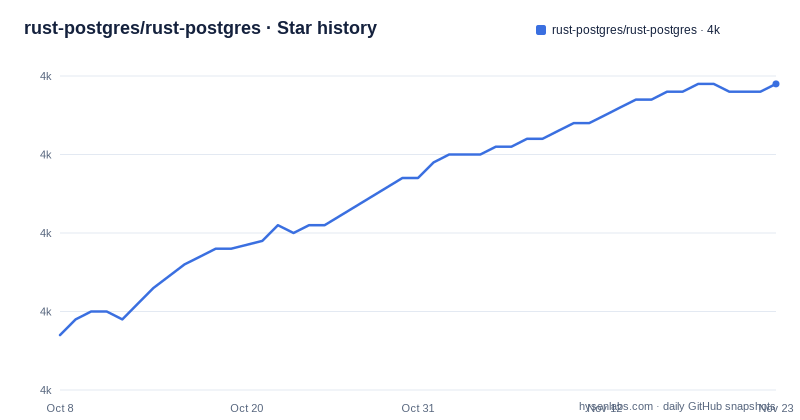
Star history
- rust-postgres/rust-postgres4,031 ★ · +24
| Repository | 2026-10-08 | 2026-11-06 |
|---|---|---|
| rust-postgres/rust-postgres | 4k | 4k |
24 Stars in the last 29 days, measured from the daily GitHub snapshot. Compare with other projects
Editorial analysis
postgres blocks the thread and tokio-postgres does not, and they are separate crates
The first decision is which client crate to depend on. The README describes postgres as a native, synchronous PostgreSQL client and tokio-postgres as a native, asynchronous one. Each has its own crates.io page and its own docs.rs documentation.
The word native in both lines means the clients speak the PostgreSQL protocol themselves. There is a postgres-protocol crate in the workspace members, next to the two clients, which is where that protocol code lives. The repository description says the same thing in one line: a native PostgreSQL driver for the Rust programming language.
The split has a practical consequence. A program picks the synchronous client or the asynchronous one at the dependency level. The README does not explain how the two relate, whether one wraps the other, or how code written for one moves to the other. That answer is on docs.rs and in the source of the postgres and tokio-postgres directories.
TLS is not built in: postgres-native-tls and postgres-openssl are separate add-ons
Neither client crate is described as handling TLS by itself. Two more crates carry it. postgres-native-tls provides TLS support for postgres and tokio-postgres via native-tls. postgres-openssl provides the same support via openssl.
That gives two backends and one choice to make. A project that already links OpenSSL can use postgres-openssl. A project that wants the platform TLS stack goes through native-tls. Both crates serve the synchronous and the asynchronous client, so the choice of TLS backend does not constrain the choice between postgres and tokio-postgres.
The README lists no rustls option. A project standardized on rustls will not find it in this list of crates, and the README does not say whether another crate fills the gap. That is worth settling before you commit, because connecting to a hosted Postgres that requires encryption cannot work without one of these add-ons.
postgres-types owns the Rust to Postgres conversions, with a derive crate beside it
Type mapping lives in its own crate. postgres-types is described as conversions between Rust and Postgres types. Both clients use it, which is why a custom type can be defined once.
The workspace also contains postgres-derive and postgres-derive-test in its members list. The README does not mention them, and it does not say what they derive. Their names point at derive macros for the type conversions, and postgres-derive-test is the crate that tests them, but the README confirms neither. Check docs.rs for postgres-types to see which traits and attributes exist.
There is also a codegen directory at the top level of the repository and in the workspace members. Nothing in the README explains what it generates. If you need to add support for a Postgres type that is missing, expect to read that directory and postgres-types together, because the README gives no contributor guide for it.
The test suite assumes a postgres:18 container with a specific setup script
The repository's only extended instructions are about running tests. The suite requires Postgres to be running in the correct configuration, and the easiest route is Docker. The steps run in order: install docker and docker-compose, make sure your user has permission for docker, change to the top-level directory of the repo, run docker-compose up -d, run cargo test, then run docker-compose stop.
For Ubuntu the README gives sudo apt install docker.io docker-compose and sudo usermod -aG docker $USER. The docker-compose.yml defines a single postgres service on the image docker.io/postgres:18, publishes port 5433:5433, sets POSTGRES_PASSWORD to postgres and mounts ./docker/sql_setup.sh into /docker-entrypoint-initdb.d/.
If you already run a local Postgres on port 5433, the published port will collide with it. Running cargo test without the container up fails, because the README says the tests need Postgres in the correct configuration and nothing else in the repository provides it.
The README has no install line, so the crate names and docs.rs pages are the entry point
The README does not contain a cargo add command or a Cargo.toml snippet. Each crate gets a heading with a crates.io badge and a Documentation link to docs.rs. To start, you pick the crate, open its docs.rs page and follow the usage shown there.
That is a gap for a first-time reader. The README tells you what each crate is, in one sentence each, and nothing about connecting, running a query or handling errors. No example code appears in it at all. Anything beyond the one-line descriptions has to come from docs.rs, which the README links for every crate.
The workspace file Cargo.toml lists nine members and sets resolver to 2. It also sets debug to 2 in the release profile, so release builds of the workspace carry full debug information. That detail applies to building this workspace from source and does not change what you get when you depend on a published crate.
Tagged releases date from 12 June 2026, while pushes continued into October
The three most recent tagged releases were all published on 12 June 2026: tokio-postgres v0.7.18, postgres v0.19.14 and postgres-types v0.2.14. They carry version numbers below 1.0, which is a signal worth reading. The sync client is at 0.19 and the async client at 0.7, so semver allows breaking changes between minor versions of those crates.
The repository is not archived. The last push was on 3 October 2026, later than every listed release, so the master branch holds changes that no tag contains. If you need a tagged artifact, depend on the published version. If you need a fix that has landed since June, you would have to depend on the git repository.
The license field reads Apache-2.0, and the repository includes both LICENSE-APACHE and LICENSE-MIT files at the top level. The README does not say which one governs each crate, so check the crate metadata on crates.io.
No comparison with sqlx, no ORM and no migrations appear in the repository
People looking at this project also search for sqlx, ORMs and migrations. The README addresses none of them. It makes no comparison with sqlx or any other driver, and it names no alternative.
What the crates cover is narrow and visible in the list: a synchronous client, an asynchronous client, type conversions and two TLS adapters. The README promises nothing about schema management, query building, connection pooling or migrations. A team that expects those from its database layer has to find them in other crates, and the README does not point to any.
That narrowness is a fair reason to pick it. You get a driver and nothing around it, and each concern sits in a separately versioned crate with its own docs.rs page. The cost is the assembly work: choosing sync or async, choosing a TLS backend, and finding your own answer for pooling and migrations.
Editorial conclusion
Choose rust-postgres if you want a plain native PostgreSQL client in Rust and are happy to pick between a synchronous crate and a tokio one, then add a TLS crate yourself. Look elsewhere if you need an ORM, migrations or a written comparison with other drivers, since the README covers none of those. Before adopting, read the docs.rs pages for the crate you choose, because the README only gives one line per crate, and note that the newest tagged releases date from 12 June 2026.
Frequently asked questions
Rust postgres vs tokio postgres: which crate should I use?
Both come from the rust-postgres repository. postgres is the native synchronous client and tokio-postgres is the native asynchronous one, so the choice depends on whether your program runs async code.
Rust postgres vs sqlx: how do they compare?
The README makes no comparison with sqlx. It describes a set of crates for a synchronous client, an asynchronous client, type conversions and TLS support, and says nothing about ORMs or migrations.
Is there an alternative to rust-postgres?
The README names no alternative. Within the repository, postgres and tokio-postgres are the two client crates, and which fits depends on whether you need synchronous or asynchronous access.
Official sources
Add this badge to your README
If you maintain this project, the badge below links readers to this analysis and shows its maintenance status from the daily GitHub snapshot. Paste the markdown into your README; add ?metric=license or ?metric=stars to the image URL for a different field.

[](https://hysenlabs.com/projects/rust-postgres-rust-postgres)Star history chart for your README
[](https://hysenlabs.com/projects/rust-postgres-rust-postgres)Was this useful?