RuVector: agent memory in Rust, with a decision engine you install separately
RuVector is a High Performance, Real-Time, Self-Learning Ai, Vector GNN, Memory DB built in Rust.
At a glance
- What is it?
- RuVector is a Rust native substrate for agent memory and fast local decisions, combining local semantic embeddings, persistent vector retrieval and graph relationships, with npm, crates.io, Python and WASM routes in.
- Who is it for?
- Adopt RuVector if you want agent memory across sessions with local semantic embeddings, persistent vector retrieval and graph relationships, reachable from npm, crates.io, a Python source install or WASM. Do not assume every component arrives with the root npm package, since the README says its System groupings are not a claim that every component is installed together, and typed decisions live in their own package.
- Can I use it commercially?
- Yes. MIT is a permissive licence: you can use, modify and sell software built on it, as long as you keep its copyright and licence notices.
- Is it still maintained?
- Yes. The repository last received commits 1 day ago.
- What is it written in?
- Mainly Rust, according to GitHub's language statistics.
Answers come from the project's GitHub data, last synced on November 13, 2026, and from our analysis. They are not legal advice.
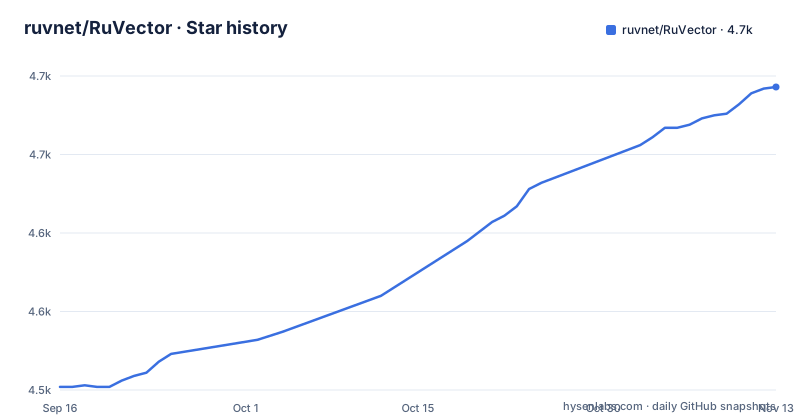
Star history
- ruvnet/RuVector4,693 ★ · +191
| Repository | 2026-09-16 | 2026-11-13 |
|---|---|---|
| ruvnet/RuVector | 4.5k | 4.7k |
191 Stars in the last 58 days, measured from the daily GitHub snapshot. Compare with other projects
Editorial analysis
Remember and recall need no server and no key
The npm quick start installs the package and then runs two hooks commands to remember and recall a statement.
npx ruvector hooks remember --semantic --type decision \
"The customer requires all inference to remain in Canada."npx ruvector hooks recall --semantic --top-k 3 \
"Where may customer data be processed?"The README says to reuse the same project directory and model to retain searchable context, which is the design decision here: memory is a directory you can put next to your code rather than a service someone else has to run.
The first semantic command downloads a local embedding model, so the first run has a network step in it, and you should keep the same model to retain searchable context.
Score is a distance, so lower values are closer
The Node.js track installs the package with:
npm install ruvectorThe Node.js API reference is at docs/api/NODEJS_API.md.
The decision engine is a separate package, and its numbers are scoped
Typed decisions live in their own package under npm/packages/typesafe, which the README places in its System 0 row for encoding observations and making bounded local decisions, with a separate typed decision guide.
Memory classes are application semantics over a general store
The README groups its libraries by role. System 1, for persisting context, retrieving evidence and adapting from explicit feedback, lists VectorDB in ruvector-core, graph memory in ruvector-graph, SONA, and contrastive primitives in ruvector-cnn. System 2, for reconstructing multi step context and coordinating work, lists RuvLLM, RVF, Ruflo and MetaHarness.
Your application decides what is worth remembering
The README lists what RuVector combines: local semantic embeddings, persistent vector retrieval, graph relationships, explicit feedback learning, memory lifecycle controls, and optional shared memory. It also says its System 0, 1 and 2 groupings are architecture groups, not automatic execution tiers or a claim that every component is installed together.
The Cargo workspace excludes a dozen crates, each with a reason
Cargo.toml is mostly an exclude list, and the comments explain why, which is more informative than a list of members.
ruvector-postgres is a pgrx-based PostgreSQL extension. Its build script requires PGRX_HOME set up through a specific cargo-pgrx version and cargo pgrx init, which downloads and builds multiple Postgres versions, so it is kept out of the default workspace and cargo build --workspace works in stock environments.
ruos-thermal, a Pi 5 thermal supervisor skeleton, stands alone for now and joins the workspace once daemon mode and a Unix socket protocol land in later iterations. sonic-ct crates are self-contained detached workspaces, and emergent-time-wasm is a standalone cdylib with its own optimisation and panic settings.
One entry is a re-entry. The hailo crates rejoined the workspace once a path dependency and some embedding provider implementations landed, with the feature staying opt-in so workspace builds on stock x86 hardware still compile without Pi specific tooling.
So the workspace boundary is a maintenance decision with a paper trail, and a reader can see which pieces need hardware or a second toolchain before they touch them.
The env template asks for four providers' keys anyway
The .env.example file at the root is where the project's own development expectations show, and it does not match the local-first pitch at first glance.
It asks for a crates.io API key and an NPM token for publishing, then for provider keys: Anthropic, OpenAI and Google, plus a HuggingFace token and a hub token with an optional cache directory override. Then a block of Claude Flow settings, with a configuration path, a log level, a memory backend that accepts hybrid, sqlite or memory, a memory path, and an MCP port and host.
The file groups them under package publishing, AI provider API keys, HuggingFace configuration and Claude Flow configuration.
Two version numbers are worth separating here. The npm package manifest in the root is at version 0.1.2 and is marked private, while the release tags are mixed: the newest is ruvector-wasm-v2.3.1, for ruvector-wasm 2.3.1, and the one before it is a date-based tag, crates-2026-09-26, whose title lists what that release contained.
Editorial conclusion
Adopt RuVector if you want agent memory across sessions with local semantic embeddings, persistent vector retrieval and graph relationships, reachable from npm, crates.io, a Python source install or WASM. Do not assume every component arrives with the root npm package, since the README says its System groupings are not a claim that every component is installed together, and typed decisions live in their own package. Before you build on it, reuse the same project directory and embedding model so the store stays searchable, and read the Node.js API reference before relying on search results.
Frequently asked questions
What is RuVector?
A Rust-native vector database and memory layer for AI agents. It combines local semantic embeddings, persistent vector retrieval, graph relationships, feedback learning and memory lifecycle controls, and it publishes as crates, an npm package and a WASM build.
Do I need an API key to use RuVector?
The README's npm quick start has no API key step: you install the package and run the hooks commands, and the first semantic command downloads a local embedding model. The .env.example in the repository does hold publishing tokens and Anthropic, OpenAI, Google and HuggingFace keys for development work.
How do I store and recall memory with RuVector?
With the hooks CLI. Store a statement with npx ruvector hooks remember --semantic --type decision, and query with npx ruvector hooks recall --semantic --top-k 3. Reuse the same project directory and model to retain searchable context.
What does the RuVector search score mean?
The Node.js API reference at docs/api/NODEJS_API.md is where to check how search results are scored before you sort them.
Is the RuVector decision engine part of the main package?
Typed decisions are documented as their own package under npm/packages/typesafe with a typed decision guide, and the README says its System groupings are not a claim that every component is installed together.
Official sources
Add this badge to your README
If you maintain this project, the badge below links readers to this analysis and shows its maintenance status from the daily GitHub snapshot. Paste the markdown into your README; add ?metric=license or ?metric=stars to the image URL for a different field.

[](https://hysenlabs.com/projects/ruvnet-ruvector)Star history chart for your README
[](https://hysenlabs.com/projects/ruvnet-ruvector)Was this useful?