Nerd Fonts patches 67 families with 10,000 glyphs, and the width mode is not what you think
Iconic font aggregator, collection, & patcher. 3,600+ icons, 50+ patched fonts: Hack, Source Code Pro, more. Glyph collections: Font Awesome, Material Design Icons, Octicons, & more
At a glance
- What is it?
- A read of the ryanoasis/nerd-fonts repository: the three glyph width modes, the nine install routes the readme lists, the container that builds FontForge from one pinned commit, and the three disagreeing icon counts in the project's own metadata.
- Who is it for?
- Terminal users should take a tagged release archive and pin a version instead of tracking master, and should pick the width mode that matches their cell geometry rather than the font family they like. Anyone redistributing a patched family inside a product has to read the upstream font's own terms first, because the repository metadata reports NOASSERTION while the patch table spans dozens of separately licensed upstream fonts.
- Can I use it commercially?
- Check first. The repository uses a licence we do not classify automatically, so read its LICENSE file before any commercial use.
- Is it still maintained?
- Yes. The repository last received commits 27 days ago.
- What is it written in?
- Mainly CSS, according to GitHub's language statistics.
Answers come from the project's GitHub data, last synced on November 13, 2026, and from our analysis. They are not legal advice.
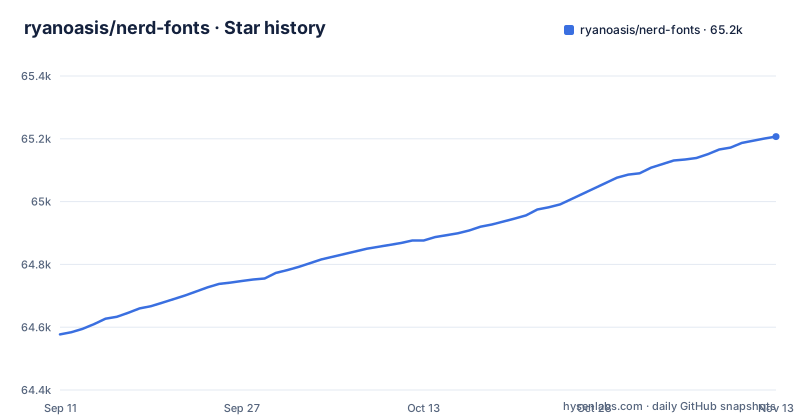
Star history
- ryanoasis/nerd-fonts65,207 ★ · +630
| Repository | 2026-09-11 | 2026-11-13 |
|---|---|---|
| ryanoasis/nerd-fonts | 64.6k | 65.2k |
630 Stars in the last 63 days, measured from the daily GitHub snapshot. Compare with other projects
Editorial analysis
Width mode changes the icons, not the font underneath them
Every patched family can be built with its Nerd Font glyphs monospaced (fixed-pitch, fixed-width), double-width (non-monospaced), or proportional. The readme is explicit that this choice refers to the Nerd Font glyphs themselves and not necessarily to the font as a whole. The Font Fallback option (Option 7) is described in the readme as the choice for anyone who wants to install only one font for all fonts. The width mode itself is chosen inside the Font Patcher, which is a FontForge Python script, and a Developer/Contributor provided bash script, Gotta Patch 'em All, re-patches all the fonts.
Nine install routes, named but not written down
The readme's TL;DR lists the install routes by number and situation. Option 1 is a release archive download for a font family package of variations. Option 2 is Homebrew Fonts for macOS and Linux. Option 3 is an install script, described as the route for automating installs or for use in scripts. Option 4 is explicitly titled unofficial Chocolatey or Scoop repositories, which is the Windows path. Option 5 points Arch Linux users at the Extra repository. Option 6 is a PowerShell installer, offered for interactive setup or for scripts. Option 7 is Font Fallback, Option 8 is cloning the repo for complete control, and Option 9 is patching your own font. On Windows, Option 4 is explicitly titled unofficial, so it may lag the current release. The releases page is the place where the version being served is visible: v3.5.1 on 2026-08-21, v3.5.0 on 2026-08-02, and v3.4.0 back on 2025-04-24.
Master file paths are declared unstable, so pinned raw URLs rot
The first of the readme's important notices states that file paths on the master branch are not considered stable, and it links to a section titled Unstable file paths on master whose job is verification of repository URI references. The top-level tree explains what is exposed to that risk: 10-nerd-font-symbols.conf, FontPatcher.zip, fonts.json, glyphnames.json, install.sh, and whole directories named patched-fonts/, src/, bin/, css/, and images/. Any configuration that points at one of those paths on master is holding a location the project has told you it may move. A shell rc file, a terminal profile, or a dotfiles repository that hardcodes a raw URL into master can therefore stop resolving after a reorganisation, and the failure looks like a missing font or a blank icon rather than a broken link, which makes it slow to trace. A tagged release archive is the version of this tree that the notice is not about, since unpacking a downloaded archive does not depend on any path staying where it was. The readme also routes readers to the wiki for higher level information, and a preview of all the fonts sits at https://www.nerdfonts.com/font-downloads.
Repo size pushes cloning out of the user path and into the contributor path
The second important notice says cloning the repository is not recommended, and gives the reason directly: the repo size. The notice attaches one exception, contributing to development. That inverts the usual order. A user who clones in order to script an install pays the cost of the entire tree, build tooling included, to obtain a handful of font files that the release archive already contains. The people for whom a clone pays off are the ones patching new families, and they are also the ones the Gotta Patch 'em All bash script and the Font Patcher are written for. The tree layout makes the same point structurally. patched-fonts/ holds the patched fonts, FontPatcher.zip is shipped as a single archive at the root, and src/glyphs/README.md is the authoritative list of the glyph sets currently in use, which is a different job from the summary in the root readme. If you are evaluating the project as a source of icons rather than as a font, that glyphs file is the part worth reading, and it does not require the rest of the clone.
The container pins one FontForge commit and switches five features off
The Dockerfile is where the real build constraints are visible, and it starts from alpine:latest, adds build dependencies from the Alpine community repository, and then compiles FontForge from source at a fixed commit. These lines are copied exactly as the Dockerfile writes them.
git clone https://github.com/fontforge/fontforge.git
cd fontforge
git checkout 3a960a4d83c65b8ff5fc0bab8b1f19964aa023df
mkdir build
cd build
cmake -GNinja \
  -DENABLE_GUI=off \
  -DENABLE_DOCS=off \
  -DENABLE_NATIVE_SCRIPTING=off \
  -DENABLE_LIBSPIRO=off \
  -DENABLE_PYTHON_EXTENSION=off \
  ..
ninja
cmake --install . --strip
Five cmake switches are set: GUI, docs, native scripting, libspiro, and the Python extension are all off. That is the honest limit of the image. Anything needing a FontForge window to preview a glyph, native scripting hooks, or the Python extension as an embeddable module is unavailable inside it, and PYTHONIOENCODING=utf-8 is set. Build dependencies are removed with apk del after the install, and the removal list also names tiff-dev, which the earlier add step never installed. The runtime also adds the parallel package. The image exposes /in and /out as volumes and enters through /nerd/bin/scripts/docker-entrypoint.sh, so the calling convention is a pair of mounted directories rather than a set of flags. Pinning the FontForge commit also means patch output is reproducible against a known engine, but the engine itself never advances inside that image.
package.json points at an index.js the repository does not ship, and npm test fails by design
The npm manifest reads like a library, and it is not one. It declares main as index.js, version 3.5.1, author Ryan L McIntyre, and an empty dependencies object, with all-contributors-cli at ^4.8.1 as the only devDependency. The top-level file listing has no index.js in it, and there is no test directory. The test script is a placeholder that prints an error and exits non-zero. So `npm test` cannot pass in this repository by design, and `require('nerd-fonts')` has no entry point to resolve. The keywords list, powerline, shell, statusline, iconic-fonts and the rest, describes what the fonts are for rather than what the package exports. This matters because the manifest sits next to a real Font Patcher, and the two look interchangeable from a distance: the patcher is a FontForge Python script the font-patcher script at the repository root, not a JavaScript module, and the bash script that repatches everything is a shell entry point. For anyone automating the patch, the Dockerfile route with mounted /in and /out volumes is the interface the repository ships, and the npm manifest will not get you there.
Three icon and family counts disagree, and the patch table has an undefined RFN column
The repository description quotes 3,600+ icons and 50+ patched fonts. The npm manifest description, written in the same voice, quotes 10,000+ icons and 70+ patched fonts. The readme features list says over 10,000 glyphs and icons combined, and 67 already patched font families. Three numbers for the same two quantities, and the smallest sits in the field search engines and social previews pick up. The patch table is where per-family truth lives, listing each Nerd Font next to its original font and repository, an upstream version column, and a final column headed RFN. In the visible rows the RFN column reads NO for 0xProto Nerd Font at version 2.502, 3270 at 3.0.1, Adwaita Mono at 34.1, Agave at 38, Annotation Mono at 0.4, and Arimo at 1.33, and YES only for AnonymicePro Nerd Font at 1.002. Maintenance is active in the ordinary sense, with the last push on 2026-10-17, but the release cadence is not: the gap between v3.4.0 on 2025-04-24 and v3.5.0 on 2026-08-02 is over a year.
NOASSERTION metadata next to a table of separately licensed upstream fonts
The repository license field reads NOASSERTION, and the npm manifest sidesteps it again with a pointer to the LICENSE file rather than a name. A LICENSE file and a license-audit.md both sit in the tree, and the Dockerfile labels the image with MIT. None of that settles the question a redistributor actually has, which is what the shipped font files are. The patch table names the upstream project behind every family, from 0xProto and Agave to Adwaita Mono and Anonymous Pro, and each of those arrives under its own terms with its own repository. A patched build is a derivative of fonts the project did not author, so the patch cannot be assumed to carry one blanket license from top to bottom. For a personal terminal this costs nothing, since you are not redistributing. For a theme bundle, a container image, or a screenshot in product documentation, the check you owe yourself is per upstream family: which one you are shipping, and what its repository says. A license-audit.md file is in the tree and is worth reading alongside the NOASSERTION field.
Editorial conclusion
Terminal users should take a tagged release archive and pin a version instead of tracking master, and should pick the width mode that matches their cell geometry rather than the font family they like. Anyone redistributing a patched family inside a product has to read the upstream font's own terms first, because the repository metadata reports NOASSERTION while the patch table spans dozens of separately licensed upstream fonts.
Frequently asked questions
What are Nerd Fonts, in the project's own terms?
A patcher that takes developer oriented fonts and adds glyphs from iconic font sets, including Powerline with Extra Symbols, Font Awesome, Material Design Icons, Weather, Devicons, Octicons, Font Logos, Pomicons and Codeicons, producing 67 patched families carrying over 10,000 glyphs combined.
How do I install Nerd Fonts on my system?
The readme names nine routes: release archive download, Homebrew Fonts for macOS and Linux, an install script for automation, unofficial Chocolatey or Scoop repositories on Windows, the Arch Extra repository, a PowerShell installer, Font Fallback, cloning the repo, and patching your own font.
How do I use Nerd Fonts icons in a terminal?
Pick a patched family whose width mode matches your cell geometry, and use the Font Fallback option if you want one patched font to cover every font on the system, since the width mode changes the Nerd Font glyphs and not necessarily the font as a whole.
Where do I find Nerd Fonts glyph codepoints before using the icons?
The glyph sets currently in use are listed in src/glyphs/README.md, and a cheat sheet search plus a preview of all the fonts is hosted on NerdFonts.com, so a codepoint can be looked up before it is pasted into a shell or editor config.
Is there a Nerd Fonts version of Cascadia Code?
The Patched Fonts table in the readme pairs each Nerd Font with its original font, upstream version and an RFN flag; check that table or the font preview page at https://www.nerdfonts.com/font-downloads for a Cascadia Code entry.
What is the most popular Nerd Font?
The repository metadata does not rank its families. It offers 67 patched families with previews at https://www.nerdfonts.com/font-downloads, and points to the wiki for higher level information, so popularity has to be judged outside this repository.
Official sources
Add this badge to your README
If you maintain this project, the badge below links readers to this analysis and shows its maintenance status from the daily GitHub snapshot. Paste the markdown into your README; add ?metric=license or ?metric=stars to the image URL for a different field.

[](https://hysenlabs.com/projects/ryanoasis-nerd-fonts)Star history chart for your README
[](https://hysenlabs.com/projects/ryanoasis-nerd-fonts)Was this useful?