Astro8-Computer: a 16-bit homebrew CPU with an emulator and two languages
Custom 16-bit homebrew CPU, emulator, renderer, PCB, and language
At a glance
- What is it?
- Astro8-Computer is a 16-bit computer design that exists in three forms at once, a Logisim Evolution circuit, a C++ emulator that runs at full speed on Windows, Mac and Linux, and a growing set of programming tools including an assembler and the Armstrong higher level language. It is a teaching and hobby platform, and the pieces are released as alpha builds.
- Who is it for?
- Astro8-Computer fits students and hobbyists who want to understand how a processor, an assembler and a compiler fit together, and who are happy to work inside an alpha tagged project. It does not fit anyone needing a supported toolchain or a stable binary.
- Can I use it commercially?
- Yes. MIT is a permissive licence: you can use, modify and sell software built on it, as long as you keep its copyright and licence notices.
- Is it still maintained?
- Yes. The repository last received commits 72 days ago.
- What is it written in?
- Mainly C++, according to GitHub's language statistics.
Answers come from the project's GitHub data, last synced on November 7, 2026, and from our analysis. They are not legal advice.
Star history
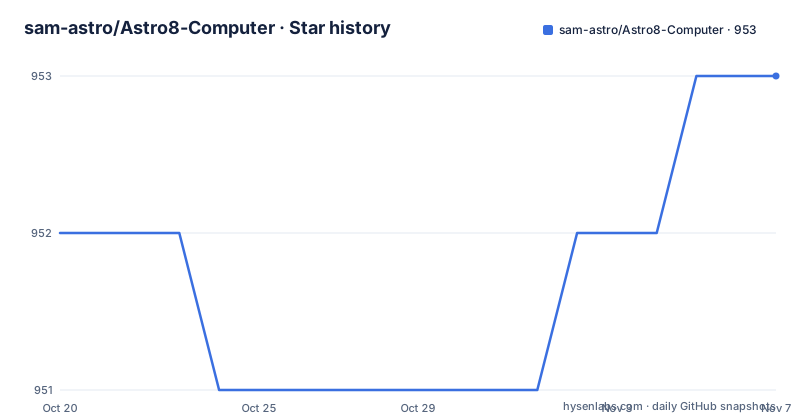
- sam-astro/Astro8-Computer953 ★ · +1
| Repository | 2026-10-20 | 2026-11-07 |
|---|---|---|
| sam-astro/Astro8-Computer | 952 | 953 |
1 Stars in the last 18 days, measured from the daily GitHub snapshot. Compare with other projects
Editorial analysis
One computer in three forms: circuit, emulator and toolchain
Astro8-Computer is a 16-bit computer design, and the interesting part is that it exists simultaneously as a piece of hardware you can wire, a program you can run, and a set of languages you can write for it.
The hardware form is an almost working Logisim Evolution circuit, so the processor can be inspected at the logic level rather than taken on trust. The runnable form is an emulator on Windows, Mac and Linux that runs code at full speed, which is what makes the design usable for writing programs rather than only for study. The description also lists a renderer and a PCB, which is the standard progression for a homebrew project of this kind: simulate the gates first, then draw the board.
The repository layout shows the same three way split in files. Astro8-Emulator/ holds the C++ emulator, cpu-circuit.circ at the root is the Logisim circuit, Astro8_Installer_Maker.iss and modpath.iss are Inno Setup scripts for the Windows installer, ResourceGenerator/ holds the tooling that produces the character assets, and there are two directories of example programs, example_armstrong_programs/ and example_assembly_programs/. The Releases/ directory holds the built artefacts.
The primary language of the repository is C++, which is the emulator. The rest of the toolchain, the assembler and the Armstrong compiler, lives in the same tree but is not what the language statistic is measuring.
For the audience, read the README's own framing: this is a computer you build yourself, with community projects being actively built around it.
Programming it with the instruction set or with Armstrong
There are two supported ways to write for the machine, and the README points at both.
The first is the assembly language, documented through the instruction set page in the project documentation. For a 16-bit design, an instruction set reference is short enough to read in full, which is exactly the point of the project. You can see what the processor does with a register and an immediate value, and there is no hidden runtime between your program and the machine.
The second is Armstrong, the higher level language. The README describes the two as the most supported ways to program for the computer, and the presence of example_armstrong_programs/ next to example_assembly_programs/ shows that both are meant to be used rather than one being a toy.
The examples are worth knowing about because they show the intended shape of a program. The README points to a pong game and a typing program as demos for the Astro-8, and the documentation site carries a Demos page with more previews, including what the images in the README show, a pong game, a perspective cube and a raytracer. A raytracer on a 16-bit machine with a fixed character set is a fairly serious exercise, and it is the kind of thing that only makes sense as a goal for someone who wants to see how far the hardware can be pushed.
Programming tools, then, are the third element of the project after the circuit and the emulator. That is what separates it from a static emulator of a fictional machine, where you could only watch. Here you can compile, assemble and run.
Getting the emulator running on Linux, Windows or from source
Prebuilt binaries are the easy path. On Windows, the README says to navigate to the most recent release, download the Windows version and unzip the downloaded file. On Linux, the same applies with one extra prerequisite, SDL2, which has to be installed on your system first. On debian based operating systems the README gives the command:
sudo apt-get install -y libsdl2-2.0-0 libsdl2-mixer-2.0-0The two packages, the base SDL2 runtime and the mixer library, are what the emulator links against for its window and its audio, so the mixer is not optional for anything that produces sound.
Building from source takes six steps. Clone the repository with git clone or download it as a .ZIP file and unzip it to a location of your choice, make sure SDL2 is installed, enter the directory Astro8-Computer/Astro8-Emulator/linux-build, and then generate the build and compile:
cmake ..
make -j5
The resulting executable is Astro8-Computer/Astro8-Emulator/linux-build/Astro8-Emulator, at which point you can run the example programs from the repository.
Note the shape of the build instructions. They are Linux specific, they assume a Unix Makefile generator from CMake, and they use a parallel make with five jobs. There is no equivalent documented path for building the Windows or Mac emulator from source in the README, even though prebuilt binaries exist for both, so anyone planning to modify the emulator rather than just run it will be working on Linux unless they work out the rest themselves.
Character sets, memory tapes and the resource generator
The repository contains a handful of files that tell you more about the machine than the prose does.
There is a character-set.png at the root, a char_set_memtape file, and a char_set_processed.hex file, which is presumably the output of the resource tooling in its processed form. The ResourceGenerator/ directory holds the tool that produces these assets. Together they describe a machine with a fixed character set, a memory image format, and a way to convert between them, which is exactly the set of artefacts you need when the display is character based rather than pixel based.
That choice shapes what is possible. A character based display with a fixed glyph set makes the hardware simpler, makes the memory footprint small, and makes text output trivially portable between programs. It also caps what a program can draw, and it is why the raytracer demo in the README is interesting: rendering is happening in terms of the character set, which is a constraint the author is clearly working within rather than around.
The files tags, tags.lock and tags.temp at the repository root are less obvious. A tags.lock and tags.temp pair alongside a tags file usually indicates a version tagging helper rather than something the machine consumes, which is a small sign that the release process is scripted in the repository.
None of this is documented in prose in the README, so if you are modifying the emulator or writing your own tools, the directory listing is the only map you have. That is a fair criticism of a project whose documentation site is otherwise thorough.
Community forks that may not match the main branch
The README lists related projects, and it puts a warning above them: these projects are not always compatible with the main branch of the official Astro8-Computer repository, and you should read the instructions in each project's repository before using them.
That warning is the most useful line in the section, because it changes how you should treat the ecosystem. Three community projects are named. Astro8-VM by LucasJG1994 is an alternative implementation of the virtual machine. GerardSmit's Astro8 is described as a C# and web emulator. The third entry is Yabal, a high level C-like language, and its link in the README points at the same GerardSmit/Astro8 URL as the emulator entry rather than at a separate repository.
So there are effectively three directions of extension: a different virtual machine, a different emulator that runs in the browser or on .NET, and a different language above the hardware. Each is a fork of the design rather than a plugin, which is why the compatibility warning matters. A community emulator built against an older instruction set will not necessarily run the same binary as the reference emulator.
The Astro8 C# and web emulator is the most interesting of the three for a reader who cannot run the SDL2 build, since a browser based version removes the native dependency entirely. The Yabal language is the most interesting for someone who finds Armstrong too small, since a C-like language opens up a much larger body of existing source to port.
The point to take away is that the main repository is the reference, and the community work is adjacent rather than integrated.
MIT licence, alpha tags and a project still being worked on
The licence is MIT, and the README links the LICENSE file, so the code, the circuit and the documentation can be reused and modified with attribution and without a copyleft obligation on anything you build with it.
The releases tell the other half of the story. The recent tags are v3.4.3-alpha and v3.4.2-alpha, both dated 2025-01-13, and v3.4.0-alpha from 2023-12-04. Every recent release carries the alpha suffix, and two of the three were published on the same day, which suggests a batch of fixes rather than a schedule of features.
That is the honest state of the project. An alpha tagged emulator for a homebrew CPU is not a problem in itself, since the whole point is that you are building a computer from the gates up and the software is part of the exercise, but it does mean you should not expect stable binaries, a compatibility promise between versions, or documentation of breaking changes.
The last push was on 2026-08-27, so work is still landing in the repository even though the newest release tag is from January 2025. The gap between the two tells you how to use it: follow the main branch if you want the latest language tooling, and pin a release if you want a fixed binary that matches a known set of example programs.
The other communication channels are a Discord server for the community and a documentation site hosted under the project's GitHub pages, plus a video linked from the README. There is a Demos page in that documentation, which is where the previews for the other demos live beyond the three images shown in the README.
Editorial conclusion
Astro8-Computer fits students and hobbyists who want to understand how a processor, an assembler and a compiler fit together, and who are happy to work inside an alpha tagged project. It does not fit anyone needing a supported toolchain or a stable binary. Verify first that the emulator release you download matches the language tooling you use, since the README warns that community projects are not always compatible with the main branch, and expect alpha tagged releases, with the newest one at v3.4.3-alpha from 2025-01-13.
Frequently asked questions
What do I need to install to run the Astro8 emulator on Linux?
SDL2 must be installed on your system. On debian based operating systems the README gives sudo apt-get install -y libsdl2-2.0-0 libsdl2-mixer-2.0-0. After that you can download the Linux version from the most recent release and unzip it.
How do I build the Astro8 emulator from source?
Clone the repository or download it as a .ZIP, make sure SDL2 is installed, enter the directory Astro8-Computer/Astro8-Emulator/linux-build, then run cmake .. to generate the Unix Makefile and make -j5 to produce the Astro8-Emulator executable.
Which languages can I use to program the Astro-8?
The two most supported ways are the assembly language, documented through the instruction set page, and Armstrong, the higher level language. Example programs for both live in the example_assembly_programs/ and example_armstrong_programs/ folders.
Is there a Logisim version of the Astro8 computer?
Yes, the project has an almost working Logisim Evolution circuit, and cpu-circuit.circ sits at the root of the repository. The community list also names a C# and web emulator by GerardSmit, which removes the need for the native SDL2 build.
Official sources
Add this badge to your README
If you maintain this project, the badge below links readers to this analysis and shows its maintenance status from the daily GitHub snapshot. Paste the markdown into your README; add ?metric=license or ?metric=stars to the image URL for a different field.

[](https://hysenlabs.com/projects/sam-astro-astro8-computer)Star history chart for your README
[](https://hysenlabs.com/projects/sam-astro-astro8-computer)Was this useful?