Window Sweaters dresses 37 apps, and its settings folder is still called Knit Borders
A macOS menu-bar app that dresses your windows in knitted borders.
At a glance
- What is it?
- A single developer C app for macOS that knits a border around the focused window, with a per-app colour rule file, PNG pattern charts and a link against a private system framework. The parts worth reading are where it reaches into macOS and what it leaves behind on uninstall.
- Who is it for?
- Window Sweaters suits people who spend the day in one or two apps and want their windows to look different, and the untick-an-app control makes it tolerable in a mixed desktop. Three things to know before installing.
- Can I use it commercially?
- Yes, with conditions. GPL-3.0 is a copyleft licence: if you distribute software that includes it, you must release that software's source code under the same licence. Running it internally without distributing it does not trigger that obligation.
- Is it still maintained?
- Yes. The repository last received commits 2 days ago.
- What is it written in?
- Mainly C, according to GitHub's language statistics.
Answers come from the project's GitHub data, last synced on November 15, 2026, and from our analysis. They are not legal advice.
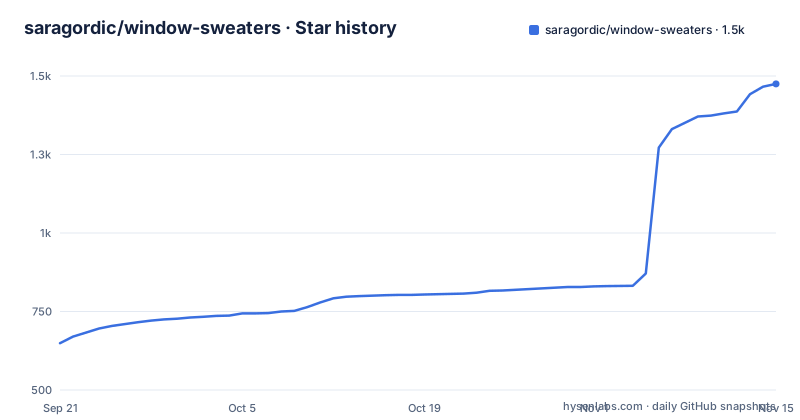
Star history
- saragordic/window-sweaters1,475 ★ · +826
| Repository | 2026-09-21 | 2026-11-15 |
|---|---|---|
| saragordic/window-sweaters | 649 | 1.5k |
826 Stars in the last 55 days, measured from the daily GitHub snapshot. Compare with other projects
Editorial analysis
The settings folder kept the app's original name
The folder the app reads at startup is `~/Library/Application Support/Knit Borders`, which is not the name you see in the menu bar. The author kept the earlier name on purpose so existing settings keep working, and the same is true of the preferences file, `~/Library/Preferences/local.knitborders.app.plist`. Two things live in the folder: `apps.conf` and a `charts` subfolder. A colour rule is one line, an app name, a hex colour and a pattern:
Claude = #D58561 atelier-claudeNames match app-name prefixes and ignore capitalisation, so a rule for Claude covers anything starting with that name, and when two rules both match, the longest one wins. You can also drop your own PNG files into the charts folder to replace the built-in patterns outright. Changes take effect on restart.
An optional startup script runs before anything else
There is a second configuration surface that is not in the Application Support folder at all. If a shell script exists at `~/.config/window-sweaters/sweatersrc` or at `~/.sweatersrc`, Window Sweaters runs it at startup. That is the whole mechanism, with no arguments and no documented options attached to it, and it is described as optional. It matters because it sits at the same level as your colour rules: whatever it changes applies before the app draws its first border, which makes it the place to handle per-app setup you would otherwise script yourself. The colour rules and the PNG charts remain the ordinary path for most people. This one is for the case where the app needs something done to the system, or to other tools, before the border work starts.
The build links SkyLight out of PrivateFrameworks
The link line in the Makefile is the part of this project with the most exposure to the system underneath it:
LIBS = -framework AppKit -framework Cocoa -framework CoreVideo -framework UniformTypeIdentifiers \
       -F/System/Library/PrivateFrameworks/ -framework SkyLight
AppKit and CoreVideo are public frameworks. SkyLight is not, and the search path it is picked up from is PrivateFrameworks, so the window behaviour this app draws borders around comes from an interface Apple does not promise to keep. The README says the same thing in plain words: private macOS window APIs are used, so system updates may affect how it works. The author also asks for the macOS version, the Mac model and whether another screen is attached in every bug report, which is the right set of details to send precisely because of that dependency. Nothing in the repository guards against a private framework changing shape between releases.
Released builds are universal, local builds are not
Two build outputs come out of the same source, and the difference is deliberate. Released builds carry both architectures, with `ARCHS = -arch arm64 -arch x86_64` and a comment explaining that Intel Macs need to run the download, while local development targets stay native for build speed. Three Objective-C files, menubar.m, autoyarn.m and hidden.m, compile first under ARC, and then the C sources link together under `-std=c99` into `bin/borders`. The debug path repeats the same work at `-O0` with `-DDEBUG` and writes `bin/debug` instead. A third target, `bin/render-test`, is narrower still: it compiles the knitting, chart and app sources with ApplicationServices and CoreText and no AppKit at all, which is what lets the collection render without a window server.
The minimum version flag exists because the plist is not enough
The Makefile carries a comment explaining a linker flag that looks redundant. `DEPLOY = -mmacosx-version-min=13.0` sets the deployment target at compile time, and the note above it says that without it clang targets whatever macOS the build ran on, after which the binary refuses to launch below that version no matter what LSMinimumSystemVersion says. So the floor stated in the README as macOS 13 or later is enforced twice, once in the metadata and once in the binary, and only the compiler flag makes them agree. An `AppInfo.plist` sits at the repository root for the bundle side of the same question. Two platform caveats come from elsewhere in the project rather than the build: the app is built for Apple Silicon and Intel, but the author has tested by hand on Apple Silicon with macOS 26, leaving older macOS and Intel without that testing.
Icon colours are a fallback, and apps.conf beats them
Apps without a hand-picked colourway borrow one from their own icon, sampled locally in the background when needed, softened into yarn and used for a two-colour zigzag, picnic or twinkle sweater. While that sampling runs, the border shows its usual fallback rather than an empty colour, and an icon with nothing usable in it falls back again to a stable colour chosen from the app name, so a given app looks the same every launch. Three details decide what wins. Colours set in `apps.conf` always take precedence. Zigzag uses icon colours for every app, including the 37 with custom sweaters, going with cream or with a deeper shade of the app's own colour on pale icons. The other shared patterns keep their own contrast yarns over each app's base colour. The 37 custom sweaters hold on to their hand-picked colours and patterns throughout.
Not notarized, Accessibility-gated, and three leftovers on uninstall
The app is not notarized by Apple, so the first launch can be blocked and the documented route is System Settings, then Privacy & Security, then Open Anyway. It also asks for Accessibility access so it can follow which window is focused. Removal is where the three pieces separate. Quit from the yarn icon first, then Homebrew users run:
brew uninstall --zap --cask window-sweatersNote that the install command is qualified with the tap while the uninstall is not, so the two lines are not symmetric to copy. `--zap` also removes your saved colourways, and leaving it off keeps them. A manual install means dragging the app to the Trash and then deleting `~/Library/Application Support/Knit Borders` and `~/Library/Preferences/local.knitborders.app.plist` if you want everything gone. The Accessibility permission is remembered by macOS separately and has to be withdrawn from System Settings by hand.
Editorial conclusion
Window Sweaters suits people who spend the day in one or two apps and want their windows to look different, and the untick-an-app control makes it tolerable in a mixed desktop. Three things to know before installing. It is not notarized, so the first launch needs Open Anyway. It needs Accessibility access to know which window is focused, which is a permission macOS also keeps separately when you remove it. And it links SkyLight from /System/Library/PrivateFrameworks, so a system update can change how it behaves on a machine you did not test.
Frequently asked questions
What does Window Sweaters need Accessibility access for?
So it can follow which window is focused. The permission is granted in System Settings under Privacy & Security, and macOS remembers it separately, so removing the app does not withdraw it.
How do I change one app's colours in Window Sweaters?
Edit apps.conf in ~/Library/Application Support/Knit Borders and restart the app. A rule looks like `Claude = #D58561 atelier-claude`, names match app-name prefixes ignoring capitalisation, and the longest match wins.
What does the zap flag remove from Window Sweaters?
`brew uninstall --zap --cask window-sweaters` removes your saved colourways along with the app. Leaving --zap off keeps those settings for later.
How many apps have custom sweaters in Window Sweaters?
37, grouped across Apple apps, work and notes, coding and AI, design, Microsoft Office and a last group of favourites. Almost 40 colourways in total, with the colours picked by hand.
Which Macs does Window Sweaters support?
macOS 13 or later, on Apple Silicon and Intel. The author has tested by hand on Apple Silicon with macOS 26 and notes that older macOS versions and Intel Macs have not had the same testing.
Can Window Sweaters run its own script at startup?
Yes. If a script exists at ~/.config/window-sweaters/sweatersrc or at ~/.sweatersrc, the app runs it at startup. The feature is described as optional.
Official sources
Where developers are discussing it
Posts on Hacker News, dev.to and Lobsters that link to this repository, found by our scan of those communities. 1 in the last 30 days; newest first.
- Window SweatersHacker News · Nov 5, 2026 · 461 points · 136 comments
- Window SweatersHacker News · Sep 15, 2026 · 2 points · 0 comments
Add this badge to your README
If you maintain this project, the badge below links readers to this analysis and shows its maintenance status from the daily GitHub snapshot. Paste the markdown into your README; add ?metric=license or ?metric=stars to the image URL for a different field.

[](https://hysenlabs.com/projects/saragordic-window-sweaters)Star history chart for your README
[](https://hysenlabs.com/projects/saragordic-window-sweaters)Was this useful?