discord-mcp: a small Java MCP server whose docs contradict themselves about Docker
A MCP server for the Discord integration. Enable your AI assistants to seamlessly interact with Discord. Enhance your Discord experience with powerful automation capabilities.
At a glance
- What is it?
- A Spring Boot Model Context Protocol server for Discord on port 8085, with six documented client configurations, an actuator health check, and two run modes. The recommended path handles the bot token well; the legacy path inlines it into command arguments, and the compose file reuses the published image tag.
- Who is it for?
- discord-mcp is a small, conventional service, and the documentation is better than average for one: six client configurations, a health endpoint you can curl, and a compose file that refuses to start without a token. Two things to check before you run it.
- Can I use it commercially?
- Yes. MIT is a permissive licence: you can use, modify and sell software built on it, as long as you keep its copyright and licence notices.
- Is it still maintained?
- Yes. The repository last received commits 23 days ago.
- What is it written in?
- Mainly Java, according to GitHub's language statistics.
Answers come from the project's GitHub data, last synced on November 15, 2026, and from our analysis. They are not legal advice.
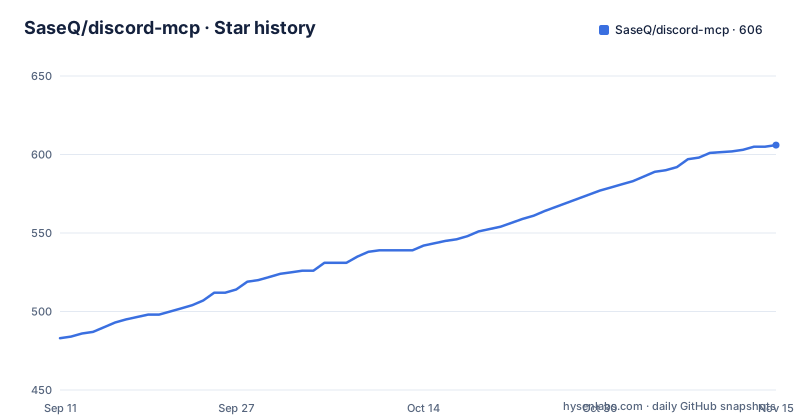
Star history
- SaseQ/discord-mcp606 ★ · +123
| Repository | 2026-09-11 | 2026-11-15 |
|---|---|---|
| SaseQ/discord-mcp | 483 | 606 |
123 Stars in the last 65 days, measured from the daily GitHub snapshot. Compare with other projects
Editorial analysis
Docker is called required, and a Maven path is documented two sections later
The installation section opens with Docker marked as the recommended path, and the note under it says Docker installation is required. Full instructions are pointed at a Docker download page.
Two sections later, a manual installation section gives instructions that do not involve Docker at all: clone the repository, build with Maven, and run the jar as a long-running server.
Both cannot be true as written. Either the note means Docker is the recommended path and Maven is an alternative for people who cannot run a container, in which case the word required is doing the wrong job, or Docker really is mandatory and the manual route is a leftover from an earlier release.
The manual route is current enough to be deliberate, because it ends with a specific jar filename and version. Running it means passing the credentials as inline environment assignments:
DISCORD_TOKEN=<YOUR_DISCORD_BOT_TOKEN> \
DISCORD_GUILD_ID=<OPTIONAL_DEFAULT_SERVER_ID> \
SPRING_PROFILES_ACTIVE=http \
java -jar /absolute/path/to/discord-mcp-1.0.0.jar
That version in the filename is also the only release the project has tagged, and the last push to the branch came about five weeks after it. So the documented manual command names a build that predates the current source.
The recommended docker run passes the token through, and the legacy config inlines it
Three environment variables are set before anything starts, and the recommended Docker run forwards them by name rather than by value:
export DISCORD_TOKEN="YOUR_DISCORD_BOT_TOKEN"
export DISCORD_GUILD_ID="OPTIONAL_DEFAULT_SERVER_ID"
export SPRING_PROFILES_ACTIVE=httpdocker run -d -i \
--name discord-mcp \
--restart unless-stopped \
-p 8085:8085 \
-e SPRING_PROFILES_ACTIVE \
-e DISCORD_TOKEN \
-e DISCORD_GUILD_ID \
saseq/discord-mcp:latestPassing a variable name with no equals sign hands the value across from the shell environment. The token never appears in the command line, so it does not end up in shell history or in the process list.
The legacy configuration for the same server does the opposite. The stdio form of the client config spells the token out inside the argument list, and so does the legacy Claude Code registration command.
That is a real difference in exposure between two paths on the same page, and the page labels one recommended and the other legacy without saying why the handling differs. The legacy mode also has a structural cost independent of the token: it starts a new container for each client session, where the recommended HTTP mode is a single shared server.
The compose route adds a third variant. Its setup step writes the token into a local env file through a heredoc, so it lands on disk in plaintext rather than in a shell variable. An example env file is shipped, which means the pattern is intended rather than accidental.
The compose file tags a local build with the same tag as the published image
The compose file does two things that conflict. It declares a build from the local context, and it tags the result with the published image name and the latest tag.
So the documented start command, which builds, produces a local image carrying the same reference as the one the Docker installation section pulls. Nothing on the page mentions the overlap.
The practical sequence problem is straightforward. Someone who builds gets their own code. Someone who runs the pull command from the Docker section gets the published code. Someone who builds once and then later runs without rebuilding is still on their local image, and cannot tell from the tag name which one is running.
It is the kind of thing that makes a support conversation start with a version mismatch, because both sides report the same image reference.
The environment handling in the same file is better. The profile variable falls back to http, the guild id falls back to an empty string, and the token has no fallback at all, so compose refuses to start rather than launching a bot with an empty credential.
The health check is declared too, against the actuator endpoint, on a thirty-second interval with three retries and a twenty-second start period, which is a reasonable shape for a service that takes a moment to come up.
The example env file gives the optional guild id a non-empty placeholder
The guild id variable is described three times as optional. When it is set, it supplies a default Discord server id so that any tool accepting a guildId parameter can omit it.
The compose file treats it as genuinely optional, defaulting it to an empty string. The example environment file does not. Its placeholder value is a literal non-empty string reading as an optional default server id placeholder, rather than being left blank.
So a user who copies the example file, fills in the token, and leaves the third line alone ships a literal placeholder string as their default guild. Nothing errors at startup. Tool calls that accept a guildId will simply use it, and every one of them will fail against Discord.
The failure would look like a broken server rather than an unedited configuration line, which is why it is worth checking the value rather than assuming an optional variable is inert.
The variable is genuinely useful and the optionality is genuinely correct. It is only the placeholder that works against both. Deleting the line, rather than editing it, is what produces the optional behaviour the page describes.
The recommended mode publishes port 8085 on every interface
Both the Docker run and the compose file publish the same port mapping, and both use the plain form rather than binding to loopback.
That means the MCP endpoint, and the actuator health endpoint on the same port, are reachable from anywhere that can route to the host. The page describes neither endpoint as requiring authentication.
The only credential in play is the Discord bot token, and it is consumed by the server rather than checked by the endpoint. So the access control story for the server itself rests on network position rather than on anything the application enforces.
This is normal for a locally run MCP server, and both example configurations point at localhost. The mismatch is that the container configuration makes the service reachable off-host by default while every example client configuration assumes it is not, so the same setup behaves differently depending on whether the client and the server share a machine.
The health check is worth separating out. It is the documented verification step, it is unauthenticated by design, and the compose instructions tell you to curl it. That is the right shape for a liveness probe, and it does mean a deployment has an unauthenticated endpoint that confirms which software is running on it.
The image build skips tests, and the jar copy is a wildcard
The image is built in two stages. A Maven stage on a JDK 17 base copies the build descriptor, copies the source, and packages with tests skipped. A runtime stage on a Java 17 Alpine image copies the resulting jar in and runs it.
Skipping tests in the image build is the right call for a container image, since a test suite belongs in continuous integration rather than in every pull. The cost is that a build which produces a working container tells you nothing about whether it is correct.
The copy is a wildcard over the target directory rather than a named file. That works while the build emits exactly one jar. If the build ever emits a second artefact in that directory, a source jar or a shaded-plus-original pair, the copy either picks up more than the entrypoint expects or fails outright.
Two more details come from the same file. The runtime stage declares the bot token and the guild id as empty environment variables, which means a container started without them runs with an empty credential rather than refusing to start. And the expose directive and the health check are declared at the image level, which is what makes a bare container run healthy without compose.
The image and the compose file declare the same health check twice
The compose file declares a health check, and the image declares one too. They are not similar, they are identical: the same command, the same thirty-second interval, the same three-second timeout, the same twenty-second start period, and the same three retries.
The command itself greps the actuator health response for a status field reading UP, and exits non-zero otherwise.
Under compose the file's version wins and the image's instruction is inert, so for anyone using the documented compose route the duplication is harmless. For anyone running the container directly, the image's copy is what makes the container report healthy, which is the case the compose file does not cover.
So the redundancy has a defensible reason, and the page does not explain it. What it does mean is that changing the health check means changing it in two files, and a mismatch between them would only show up on one of the two run paths.
The same split applies to the published image reference. The compose file rebuilds locally and applies the published tag, while the Docker section pulls the published tag directly, so the two documented routes do not guarantee the same code.
Only one client configuration names the HTTP transport explicitly
Six clients are documented, and they disagree about how to name the transport.
Claude Code is given an explicit transport flag pointing at the local endpoint, plus a legacy form that registers a Docker command instead. Codex is given a url flag with no transport argument, followed by a command that lists what was added. OpenClaw is the only one that names the transport as streamable HTTP, in both its command-line form and its config file. Cursor's config carries a url and nothing else. n8n is told to choose between HTTP and streamable HTTP depending on its version and node options.
So one project, one endpoint, and five different ways of describing how to reach it, with only one configuration telling you the wire format the server actually speaks.
That matters because the two names are not interchangeable in every client. A reader copying the OpenClaw example into a client that expects a different transport name gets a configuration error, and a reader copying the Cursor example into one that needs the transport spelled out gets a connection failure.
The server side is unambiguous about the endpoint itself, and it is the same string in all six places. It is the transport vocabulary that is left to the reader to infer.
Editorial conclusion
discord-mcp is a small, conventional service, and the documentation is better than average for one: six client configurations, a health endpoint you can curl, and a compose file that refuses to start without a token. Two things to check before you run it. Token handling differs between the documented modes, passed through from the environment in the recommended path and inlined into command arguments in the legacy one, which puts it in your shell history. And the compose file tags a locally built image with the same tag the published image uses, so a build and a pull will silently hand you different code depending on which ran last.
Frequently asked questions
What is discord-mcp?
A Model Context Protocol server for the Discord API built on JDA, letting MCP-compatible assistants such as Claude or ChatGPT manage channels, send messages and retrieve server information. It runs as a Spring Boot service listening on port 8085.
Which environment variables does discord-mcp need?
Three: the Discord bot token, an optional default guild id, and a Spring profile selecting HTTP or legacy stdio mode. The guild id is optional, and when set it lets any tool that accepts a guildId parameter omit that argument.
How do I connect discord-mcp to Claude Code?
In the recommended HTTP singleton mode, add it with the HTTP transport flag pointing at the local endpoint. The legacy alternative registers a Docker command that starts a new container for each client session rather than reusing one server.
Does discord-mcp require Docker?
The Docker section says Docker installation is required and marks it the recommended path, but a manual route is documented too: clone the repository, build with Maven, and run the jar as a long-running server.
How do I check whether discord-mcp is healthy?
Request the Spring Boot Actuator health endpoint on port 8085. Both the image and the compose file declare a health check against it, and the compose instructions list filtering the running container and curling that endpoint as the verification step.
Official sources
Add this badge to your README
If you maintain this project, the badge below links readers to this analysis and shows its maintenance status from the daily GitHub snapshot. Paste the markdown into your README; add ?metric=license or ?metric=stars to the image URL for a different field.

[](https://hysenlabs.com/projects/saseq-discord-mcp)Star history chart for your README
[](https://hysenlabs.com/projects/saseq-discord-mcp)Was this useful?