scx: a shelf of sched_ext schedulers you can try by typing a name
sched_ext schedulers and tools
At a glance
- What is it?
- The sched_ext reference tree, holding around twenty production schedulers and a set of tools, all of which become the system scheduler by being run and stop being it when they exit.
- Who is it for?
- What makes scx unusual is that trying a scheduler costs you one command and undoing it costs you one keystroke, so the tree reads as a menu rather than a commitment. `scx_simple` is the honest starting point because its userspace process only prints statistics, which is why suspending it with ctrl-z changes nothing about scheduling behaviour, and the README is explicit that this does not hold for every scheduler.
- Can I use it commercially?
- Yes, with conditions. GPL-2.0 is a copyleft licence: if you distribute software that includes it, you must release that software's source code under the same licence. Running it internally without distributing it does not trigger that obligation.
- Is it still maintained?
- Yes. The repository last received commits 3 days ago.
- What is it written in?
- Mainly C, according to GitHub's language statistics.
Answers come from the project's GitHub data, last synced on October 20, 2026, and from our analysis. They are not legal advice.
Star history
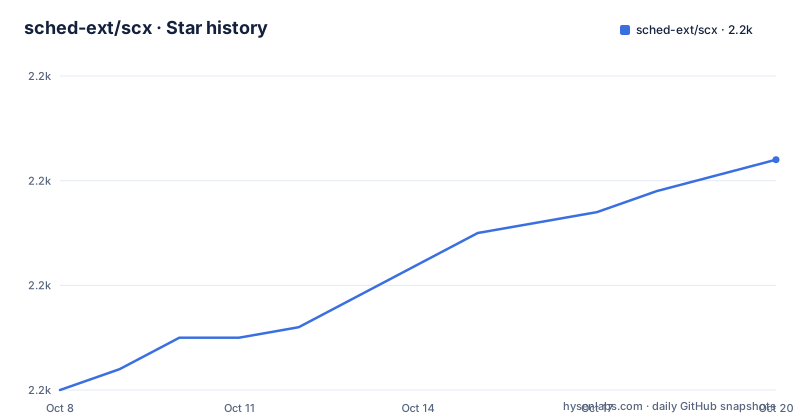
- sched-ext/scx2,202 ★ · +22
| Repository | 2026-10-08 | 2026-10-20 |
|---|---|---|
| sched-ext/scx | 2.2k | 2.2k |
22 Stars in the last 12 days, measured from the daily GitHub snapshot. Compare with other projects
Editorial analysis
Running a binary is what installs a scheduler
The operational model is short enough to quote in full, and the transcript is the documentation. The README starts by reading the kernel state and the per-scheduler ops files, runs a scheduler, suspends it to confirm it loaded, and then terminates it to fall back to the kernel default:
root@test ~# cat /sys/kernel/sched_ext/state /sys/kernel/sched_ext/*/ops 2>/dev/null
disabled
root@test ~# scx_simple
local=1 global=0
local=74 global=15
local=78 global=32
local=82 global=42
local=86 global=54
^Zfish: Job 1, 'scx_simple' has stopped
root@test ~# cat /sys/kernel/sched_ext/state /sys/kernel/sched_ext/*/ops 2>/dev/null
enabled
simple
root@test ~# fg
Send job 1 (scx_simple) to foreground
local=635 global=179
local=696 global=192
^CEXIT: BPF scheduler unregistered
Three things fall out of that. There is no daemon to install, no service to register, no kernel module to sign. You run a binary, it loads BPF code into the kernel, and the kernel default goes away. Kill the process and it comes back. The state file changes from `disabled` to `enabled`, and the ops file shows the scheduler name, which is also the cheapest way to confirm what is actually running on a machine.
The numbers the process prints are vtime counters, which is why the README describes `scx_simple` as a global vtime scheduler. That is the whole algorithm: virtual time for everything, with no topology awareness, which is fine on a single socket with a single L3 domain and the wrong choice for anything else.
The README also names two escape hatches beyond ctrl-c: `sysrq-S` and the watchdog timer. Ignoring kernel bugs, a `sched_ext` scheduler can starve threads, and the watchdog is the backstop when your userspace process wedges.
Twenty schedulers, and the docs tell you what each one is for
The Cargo workspace member list is the closest thing to a catalogue, and it is worth reading as a menu rather than as infrastructure. Under `scheds/rust/` sit `scx_beerland`, `scx_bpfland`, `scx_cake`, `scx_chaos`, `scx_cosmos`, `scx_eevdf`, `scx_forge`, `scx_flash`, `scx_lavd`, `scx_layered`, `scx_mitosis`, `scx_p2dq`, `scx_pandemonium`, `scx_rustland`, `scx_rusty` and `scx_tickless`. A separate `scheds/experimental/` directory holds `scx_flow`, `scx_nitosis`, `scx_mavd`, `scx_rlfifo` and `scx_mlfq`, and putting those five in their own directory is the maintainers telling you something about their confidence level.
The names alone do not tell you much, which is why the README points at a separate schedulers document at `scheds/README.md` for descriptions and at a case study for `scx_layered` for a worked example of what the mechanism can do. `scx_cosmos` is described by upstream as a latency-sensitive scheduler, `scx_lavd` as a latency-critical one, and `scx_flash` and `scx_pandemonium` as experimental takes on other ideas. The tree deliberately contains competing approaches to the same problem, which is the point of an experimental platform.
The README's own worked example is more useful than the names. It points at `scx_rustland`, which makes most scheduling decisions in userspace Rust rather than BPF, and reports better frame rates in Terraria while a kernel compile is running. It immediately qualifies the result: this does not mean it is a better scheduler, it shows how safe and easy it is to write one that is generally usable and beats the default in a specific scenario. That is an unusually careful framing from a project that could have claimed a win, and it tells you how to read every other benchmark claim attached to this tree.
Tooling sits alongside the schedulers: `scxtop` for live inspection, `scx_characterize` for workload characterisation, `scx_forge_agent` paired with `scx_forge`, and `vmlinux_docify` for generating kernel headers.
The build needs a newer toolchain than most distros ship
Here is the practical friction. The README says outright that developing schedulers in this tree is not complicated, then immediately says `sched_ext` uses many new BPF features that require build tools newer than what many distributions ship, and that custom repositories are provided for select distributions in the meantime.
The floors are specific. `clang` 18 is required and 22 is required for the cid-form schedulers, `libbpf` 1.2.2 is required with 1.3 recommended, `bpftool` usually arrives in `linux-tools-common`, and `libelf`, `libz` and `libzstd` are needed for linking against libbpf. The Rust toolchain must be 1.91 or newer, pinned through `rust-toolchain.toml` at the repository root. There is also a `SCX_ALLOW_OLD_CLANG` environment variable that lets you build the cid-form schedulers with an older clang, with a warning instead of a refusal.
The kernel side has its own configuration list, and these are the lines you append to your kernel `.config`:
CONFIG_BPF=y
CONFIG_BPF_SYSCALL=y
CONFIG_BPF_JIT=y
CONFIG_DEBUG_INFO_BTF=y
CONFIG_BPF_JIT_ALWAYS_ON=y
CONFIG_BPF_JIT_DEFAULT_ON=y
CONFIG_SCHED_CLASS_EXT=y
The repository ships a `kernel.config` file containing those required options plus the recommended ones, so appending it is the practical route rather than copying seven lines by hand. Install instructions are broken out per distribution in `INSTALL.md`, covering Ubuntu, Arch, Gentoo, Fedora, Nix and openSUSE Tumbleweed, and a `.nix/` directory at the root is the Nix route made concrete.
Building itself is a cargo invocation, and because these are published crates, you can skip the checkout entirely:
$ cd $SCX
$ cargo build --release                 # Build all Rust schedulers
$ cargo build --release -p scx_rusty # Build specific scheduler$ cargo install scx_rustyRust schedulers land in `target/release/scx_rusty`. In the examples `$SCX` refers to the repository root.
Upstream status, and what the C example repository means
Two statements in the README define the project's standing. First, `sched_ext` is supported by the upstream kernel from version 6.12 onward, and both Meta and Google are described as fully committed to it, with Meta in the process of mass production deployment. Second, the C schedulers that used to live in this repository have moved out to a separate `scx-c-examples` repository, and everything shipped here now uses Rust for its userspace component.
That second point is the one to internalise before reading the tree. A visitor arriving with a mental model of BPF C from the earlier scx layout will find `scheds/include/` still described as shared BPF and user C include files including `vmlinux.h`, which preserves that impression, but the actual scheduler implementations are Rust. The `scx_simple` example is likewise no longer here; the README links it to the C examples repository, which also holds the `scx_simple.bpf.c` source. So the historical narrative and the current layout genuinely differ, and both are in the README.
The repository makes an explicit architectural commitment that you will not find elsewhere in this form: the split between BPF code in the kernel and a userspace component that exists mostly to keep the scheduler alive and report statistics. Rust land takes that further by moving the scheduling decisions themselves into userspace Rust, which is a bigger bet on correctness and a bigger risk if the userspace process stalls.
The remaining root-level documents are unusually thorough for a project of this kind: `OVERVIEW.md` for the motivation, `DEVELOPER_GUIDE.md`, `CARGO_BUILD.md`, `BREAKING_CHANGES.md`, `RELEASE.md`, `INSTALL.md`, plus `DHQ_README.md` for a separate deliverable and a `pgo-lto.sh` script at the root, which tells you release builds go through profile-guided optimisation.
Editorial conclusion
What makes scx unusual is that trying a scheduler costs you one command and undoing it costs you one keystroke, so the tree reads as a menu rather than a commitment. `scx_simple` is the honest starting point because its userspace process only prints statistics, which is why suspending it with ctrl-z changes nothing about scheduling behaviour, and the README is explicit that this does not hold for every scheduler. For anything else, read `scheds/README.md` for what each implementation targets, and expect a build toolchain newer than most distributions ship: clang 18 minimum and 22 for the cid-form schedulers, libbpf 1.2.2 or newer, and a Rust toolchain at 1.91 or above. Start by confirming the state file reports `enabled` after you run a binary, because that single line tells you whether the kernel side is actually live.
Frequently asked questions
Which scheduler should I try first in scx?
Start with `scx_simple`, the one the README demonstrates. It is a global vtime scheduler that behaves acceptably on a simple single-socket, single-L3 topology, and its userspace process only prints statistics, so suspending it changes nothing about scheduling behaviour.
How do I undo an sched_ext scheduler?
Terminate the scheduler process and the kernel default scheduler takes over again. The README also names `sysrq-S` and the watchdog timer as two further ways to disable it. You can confirm the current state by reading `/sys/kernel/sched_ext/state` and the per-scheduler ops files.
What do I need installed to build the scx schedulers?
Clang 18 or newer, 22 for the cid-form schedulers; libbpf 1.2.2 or newer; bpftool, usually from `linux-tools-common`; libelf, libz and libzstd; and Rust 1.91 or above. The kernel needs `CONFIG_SCHED_CLASS_EXT=y` plus the BPF and BTF options, and the repository ships a `kernel.config` with the full list.
What is the difference between scx_rustland and the BPF schedulers?
Most schedulers make their decisions in BPF inside the kernel. `scx_rustland` moves most of that logic into userspace Rust, which the README says demonstrates how safe and easy it is to implement a generally usable scheduler that beats the default in a particular scenario.
Official sources
Add this badge to your README
If you maintain this project, the badge below links readers to this analysis and shows its maintenance status from the daily GitHub snapshot. Paste the markdown into your README; add ?metric=license or ?metric=stars to the image URL for a different field.

[](https://hysenlabs.com/projects/sched-ext-scx)Star history chart for your README
[](https://hysenlabs.com/projects/sched-ext-scx)Was this useful?