WaaS: a Redis queue, an email inbox and signed webhooks around Whisper
Whisper as a Service (GUI and API with queuing for OpenAI Whisper)
At a glance
- What is it?
- Schibsted's WaaS wraps OpenAI Whisper in a queued API with email or webhook delivery, plus a browser editor called Jojo for fixing the transcript afterwards. The routes are short and readable, but the prose and the compose file disagree in more than one place.
- Who is it for?
- WaaS fits a team that wants finished transcripts pushed out by email or webhook without assembling Redis, a worker and an SMTP server itself. It does not fit an operator who needs an authenticated API surface, pinned dependency versions or a written upgrade path, because none of those exist here.
- Can I use it commercially?
- Yes. Apache-2.0 is a permissive licence: you can use, modify and sell software built on it, as long as you keep its copyright and licence notices.
- Is it still maintained?
- Yes. The repository last received commits 8 days ago.
- What is it written in?
- Mainly JavaScript, according to GitHub's language statistics.
Answers come from the project's GitHub data, last synced on October 23, 2026, and from our analysis. They are not legal advice.
Star history
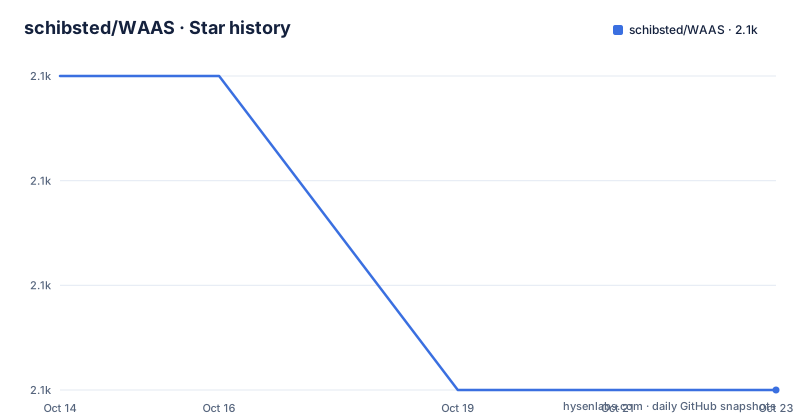
- schibsted/WAAS2,071 ★ · -3
| Repository | 2026-10-14 | 2026-10-23 |
|---|---|---|
| schibsted/WAAS | 2.1k | 2.1k |
-3 Stars in the last 9 days, measured from the daily GitHub snapshot. Compare with other projects
Editorial analysis
Jojo edits transcripts in the browser after the file lands in your inbox
Schibsted's WaaS is two products sharing one repository. The API side queues jobs for OpenAI Whisper. The GUI side is called Jojo, and it works like this: you upload an audio or video file, wait for the transcription to finish, and an email arrives with download links. That mail offers a Jojo-file, an SRT file, or plain text. Upload the Jojo-file back to the frontend and an editor opens that runs entirely inside your own browser. Segments can be played with the Control key held down, transcription errors can be retyped, and the corrected Jojo-file is saved straight to your desktop. Nothing in that loop requires the audio to travel back to the server, which is the reason for splitting the media file from the correction step. The naming is uneven, though. Routes, the webhook payload and the repository all call themselves waas, while the interface a user actually meets is Jojo, so a first-time user has to learn two names for one service.
One Redis queue separates the API container from the worker
The compose file defines three services: api, worker and redis. The api service publishes port 3000 and its command starts Gunicorn against `src.main:app`, while the worker runs `rq worker --url redis://redis:6379 -c worker-settings`, so the queue is Redis itself, reached on port 6379. A POST to `/v1/transcribe` returns a JSON object holding `job_id` and nothing more, because the worker does the transcription later. The route `/v1/jobs/<job_id>` reports status and metadata, and `/v1/queue` returns a single number under the key `length`. Both containers mount `.:/workspace`, and the tree carries an `upload-shared-tmp/` directory, so the hand-off between api and worker happens through a bind mount on the host rather than a named volume. `depends_on` sequences startup without a healthcheck, so nothing holds the API back until Redis is ready. Nothing in the documentation describes queue depth limits, retry policy or a dead letter path either.
Every job must name an email callback or a whitelisted webhook
Both submit routes insist on a destination for the finished file. `/v1/transcribe` requires `email_callback` or `webhook_id` as a query parameter and takes raw audio as binary data in the body. Four optional parameters tune the job: `language`, defaulting to automatic detection, `model`, defaulting to `tiny`, `task`, defaulting to `transcribe` and also accepting `translate` to transcribe and then translate, and `filename`, defaulting to `untitled-transcription`. That last default is what turns up in the download email when nothing is passed, so it is worth setting by hand. `/v1/detect` is the smaller sibling, taking the same binary body plus one optional `model` parameter that also defaults to `tiny`, and returning the detected language. Both routes answer OPTIONS calls, documented as returning the available options for the route. Audio therefore reaches the worker as an opaque upload with no declared size ceiling anywhere in the documentation.
Five output formats hang off one download route
Results leave through the route `/v1/download/<job_id>`, which takes one optional `output` parameter defaulting to srt. The accepted values are json for the raw model output, timecode_txt for a text file carrying timecodes, txt for the detected text on its own, vtt for WebVTT, and srt as the default. The list contains a slip: the srt entry repeats the WebVTT wording used for vtt, which tells a caller nothing about how the default output differs from WebVTT. Job identifiers are UUIDs, and the webhook payload shows the finished address assembled from `BASE_URL`, in the shape `https://example.com/v1/download/09d2832d-cf3e-4719-aea7-1319000ef372`. An OPTIONS call is documented on the same route. Since one route serves every format, a caller that guesses the parameter value gets the default rather than an error.
Webhooks are signed and matched against a git-ignored allowlist
Choosing `webhook_id` instead of an email address points the service at an entry in `allowed_webhooks.json`, a file you add to the project root and git ignores. Each entry holds an id, a url and a token, so destinations are enumerated on disk rather than open to whoever finds the API. When a job ends, the service POSTs to the registered url and attaches a `X-WAAS-Signature` header carrying a hash; `tests/test_webhook.py` is the reference for verifying it in Python on the receiving side. The success payload looks like this:
{
  "source": "waas",
  "job_id": "09d2832d-cf3e-4719-aea7-1319000ef372",
  "success": true,
  "url": "https://example.com/v1/download/09d2832d-cf3e-4719-aea7-1319000ef372",
  "filename": "untitled-transcription"
}
The failure payload drops the download address and the filename, keeping only source, job_id and a success flag set to false, so a rejected job says nothing about why it failed. For trying this out, the webhook.site service is offered, with the warning against sending private data through it.
Starting it takes a venv, an envrc file and one compose command
Without Docker the install is three lines in a shell:
python3 -mvenv .venv
source .venv/bin/activate
pip install -r requirements.txt
The first line attaches the module name to the flag with no space, which is odd formatting for a virtualenv command, and the second only reads in bash or zsh. Nothing in that sequence starts a server: the entry point lives under `src/`, and the repository image launches flask against `src/main` in debug mode on port 3000.
The container path begins with a `.envrc` file, although the tree ships `dotenv-example` instead:
export BASE_URL=https://example.com
export [email protected]
export EMAIL_SENDER_PASSWORD=example
export EMAIL_SENDER_HOST=smtp.example.com

export DISCLAIMER='This is a <a href="example.com">disclaimer</a>'

export ALLOWED_WEBHOOKS_FILE='allowed_webhooks.json'
export LOG_EMAIL=true // Optional, log email content to console
The mail variables point at an SMTP server, so email delivery is not optional for the Jojo flow. The trailing comment uses `//`, which is JavaScript syntax sitting inside a shell export file. Three containers then come up:
docker-compose --env-file .envrc upThe environment lists in the compose file are shorter than the documentation. The api service passes `BASE_URL`, the four mail variables, `DISCLAIMER` and `ALLOWED_WEBHOOKS_FILE`, while the worker's list ends at `ALLOWED_WEBHOOKS_FILE` and has no `DISCLAIMER`. `LOG_EMAIL`, documented in the env file above, appears in neither list.
The README describes Flask, compose runs Gunicorn with two workers
The prose and the compose file disagree about how the API starts. The container list in the README calls it an api container running flask from src, and the Dockerfile's default command runs flask against `src/main` with debug enabled on port 3000. Compose replaces that command with `gunicorn -w 2 -b 0.0.0.0:3000 --log-file=- 'src.main:app'`, so the debug flag never applies on the compose path and the Flask development server serves nothing there. The tree carries `gunicorn.conf.py`, and that command never names the file, while the worker does pass its settings through `-c worker-settings`. Two further slips: the instructions tell you to edit `docker-compose.yml` although the repository file is `docker-compose.yaml`, and the GPU walkthrough stops mid-word at 'You also have to uncomment the devic', so its last step is missing. The GPU path splits the same way, with the compose file shipping a comment to switch dockerfile:
build:
    context: .
    # use Dockerfile.gpu when using a NVIDIA GPU
    dockerfile: Dockerfile.gpu
The device reservation block that would go with it is present but commented out.
One unpinned dependency, no API key and no job expiry policy
requirements.txt pins thirteen of its fourteen entries, among them `Flask==3.0.0`, `redis==5.0.1`, `rq==1.16.2`, `gunicorn==21.2.0` and `sentry-sdk==1.39.1`. The single unpinned line is `openai-whisper`, the component everything else exists to serve, so the model runtime you get is whatever pip resolves when the image is built. Test tools ride along in the same file, with `pytest==7.4.4`, `requests-mock==1.11.0` and `autopep8==2.0.4` installed into the runtime image. Hardware needs follow the model: the default `tiny` asks for about 1GB of VRAM, and larger sizes are left to Whisper's own model table. Python support is stated as 3.8-3.10 while the image is built from python:3.10-bookworm, and the repository names JavaScript as its primary language even though every pin in requirements.txt belongs to a Python package. More seriously, nothing in the API documentation requires a key: the route `/v1/download/<job_id>` takes no authentication parameter, so holding a job UUID is the only thing standing between a caller and the transcript. No route for deleting a job, no expiry policy and no rollback procedure appear anywhere.
The comparison to weigh is against running Whisper yourself, which is where the README sends you for models and Python versions. WaaS adds a Redis queue, an SMTP dependency, a webhook allowlist, five output formats and a browser editor; none of that is needed to turn a recording into an SRT file. The licence is Apache-2.0, the last push to the default branch landed on 2026-09-06, and there is no tagged release to upgrade to.
Editorial conclusion
WaaS fits a team that wants finished transcripts pushed out by email or webhook without assembling Redis, a worker and an SMTP server itself. It does not fit an operator who needs an authenticated API surface, pinned dependency versions or a written upgrade path, because none of those exist here. Before adopting it, check the open edges: the download route takes no key, openai-whisper carries no version pin, the README describes Flask while compose runs Gunicorn, and no job expiry or rollback is documented.
Frequently asked questions
What does WaaS add on top of OpenAI Whisper?
It puts a Redis queue in front of the model, delivers finished jobs by email or signed webhook, converts one job into five output formats, and ships Jojo, a browser editor for correcting segments after the fact.
Which model does WaaS use by default and how much VRAM does it need?
Both submit routes default the model parameter to `tiny`, which is documented as needing about 1GB of VRAM. Larger models are not listed in this repository; the README points at Whisper's own table for their requirements.
How do I collect a finished WaaS transcription?
The job identifier returned by the POST response feeds the route `/v1/download/<job_id>`, where one optional output parameter selects the format and defaults to srt. A webhook subscriber receives the download address in the success payload instead.
What does WaaS need before it will use a NVIDIA GPU?
Compose must build `Dockerfile.gpu` instead of `Dockerfile`, and the device reservation block shipped in the compose file has to be uncommented. The README also requires nvidia-docker to be installed on the host.
Can WaaS tell me that a transcription job failed, and why?
The webhook failure payload sets `success` to false and carries only `source` and `job_id`, with no error text at all. The route `/v1/jobs/<job_id>` returns the status and metadata for a given job.
Official sources
Add this badge to your README
If you maintain this project, the badge below links readers to this analysis and shows its maintenance status from the daily GitHub snapshot. Paste the markdown into your README; add ?metric=license or ?metric=stars to the image URL for a different field.

[](https://hysenlabs.com/projects/schibsted-waas)Star history chart for your README
[](https://hysenlabs.com/projects/schibsted-waas)Was this useful?