Capptivo needs four version numbers to agree, and its example tag is v0.1.0
Give your demos the spotlight they deserve ( Mac/Windows/Linux ).
At a glance
- What is it?
- A Tauri screen recorder distributed as unsigned installers for three platforms, where the release instructions, the test script and the FFmpeg sidecar pinning are more precise than the parts of the product a user actually runs.
- Who is it for?
- The engineering here is careful in the places that are hard to get right. FFmpeg arrives as a pinned, digest-verified sidecar instead of whatever the machine happens to have.
- Can I use it commercially?
- Yes. MIT is a permissive licence: you can use, modify and sell software built on it, as long as you keep its copyright and licence notices.
- Is it still maintained?
- Yes. The repository last received commits 42 days ago.
- What is it written in?
- Mainly TypeScript, according to GitHub's language statistics.
Answers come from the project's GitHub data, last synced on November 23, 2026, and from our analysis. They are not legal advice.
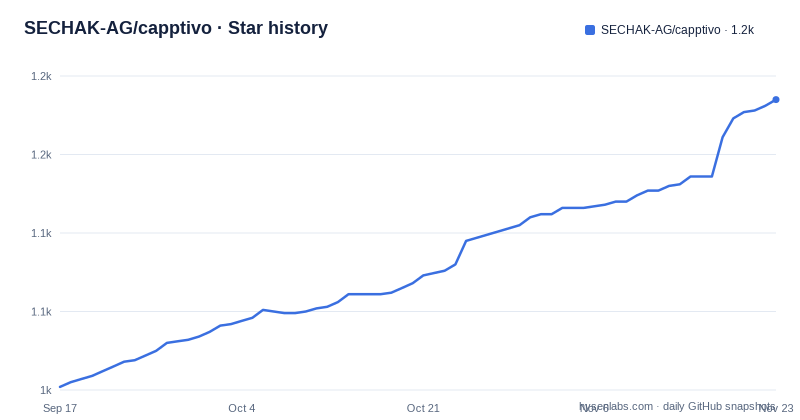
Star history
- SECHAK-AG/capptivo1,185 ★ · +183
| Repository | 2026-09-17 | 2026-11-23 |
|---|---|---|
| SECHAK-AG/capptivo | 1k | 1.2k |
183 Stars in the last 67 days, measured from the daily GitHub snapshot. Compare with other projects
Editorial analysis
Four version entries have to agree, and the example tag predates the releases
Cutting a release is a documented procedure, and step one is editing four places: the desktop version in `package.json`, `src-tauri/tauri.conf.json`, `src-tauri/Cargo.toml`, and the `desktop` package entry in `src-tauri/Cargo.lock`. The instruction is to keep all four identical.
That fourth entry is the awkward one. A lockfile normally records resolved dependency versions, so having the application version inside it means the file has to be edited by hand and can drift from the three declarations that a tool would otherwise keep in step.
The tag and push sequence follows:
git tag v0.1.0
git push origin main
git push origin v0.1.0
The example tag is v0.1.0. The published tags are v1.0.1, v1.0.2 and v1.0.3, so the worked example in the release instructions is two major versions behind what the project actually ships.
The workflow compensates for the human error this invites. It is run manually against an existing tag, accepts only a tag shaped like vMAJOR.MINOR.PATCH whose commit is reachable from the canonical default branch and whose four version entries match that tag, and it creates or replaces the assets of a draft release. Publication is a separate, deliberate step after a human reviews the draft.
The test script is five self-checks and a typecheck, with no unit runner
The `test` script in the desktop package is a chain rather than a single command: a typecheck with `tsc --noEmit`, then five Node scripts. Those are a general self-check runner, an FFmpeg fetch self-check, a release contract self-check, a release workflow self-check, and a cursor hotspot checker.
Two of the five validate the release machinery itself rather than application behaviour. The release contract check and the release workflow check exist because the release process is the part most likely to break silently, and the four-version-entry rule described earlier is exactly the kind of invariant that needs a test rather than a paragraph in a readme.
What is not in the visible dependency list is a unit test framework. There is no test runner declared among the packages, and there is no unit test directory at the top level. So the meaning of test in this repository is self-checks: contract assertions, workflow assertions, a fetch verifier, and a cursor-path check. That is a legitimate choice for a desktop app whose hardest logic lives in Rust and in media handling, and it is not the same thing as a suite that exercises the recorder, the editor and the zoom logic.
The cursor hotspot checker also appears on its own as a `check:cursor-hotspots` script, which suggests it is meant to be run on demand rather than only in the chain.
FFmpeg arrives as a pinned, digest-verified sidecar under a different name
A screen recorder needs FFmpeg, and most projects either require it on the machine or bundle whatever build they find. This one fetches it, and then checks it four times.
On the first development run or build, a script fetches FFmpeg as a per-platform sidecar. The binaries are installed under the names `capptivo-ffmpeg` and `capptivo-ffprobe` rather than `ffmpeg` and `ffprobe`, specifically so that a Linux package does not collide with the system ffmpeg package. That one rename removes a whole class of packaging conflict.
The pins live in a committed file, `scripts/ffmpeg-sidecars.json`, which records the exact source URLs, the archive members, the sizes and the SHA-256 digests. So the artifact is identified by content, not by a version string a mirror could move.
The fetcher then verifies at four stages: the downloaded file, the extracted file, the staged file, and the cache. Only after all four pass does it permit Tauri's chained command to continue. A cache entry that is missing or invalid is replaced from the pinned source, which means a corrupted cache is a slow re-download rather than a broken build.
A `THIRD_PARTY_NOTICES.md` at the repository root accompanies this, which is the right companion to redistributing someone else's binaries.
The interesting part is the contrast with the next feature, which handles a binary dependency in the opposite way.
Captions need a binary you install yourself, while everything else is fetched
The caption feature is described as on-device, which is accurate about where the recognition happens and incomplete about what you need first. Captions require a system whisper.cpp `whisper-cli` binary. The application downloads the model weights on the first use, but it does not provide the binary.
That puts two dependencies in front of the user where the project has already shown it can handle one of them properly. FFmpeg is fetched automatically, pinned by digest, renamed to avoid collisions and verified at four stages. The whisper binary is assumed to be on the system. So the least reliable path in the whole build is the one the project could have modelled on its own sidecar fetcher.
The distinction matters at install time rather than at feature time. A user who installs Capptivo expecting captions finds a working recorder and a caption option that produces nothing until they locate a build of whisper.cpp and put it on the path. Nothing in the download section says so, because the download section is a table of installer formats by platform.
The licensing side is worth noting too, since a whisper.cpp binary the user supplies is their own copy rather than one this project redistributes, and the third-party notices file therefore does not need to cover it.
The installers are unsigned on two platforms and the updater artifacts are signed
Three different signing states coexist in this project and it is worth keeping them apart.
The macOS bundles are ad hoc signed and not notarized, and the download section says the builds are currently unsigned. The instruction is that on first launch you right-click the app and choose Open, or allow Capptivo in System Settings under Privacy and Security. You then grant Screen Recording when prompted and relaunch.
The Windows bundles are not Authenticode-signed either. Apple notarization and Windows code-signing credentials are named as separate future work, which is a more useful statement than silence because it tells you the gap is known.
The updater artifacts are a different matter, and this is the part that matters most in practice. A protected `release` environment holds `TAURI_SIGNING_PRIVATE_KEY` and `TAURI_SIGNING_PRIVATE_KEY_PASSWORD`, and those are required to sign the updater artifacts for every platform. So the in-app update channel verifies what it downloads, even though the installer you fetch from the releases page does not carry a signature a user can check.
That asymmetry is a defensible security posture. It stops a compromised update server from pushing arbitrary code, and it leaves the first-install trust problem to the user's judgement, mitigated by the download coming from the project's own releases page.
Three capture back ends with three different hardware floors
Each platform gets a native capture path, and each has a requirement that will stop the app on some machine.
macOS 13.0 and later captures through ScreenCaptureKit with VideoToolbox hardware H.264 encoding, and system audio comes from a companion ScreenCaptureKit stream. The floor is the OS version, and hardware encoding is part of the design rather than an option.
Windows 10 version 2004, build 19041 or later, is required, with the stated reason being to keep Capptivo overlays out of recordings. That is a specific and sensible reason for a floor that would otherwise look arbitrary. Capture goes through Windows.Graphics.Capture, and the current backend requires Direct3D feature level 11_0 or later on the hardware adapter that Windows selects by default. Hardware encoding is probed per machine across NVENC, QuickSync, AMF and Media Foundation, with system audio through WASAPI loopback.
Linux requires PipeWire 1.0 or later on modern distributions, Ubuntu 24.04 named as an example, and covers both X11 and Wayland through the desktop portal. The screen or window is chosen in the system dialog rather than in the app, and system audio comes from the PulseAudio or PipeWire monitor.
So the app is portable in the sense that matters for capture APIs, and the cost of that portability is that the supported hardware set is the intersection of three different vendor requirements.
Linux has no area selection, and cursor-follow depends on portal metadata
The Linux notes contain the two functional gaps stated anywhere in the project, and both are quieter than they should be.
The first is area selection. It is not available yet on Linux, and the workaround is to crop in the editor afterwards. For a tool whose main selling point is click-based auto zoom and follow-cursor zoom, the absence of the region-selection step on one of three platforms is a real difference in what you can record, not in how it looks.
The second is the cursor. Cursor replay and follow-zoom read the pointer through an X11 probe on X11 sessions. On Wayland they depend on the PipeWire cursor Metadata, and only when the portal supports it. When it does not, the cursor is embedded in the recording and zoom-follow is unavailable.
That second gap is architectural rather than a missing feature. X11 lets a client read the pointer; Wayland deliberately does not, so the information has to arrive through the compositor's metadata stream. A portal that does not expose it leaves the application no way to reconstruct the pointer's path after the fact, which is exactly why zoom-follow cannot be approximated there.
The practical consequence for anyone comparing platforms is that a demo built around cursor movement is a macOS or Windows demo, and the Linux build is the one where you would plan around static framing and crop in the editor.
The Windows development launcher refuses to fall back to a host toolchain
Development normally needs Rust, Node and Corepack, with the Rust version pinned in a toolchain file that also brings in rustfmt and Clippy, the Node version declared in `.node-version`, and Corepack selecting the pinned pnpm release from the package manifest.
On Windows the project goes further and removes the host toolchain from the equation. A portable Rust 1.98.0 installation can be placed under `.local`, and development commands are run through a repository launcher rather than directly:
powershell -ExecutionPolicy Bypass -File scripts/with-local-rust.ps1 corepack pnpm tauri devThe launcher's rules are specific. It prefers a verified versioned MSVC toolchain at a path such as `.local/rustup/toolchains/1.98.0-x86_64-pc-windows-msvc/bin`. It uses a sole matching alias, the kind that has no version in its name, only when that directory is absent. It keeps Cargo state and build output under `.local`. It does not install or download Rust, and it does not fall back to a host toolchain.
That last rule is the interesting one. A launcher that quietly used whatever Rust it found on the machine would produce a build that differs from CI, and the explicit refusal is a deliberate trade of convenience for reproducibility.
What it does not remove is the C++ side. Native Windows builds still require the MSVC C++ Build Tools, including `link.exe`, on the path. The portable directory replaces the Rust installation and nothing else.
Editorial conclusion
The engineering here is careful in the places that are hard to get right. FFmpeg arrives as a pinned, digest-verified sidecar instead of whatever the machine happens to have. The release workflow refuses a tag whose four version entries disagree. The test script checks the release contract rather than asserting nothing. Against that, three things a user meets first. macOS and Windows builds are unsigned, so the first launch needs a right-click and a security-settings exception. Captions need a whisper.cpp binary you install yourself, while every other binary dependency is fetched for you. And on Linux, area selection does not exist and cursor-follow zoom depends on what the desktop portal exposes, so a demo recorded on macOS may not record the same way on Linux.
Frequently asked questions
What is Capptivo and what does it replace?
It is a free MIT-licensed screen recorder for macOS, Windows and Linux, positioned by its author as an open-source alternative to Screen Studio and Cursorful rather than a clone, built for his own use and released for anyone to use, improve and customise. It offers follow-cursor zoom, click-based auto zooms, editor presets and on-device captions.
How do I install Capptivo?
Installers are published on the project's GitHub Releases page: a .dmg or .app.tar.gz for macOS on either Apple Silicon or Intel, an .msi or setup executable for Windows, and .deb, .AppImage or .rpm for Linux. macOS builds are currently unsigned, so the first launch needs a right-click and Open, or an allowance in System Settings under Privacy and Security, then Screen Recording permission and a relaunch.
What does it take to build Capptivo from source?
Rust 1.98.0, the Node version in .node-version, and Corepack, then corepack pnpm install followed by corepack pnpm tauri dev. FFmpeg is fetched automatically as a per-platform sidecar named capptivo-ffmpeg and capptivo-ffprobe, pinned by SHA-256 digest in a committed manifest. Windows additionally requires the MSVC C++ Build Tools including link.exe on the path.
Why does Capptivo need a whisper.cpp binary for captions?
Because captions call a system whisper.cpp whisper-cli binary, and only the model weights are downloaded automatically on first use. The binary itself is not bundled, which is a different approach from FFmpeg, where the project fetches, pins and verifies the binary itself.
What are the minimum system requirements for Capptivo?
macOS 13.0 or later, capturing through ScreenCaptureKit with VideoToolbox hardware H.264. Windows 10 version 2004 build 19041 or later, required to keep overlays out of recordings, with Direct3D feature level 11_0 or later on the adapter Windows selects. Linux needs PipeWire 1.0 or later, with Ubuntu 24.04 given as an example, on both X11 and Wayland.
What can Capptivo not do on Linux?
Area selection is not available on Linux, so you crop in the editor instead. Cursor replay and follow-zoom read the pointer through an X11 probe on X11, and on Wayland depend on PipeWire cursor metadata from the portal; without it the cursor is embedded in the recording and zoom-follow is unavailable.
Official sources
Add this badge to your README
If you maintain this project, the badge below links readers to this analysis and shows its maintenance status from the daily GitHub snapshot. Paste the markdown into your README; add ?metric=license or ?metric=stars to the image URL for a different field.

[](https://hysenlabs.com/projects/sechak-ag-capptivo)Star history chart for your README
[](https://hysenlabs.com/projects/sechak-ag-capptivo)Was this useful?