docker-selenium: standalone, hub and nodes, or the full Grid
Provides a simple way to run Selenium Grid with Chrome, Firefox, and Edge using Container Platform, making it easier to perform browser automation at scale
At a glance
- What is it?
- SeleniumHQ/docker-selenium turns the Selenium Grid server into container images for Chrome, Firefox and Edge. The execution modes are genuinely different systems, and two of them hand you work the README does not do for you.
- Who is it for?
- Adopt docker-selenium if your suite needs Chrome, Firefox or Edge somewhere you cannot install them, and you can live with a browser version that changes when you change the tag. Skip it if you want one frozen browser you never think about again, because pinning 4.51.0-20261010 hands the driver upgrades to you.
- Can I use it commercially?
- Check first. The repository uses a licence we do not classify automatically, so read its LICENSE file before any commercial use.
- Is it still maintained?
- Yes. The repository last received commits 1 day ago.
- What is it written in?
- Mainly Go, according to GitHub's language statistics.
Answers come from the project's GitHub data, last synced on November 15, 2026, and from our analysis. They are not legal advice.
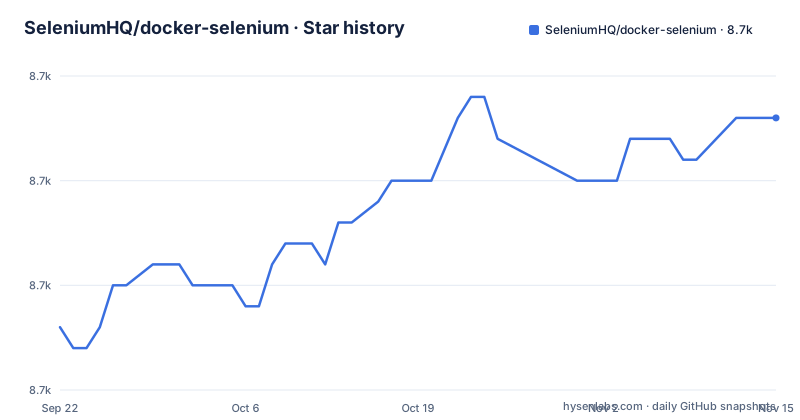
Star history
- SeleniumHQ/docker-selenium8,663 ★ · +10
| Repository | 2026-09-22 | 2026-11-15 |
|---|---|---|
| SeleniumHQ/docker-selenium | 8.7k | 8.7k |
10 Stars in the last 54 days, measured from the daily GitHub snapshot. Compare with other projects
Editorial analysis
Port 4444 and one Firefox container is all the quick start spells out
SeleniumHQ/docker-selenium is packaging rather than a new automation tool. It takes the Selenium Grid server and wraps each role in an image, which takes the question of where the browser binary lives off the test host entirely.
Images go to Docker Hub under the selenium account, and three repositories are linked from the top of the page: hub, node-chrome and standalone-chrome. Chrome, Firefox, Edge and Chromium each get their own node directory in the tree, NodeChrome/, NodeFirefox/, NodeEdge/ and NodeChromium/, with Standalone/ and StandaloneDocker/ for the single container shape and NodeAllBrowsers/ for the one image that carries every browser.
The quick start opens with one command:
docker run -d -p 4444:4444 -pPort 4444 is published; copy the full command from the README's quick start.
System Recommendations sets the floor underneath all of it: Docker Engine 26.1.4 or later, Docker Compose v2.34.0 or later, Docker Buildx v0.25.0 or later, and Kubernetes v1.26.15 or later for the Helm route. Anything below those numbers sits outside what the project says it supports.
Standalone, hub and nodes, or six Grid processes
Execution mode is the first decision, and the repository names three shapes for it.
Standalone is one container holding the grid server, a node and the browser together. Hub and Nodes splits the server from the browsers, so Hub/ carries the coordinating role while NodeChrome/, NodeFirefox/ and NodeEdge/ carry the browser side. Fully distributed mode names its own parts: Router, Queue, Distributor, EventBus, SessionMap and Nodes, and those line up with Router/, SessionQueue/, Distributor/, EventBus/ and Sessions/ at the top of the tree.
Choosing badly costs more than choosing nothing. A standalone container that also accepts requests cannot be restarted without killing the tests running inside it. The distributed mode buys separation and pays in containers to wire up, which is why the repository ships a compose file per shape instead of one file with a switch.
You pick the topology by picking a file. docker-compose-v3.yml is the simple one and docker-compose-v3-full-grid.yml the distributed one. Around twenty more variants each add one concern: tracing, basic auth, secure mode, swarm, monitoring, video, an external Postgres, an external Redis, nightly images, dev and beta browser channels.
GitHub reports Go as the primary language of this repository, though the tree is image build directories and compose files from top to bottom. What you consume either way is an image tag, not a library call.
SE_OPTS, SE_JAVA_OPTS and SE_BROWSER_ARGS_* carry the configuration
Configuration arrives as environment variables, and three names do most of the work. SE_OPTS passes Selenium's own configuration options into the container. SE_JAVA_OPTS passes JVM options, which is where memory for the Java process behind the grid belongs. SE_BROWSER_ARGS_* is a family rather than one variable, adding arguments to the browser launch line.
The rest follows the same pattern and the README groups them the same way. The README has separate sections for node configuration options and node configuration relay commands. Grid URL and session timeout decide where a node finds the server and how long a session survives; session request timeout decides how long a request waits. Session concurrency per container sets how many browsers one container serves, which is the number that decides how many containers you need.
Then there are the ones that change what the browser sees: sub path, screen resolution, and browser language and locale. And the ones that change what the container does over its lifetime: headless mode, stopping the node or standalone after N sessions, and automatic browser leftovers cleanup. Mask sensitive information in console logs keeps values out of the container output, which matters the moment those logs are shipped to a shared CI system.
The cost of this design is consistency. Every knob is a string in an environment, and a distributed grid is several files worth of strings.
Dynamic Grid only works if the config volume reaches the node containers
Dynamic Grid changes the shape of the deployment rather than the shape of the grid: one container decides how many browsers to run and creates the node containers itself. That decision is where the sharp edge is.
The README carries a section on sharing the volumes config of the Dynamic Grid container to node browser containers, alongside sections on using Dynamic Grid on different machines/VMs and running it with Docker Compose.
The features that need extra state inside a container are the ones that need extra wiring outside it. Screen resolution, video recording and time zones all appear in their own Dynamic Grid section, time zone configuration through an env variable of its own, and child container behaviour through a configuration section of its own.
Two arrangements are documented: hub and node roles, or standalone roles.
Video and downloaded files disappear with the container unless you mount them out
Video recording is the feature teams turn on after their first unexplained failure, and it is also the feature that most often disappoints them. Four shapes are documented: record every session, name the file dynamically from metadata set in the tests, upload the recording, and retain recordings for failed sessions only. That last option is the one that scales, and it is the one you cannot turn on and forget.
The files land inside the container filesystem. The troubleshooting section exists for that: mount a volume to retrieve downloaded files, mount a volume to retrieve video files. Without those mounts, the recording of the run that failed while nobody was watching is destroyed when the container is removed, and a dynamic filename only makes the loss harder to script around. Anything else a test writes goes the same way, including reports and downloads your pipeline expects to find afterwards.
Recording also has a build input. The repository carries a .ffmpeg/ directory, and the Makefile pins the ffmpeg side of the build:
FFMPEG_VERSION := $(or $(FFMPEG_VERSION),$(FFMPEG_VERSION),9.0)
FFMPEG_TAG_VERSION := $(or $(FFMPEG_TAG_VERSION),$(FFMPEG_TAG_VERSION),ffmpeg-8.1)
Both values are defaults that any build can override, which is convenient and also means an image built from an older checkout carries an older ffmpeg. Reproducing that build later is your problem, not the repository's.
Shared memory, VNC and waiting for the grid to be ready
Three operational details decide whether a container is usable, and all three sit in the back half of the README rather than in the quick start.
Shared memory comes first. The troubleshooting section carries the flag:
--shm-size="2g"It is an argument to docker run, not an environment variable, so it has to be present in every compose file and container spec you write by hand. A container missing it is the case that troubleshooting section exists for, and the symptom appears inside the browser rather than in the grid logs, which sends people looking in the wrong place.
Readiness comes second. A grid is several processes, so a client that connects the moment the container starts can arrive before the server does. The documented answers are a HEALTHCHECK on the grid or a bash script that waits for it. If your pipeline starts the container and immediately runs tests, one of those two belongs in the pipeline.
Debugging access comes third. A session can be inspected through a VNC client, through a browser with no VNC client needed, or with VNC disabled entirely. On a shared build machine that last option is the one you want, since a debugging port nobody asked for is an entry point. Certificates for Chromium-based browsers have their own section, including an alternative method for adding them to images you already have.
Pinning 4.49.0-20260909 freezes the browsers and hands you the upgrades
Tag choice has the longest tail of any decision here. Release tags carry their build date: the README points to 4.51.0-20261010 as its current tagged release. Alongside it sit a nightly tag refreshed on 2026-10-28 and separate dev and beta channel browser images, which run standalone or on a grid. Those channels exist so a team can test a browser build before it reaches a stable channel, and the price is that the tag moves under you.
Pin a dated tag and your browser and driver versions stop moving. You also inherit the upgrade work, because the README has three separate sections for it: building images with specific versions, upgrading the browser version in the images, and upgrading both browser and driver versions. Nothing walks a pinned image forward for you, and a suite that only ever passed against one driver build says so the next time the browser moves.
The Makefile shows how a version becomes a tag:
VERSION := $(or $(VERSION),$(VERSION),4.51.0)
MVN_SELENIUM_VERSION := $(or $(MVN_SELENIUM_VERSION),$(MVN_SELENIUM_VERSION),latest.release)
TAG_VERSION := $(VERSION)-$(BUILD_DATE)
That middle line is worth pausing on. MVN_SELENIUM_VERSION defaults to latest.release rather than a pinned build, while BASE_VERSION and VERSION pin 4.51.0. The dated tag comes from appending the build date to VERSION, which is what keeps 4.51.0-20261010 a name you can put in a pipeline and leave there.
The repository itself is not dormant. The last push was on 2026-10-29.
charts/ takes the same images to Kubernetes, where the requirements jump
Everything above runs on Docker or Docker Compose. The alternative the project documents is Kubernetes, through a Helm chart published on ArtifactHub under the repository name selenium-grid and built from the charts/ directory in the tree.
The difference in approach is structural rather than cosmetic. Compose files describe containers you start and watch yourself. A chart describes a deployment a cluster reconciles, so Kubernetes v1.26.15 or later becomes a requirement instead of a Docker Engine 26.1.4 floor, and the chart carries its own version line, 1.0.0-nightly for the nightly channel.
The tree also carries a .keda/ directory with a .keda-external-scaler/ beside it, plus a .monitoring/ directory and a monitoring compose file. Scaling on demand and metrics are things this repository puts on the table rather than something you assemble elsewhere afterwards.
Which route fits comes down to whether your team already runs a cluster. If it does, the chart saves you from hand-writing manifests for six Grid processes and their storage. If it does not, the chart is a large amount of machinery with no obvious use, and the compose files remain the shorter path to a first passing test.
Editorial conclusion
Adopt docker-selenium if your suite needs Chrome, Firefox or Edge somewhere you cannot install them, and you can live with a browser version that changes when you change the tag. Skip it if you want one frozen browser you never think about again, because pinning 4.51.0-20261010 hands the driver upgrades to you. Before the first run, confirm that your container spec passes --shm-size="2g" and that your client can reach the published 4444 port.
Frequently asked questions
What is docker-selenium?
A set of container images that run Selenium Grid with Chrome, Firefox and Edge, published to the Docker Hub registry under the selenium account. It is the packaging layer around the grid server: standalone, hub and node images, plus a Helm chart for Kubernetes.
How is Docker used in automation testing?
The browser runs inside the container, so the machine that starts the tests does not need Chrome, Firefox or Edge installed. This repository wires that up with compose files such as docker-compose-v3.yml and docker-compose-v3-full-grid.yml.
What is Selenium used for in docker-selenium?
Grid is the component being containerised. The server side is split into Router, Queue, Distributor, EventBus and SessionMap, and nodes host the browsers. Configuration reaches the container through environment variables such as SE_OPTS, SE_JAVA_OPTS and SE_BROWSER_ARGS_*.
Official sources
Add this badge to your README
If you maintain this project, the badge below links readers to this analysis and shows its maintenance status from the daily GitHub snapshot. Paste the markdown into your README; add ?metric=license or ?metric=stars to the image URL for a different field.

[](https://hysenlabs.com/projects/seleniumhq-docker-selenium)Star history chart for your README
[](https://hysenlabs.com/projects/seleniumhq-docker-selenium)Was this useful?