sentient-os wakes your Mac at 3 AM, triages what it reads, and writes markdown
An on-device LLM understands your entire life, then proactively offers to get your work done through computer use.
At a glance
- What is it?
- An AGPL-3.0 Swift app that reads your files, messages and notes on-device every night, drops anything sensitive without a trace, and distills the rest into a folder of markdown you can open and edit. Proactive work and Sidekick run on your own ChatGPT or Claude subscription, and the optional cloud mirror is encrypted with a key the server never holds.
- Who is it for?
- sentient-os is for someone who already pays for a frontier model subscription and wants that subscription to be useful before they open a chat window, because the knowledge base it builds is plain files you can read, edit and delete note by note rather than an embedding store you cannot inspect.
- Can I use it commercially?
- Yes, with strict conditions. AGPL-3.0 is a network copyleft licence: if people use a modified version over a network, for example as a hosted service, you must offer them its source code under the same licence.
- Is it still maintained?
- Yes. The repository last received commits 2 days ago.
- What is it written in?
- Mainly Swift, according to GitHub's language statistics.
Answers come from the project's GitHub data, last synced on November 14, 2026, and from our analysis. They are not legal advice.
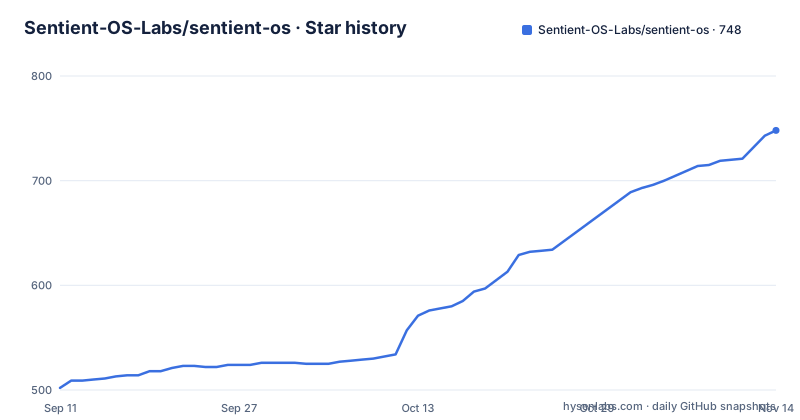
Star history
- Sentient-OS-Labs/sentient-os748 ★ · +246
| Repository | 2026-09-11 | 2026-11-14 |
|---|---|---|
| Sentient-OS-Labs/sentient-os | 502 | 748 |
246 Stars in the last 64 days, measured from the daily GitHub snapshot. Compare with other projects
Editorial analysis
Two problems: an AI that forgets you, and one that waits
The pitch is framed as two failures rather than a feature list. Every AI in use today knows nothing about you, because nobody can paste their entire life into a chat box, and it only helps when summoned. Both problems are answered the same way, by reading everything new every day, and the argument against doing that is cost and exposure: in the cloud, that much inference is expensive and a privacy problem, while on your own chip the inference is free and stays your business. The sources are named concretely rather than abstractly: files, screenshots, WhatsApp, iMessage, Notes and email, with Gmail and Google Calendar arriving through your own OpenAI connectors. What is being built from that is not a chat history but a knowledge base, described as the deepest memory of you any AI has ever had. One boundary matters immediately: no signup is required, and local source processing happens on your Mac.
3 AM, and an on-device bouncer rules keep, junk or sensitive
The nightly pass has a fixed time and a fixed order. At 3 AM the app wakes the Mac, and a closed lid is fine because it falls back asleep afterwards. It reads files and screenshots, WhatsApp, iMessage and Apple Notes, decoding them straight out of the databases already sitting on disk rather than through an export. Every single item then passes a bouncer that runs locally: Gemma 4 E4B reads it and rules on it, with three outcomes. Junk is dropped. Sensitive is dropped harder, and the description of that is unusually specific: no summary, no log, no tombstone, and zero trace that the item ever existed. Only clean, PII-stripped summaries of the keepers survive into the next stage. That ordering is the whole privacy argument in one sentence, and it is also the assumption worth auditing, since the quality of the triage is entirely the quality of a small model judging your own messages.
The knowledge base is a folder of markdown, not an embedding store
The distillation step is where a frontier model gets involved, and the distinction that matters is which subscription pays for it. Knowledge-base generation, proactive work and Sidekick all run on your own ChatGPT or Claude subscription, or on a model endpoint you choose. Double Tap is the exception with its own route, covered by Sentient by default with your own provider available in Settings. The output is deliberately the least fashionable option available: thousands of PII-stripped summaries are condensed into an Obsidian-style folder of plain markdown on your Mac, yours to read, edit and delete note by note. The line used for it is that it is not a black box, it is a folder. That is a real architectural commitment rather than a slogan, because it means you can grep the memory, version it, move it to another tool, and delete a note without asking anyone's permission.
The morning card is the only thing that fires an action
By 9 AM a frontier model has read the night's findings against everything it knows about your life, and the result is not a dashboard but a small handful of drafted cards. The examples given are the reply you forgot, drafted from your own personal context, and the subscription you meant to cancel, caught the night before it renews. You read a card, edit it if you want, and click once to fire it. That click is described as the only thing that ever fires an action, which is the safety property that matters for something acting on a live machine: overnight inference decides what to propose, never what to do. It is worth being precise about the residual risk, though, because the proposal itself is generated from a model that read your messages, so a plausible but wrong draft is still something you are asked to approve.
Sidekick drives your apps through your logged-in browser
Sidekick is the interactive half, triggered by clicking the notch or holding right Command, where holding speaks and tapping types. The notch drops open, transcribes you on-device, and then computer use takes over in your own apps and your own logged-in browser, with progress streaming live in the notch. The example commands are ordinary errands: finish this for me, reply with the update from Sarah, put these ingredients in my cart. The claimed advantage is grounding, that because each task sits on the knowledge base, Sidekick knows who the people in your life are, what the usual means and what you promised whom, which the project calls the difference between an agent and a proactive agent. The operational reality is that it is acting inside sessions you are already logged into, so the permission surface is your accounts rather than a sandbox, and that is the part to think about before granting accessibility control.
AES-256-GCM with a key the relay never holds
The optional cloud feature is an MCP server that can serve your knowledge base to ChatGPT and Claude, phone apps included, and it is off by default. The encryption scheme is specified rather than gestured at. Your Mac seals the knowledge base with AES-256-GCM before anything leaves, and this is called zero-access encryption because the key lives only on your Mac and in your private link, never on the project's servers, which hold ciphertext and nothing to unlock it. The argument is comparative: compromising the relay yields scrambled bytes, unlike an ordinary cloud backup where the company keeps the keys and can be compelled to hand them over. There is no account, so turning sharing off deletes the cloud copy on the spot, and if the Mac simply stops syncing the copy self-destructs after 30 days under what is described as a dead-man lease. The relay itself is open source in a separate repository, which is the piece to read before trusting the claim.
Apple silicon, macOS 15, and a 3.7 GB model download
The install requirements are specific and there is no Linux path mentioned. You need an Apple silicon Mac, M1 or newer, on macOS 15 or later, and the claim is that 8 GB of RAM is enough because the on-device model was tuned until it fit. Disk headroom is the number people miss: keep about 10 GB free, since the on-device model is a 3.7 GB download that needs room to land. Installation is a DMG from the latest release or a cask:
brew install --cask sentient-os-labs/tap/sentient-osBuilding from source means cloning, opening `Sentient OS macOS.xcodeproj` in Xcode 26 and pressing Run, with the model downloading itself during onboarding. The repository layout backs up the parts of the product you cannot see from the interface: a root helper plist for waking the machine, two entitlement files including one named for the computer-use lab, a `Signing.xcconfig`, a `Vendor/` directory, a `supabase/` directory behind the invitation service, and both a `LICENSE` and a separate `LICENSING.md` next to `SECURITY.md`. Versions move quickly, with 1.4.1, 1.4.2 and then 1.5 landing inside ten days.
Editorial conclusion
sentient-os is for someone who already pays for a frontier model subscription and wants that subscription to be useful before they open a chat window, because the knowledge base it builds is plain files you can read, edit and delete note by note rather than an embedding store you cannot inspect. It is the wrong shape for anyone uneasy about an application decoding their message databases and photos, and the project's own answer to that concern is a local triage model plus drop-without-trace for sensitive items, which is a design decision rather than a proof. Before you install, read SECURITY.md rather than the marketing framing, confirm the four things the local pipeline actually claims, and check the compatibility floor: Apple silicon, macOS 15 or later, and about 10 GB of free disk for a 3.7 GB model download. If you turn on the cloud mirror, verify who holds the relay before you assume the encryption story holds end to end.
Frequently asked questions
What does sentient-os read on my Mac overnight?
At 3 AM it wakes the Mac and reads files and screenshots, WhatsApp, iMessage and Apple Notes, decoding them directly from the databases on disk. Gmail and Google Calendar arrive through your own OpenAI connectors. Each item is triaged locally by Gemma 4 E4B as keep, junk or sensitive.
What happens to items the local model calls sensitive?
They are dropped with no summary, no log and no tombstone, so there is zero trace that the item existed. Junk is dropped as well. Only clean, PII-stripped summaries of what is kept go on to the model that builds the knowledge base, which is written as an Obsidian-style folder of plain markdown you can delete note by note.
Which AI subscription does sentient-os use?
Knowledge-base generation, proactive work and Sidekick use your own ChatGPT or Claude subscription, or a model endpoint you choose. Double Tap is the exception: it is covered by Sentient by default through their inference relay, with your own API provider selectable in Settings. The optional encrypted MCP mirror and the invitation service also use separate server paths.
What are the system requirements for sentient-os?
An Apple silicon Mac, M1 or newer, running macOS 15 or later. The project says 8 GB of RAM is enough because the on-device model was tuned to fit. Keep roughly 10 GB of disk free, since the on-device model is a 3.7 GB download. Building from source means opening Sentient OS macOS.xcodeproj in Xcode 26.
Official sources
Add this badge to your README
If you maintain this project, the badge below links readers to this analysis and shows its maintenance status from the daily GitHub snapshot. Paste the markdown into your README; add ?metric=license or ?metric=stars to the image URL for a different field.

[](https://hysenlabs.com/projects/sentient-os-labs-sentient-os)Star history chart for your README
[](https://hysenlabs.com/projects/sentient-os-labs-sentient-os)Was this useful?