art ships 677 fonts and 711 one-line arts behind text2art and art(), and some environments cannot display them
🎨 ASCII art library for Python
At a glance
- What is it?
- A pure Python library with no required dependencies that turns text into ASCII art, prints one-line emoticons and builds decorated strings. The README flags fonts, characters and terminals that fail, and the last tagged release is v6.5 from April 2025.
- Who is it for?
- Use art if you need styled banners or emoticons in a Python script and want one import with no required dependencies. Skip it if you need photo-to-ASCII conversion or guaranteed output in every terminal, because the README warns that fonts and one-line arts break in some environments.
- Can I use it commercially?
- Yes. MIT is a permissive licence: you can use, modify and sell software built on it, as long as you keep its copyright and licence notices.
- Is it still maintained?
- Yes. The repository last received commits 26 days ago.
- What is it written in?
- Mainly Python, according to GitHub's language statistics.
Answers come from the project's GitHub data, last synced on November 24, 2026, and from our analysis. They are not legal advice.
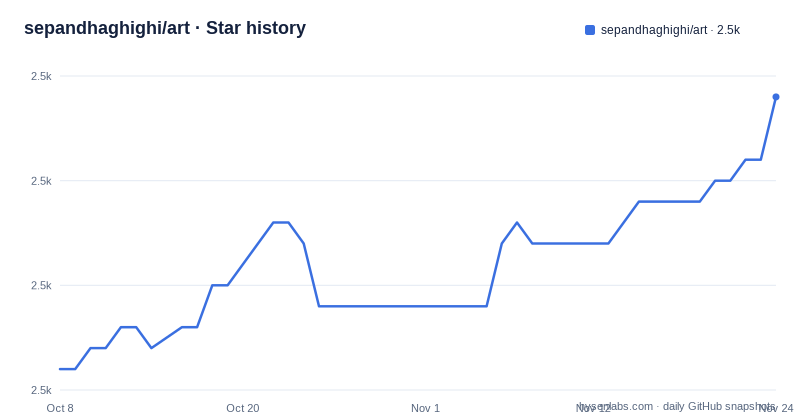
Star history
- sepandhaghighi/art2,519 ★ · +13
| Repository | 2026-10-08 | 2026-11-24 |
|---|---|---|
| sepandhaghighi/art | 2.5k | 2.5k |
13 Stars in the last 47 days, measured from the daily GitHub snapshot. Compare with other projects
Editorial analysis
Three kinds of output: one-line art, text banners and character grids
The library does three jobs. The first is 1-line art, short pieces such as a coffee cup or a butterfly. The second is ASCII text, where a word is rendered in a large font. The third is line grids, which repeat a character across a length and a height. The README counts 677 fonts, 711 1-line arts and 218 decors in its counters, and publishes them as FontList, ArtList and DecorList notebooks in the repository.
The author describes the whole thing as a Python library for converting text to ASCII art. There is no image input anywhere in the README, so converting a photo is outside what this library does. Everything starts from a string you type or a name you pick from a list.
art(), aprint() and randart() return or print a named one-line art
The visible README gives no install command, and the package is published on PyPI under the name art, so the first run is an import from a Python prompt:
>>> from art import *
>>> art_1=art("coffee") # return art as str in normal mode
>>> print(art_1)
c[_]
The function `art` returns a 1-line art as a `str`. Beyond that example, the README shows that `art("woman",number=2)` repeats the art twice, so number controls how many copies come back in one string. Passing `number=3, space=5` to the coffee art puts five spaces between three copies. `art("random")` and `art("rand")` pick one at random, and `randart()` is a shortcut for the random mode that was added in Version 2.2.
`aprint` prints instead of returning and returns None. Both raise `artError` on bad input. The README shows `art(22,number=1)` failing with the message that the artname type must be str, and `aprint("woman",number="22")` failing with the message that the number type must be int. Catch that exception if the name comes from user input. Names come from `ART_NAMES` (new in Version 4.2), with `NON_ASCII_ARTS` (4.6) and `ASCII_ARTS` (5.7) as filtered lists.
Many one-line arts depend on Unicode your terminal may not render
Two warnings sit at the top of the 1-line section. Some environments do not support all 1-Line arts, and ART 4.6 is the last version to support Bipartite art. The example outputs show why the first matters: the woman art uses characters such as the alembic symbol, and the butterfly art uses combining marks.
The README's answer is the filtered lists. `NON_ASCII_ARTS` lists arts that need characters beyond ASCII, and `ASCII_ARTS` lists the safe ones. If your output goes to a log file, a CI console or a legacy Windows terminal, choose from `ASCII_ARTS` and test there. The second warning is permanent in practice: if you depended on bipartite art, you are stuck at version 4.6 or must stop using it.
text2art picks a font and silently drops unsupported characters by default
For text banners, `text2art("art")` returns the string in the default font, and `tprint` prints it. Both default to `chr_ignore=True`, which means characters a font cannot draw are skipped instead of raising an error. A different font is a keyword away, as in `text2art("art",font='block',chr_ignore=True)`, whose output is a wide dotted-outline lettering.
Two notes limit this. Some fonts do not support all characters, and Non-ASCII fonts, added in Version 3.3, are not compatible with some environments. From Version 5.3 the default line separator is `\n` instead of `\r\n`, and the `sep` parameter restores the old behaviour. If you write banners to files read on Windows tools, set `sep`. Font names are listed in `FONT_NAMES` (4.2), `NON_ASCII_FONTS` (4.4) and `ASCII_FONTS` (5.7).
tsave writes to a file and reports failure in a dictionary, not an exception
`tsave` saves the rendered text to a file, and it behaves differently from the other functions. It returns a dict in both normal and exception mode. On success, `Response["Message"]` is `'OK'` and `Response["Status"]` is `True`, and by default it prints `Saved!` followed by the filename. Passing `print_status=False` silences that message.
On bad input it does not raise. The README shows `tsave(22,font=DEFAULT_FONT,filename="art",chr_ignore=True,print_status=True)` returning `{'Status': False, 'Message': "'int' object has no attribute 'split'"}`. The message is the underlying Python error text, so check `Status` before assuming the file exists. Code written to catch `artError` around tsave will never trigger.
lprint and line draw character grids, added in Version 6.4
The line section is the newest. `lprint` prints a grid of any character, and the README example `lprint(length=15, height=2, char="*")` prints two rows of fifteen asterisks. The defaults are `length=15`, `height=1` and `char='#'`. A companion `line` function returns the same grid as a `str`. The README marks lprint as new in Version 6.4.
The decor features, with 218 entries in the counter, are the third family, and the DecorList notebook lists them. They are mentioned in the README counters and in the repository, but the visible README text does not show how a decor is applied, so read the notebook or the project's CHANGELOG.md before building on them. Treat anything outside the documented functions as unverified.
Release v6.5 is April 2025, with pushes continuing and no dependencies to manage
Recent releases are v6.5 on 2025-04-12, v6.4 on 2024-11-26 and v6.3 on 2024-09-19. The repository was last pushed on 2026-10-25 and is not archived. The code is MIT licensed.
In setup.py the package name is `art`, the packages are art, art.data and art.tests, `install_requires` is empty and `python_requires` is `>=3.6`. A dev extra reads dev-requirements.txt. The distribution page lists the project on PyPI and on Anaconda, and the repository has INSTALL.md, a MATLAB folder and an otherfile folder besides the Python package. Nothing in the visible README says what the MATLAB folder contains. With zero required dependencies, the only version risk is behaviour changes of the kind listed above, such as the 5.3 line separator, so pin a version and read CHANGELOG.md before upgrading.
Editorial conclusion
Use art if you need styled banners or emoticons in a Python script and want one import with no required dependencies. Skip it if you need photo-to-ASCII conversion or guaranteed output in every terminal, because the README warns that fonts and one-line arts break in some environments. Before shipping, print your chosen font and art in the exact terminal or log viewer your users have, and pick from ASCII_FONTS and ASCII_ARTS if it fails.
Frequently asked questions
What does the art Python library do?
It converts text to ASCII art with text2art and tprint, prints named 1-line arts with art and aprint, and builds character grids with lprint and line.
Which Python versions does art support?
setup.py sets python_requires to 3.6 or newer, and install_requires is empty, so the library has no required dependencies.
Why does some art output look broken in my terminal?
The README warns that some environments do not support all 1-Line arts and that Non-ASCII fonts are not compatible with some environments. Use ASCII_ARTS and ASCII_FONTS to stay with safe choices.
Official sources
Add this badge to your README
If you maintain this project, the badge below links readers to this analysis and shows its maintenance status from the daily GitHub snapshot. Paste the markdown into your README; add ?metric=license or ?metric=stars to the image URL for a different field.

[](https://hysenlabs.com/projects/sepandhaghighi-art)Star history chart for your README
[](https://hysenlabs.com/projects/sepandhaghighi-art)Was this useful?