Magnetissimo: a self-hosted torrent indexer in Elixir and Phoenix
Web application that indexes all popular torrent sites, and saves it to the local database.
At a glance
- What is it?
- Magnetissimo searches eight torrent sites at once, caches every answer in a local SQLite index, and offers the result as a Torznab indexer so Sonarr, Radarr and Prowlarr can query it like any other tracker. It runs as a single Docker container with one required environment variable, and it can optionally crawl the BitTorrent DHT to find torrents on its own.
- Who is it for?
- Magnetissimo suits a self-hoster who wants one search box across several sources, a local index that does not rescan the network on every query, and a Torznab endpoint that a download client can treat as a tracker. It is the wrong tool if you need the sources themselves, since it caches what they return rather than replacing them, and it is the wrong choice if you want a curated private tracker, since an aggregator inherits the quality of the sites it queries.
- Can I use it commercially?
- Yes. MIT is a permissive licence: you can use, modify and sell software built on it, as long as you keep its copyright and licence notices.
- Is it still maintained?
- Yes. The repository last received commits 5 days ago.
- What is it written in?
- Mainly Elixir, according to GitHub's language statistics.
Answers come from the project's GitHub data, last synced on October 24, 2026, and from our analysis. They are not legal advice.
Star history
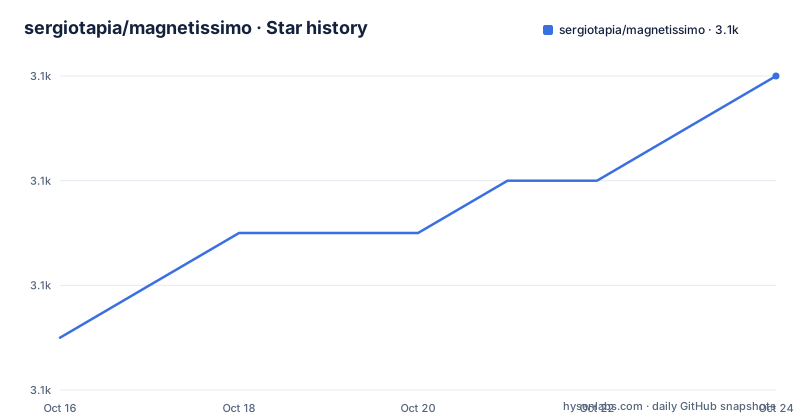
- sergiotapia/magnetissimo3,104 ★ · +5
| Repository | 2026-10-16 | 2026-10-24 |
|---|---|---|
| sergiotapia/magnetissimo | 3.1k | 3.1k |
5 Stars in the last 8 days, measured from the daily GitHub snapshot. Compare with other projects
Editorial analysis
Search once, get eight answers, keep them all
Magnetissimo is a self-hosted torrent indexer, and the README's description of the loop is the whole product in a paragraph.
You type a term. Magnetissimo answers from its own index straight away, and at the same moment asks every source's own search for that term. Each site's answer is indexed as it lands, and the new rows slide into the page while you watch. The next person to search for the same thing gets it from the index.
Sites are asked when someone searches, so the index grows into a record of what you looked for.
That last sentence is the design decision, and it is worth being clear about. This is not a crawler that sweeps the sources on a schedule. It is a cache that fills on demand, and its contents are a by-product of what its users searched for. The practical effect is that the first search for a term is slow, because it has to wait for the sources, and the second search for the same term is fast.
The eight sources are named in the README: YTS, Nyaa.si, Sukebei, TorrentDownloads, AudioBookBay, The Pirate Bay, EZTV and OxTorrent.
The DHT is optional and separate. Turn on the DHT crawler and Magnetissimo finds torrents on its own, all the time, straight from the peer-to-peer network, file lists included, and you watch them arrive on /dht.
That is a different mechanism from the site search, and a different one in kind. The site search asks eight indexers. The DHT crawler participates in the BitTorrent distributed hash table, which is a global lookup table over torrent infohashes, so a torrent is found when any peer announces it. The DHT path needs no source site at all, and it needs the network to have peers who are sharing.
The legal position of any of this is worth stating plainly. An indexer makes links more findable; it does not determine whether the material behind them is lawful to possess, and magnet links point at content without the tracker having hosted anything. Anyone running this is making a decision about their own use, and the terms of the source sites are their own.
Docker, one volume, one environment variable
The Docker path is the one the README recommends, and the setup is genuinely short.
services:
  magnetissimo:
    image: ghcr.io/sergiotapia/magnetissimo:latest
    container_name: magnetissimo
    restart: unless-stopped
    ports:
      - "4000:4000"
    volumes:
      - magnetissimo-data:/data
Then docker compose up -d, and open http://<your server>:4000.
The image is built for amd64 and arm64, and the README names the deployments it targets: a homelab server, a NAS, or a Raspberry Pi. The database and a generated secret key are kept in the magnetissimo-data volume, and every start runs any pending migrations. To upgrade, docker compose pull && docker compose up -d.
If you prefer a folder on the host to a named volume, the README shows the variant, mounting the folder at /data and running the container as the folder's owner with user: "1000:1000".
The tag scheme is worth knowing. :latest is the newest release, :edge follows every commit to master, and :3, :3.1 or :3.1.1 pin a version. The compose file in the repository also carries a build: . line, so the same file works from a checkout, and the README gives the upgrade path for that case as git pull && docker compose up -d --build.
One SQLite database holds everything, and the README's advice for backup is to stop the app and copy the data folder. That is a real constraint of the design rather than a simplification, and it is why the volume and the /data path are the only pieces of state you need to preserve.
Only DATABASE_PATH is required
The configuration table is short, and that is a good sign.
| Variable | Default | What it does | | --- | --- | --- | | DATABASE_PATH | /data/magnetissimo.db in Docker | The SQLite file. Its directory must exist and be writable. | | PORT | 4000 | The HTTP port. | | SECRET_KEY_BASE | generated | Signs cookies. When unset, a random one is generated on first start and saved as secret_key_base next to the database. | | PHX_HOST | none | Your public hostname, if the app is behind an HTTPS reverse proxy. Leave it unset for plain http://<ip>:4000. | | POOL_SIZE | 5 | Database connections. | | DHT_PORT | any free port | The local UDP port the DHT crawler sends from. Nothing needs forwarding. |
Only DATABASE_PATH is required, and the Docker image already sets it.
The SECRET_KEY_BASE default is a nice touch. Rather than refusing to start or shipping a fixed key, the app generates a random one on first start and saves it next to the database, so it survives restarts and is backed up along with everything else.
The PHX_HOST row only matters behind a proxy, and the README is explicit that you should leave it unset for plain http://<ip>:4000.
The DHT_PORT row is the one that surprises people. It is the local UDP port the crawler sends from, and nothing needs forwarding. The crawler is a client of the DHT, not a service on it, so there is no port to open and no inbound traffic to allow.
Behind a reverse proxy, the README is specific about what has to be forwarded: WebSockets, which is what makes results stream in. The proxy has to pass the Host header through and send X-Forwarded-Proto, so the app knows the page was served over HTTPS. Caddy and Traefik do both by default, and for nginx the README gives the exact configuration.
proxy_set_header Host $host;
proxy_set_header X-Forwarded-Proto $scheme;
proxy_http_version 1.1;
proxy_set_header Upgrade $http_upgrade;
proxy_set_header Connection "upgrade";
The X-Forwarded-Proto line is the one that matters for correctness rather than convenience, because it is what the app uses to decide whether to hand out a secure cookie.
Torznab, so the download clients can treat it as a tracker
The feature list has one item that makes this more than a search box, and it is the Torznab integration.
Every torrent is filed under the standard Newznab and Torznab category list that Sonarr, Radarr, Prowlarr and Jackett use, whatever the source called it. The README also lists a Torznab indexer for Sonarr, Radarr, Lidarr, Prowlarr and the book managers, and a JSON API for scripts.
This is the integration that makes the tool composable. Without it, Magnetissimo is a website a human types into. With it, the aggregator becomes something a download client polls on a schedule, exactly as it would poll a private tracker, and the category mapping is what stops that client from filing every result under the wrong type.
The category remapping is the specific problem it solves. Different sites name their categories differently, and the download client only cares about the standard taxonomy. A source that calls something a TV pack and one that calls it a Series have to end up in the same bucket, or Sonarr will refuse them.
There is also a JSON API for scripts, which is the sensible escape hatch for anything the Torznab endpoint does not cover.
The search layer has its own set of features that the README lists separately. Search that looks inside torrents covers names, descriptions, and the file names of torrents the DHT found. Search that copes with real names handles the mismatch between how people type and how files are named: spider-man finds Spider.Man.2002, toy story 4 matches the 4, and a fragment of a Japanese title matches without any spaces to split on. Better-seeded copies rank first among near-identical names. And there are search operators that no source has, covering exact text, exclusions, alternatives and wildcards, plus size, seeder and age limits.
The exact-text operator is worth understanding, because it is not the same as quoting in a general web search. The README's table shows "[ToonsHub]" returning torrents with that exact text, brackets and spaces included, and notes that capital letters and accents have no effect.
Works without JavaScript, and streams when it is on
There is a design decision in the README that says more about the project than the feature list does.
Works without JavaScript. Searching, filtering, sorting and paging are all links and plain GET forms. With JavaScript on, results stream in live.
That is a deliberate choice about who the tool is for. A self-hosted search box that a person uses from a browser on a home network, a NAS, or a machine with an ad blocker and no scripting, works with scripting disabled. The live streaming is an enhancement, not a requirement.
It also has a performance consequence that is worth stating plainly. A GET-form interface cannot stream results into the page, so on the first search the user waits for the sources to answer and then gets a page. The JavaScript path gets the same answer sooner and updates as rows land. The index makes the second search of the same term fast either way, because the results are already in SQLite.
The demo image in the README shows this in practice: a search for x265 on the Magnetissimo home page with every source's status under the search box and the results listed with size, swarm and age, and a theme switch in the nav that turns the page from light to dark.
The release history shows the project is being worked on hard. v3.1.1 was tagged on 2026-10-14, v3.1.0 on 2026-10-12 and v3.0.0 on 2026-10-10, and the last push was on 2026-10-14. Three releases in four days around a 3.0 major is a rewrite in progress rather than an incremental series.
An Elixir release for people who do not want Docker
The second install path is a release build, and the README is explicit about one constraint.
A release is a self-contained directory with the Erlang runtime included. Build it on the same OS and CPU architecture as the server it will run on.
mise install                     # Elixir 1.20.4 / OTP 29.1.1
MIX_ENV=prod mix deps.get --only prod
MIX_ENV=prod mix assets.setup
MIX_ENV=prod mix assets.deploy
MIX_ENV=prod mix release
Then copy _build/prod/rel/magnetissimo to the server and start it.
mkdir -p /var/lib/magnetissimo
DATABASE_PATH=/var/lib/magnetissimo/magnetissimo.db bin/server
bin/server runs it in the foreground, which is what a systemd unit or a process supervisor wants. To run it in the background, start it as a daemon with PHX_SERVER=true, and then bin/magnetissimo remote gives you a console inside the running app and bin/magnetissimo stop shuts it down. Starting the app runs any pending migrations, and bin/migrate runs them on their own.
The Dockerfile shows how the release is built, and it makes two choices worth noting. The builder is the official hexpm/elixir image at 1.20.4 with Erlang 29.1.1 on Debian trixie, and the runner is debian:trixie-slim. The Dockerfile's comment suggests using Debian or Ubuntu instead of Alpine to avoid production compatibility issues, specifically DNS resolution failures and dynamically linked NIFs and precompiled binaries. That is a concrete piece of advice, since musl-based builds of Erlang releases are a recurring source of trouble.
The development workflow is mise install, mix setup for dependencies, database, sources and assets, then mix phx.server, and in development the database starts with a few dozen demo torrents to look at.
Editorial conclusion
Magnetissimo suits a self-hoster who wants one search box across several sources, a local index that does not rescan the network on every query, and a Torznab endpoint that a download client can treat as a tracker. It is the wrong tool if you need the sources themselves, since it caches what they return rather than replacing them, and it is the wrong choice if you want a curated private tracker, since an aggregator inherits the quality of the sites it queries. Before you deploy it, read the configuration table in the README, because only DATABASE_PATH is required and the other variables decide whether it works behind a reverse proxy, and consider the legal position of magnet links in your jurisdiction before pointing it at your library.
Frequently asked questions
How do I run Magnetissimo with Docker?
Save the compose file shown in the README with the ghcr.io/sergiotapia/magnetissimo:latest image, a 4000 to 4000 port mapping and a magnetissimo-data volume mounted at /data, then run docker compose up -d and open http://<your server>:4000. The image is built for amd64 and arm64.
Which environment variables does Magnetissimo require?
Only DATABASE_PATH is required, and the Docker image already sets it. PORT defaults to 4000, SECRET_KEY_BASE is generated and saved next to the database if unset, PHX_HOST is only needed behind an HTTPS reverse proxy, POOL_SIZE defaults to 5 and DHT_PORT is the local UDP port the crawler sends from.
Which torrent sites does Magnetissimo search?
Eight sources: YTS, Nyaa.si, Sukebei, TorrentDownloads, AudioBookBay, The Pirate Bay, EZTV and OxTorrent. Sites are asked when someone searches, and each answer is indexed as it lands.
Can I use Magnetissimo with Sonarr or Radarr?
Yes. It provides a Torznab indexer for Sonarr, Radarr, Lidarr, Prowlarr and the book managers, and every torrent is filed under the standard Newznab and Torznab category list regardless of what the source site called it. A JSON API is also provided for scripts.
What does the DHT crawler in Magnetissimo do?
When enabled, it finds torrents on its own, all the time, straight from the BitTorrent peer-to-peer network with file lists included, and the results appear on the /dht page. It is switched on at /dht and only needs a local UDP port, with nothing to forward.
Official sources
Add this badge to your README
If you maintain this project, the badge below links readers to this analysis and shows its maintenance status from the daily GitHub snapshot. Paste the markdown into your README; add ?metric=license or ?metric=stars to the image URL for a different field.

[](https://hysenlabs.com/projects/sergiotapia-magnetissimo)Star history chart for your README
[](https://hysenlabs.com/projects/sergiotapia-magnetissimo)Was this useful?