ZKEACMS: the description says .Net 8, the Dockerfile says 9.0
ZKEACMS, a .NET CMS built with .NET 8, with a visual designer for online content editing.
At a glance
- What is it?
- A visual WYSIWYG CMS whose repository description still advertises .Net 8 while the README, the SDK requirement and both container stages are .Net 9, whose npm test script is the untouched template that exits 1, whose SQLite database is created inside the image build, and whose documented Docker one-liner pulls the enterprise tag rather than the image this repository builds.
- Who is it for?
- ZKEACMS is a full CMS with a design surface, and the parts worth checking before you adopt it are the packaging rather than the editor. Build against .NET 9, since that is what the SDK requirement and both container stages use, and ignore the .NET 8 line in the repository description.
- Can I use it commercially?
- Yes, with conditions. GPL-3.0 is a copyleft licence: if you distribute software that includes it, you must release that software's source code under the same licence. Running it internally without distributing it does not trigger that obligation.
- Is it still maintained?
- Yes. The repository last received commits 19 days ago.
- What is it written in?
- Mainly C#, according to GitHub's language statistics.
Answers come from the project's GitHub data, last synced on November 15, 2026, and from our analysis. They are not legal advice.
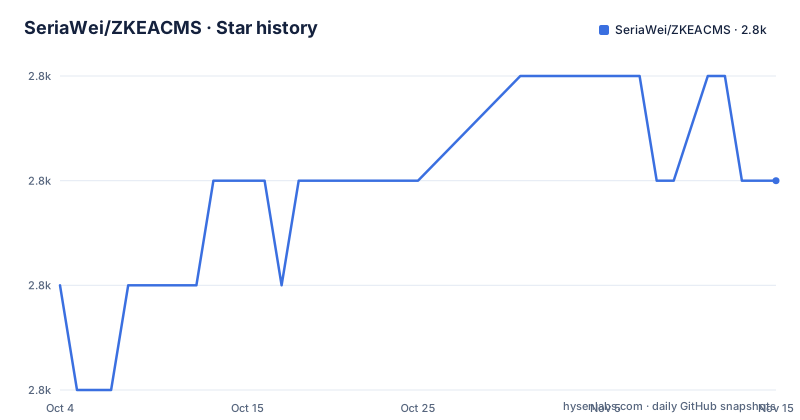
Star history
- SeriaWei/ZKEACMS2,843 ★ · +1
| Repository | 2026-10-04 | 2026-11-15 |
|---|---|---|
| SeriaWei/ZKEACMS | 2.8k | 2.8k |
1 Stars in the last 42 days, measured from the daily GitHub snapshot. Compare with other projects
Editorial analysis
The description says .Net 8 and the build says 9.0
Four places state the framework version and one of them is behind. The repository description opens by calling this a .Net 8 build, and appends a Chinese phrase about visual design and online editing. The README's own title says .Net 9, the development section requires the .Net 9 SDK, and the Dockerfile builds on the .NET 9 SDK image before switching to the .NET 9 ASP.NET runtime image. So the version a reader gets from search results or from an API response is a major version behind the one they would actually build. The database story is stated once and is a list of three: Microsoft SQL Server 2016 or newer, MySQL 5.6 or newer, or SQLite 3. The editor story is two: Visual Studio 2022 or Visual Studio Code.
FROM mcr.microsoft.com/dotnet/sdk:9.0 AS buildernpm test is the template default that exits 1
The JavaScript manifest in this repository is not a published package, it is a build tool for the theme assets, and it says so in its own description field: use to compile theme, minify javascript and style sheets. The entry point is the gulpfile. Its production dependencies object is empty and all seven packages sit in development dependencies, which is what you would expect from a toolchain that never ships. Two details are worth pausing on. The minifier is paired with a plugin whose purpose is saving licence banners, so licence comments survive minification. And the only script defined is a test script that echoes an error message about no test being specified and exits 1, which is the value npm writes into a manifest it has just initialised. The repository does have a test directory, so the failure is a leftover rather than an absence of tests.
The documented Docker command pulls the enterprise tag
The README's container section points at a Docker Hub repository and gives one line.
docker run -d -p 5000:8080 zkeasoft/zkeacms:entThe tag on that line is ent, the enterprise edition, which is not the tag this repository's Dockerfile produces. The port mapping also encodes a detail worth keeping, because the runtime stage exposes 8080 internally while the host side is 5000, so anything you point at the service from the host needs the 5000 side. Treat the line as documentation of the published images rather than as a way to reproduce a local build. Two more scripts exist at the root for local work and neither appears in the usage sections: a Windows and a shell version of the build script, and a Windows and a shell version of the run script.
The SQLite database is built into the image and copied in once
The Dockerfile is where the deployment story is actually written, and it is unusual in three ways. First, the database is created during the image build: a directory for application data is made inside the publish output, and a globally installed command line tool for SQLite is pointed at a SQL script in the Database folder to produce the database file that ships in the image. Second, the configuration that ships is not the one in the source tree, because the build overwrites the published appsettings file with the copy kept under the SQLite folder. Third, the runtime entry point is a shell script assembled from two echo commands, which copies the baked database into the application data directory only if nothing is there yet and then starts the web host assembly. The upshot is that the first start seeds from the image and every start after that keeps whatever the container already has.
English is opt-in through one config key
The interface language is not a setting in the web interface. It is a value in appsettings.json, under a culture block whose code decides which language the CMS speaks.
"Culture": {
  "Code": "en-US"
}
The default is therefore not English, which is consistent with a project whose documentation, community links and site navigation are largely in Chinese. Anyone deploying this for an English audience has to edit a configuration file in the published output before the first request, and anyone using the container has to remember that the build overwrites that file from a different folder, so the change belongs in the source of the Database folder rather than in the published copy. The documentation also points at a multi-tenant demo on a separate host, plus a quick-start video and a create-page video.
Bootstrap 3 for layout and a misspelled Bootstrap for themes
The design surface is described in three layers, and each layer names its own technology. Layout is built by dragging rows and columns, on the Bootstrap 3 grid system. Widgets are added to a zone, several can share a zone, and they are sorted by drag and drop; the sentence defining one opens by calling a widget an HTML component. Themes are written in LESS and produced by editing variables, with the base framework named in the following line. Four spelling and grammar slips sit in those short paragraphs. A publish heading reads Publish width runtime instead of with. The widget definition says a widget is followed by an indefinite article and a plural noun. The theme line misspells the framework name. And the responsive paragraph promises the page will automatically adapt to adapt, twice over.
GPL in the metadata and an enterprise licence in the README
The licensing picture takes two forms and the repository does not reconcile them. The repository metadata gives GPL-3.0 and a LICENSE file sits at the root, while the JavaScript manifest gives the licence as the shorter string GPL. The README's licence section then adds the commercial path in two languages: for commercial use, keep your source private by purchasing a commercial licence or enterprise edition. The purchase link does not point inside this repository at all, it points at the wiki of a separate project whose name ends in Core. So the terms that apply to a commercial deployment are documented somewhere else, and the sentence that would tell you which licence governs the generated site is the one that sends you to a sales page.
Every link is plain http and the version table is empty
The publishing section carries a two column table with the package name and a link on one side and a version heading on the other, and the version cell beside that link is empty. Nothing in the table says which version of the publishing tool the project expects, so the working instruction is the command line below it: install the tool globally, then run the publish script from the web host project directory, with a runtime identifier appended when you want a self-contained build for one platform. Everything the page links to is plain http, including the project site, the demo site, the multi-tenant demo and the video library. The release script at the root is a PowerShell file with no shell equivalent beside it, while the build, publish and run scripts all come in pairs.
Editorial conclusion
ZKEACMS is a full CMS with a design surface, and the parts worth checking before you adopt it are the packaging rather than the editor. Build against .NET 9, since that is what the SDK requirement and both container stages use, and ignore the .NET 8 line in the repository description. Switch the interface language by editing the culture code in appsettings.json, because English is opt-in. Decide early whether you are on the GPL terms or a commercial edition, because the README routes commercial use to a paid enterprise licence through a separate repository. Do not use the documented Docker one-liner as a reference build, since it pulls the enterprise tag, and do not run npm test expecting a result, since that script exits 1 by design.
Frequently asked questions
Which version of .NET does ZKEACMS target?
The README title, the development requirements and both container stages use .NET 9, including the SDK and ASP.NET runtime 9.0 images. The repository description still describes the project as a .Net 8 build, which is out of date.
Which databases can ZKEACMS run on?
Microsoft SQL Server 2016 or newer, MySQL 5.6 or newer, or SQLite 3. The Dockerfile builds the SQLite path, creating the database from a SQL script during the image build and copying it into place on first start.
How do I switch ZKEACMS to English?
Edit the culture code in appsettings.json to en-US. The setting sits in a Culture block, and the default is not English. When building the container, the change belongs in the configuration under the Database folder, because the build overwrites the published appsettings file from there.
Can ZKEACMS be used commercially?
The repository metadata gives GPL-3.0 and a licence file is at the root. The README's licence section says commercial users should keep their source private by purchasing a commercial licence or enterprise edition, with the purchase page hosted in the wiki of a separate Core repository.
How is ZKEACMS published?
With the Publish.cmd or Publish.sh script, or from the command line after installing the publishing tool globally with dotnet tool install -g ZKEACMS.Publisher, then running the publish script in the web host project directory. Appending a runtime identifier publishes for one specific platform.
Official sources
Add this badge to your README
If you maintain this project, the badge below links readers to this analysis and shows its maintenance status from the daily GitHub snapshot. Paste the markdown into your README; add ?metric=license or ?metric=stars to the image URL for a different field.

[](https://hysenlabs.com/projects/seriawei-zkeacms)Star history chart for your README
[](https://hysenlabs.com/projects/seriawei-zkeacms)Was this useful?