seriousm4x/UpSnap: a wake on LAN dashboard and the security note that comes with it
A simple wake on lan web app written with SvelteKit, Go and PocketBase.
At a glance
- What is it?
- A Go, SvelteKit and PocketBase app that wakes machines from a phone browser, powers them off with a piped shell command, and tells you plainly not to put it on the open web.
- Who is it for?
- UpSnap solves a small problem completely and is candid about the cost. The most important thing to know before installing it is in a bolded README section titled about exposing to the open web: the shutdown feature runs a command piped to a shell, potentially as root, so anyone who reaches that API route has a shell on your network.
- Can I use it commercially?
- Yes. MIT is a permissive licence: you can use, modify and sell software built on it, as long as you keep its copyright and licence notices.
- Is it still maintained?
- Yes. The repository last received commits 13 days ago.
- What is it written in?
- Mainly Go, according to GitHub's language statistics.
Answers come from the project's GitHub data, last synced on October 23, 2026, and from our analysis. They are not legal advice.
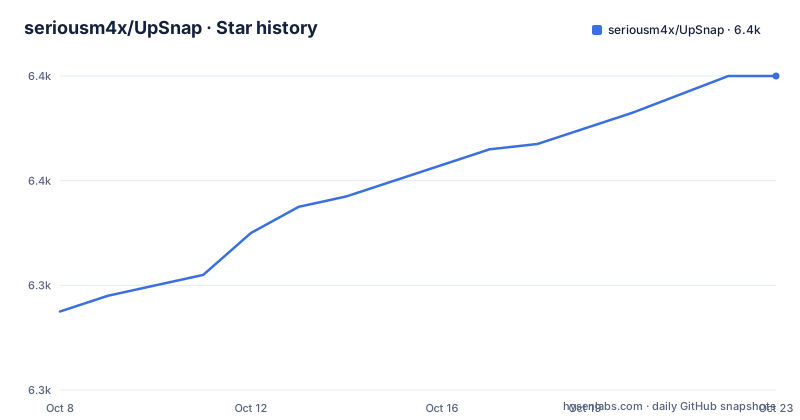
Star history
- seriousm4x/UpSnap6,380 ★ · +45
| Repository | 2026-10-08 | 2026-10-23 |
|---|---|---|
| seriousm4x/UpSnap | 6.3k | 6.4k |
45 Stars in the last 15 days, measured from the daily GitHub snapshot. Compare with other projects
Editorial analysis
Three stacks in one binary
UpSnap is a self-hostable web app for waking devices on a local network with magic packets, and the repository description names its three layers directly: SvelteKit for the frontend, Go for the backend, and PocketBase for the data layer. The tree at the repository root is small and matches that split, with `frontend/`, `backend/`, `assets/`, two Dockerfiles and two compose files.
The feature list is worth reading as a capability inventory rather than marketing. There is a one-click device wake-up dashboard, timed events driven by cron for automation, and the ability to ping any port you choose rather than a fixed one. Device discovery comes from network scanning, which the README marks as requiring nmap. Optional IP address tracking runs as a periodic ARP scan, and the README is specific that this needs nmap but no privileges beyond network scanning. Devices can be shut down with a custom command. User management is per user and per device, there is a superuser logs page, internationalization covers the languages listed in the `frontend/translations` directory, and 35 themes ship with it.
Container images are published for amd64, arm64, arm/v7 and arm/v6, and the release that added FQDN support also added a riscv64 build target to goreleaser. That spread of architectures matters more than it first appears, because the alternative to running UpSnap in a container is installing a binary from the releases page, and that route only exists for the architectures the maintainer chose to build.
The repository reports 6,294 stars, 251 forks, and zero open issues, with the last push on 2026-09-19 and the default branch set to master.
The paragraph that decides whether this is safe for you
The README has a section about exposing to the open web, and it is the most consequential text in the repository. The claim is that although UpSnap has user authorisation, it is not recommended to expose it to the open web and make it accessible by everyone.
The reason given is the shutdown feature. The shutdown device command is, in the README's phrasing, basically a command piped to a shell, possibly as root user. The stated consequence is that if anyone gains unauthorized access and can abuse that API route in any way, the attacker has access to a shell on your local network. The recommendation is a VPN, with WireGuard or OpenVPN named as the way to go.
This is a better security note than most projects of this size publish, because it identifies the specific mechanism rather than issuing a generic warning. A password-protected dashboard for a wake-on-LAN page would be a nuisance if compromised. A dashboard whose shutdown button executes a stored command through a shell interpreter is a remote code execution surface, and user authorization is the only thing standing between an attacker and that surface.
So the practical question is not whether UpSnap is safe, but where it can safely live. On a LAN you control, or reachable only through a VPN, the exposure is bounded by the network itself. Behind a public reverse proxy with nothing in front of it, the design has no second line of defense worth relying on.
Running the binary, and the sudo decision
The binary route is the shortest one documented. Download the latest binary from the release page and run it.
sudo ./upsnap serve --http=0.0.0.0:8090That single line contains three separate decisions. The first is `sudo`, which the README does not explain but which follows from the same shell-command requirement described above. The second is `serve`, one of the subcommands exposed by the binary; the README points at `./upsnap --help` and the PocketBase documentation for the rest. The third is the bind address, and it is the one worth changing, because `0.0.0.0` means every interface on the machine.
UpSnap does acknowledge the root problem twice. In the binary section and again in the Docker section, the README says that to run as a non-root user, on Linux only, you should refer to a wiki page titled Use non-root user. The fact that this needs a separate document tells you it is not a single flag.
The compose file shows what the non-root path actually requires, in a block that is commented out by default.
environment:
  - UPSNAP_HTTP_LISTEN=127.0.0.1:8090
  - UPSNAP_INTERVAL=*/10 * * * * * # Sets the interval in which the devices are pinged
  - UPSNAP_SCAN_RANGE=192.168.1.0/24 # Scan range is used for device discovery on local network
  - UPSNAP_SCAN_TIMEOUT=500ms # Scan timeout is nmap's --host-timeout value to wait for devices (https://nmap.org/book/man-performance.html)
  - UPSNAP_PING_PRIVILEGED=true # Default is true. Set to false for unprivileged ping
Two things stand out. The non-root configuration binds to `127.0.0.1` rather than `0.0.0.0`, which is the reverse of what you want if a reverse proxy runs on the same host, so you need to think about which side the proxy sits on. And the last line carries a note that unprivileged ping on Linux requires the host to set `sysctl net.ipv4.ping_group_range="0 2147483647"`, or some other value that grants the group permission to send ping. The interval value is also in six-field cron form, which is seconds-first and not what most people expect.
What the container image puts on the host network
The Dockerfile is short and tells you more about the project's assumptions than the feature list does. It is a two-stage build. The first stage, `FROM alpine:3 AS downloader`, fetches a release zip for the target architecture, unzips it, and then runs a single capability command.
RUN wget https://github.com/seriousm4x/UpSnap/releases/download/${VERSION}/UpSnap_${VERSION}_${BUILDX_ARCH}.zip &&\
    unzip UpSnap_${VERSION}_${BUILDX_ARCH}.zip &&\
    rm -f UpSnap_${VERSION}_${BUILDX_ARCH}.zip &&\
    chmod +x upsnap &&\
    apk update &&\
    apk add --no-cache libcap &&\
    setcap 'cap_net_raw=+p' ./upsnap
That `setcap` line is the container equivalent of the sudo problem. Rather than running as root, the binary itself is granted `cap_net_raw`, which is the capability needed to send raw ICMP echo requests. The image therefore ships a mechanism for doing privileged network operations without a privileged process, which is a better answer than running everything as root.
The runtime stage is where the trust surface gets interesting. It installs `tzdata`, `ca-certificates`, `nmap`, `samba`, `samba-common-tools`, `openssh`, `sshpass` and `curl`. A wake-on-LAN dashboard needs nmap, for the scanning features the README describes. It arguably needs an SSH client, since remote shutdown usually means running a command over SSH. `sshpass` exists to supply passwords non-interactively, which is how a shutdown command gets credentials. `samba` and `samba-common-tools` are there for Windows targets. The time zone data is there because cron schedules need a local clock.
None of that is gratuitous, and a container boundary contains it. But it does mean the image is not a minimal static binary in a scratch layer, and anyone auditing this deployment should look at the package list rather than assuming a small footprint.
Two defaults are set at build time rather than left blank. The listen address is `0.0.0.0:8090`, and a healthcheck polls the API every ten seconds.
HEALTHCHECK --interval=10s \
    CMD curl -fs "http://${UPSNAP_HTTP_LISTEN}/api/health" || exit 1
CMD ["serve","--http","${UPSNAP_HTTP_LISTEN}"]
Because `UPSNAP_HTTP_LISTEN` is an `ARG` and an `ENV`, it can be overridden at build or run time, which is how the README's port-changing instructions work.
Host networking and the dbus trade
The compose example is aggressive about privileges, and it is explicit about why.
    cap_add:
      - NET_RAW # NET_RAW is required for privileged ping, network device scan and ip address tracking (nmap)
    cap_drop:
      - ALL
    container_name: upsnap
    image: ghcr.io/seriousm4x/upsnap:5 # images are also available on docker hub: seriousm4x/upsnap:5
    network_mode: host # host is required for WOL magic packets
    restart: unless-stopped
    volumes:
      - ./data:/app/pb_data
The pattern is a tight one: add exactly the capability needed, drop everything else, and use host networking because magic packets are broadcast traffic that would otherwise be trapped inside the container's own network namespace. This is a defensible configuration, and the comments state the reasoning rather than leaving you to guess.
The volume mount is the persistence story. `/app/pb_data` is where PocketBase keeps its data, so a `mkdir data` on the host before first run is not optional if you want your device list to survive a recreate.
Now the part that deserves a second read. FQDN support arrived in 5.7.0, and `.local` hostnames are resolved through mDNS. The compose file carries a commented block about what that requires.
    # # If you want to use FQDN instead of an IP and it is a ".local" domain, avahi and dbus must be installed on
    # # the host, and the host dbus must be mounted in the container.
    # # Before uncommmenting, ensure you are familiar with potential security implications of mounting dbus
    #   - /var/run/dbus/system_bus_socket:/var/run/dbus/system_bus_socket:ro
Read that comment before uncommenting it. Mounting the host's system bus socket into a container gives that container a channel to services on the host, and the file's own note acknowledges the point. It is marked read-only, which limits but does not eliminate the concern. The alternative, if you would rather not do it, is to use ordinary DNS names instead of `.local` ones, which the same release supports.
What the 5.7.0 and 5.7.1 releases changed
Two releases in September 2026 show what the project is actively working on, and one of them is worth understanding because it changes how you configure devices.
5.7.0, published 2026-09-18, is titled around FQDN support with DNS and mDNS. Device addresses can now be configured using a fully qualified domain name instead of an IPv4 address, with regular hostnames resolved through DNS and `.local` hostnames through mDNS, before pinging, waking, shutting down, or putting a device to sleep. For anyone whose home router hands out DHCP addresses that change, this removes a recurring annoyance: the device entry stops needing a manual IP update when the lease moves.
The rest of that changelog is ordinary maintenance with a few signals in it. Group wake and shutdown for devices in multiple groups was fixed, contributed by someone other than the maintainer. Requests to `/api/health` stopped being written into the logs, which matters because the container healthcheck hits that endpoint every ten seconds. A `remove broadcast again` commit appears, suggesting a toggle that was adjusted more than once. Dependencies were updated, the Docker dev container was refreshed, and goreleaser gained a riscv64 target.
5.7.1, published the next day, fixed a specific bug: the shutdown cron was not working when lazy ping is enabled. That is the kind of release note that only makes sense if you read the previous one carefully, because lazy ping is a mode where devices are not probed continuously. A user relying on timed shutdown with that setting would have found the feature simply not firing.
The release cadence tells you what to expect. A beta on 2026-09-17, a stable on 2026-09-18, a fix on 2026-09-19, and the repository pushed the same day as the last tag.
Naming and tags that will trip you up
A few inconsistencies are worth knowing before you start typing commands, none of them serious but all of them capable of costing a search.
The repository is `seriousm4x/UpSnap` with a capital S. The binary is `upsnap`. The Docker images are `seriousm4x/upsnap` on Docker Hub and `ghcr.io/seriousm4x/upsnap` on GitHub Container Registry, both lowercase. Several README badge URLs point at the lowercase path, and one badge link in the feature area points at the capitalized one. GitHub resolves repository URLs case-insensitively, so the links work, but pasting a badge URL into a script or a `curl` command is a different matter.
The image tags differ by context, too. The README's quickstart uses `docker run --network=host seriousm4x/upsnap:latest`, while the compose example pins `ghcr.io/seriousm4x/upsnap:5`. Those are different update policies: `latest` follows whatever was built last, while the major-only `:5` tag moves with the 5.x line. The compose choice is the more predictable one, and it also means you will not silently jump to a future major version.
Finally, the README documents AUR installation for Arch users.
yay -Sy upsnap-binThat path leads to a separately maintained package. The README does not say how its versioning tracks the GitHub releases, so if you use it, check the package version against the latest tag before assuming you are current. Subpath deployment is also supported, and both the Caddy and nginx examples in the README end with the same reminder that paths must finish with a trailing slash.
Editorial conclusion
UpSnap solves a small problem completely and is candid about the cost. The most important thing to know before installing it is in a bolded README section titled about exposing to the open web: the shutdown feature runs a command piped to a shell, potentially as root, so anyone who reaches that API route has a shell on your network. That single design choice dictates everything else. If your devices live on a home or office LAN and you reach them through WireGuard or OpenVPN, this is a good fit, and 5.7.0's FQDN support means you no longer have to hardcode IPs that DHCP keeps changing. Before you deploy, do three concrete things: keep the listener off the public interface, since the container defaults to `0.0.0.0:8090`; decide whether you accept a container holding `sshpass` and `samba-common-tools`; and if you use hostnames ending in `.local`, read the commented dbus mount in the compose file first, because it hands the container a read-only socket into your host's system bus.
Frequently asked questions
How does UpSnap work?
UpSnap is a SvelteKit frontend over a Go backend, with PocketBase as the embedded data layer. It stores devices, sends Wake-on-LAN magic packets to wake them, pings a port you choose to check whether they are up, runs a custom command to shut them down, and uses nmap for local network discovery and optional periodic IP tracking. As of 5.7.0 a device address can be a fully qualified domain name resolved through DNS or mDNS instead of an IPv4 address.
How to start UpSnap?
Download the latest binary from the GitHub releases page and run `sudo ./upsnap serve --http=0.0.0.0:8090`, or run the container with `docker run --network=host seriousm4x/upsnap:latest`, or use the compose example. The README points at a wiki page for running as a non-root user on Linux, and Arch users can install the AUR package `upsnap-bin`.
Can I expose UpSnap directly to the internet?
The README says not to. The shutdown feature runs a stored command piped to a shell, potentially as root, so unauthorized access to that API route gives an attacker a shell on your network. It recommends reaching the app through a VPN such as WireGuard or OpenVPN instead, and the container defaults to listening on `0.0.0.0:8090`, so change `UPSNAP_HTTP_LISTEN` if that is not what you want.
Does the container need to run as root?
Not with the shipped image. The Dockerfile grants the binary the `cap_net_raw` capability with `setcap` instead, and the compose file adds only `NET_RAW` while dropping all other capabilities. Running the compose example as uid 1000 also requires a host sysctl change granting ping permission to the group when `UPSNAP_PING_PRIVILEGED` is set to false.
Official sources
Add this badge to your README
If you maintain this project, the badge below links readers to this analysis and shows its maintenance status from the daily GitHub snapshot. Paste the markdown into your README; add ?metric=license or ?metric=stars to the image URL for a different field.

[](https://hysenlabs.com/projects/seriousm4x-upsnap)Star history chart for your README
[](https://hysenlabs.com/projects/seriousm4x-upsnap)Was this useful?