Fireshare serves your original file untouched, and its own compose file still reads admin / admin
Self host your media and share with unique links
At a glance
- What is it?
- Fireshare is a self-hosted media sharing app that hands the original file straight to the browser and generates lower quality copies only when you ask for transcoding. The design decision that shapes everything else, including the narrow container list, lives in that one line.
- Who is it for?
- Fireshare fits one setup well: media already sitting in folders you can mount, and viewers who will follow a link you send them. Before deploying, put real values in the admin credentials, since the compose file committed in the repository still reads admin / admin, and settle the proxy hop count before you rely on a login whitelist.
- Can I use it commercially?
- Yes, with conditions. GPL-3.0 is a copyleft licence: if you distribute software that includes it, you must release that software's source code under the same licence. Running it internally without distributing it does not trigger that obligation.
- Is it still maintained?
- Yes. The repository last received commits 10 days ago.
- What is it written in?
- Mainly JavaScript, according to GitHub's language statistics.
Answers come from the project's GitHub data, last synced on October 22, 2026, and from our analysis. They are not legal advice.
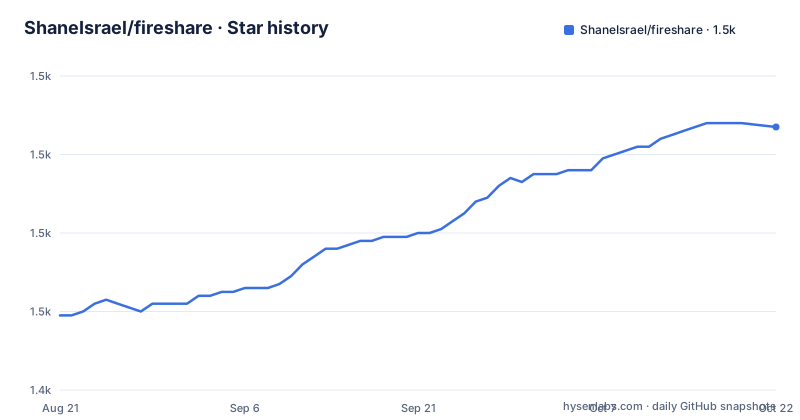
Star history
- ShaneIsrael/fireshare1,507 ★ · +48
| Repository | 2026-08-21 | 2026-10-22 |
|---|---|---|
| ShaneIsrael/fireshare | 1.5k | 1.5k |
48 Stars in the last 62 days, measured from the daily GitHub snapshot. Compare with other projects
Editorial analysis
The original file is always served straight to the viewer
Fireshare accepts four containers, and the choice is not cosmetic. `.mp4` is called out as the most compatible and recommended, `.m4v` as identical to MP4 and common on Apple devices, `.mov` as common on macOS and iOS, and `.webm` as an open, browser-native format. The encodings inside them are H.264 (AVC), H.265 (HEVC), AV1 and VP9. The reason the list stays short is stated in one sentence: the original file is always served directly to the viewer, and transcoding, when it is switched on, only generates additional lower-quality versions for adaptive streaming. The original is never modified. With no remux stage in the pipeline, anything outside those four containers has nothing to fall back on, so a file has to arrive already in a shape a browser can play.
The lite image ignores TRANSCODE_GPU, permanently
There are two images. The standard one carries a CUDA-enabled FFmpeg build; `fireshare:latest-lite` uses the FFmpeg the system already provides, which is the only reason it is smaller. The comparison table is unambiguous: GPU transcoding through NVIDIA NVENC is supported in the standard image and not available in lite, CPU transcoding works in both, and the size gap comes from the CUDA libraries. The warning matters more than the table. Setting `TRANSCODE_GPU=true` has no effect in the lite image, because GPU transcoding is permanently disabled there regardless of environment variables. A detail worth catching between the two compose examples: the README sample runs `shaneisrael/fireshare:latest-lite`, while the compose file in the repository itself runs `shaneisrael/fireshare:latest`, the larger CUDA build.
admin / admin is what the repository's own compose file ships
Two compose examples exist and they do not agree. The README sample asks you to fill in `your-admin-username` and `your-admin-password`. The `docker-compose.yml` committed at the root hardcodes `ADMIN_USERNAME=admin` and `ADMIN_PASSWORD=admin`, under a comment telling you to change these before deploying to production. The comments around that block explain the lifecycle: after the first run the two variables can be removed so the credentials stop being visible, and setting them again with new values, restarting, logging in and removing them once more is how a forgotten password gets reset. The signing key for login sessions and remember-me cookies is left commented out, since a random key is generated on first start and kept in `/data`. You are told to set it yourself only when several Fireshare containers must share sessions.
The login whitelist compares against an address you derive by hop count
Fireshare can restrict logins to a whitelist of addresses and CIDR ranges, supplied as a comma separated IPv4 or IPv6 list, and an empty or unset variable disables the whitelist. What deserves a second reading is the separate `LOGIN_IP_WHITELIST_TRUSTED_PROXIES` setting, the number of trusted reverse-proxy hops used to determine the real client IP. The bundled nginx counts as 1, and the value goes to 2 when another proxy such as Traefik, NPM or Cloudflare sits in front. So the address matched against your whitelist is derived from a number you configure by hand, and that number is the only thing tying the check to the address you thought you had written down. TOTP two-factor authentication with any authenticator app sits in the same area, and both controls are covered in docs/Security.md.
The rescan interval variable name stops after MINUTES_BETWE
The library is scanned on a timer for new or removed files, controlled by an environment variable that sets how often that scan runs, and setting it to 0 disables the automatic scan entirely, leaving scans to be triggered on demand from the admin panel. Its name inside the compose file stops partway through, at `MINUTES_BETWE`, so the exact spelling has to come from the current documentation rather than from the file you copied. What a scan reads is fixed by the volume layout instead: `/videos` and `/images` are the source directories to scan, `/processed` receives generated metadata and posters, and `/data` holds the internal database. Four mounts are required, and the single container form spells them out:
docker run --name fireshare \
  -v $(pwd)/fireshare/data:/data:rw \
  -v $(pwd)/fireshare/processed:/processed:rw \
  -v /path/to/my/videos:/videos:rw \
  -v /path/to/my/images:/images:rw \
  -p 8080:80 \
  -e ADMIN_USERNAME=your-admin-username \
  -e ADMIN_PASSWORD=your-admin-password \
  -e PUID=user-id-with-read-write-permissions \
  -e PGID=group-id-with-read-write-permissions \
  -d shaneisrael/fireshare:latest
Files dropped into the source folders are therefore picked up on the next scheduled scan, or by asking the admin panel to run one now.
The standard image compiles FFmpeg 6.1 from source against SVT-AV1
The Dockerfile is a multi-stage build whose two named stages make the size difference concrete. The client stage compiles from `node:24-slim` after an `npm ci` and a build script. The transcoder stage starts from `nvidia/cuda:11.8.0-devel-ubuntu22.04` and compiles its own FFmpeg: development libraries for x264, x265, vpx, aom, dav1d, opus, vorbis, ass, freetype, mp3lame and webp, then a shallow clone of SVT-AV1 at v1.8.0, pinned in a comment as the version for FFmpeg 6.1, then NVIDIA codec headers at n12.1.14.0 for NVENC, and finally ffmpeg-6.1.tar.xz from ffmpeg.org. One instruction records a deliberate workaround: the stale NVIDIA apt sources are deleted and archive.ubuntu.com is swapped for kernel.org's mirror, because NVIDIA GPG keys rotate and the mirror stays reachable when Canonical's servers do not.
Viewers who keep buffering get downgraded automatically
Transcoding is off by default and switched on with `ENABLE_TRANSCODING=true`, with `TRANSCODE_GPU=true` optional for NVIDIA hosts. CPU transcoding works out of the box. The GPU path additionally needs an NVENC-capable GPU, the NVIDIA driver and NVIDIA Container Toolkit installed on the host, and the container started with GPU access through `--gpus all` or `runtime: nvidia`. The adaptive part is not a setting at all: beyond letting a viewer choose a lower quality their connection can handle, Fireshare attempts to downgrade the quality of a viewer who is constantly buffering, with no threshold, cooldown or override documented. Sharing widens from there, with Open Graph metadata for rich link previews, an RSS feed for new public videos, notifications to Discord and other services, per-video view counting, tags for search, and cropping.
Upload tokens are a path that never touches the browser form
Uploads are optional as a whole and can be restricted once enabled, and there is a second way in that is not the web form at all: upload tokens for scripts and other tools, covered in docs/UploadTokens.md. User accounts sit on top of that, with multiple users carrying per-user permissions and shareable user profiles for uploads. Around the whole thing there are two visibility states, public and private, where private is link-only, plus password protected videos on individual files. Game-based organization with cover art and folder sharing decide how the library reads once media arrives, and reads are counted per video rather than published as an aggregate. Public and private feeds, with the separate RSS feed for new public videos, are the only outward-facing surfaces that enumerate what you have shared.
Editorial conclusion
Fireshare fits one setup well: media already sitting in folders you can mount, and viewers who will follow a link you send them. Before deploying, put real values in the admin credentials, since the compose file committed in the repository still reads admin / admin, and settle the proxy hop count before you rely on a login whitelist. If you need transcoding on NVIDIA hardware, take the standard image and accept the CUDA base. If you do not, the lite image is the right call, and TRANSCODE_GPU belongs nowhere in that compose file so nobody expects it to do something. GPL-3.0 covers the code, and what you serve through it is your own responsibility.
Frequently asked questions
Does Fireshare re-encode the video I upload?
No. The original file is always served directly to the viewer and transcoding only generates additional lower-quality versions for adaptive streaming, so the original is never modified. Because there is no remux stage, a file has to arrive in one of the four supported containers: mp4, m4v, mov or webm.
What is the difference between the Fireshare standard and lite images?
The standard image includes a CUDA-enabled FFmpeg build and the lite image uses the system-provided FFmpeg, which makes lite smaller. GPU transcoding with NVIDIA NVENC works only in the standard image, and setting TRANSCODE_GPU=true in the lite image has no effect because GPU transcoding is permanently disabled there.
What happens to the Fireshare admin credentials after the first run?
ADMIN_USERNAME and ADMIN_PASSWORD are only needed until the first run. After that they can be removed from the compose file so the credentials are not visible there. To reset them later, set the two variables again with new values, restart the container, log in, and remove them once more.
Which folders does Fireshare need mounted in Docker?
Four volumes: /data for the internal database, /processed for generated posters and metadata files, /videos for the source video directory to scan, and /images for the source image directory to scan. With the ports mapped 8080 to 80, the instance is then reachable at http://localhost:8080.
How do I restrict who can log in to Fireshare?
Two separate controls. Logins can be limited to a whitelist of IP addresses or CIDR ranges, given as a comma separated list, which is disabled when empty or unset, and TOTP two-factor authentication works with any authenticator app. Both are described in docs/Security.md.
Official sources
Add this badge to your README
If you maintain this project, the badge below links readers to this analysis and shows its maintenance status from the daily GitHub snapshot. Paste the markdown into your README; add ?metric=license or ?metric=stars to the image URL for a different field.

[](https://hysenlabs.com/projects/shaneisrael-fireshare)Star history chart for your README
[](https://hysenlabs.com/projects/shaneisrael-fireshare)