ShazamIO: asynchronous song recognition against a reverse engineered Shazam API
🎵 Is a free asynchronous library from reverse engineered Shazam API written in Python 3.10+ with asyncio and aiohttp.
At a glance
- What is it?
- ShazamIO is a free asyncio library for Python 3.10 and later that wraps a reverse engineered Shazam API, recognising a track from a file or from raw bytes and returning chart data. Recognition depends on a twelve second window of audio, and the library is explicitly a wrapper over an undocumented endpoint rather than a supported service.
- Who is it for?
- ShazamIO fits Python developers building personal media tooling, bots or research scripts that need to identify a track from audio and pull chart data without an official API, and who can tolerate an unofficial interface. It does not fit a production service that needs a supported contract, because the upstream service can change without notice and the library follows it.
- Can I use it commercially?
- Yes. MIT is a permissive licence: you can use, modify and sell software built on it, as long as you keep its copyright and licence notices.
- Is it still maintained?
- Yes. The repository last received commits 6 days ago.
- What is it written in?
- Mainly Python, according to GitHub's language statistics.
Answers come from the project's GitHub data, last synced on November 7, 2026, and from our analysis. They are not legal advice.
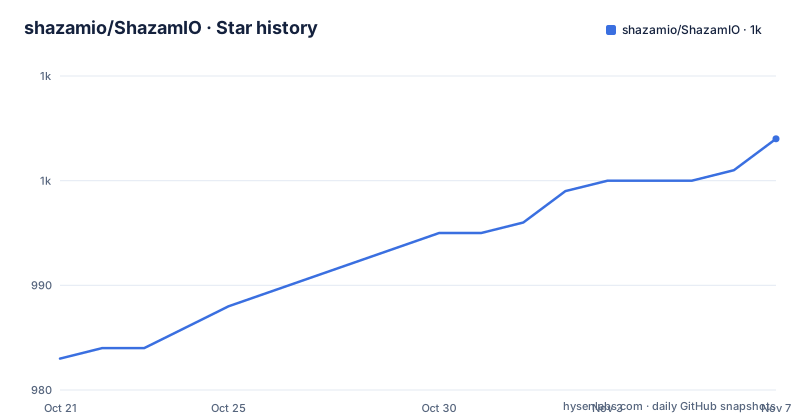
Star history
- shazamio/ShazamIO1,004 ★ · +21
| Repository | 2026-10-21 | 2026-11-07 |
|---|---|---|
| shazamio/ShazamIO | 983 | 1k |
21 Stars in the last 17 days, measured from the daily GitHub snapshot. Compare with other projects
Editorial analysis
What ShazamIO wraps and who reaches for it
ShazamIO is a free asynchronous library built on a reverse engineered Shazam API, written in Python 3.10 and later with asyncio and aiohttp. In its own words it recognises a song from a file or from bytes, reads a track, and returns every chart Shazam publishes.
The description matters more than it first appears. This is not a binding to a documented public API. The endpoints were reverse engineered, so the library is a client for an interface that Apple does not promise to keep stable, and the maintenance work it generates is the price of that approach.
Within that framing, the feature set is broad for a small library. Recognition accepts a file path, a pathlib.Path or raw bytes. Track information can be fetched by track id. You can pull the YouTube video Shazam associates with a track. Apple Music track ids can be resolved to the Shazam track keys that track_about takes. Text search of songs is supported, although it goes through a different index as described below. And the chart endpoints cover world, country, city and genre rankings.
Who it is for is fairly specific: developers writing personal tooling, chat bots, media utilities or research scripts around music identification, in Python, who want the calls to be non-blocking and want typed output rather than raw dictionaries. The package name on PyPI is shazamio, the module name is shazamio, and the project metadata describes it as an asynchronous framework for the reverse engineered Shazam API.
The dependency list tells you how the typing and the reliability are handled. aiohttp provides the HTTP layer, aiohttp-retry provides retry behaviour, and pydantic provides the models behind the Serialize helper. The floor for each is documented in pyproject.toml, with a comment for each one explaining what breaks below it.
Recognition is bound to a twelve second audio window
This is the constraint that decides whether recognition works for your audio, and it is stated directly in the example section of the README.
The signature the library sends covers 12 seconds of audio, which is the window Shazam clients send. The README explains what happens when you give it more. The segment_duration_seconds parameter still takes another window and warns about it, and from 15 seconds up Shazam finds nothing at all.
So the practical rule is that the library will not simply trim your file for you. If you pass a three minute recording, the recognition request carries a 12 second signature, and the service identifies what it can from that. If you pass something long enough that the window covers a passage the service cannot fingerprint, you get no match rather than a wrong match.
The complementary failure mode is audio that does not contain a clean twelve second segment at all. A recording that is mostly silence, a clip that starts mid-song and ends early, or a file that is too short will not produce a usable signature, and the library cannot fix that because the fingerprint is computed from what you give it.
For an application that receives arbitrary user uploads, that means a pre-processing step on your side: normalise the audio, make sure there is a clear window of the actual music, and be prepared to report a failure rather than retry the same bytes. The segment_duration_seconds argument exists for the case where you want to move that window, but the README is clear that going beyond the supported range is not productive.
Installing the package and recognising a first track
Installation is a single pip command, and the package requires Python 3.10 or newer.
pip install shazamioThe repository ships a set of runnable examples under examples/, including recognize.py, about_track.py, recognize_track_youtube.py, search_tracks_via_itunes.py, track_keys_from_apple_ids.py, top_world_tracks.py, top_tracks_country.py, top_tracks_city.py and the two genre examples, plus a data directory with sample audio.
The recognition call is short. The client is used as an async context manager, which keeps the aiohttp session inside the library's control and closes it when you leave the block.
import asyncio
from shazamio import Serialize, Shazam


async def main():
    async with Shazam() as shazam:
        out = await shazam.recognize("Gloria.ogg")

        print(out)  # dict
        print(Serialize.full_track(out).track.title)  # I Will Survive


asyncio.run(main())
Two things to notice. The recognition result is a plain dict, so nothing stops you from using it directly. And Serialize.full_track turns that dict into a typed model whose track attribute has a title, which is the path most code should take.
Track information by id follows the same pattern, and returns a pydantic model through Serialize.track.
import asyncio
from shazamio import Serialize, Shazam


async def main():
    async with Shazam() as shazam:
        about_track = await shazam.track_about(track_id=552406075)

        print(about_track)  # dict
        print(Serialize.track(data=about_track))  # pydantic model


asyncio.run(main())
The YouTube lookup builds on the recognition result, taking the youtube_link from the recognised track and returning the video URI.
import asyncio
from shazamio import Serialize, Shazam


async def main():
    async with Shazam() as shazam:
        out = await shazam.recognize("Gloria.ogg")
        track = Serialize.full_track(out).track

        youtube_data = await shazam.get_youtube_data(link=track.youtube_link)
        print(Serialize.youtube(youtube_data).uri)  # https://youtu.be/6dYWe1c3OyU?autoplay=1


asyncio.run(main())
Serialize gives typed models over the raw dictionaries
The Serialize helper is the layer that makes the library pleasant to use in a real codebase, and it exists because the underlying responses are nested dictionaries with keys that do not match what a developer would name a field.
There are several entry points. Serialize.full_track takes the recognition output and gives a model whose track attribute carries the title and the youtube_link, as the examples show. Serialize.track takes the output of track_about and returns a pydantic model. Serialize.youtube takes the YouTube data and gives a model with a uri field.
That the models are pydantic models is the point. The project moved to pydantic 2 in release 0.7.0, whose release note says the update was for Pydantic2 and Python 3.10 and later, and the pyproject.toml pins pydantic at 2.2.0 or newer. The comment on that pin is specific about why the floor matters: the suite passes with older releases, but Field(union_mode="left_to_right") on the artist union is silently ignored before 2.2.0, so the union parses in smart mode there. In other words, a version that installs cleanly can quietly change how artist fields are parsed.
That is exactly the kind of detail a consumer needs to know about, and it is recorded in the dependency comments rather than in the README. The sibling crate referred to in the pyproject comments is released in lockstep with this package and bumped by hand, which is why the dependency is pinned exactly rather than with a range: the exact pin ships the one pair that was tested together.
Chart endpoints differ in size and in what they key on
The chart methods mirror the pages Shazam publishes, and they do not all return the same number of entries.
The world chart is the 200 most shazamed tracks worldwide. The country chart is the 200 most shazamed tracks in a country. The city chart is smaller at 50 most shazamed tracks, and its location argument is not a free text city name but the one that the services/charts/locations endpoint publishes. The genre chart returns the most shazamed tracks worldwide in one genre.
import asyncio
from shazamio import Shazam


async def main():
    async with Shazam() as shazam:
        tracks = await shazam.top_country_tracks(
            country_code="NL",
            limit=5,
        )

        for track in tracks:
            print(f"{track.rank}. {track.artist} - {track.title}")


asyncio.run(main())
The city variant takes both a country code and a city name, which is why the example passes country_code="RU" together with city_name="Moscow".
The objects returned by the chart methods are models with rank, artist and title attributes, which is convenient for printing a leaderboard directly. The limit argument caps how many you request, and it defaults sensibly for the search endpoint rather than for the charts.
The genre chart is the one that imports something extra. The example brings in GenreMusic alongside Shazam, which tells you the genre parameter is a typed value rather than a loose string.
For an application, the important detail is that the 200 and 50 ceilings are properties of the service, not of the library. Asking for more than a city chart publishes gets you what the service publishes.
Text search runs through Apple's iTunes index, not Shazam
The text search method is the one place where the library steps outside Shazam, and the README is explicit about the consequences.
Shazam no longer answers text search, so search_tracks_via_itunes searches Apple's iTunes index and fetches the Shazam track of every song found. Relevance and ordering are Apple's, not Shazam's, so the ranking you get is the ranking of the iTunes search results.
import asyncio
from shazamio import Shazam


async def main():
    async with Shazam() as shazam:
        tracks = await shazam.search_tracks_via_itunes("daft punk one more time")

        print([track["title"] for track in tracks])
        # ['One More Time', 'One More Time (12 Mix)', "One More Time (Romanthony's Unplugged)"]


asyncio.run(main())
Three filters reduce the result count, and all of them are documented. Songs that Shazam has no track for are left out. Versions that share one Shazam track come back once, so you can get fewer tracks than the limit you asked for. And each song costs two requests, which is why the limit defaults to 5.
That last point is the one to design around. A search is not a single call, it is a fan-out, so a limit of 50 means a hundred network round trips. For a UI that autocompletes as the user types, the default limit is the right shape.
Note the return type as well. The search example indexes the results with track["title"], dictionary access rather than attribute access, which differs from the chart methods that return objects with attributes.
The test suite replays recorded cassettes offline
The most interesting part of this repository for a consumer is the testing strategy, because it reveals how the project deals with an API it does not control.
The justfile is described in its own comments as the one home of every command the project runs, so that a CI job and a local check are the same string rather than two copies that drift apart. The shell is pinned to bash so a recipe behaves the same on a developer machine and on the CI runners.
The test recipe runs the suite offline, replaying the recorded answers in tests/cassettes/.
uv run pytest {{ args }}Updating the recordings is a separate recipe that records the missing cassettes against the real services while keeping the rest.
uv run pytest --record-mode=once {{ args }}So the normal test run touches no network, which is what makes it fast and stable, and the network is only involved when someone deliberately refreshes the recordings. That also means a test failure usually means either the library changed or the recorded response no longer matches what the service returns today.
The rest of the toolchain follows the same shape. The install recipe uses uv sync --locked so the environment matches uv.lock exactly, and it installs the pre-commit hooks only outside CI, because CI calls the same recipes as workflow steps and building hook environments there would cost a download for nothing. Linting runs ruff for both formatting and lint checks, and there is a check-lock recipe that verifies uv.lock still agrees with pyproject.toml. The oldest supported interpreter is not hardcoded either, it is read out of requires-python in pyproject.toml with a sed expression so the two cannot drift apart.
MIT licence, a Python floor and version drift between PyPI and the tree
The licence is MIT, stated in the project metadata with the licence file listed as LICENSE.txt at the root of the repository. For a library that sends HTTP requests to a public service and parses responses, that is a straightforward grant.
The Python requirement is explicit in the metadata: requires-python is >=3.10,<4.0. The classifiers list releases from 3.10 through 3.15, and the comments in pyproject.toml explain the upper bound philosophy: a library's upper caps conflict with everything else in a consumer's environment, so a cap needs a reason. The floor for each dependency is also documented in comments, including the reason aiohttp 3.8.0 is the minimum (it is the oldest release with CPython 3.10 wheels, and 3.7.4.post0 ships none at all) and why aiohttp-retry must be 2.3 or newer (RetryOptionsBase is first exported in 2.3, and 2.2 fails at import).
There is one inconsistency a consumer should notice. The version in pyproject.toml is 0.9.0, while the most recent listed GitHub release is 0.8.1 from 2025-06-11, preceded by 0.8.0 from 2025-02-04 and 0.7.0 from 2024-10-29. The source tree is ahead of the last tagged release. The repository is not archived and the last push was on 2026-10-19, so the work continues on the default branch rather than in a series of tags.
The practical guidance is to pin what you tested and to check the changelog between the pinned version and the current tree. The dependency floor for the sibling crate is an exact pin for the same reason, so that the one tested pair is the one you get.
Editorial conclusion
ShazamIO fits Python developers building personal media tooling, bots or research scripts that need to identify a track from audio and pull chart data without an official API, and who can tolerate an unofficial interface. It does not fit a production service that needs a supported contract, because the upstream service can change without notice and the library follows it. Verify first that your audio really contains a clean twelve second window, since longer input finds nothing, then pin the version you test against and record your own cassette set before you depend on it.
Frequently asked questions
How do I install ShazamIO and recognise a song?
Install it with pip install shazamio, then use the Shazam client as an async context manager and call recognize with a file path, a pathlib.Path or raw bytes. The result is a dict, and Serialize.full_track turns it into a pydantic model.
Why does ShazamIO fail to recognise long audio files?
The signature it sends covers 12 seconds of audio, the window Shazam clients send. The README says that from 15 seconds up Shazam finds nothing at all, so a long file has to contain a usable window rather than relying on the library to trim it.
How does text search work in ShazamIO?
Shazam no longer answers text search, so search_tracks_via_itunes searches Apple's iTunes index and then fetches the Shazam track of each song found. Relevance and order come from Apple, songs without a Shazam track are dropped, and each song costs two requests, which is why the limit defaults to 5.
What does the ShazamIO test suite do without network access?
The test recipe replays recorded answers from the tests/cassettes/ directory, so the suite runs offline. A separate recipe records the missing cassettes against the real services when the recordings need refreshing.
Which Python versions does ShazamIO support?
The project metadata sets requires-python to >=3.10,<4.0, with classifiers from 3.10 through 3.15. The oldest interpreter is read from that same field by the justfile so the two cannot drift apart.
Official sources
Add this badge to your README
If you maintain this project, the badge below links readers to this analysis and shows its maintenance status from the daily GitHub snapshot. Paste the markdown into your README; add ?metric=license or ?metric=stars to the image URL for a different field.

[](https://hysenlabs.com/projects/shazamio-shazamio)Star history chart for your README
[](https://hysenlabs.com/projects/shazamio-shazamio)Was this useful?