subprocess.h: one header for launching and talking to child processes
🐜 single header process launching solution for C and C++
At a glance
- What is it?
- subprocess.h is a single header C and C++ library for launching child processes and interacting with their stdin, stdout and stderr, with a synchronous API for the common case and an asynchronous read path for when you need output before the child exits. It is released under the Unlicense, the last push was on 2026-08-21, and the only tagged release is named pre-ai.
- Who is it for?
- subprocess.h fits a C or C++ program that needs to run a child process and read what it says without pulling in a dependency, and it fits a codebase that already has a platform abstraction but wants something smaller than a full process library. It does not fit a program that needs cross-platform process trees, job objects, or output streaming with fine grained control, since the library is one process at a time with a FILE handle interface.
- Can I use it commercially?
- Yes. Unlicense is a permissive licence: you can use, modify and sell software built on it, as long as you keep its copyright and licence notices.
- Is it still maintained?
- Yes. The repository last received commits 63 days ago.
- What is it written in?
- Mainly C, according to GitHub's language statistics.
Answers come from the project's GitHub data, last synced on October 23, 2026, and from our analysis. They are not legal advice.
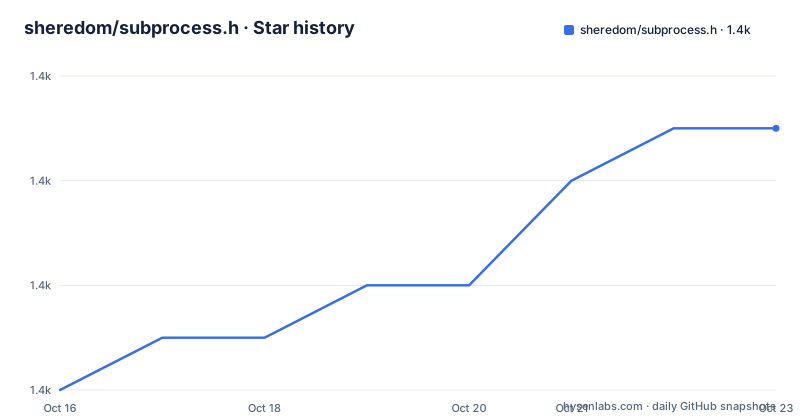
Star history
- sheredom/subprocess.h1,437 ★ · +5
| Repository | 2026-10-16 | 2026-10-23 |
|---|---|---|
| sheredom/subprocess.h | 1.4k | 1.4k |
5 Stars in the last 7 days, measured from the daily GitHub snapshot. Compare with other projects
Editorial analysis
One header, five functions, and no dependencies
subprocess.h is a single header cross-platform library that allows users to launch sub-processes, interact with the stdin, stdout and stderr of the process, and wait for them to complete.
The usage instruction is as short as it gets. You just `#include "subprocess.h"` in your code. The current supported platforms are Linux, macOS and Windows, and the current supported compilers are gcc, clang, MSVC's cl.exe and clang-cl.exe.
That combination of scope and shape is the design. There are no dependencies, no build step and no library to link, which for a C project means the difference between dropping a header into a build and adding a package to a dependency management system.
The repository is correspondingly small. The top-level listing is `.github/`, `.gitignore`, `LICENSE`, `README.md`, `subprocess.h` and a `test/` directory. Everything is in the one file, and the test directory is the test suite for it. The CI badges are for a CMake workflow and an AppVeyor project, which matches the claim that it builds with both Unix toolchains and MSVC.
The licence is the Unlicense, which is a public domain dedication with no attribution requirement. For a header that is meant to be copied into projects, that is the licence you would expect, and it removes the question that most single-header libraries leave you with.
The release history has one entry, a tag named `pre-ai` from 2026-05-22, and the last push was on 2026-08-21. A tag name like that is unusual, and it is best read as a marker of a point in time rather than a version scheme.
Launching is a NULL-terminated array and an options flag
The core of the API is `subprocess_create`, and the calling convention is the familiar C one.
const char *command_line[] = {"echo", "Hello, world!", NULL};
struct subprocess_s subprocess;
int result = subprocess_create(command_line, subprocess_option_search_user_path,
                               &subprocess);
if (0 != result) {
  // an error occurred!
}
You specify an array of strings for the command line, terminating the array with a `NULL` element. The example uses `subprocess_option_search_user_path` so that the `echo` executable can be found via the user's `PATH`, and alternatively you can pass an absolute or relative path to the executable. On Windows, command line strings are interpreted as UTF-8 and passed to the Unicode process creation APIs, which is the detail that makes the library usable from a non-ASCII code path without a conversion layer.
The error handling is explicit and worth copying. If the process is created successfully then 0 is returned. If process creation fails, a non-zero `subprocess_error_e` value is returned, with examples given being `subprocess_error_not_found`, `subprocess_error_permission_denied` and `subprocess_error_not_supported`. On POSIX platforms you inspect `errno` for the platform-specific failure reason, and on Windows you inspect `GetLastError()`.
That is a two-layer error model, a portable classification plus the native detail, and it is the right shape for a library that has to work on three operating systems.
The options argument is where the behaviour switches live. `subprocess_option_search_user_path` is the path lookup, and `subprocess_option_enable_async` switches on the asynchronous reading mode described further down. The flags are a bitmask, passed in the same position on every platform, which is what makes the API feel the same everywhere even though the implementation underneath is not.
stdin, stdout and stderr as FILE handles, with ordering rules you have to respect
The interaction model is to hand you standard `FILE*` handles for the three standard streams of the child, and that has one important consequence.
Writing to the child's standard input is `subprocess_stdin`:
FILE* p_stdin = subprocess_stdin(&process);
fputs("Hello, world!", p_stdin);
Reading the child's standard output is `subprocess_stdout`:
FILE* p_stdout = subprocess_stdout(&process);
char hello_world[32];
fgets(hello_world, 32, p_stdout);
And `subprocess_stderr` is the same for the error stream.
The rules about when you may use those handles are stated carefully and they are the whole of the API's safety story. You must not write to the stdin after any call to `subprocess_join` or `subprocess_destroy`. You must not read from the stdout after any call to `subprocess_destroy`. And you must not read from the stderr after any call to `subprocess_destroy`.
The asymmetry between stdin and stdout is deliberate and reflects the fact that the streams are separate pipes. The stdin rule mentions both `join` and `destroy`, because after joining the process has finished and its input pipe is closed, while the stdout rule mentions only `destroy`, because a joined process's output can still be read, it is just at end of file.
The `FILE*` interface is a genuine design choice with consequences. It means you can use `fgets`, `fread`, `fprintf` and every other stdio function on the child's streams, which is convenient and familiar. It also means the pipe buffering is stdio's buffering, and a program that writes a lot to stdout and then waits for a response on stdin can deadlock, because the child's output fills the pipe buffer and the parent is still writing. The library's answer to that is the asynchronous mode, which is a separate set of functions precisely because the synchronous ones cannot express it.
Waiting, destroying and terminating, and why destroy before the child finishes is legal
Three functions handle the lifecycle of the child, and each has a documented behaviour that is slightly different from what you might expect.
`subprocess_join` waits for the process to finish:
int process_return;
int result = subprocess_join(&process, &process_return);
if (0 != result) {
  // an error occurred!
}
The return code of the child is written into the second argument, and that parameter can be `NULL` if you do not care about the return code. If the child process encounters an unhandled exception, the return code will always be filled with a non-zero value.
`subprocess_destroy` releases the resources:
int result = subprocess_destroy(&process);And the detail that makes this library more flexible than it first appears is that you can destroy a process before it has completed execution, which allows you to spawn a process that would outlive the execution of the parent process.
`subprocess_terminate` kills a possibly hung process:
int result = subprocess_terminate(&process);The note here is precise about ordering. You can still call `subprocess_destroy` and `subprocess_join` after calling `subprocess_terminate`, and the return code filled by `subprocess_join` is then guaranteed to be non-zero.
So the ordering is flexible in a way that is genuinely useful. Terminate then join gives you a killed process's exit status. Destroy without joining gives you a detached child. Join then destroy is the normal path. The library is explicit that these are all valid, which is more than most process libraries document.
The guarantee that a terminated process reports a non-zero return code is also the right behaviour, because a signal-killed child does not have a meaningful exit status and reporting zero would make a caller think the process succeeded.
Asynchronous reads, custom environments, and the working directory caveat
Two features go beyond the basic lifecycle, and both come with caveats worth reading before you rely on them.
The first is asynchronous reading. If you want to read from a process before calling `subprocess_join` on it, you cannot use `subprocess_stdout` or `subprocess_stderr`, because the various operating systems that this library supports do not allow for this. Instead you call `subprocess_create` with the `subprocess_option_enable_async` option, and then use the `subprocess_read_stdout` and `subprocess_read_stderr` helper functions. Those calls may block if there is not any data ready to be read, so the caller has to be prepared for a blocking read on a supposedly asynchronous interface.
The second is the extended entry point `subprocess_create_ex`, which adds an `environment` argument, an array of `FOO=BAR` pairs terminated in a `NULL` entry:
const char *command_line[] = {"echo", "Hello, world!", NULL};
const char *environment[] = {"FOO=BAR", "HAZ=BAZ", NULL};
struct subprocess_s subprocess;
int result = subprocess_create_ex(command_line, subprocess_option_search_user_path,
                                  environment, NULL, &subprocess);
The fourth argument optionally specifies the child process's current working directory, and passing `NULL` inherits the parent's. On Windows, custom environment entries and the working directory string are interpreted as UTF-8.
Here is the caveat, and it is a well-handled one. Not every platform can honour a custom working directory. Where it cannot, `SUBPROCESS_HAVE_CWD` is defined to `0` and passing a non-`NULL` working directory returns `subprocess_error_not_supported` with `errno` set to `ENOSYS`. The library names the affected platforms precisely, glibc older than 2.29, macOS older than 10.15, and iOS, tvOS and watchOS where Apple marks the underlying call unavailable. And you can define `SUBPROCESS_HAVE_CWD` yourself to override the detection, for instance on musl older than 1.1.24.
One more constraint on the environment: you cannot specify `subprocess_option_inherit_environment` with a custom environment. Merging the parent environment with your own is left to you, and the documentation is clear that you have to query the parent variables you want and specify them yourself.
Where subprocess.h is the wrong tool
The first case is a program that needs to manage a tree of processes. The library is one child at a time, and the documentation says you can destroy a process before it finishes so it outlives the parent, but there is no job object on Windows, no process group on POSIX, and no way to ask the library to kill a child's children. A server that spawns workers and must reap them reliably is looking for a different tool.
The second case is a program that needs fine-grained output control. The synchronous path hands you `FILE*` handles with stdio buffering, and the asynchronous path is two functions that may block. There is no select or poll integration, no callback, no per-stream reader thread and no way to interleave a timeout. For a program that must not block on a chatty child, the `FILE*` interface is the wrong shape.
The third is a C++ project that already uses the standard library's facilities or a platform abstraction. `std::system`, `posix_spawn` and the platform process APIs are already there, and adding a header that reimplements them to get a nicer signature is a trade you should make deliberately.
The fourth is anything expecting a maintained dependency. The only tagged release is `pre-ai`, which is a marker rather than a version, and the last push was on 2026-08-21. For a header this small, staleness matters less than it would for a library, because the code is readable in one sitting and you can maintain it yourself. But if you are shipping it in a product, you are carrying it.
The deadlock risk deserves one more word, because it is the failure a user will hit. A child that writes more than the pipe buffer to stdout, while the parent writes to the child's stdin and waits for a reply, will block on the write, and the parent will block on the read. The library documents the ordering rules for the handles but not this scenario, so the practical mitigation is to use the async read functions and to close the stdin handle when you have finished writing to it.
Editorial conclusion
subprocess.h fits a C or C++ program that needs to run a child process and read what it says without pulling in a dependency, and it fits a codebase that already has a platform abstraction but wants something smaller than a full process library. It does not fit a program that needs cross-platform process trees, job objects, or output streaming with fine grained control, since the library is one process at a time with a FILE handle interface. Before you use it, read the working directory section, because `SUBPROCESS_HAVE_CWD` is not universally supported and the failure is `subprocess_error_not_supported` rather than an error, and note that reading stdout and stderr with the synchronous helpers after the fact requires careful ordering to avoid a deadlock.
Frequently asked questions
How do I use subprocess.h in a C project?
Just `#include "subprocess.h"` in your code, with no dependency to install and nothing to link. Linux, macOS and Windows are supported, with gcc, clang, MSVC's cl.exe and clang-cl.exe as the supported compilers.
How do I launch a process and read its output?
Call `subprocess_create` with a NULL-terminated array of command line strings and an options flag such as `subprocess_option_search_user_path`, then use `subprocess_stdout` or `subprocess_stderr` to get a `FILE*` handle and read with `fgets` or `fread`. Use `subprocess_join` to wait for the exit code and `subprocess_destroy` to release the resources.
Can I read from a subprocess before it exits?
Yes, but not with `subprocess_stdout` or `subprocess_stderr`, because the supported operating systems do not allow that. Pass `subprocess_option_enable_async` to `subprocess_create` and use the `subprocess_read_stdout` and `subprocess_read_stderr` helpers instead, keeping in mind that those calls may block if no data is ready.
Can I set a custom working directory and environment for the child?
Use `subprocess_create_ex` with an array of `FOO=BAR` pairs and a working directory path, passing NULL for the directory to inherit the parent's. Where a platform cannot honour a working directory, `SUBPROCESS_HAVE_CWD` is defined to 0 and the call returns `subprocess_error_not_supported` with `errno` set to `ENOSYS`; you can define the macro yourself to override the detection.
Official sources
Add this badge to your README
If you maintain this project, the badge below links readers to this analysis and shows its maintenance status from the daily GitHub snapshot. Paste the markdown into your README; add ?metric=license or ?metric=stars to the image URL for a different field.

[](https://hysenlabs.com/projects/sheredom-subprocess-h)Star history chart for your README
[](https://hysenlabs.com/projects/sheredom-subprocess-h)Was this useful?