AAAD's licence is bound to a device, which is why a factory reset wipes it
The original application for downloading and installing apps made specifically for Android Auto outside of Google Play Store. Active since 2021.
At a glance
- What is it?
- AAAD is an Android phone app that downloads third party Android Auto apps and installs them so that Android Auto will show them, on a phone with no root. It works by staying ahead of a platform restriction rather than by holding anything proprietary, and almost everything interesting about it is in the known issues list, where each device family gets its own workaround.
- Who is it for?
- AAAD suits someone whose car head unit will only show apps that declare themselves a particular way, and who does not want to root a phone or run a computer to patch an APK by hand. Three things to check before you rely on it.
- Can I use it commercially?
- Yes. MIT is a permissive licence: you can use, modify and sell software built on it, as long as you keep its copyright and licence notices.
- Is it still maintained?
- Yes. The repository last received commits 49 days ago.
- What is it written in?
- Mainly Java, according to GitHub's language statistics.
Answers come from the project's GitHub data, last synced on November 15, 2026, and from our analysis. They are not legal advice.
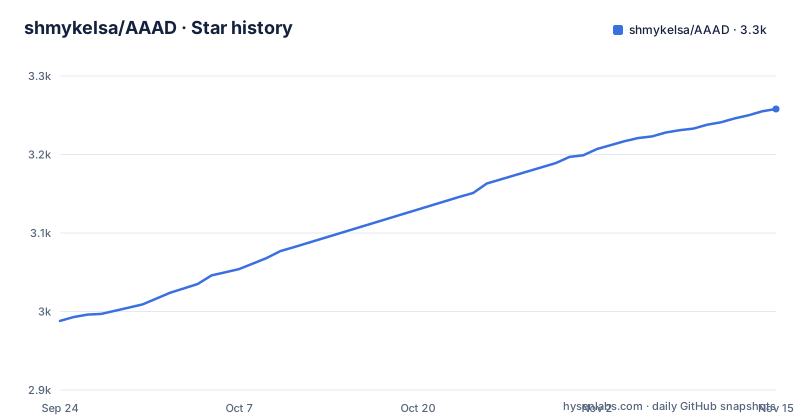
Star history
- shmykelsa/AAAD3,258 ★ · +270
| Repository | 2026-09-24 | 2026-11-15 |
|---|---|---|
| shmykelsa/AAAD | 3k | 3.3k |
270 Stars in the last 52 days, measured from the daily GitHub snapshot. Compare with other projects
Editorial analysis
The whole product exists because of a restriction that dates to 2018
The frequently asked questions end with a question that sounds like a complaint: why do I need this app, and can I not just install the apps myself.
The answer starts by conceding the point. Yes, you could install them yourself, but they would not appear in Android Auto. Then it gives the reason, and the sentence is cut off partway through: since the beginning of 2018 the custom apps for Android Auto are blocked by something the page does not finish naming.
That date is the reason the project exists, and it is worth separating from the project's own timeline. The repository description says active since 2021, three years after the restriction it works around, which is consistent with a tool that appeared once sideloading had already stopped working and has been maintaining that workaround ever since.
The rest of the value proposition follows from the same fact. The main goal is stated as having the listed apps in Android Auto with a painless experience and, most of all, without requiring a rooted phone. The headings make the same promise three more times: no need for a computer, no developer options, no need to grab APKs and patch them, no root needed.
So this is a compatibility shim for a platform decision, which is also why it carries so much device-specific advice.
Everything happens on the phone, with no developer settings anywhere
The mechanism is described in one paragraph and it is deliberately unexciting.
The app is installed on an Android phone, you select an app you want, the download begins, and once it completes you install the result through the classic Android interface and the app shows up in Android Auto. The claim about the environment is repeated in the next section: AAAD can be easily installed on any Android phone, the whole installing process takes place only on it, and you will not need to activate developer settings, neither in the main settings nor in Android Auto.
The line about not needing to grab APKs and patch them is the historical claim. The project also points rooted users at a separate free tool from the same author, which takes an alternative root route to patch the apps and carries a list of other features you can activate or pre-activate in Android Auto.
So there are two paths to the same outcome, and the project steers non-rooted users to itself. That also explains why the known issues are written as instructions rather than as bugs to report: the work is done locally on the device, and the failure modes belong to the phone's manufacturer build rather than to a server.
Free is one download a month, and the licence lives on the device
The commercial terms are short enough to state in full, which is unusual and welcome.
The app is free and offers in-app purchases. The free version allows up to one download every 30 days. The PRO version gives unlimited downloads, forever.
Then the clause that explains the rest of the support story. PRO can be activated directly and automatically inside the app, and it will be bound to one device. The PRO or FREE version, including the date of the next download, survives an app uninstall.
Two consequences fall straight out of that. Surviving an uninstall is what lets you clear storage or reinstall the app without losing your entitlement. And being bound to one device is what makes the entitlement fragile in exactly one direction: a factory reset is listed as a known issue that wipes the licence, and the page's response is an email link with a pre-filled subject and body asking the user to replace a masked address with the one the payment was registered to.
The page also draws a line that is easy to misread. Asked whether a licence is needed for the apps to work while the vehicle is not parked, the answer is no, and the sentence says the PRO licence only gives access to unlimited downloads. It is not a feature unlock.
Buying outside the app means keeping a receipt and writing a tagged email
There is a whole section on paying outside the app, and it describes a manual activation process rather than an automated one.
You can pay through a hosted card payment page, or donate through another provider an amount equal to or greater than the asking price, which the page gives as 3.99 EUR. Then comes the instruction that decides whether it works: keep the donation receipt, and it lists what counts, a bank statement, a confirmation page or an email.
After that you follow a mail link, or write to the help address yourself, put a bracketed tag in the subject line, and include a small thought. The page says an automatic response will then guide you through the following steps, and the pre-filled body invites the sender to edit it.
So the activation path depends on two things the app cannot do for itself: the payer retaining proof, and the payer composing an email. That is the cost of selling outside a store, and the page is honest about it rather than pretending there is a button.
There is a simpler path inside the app, which the licensing section mentions in five words: press the bottom text of the app.
Five known issues, four of them per device family
The known issues section is the longest part of the page and it is where this project is honest.
Four of the five are device or version specific. Devices from one manufacturer family, including two brands, will not show apps or will report no messages during drive, with a wiki fix offered for Android 13 and below. A Pixel on Android 13 reports no new messages during drive, with a fix to apply before installing rather than after. On Android 14 and later, versions below 2.0 are not compatible and compatibility under the 2.x line is still described as uncertain, with a USB dongle product suggested as an alternative for making apps available. And a factory reset wipes the licence.
The fifth is different in kind. Google Play Protect erased the downloaded apps, and the response is not a fix but a reading list: take a deep look before installing anything, expect the ordinary install button to be hidden, and note that the large blue button will not install the app you chose. The instruction is to use the install anyway button instead.
That is an unusual thing for an app to ask of its users, and it is worth stating plainly: the interface is arranged so the normal path does nothing, which is also why the security scanner objects to it.
It downloads from official sources, and paid apps are out of scope
The sourcing policy is one sentence and it is the sentence that makes the project defensible.
AAAD downloads directly from the official source of publicly available Android Auto apps. Paid applications, and apps already in the Play Store, will not be available in it.
So the catalogue is bounded by what the original developers publish for free, and the tool's contribution is installation rather than acquisition.
The honourable mentions section shows how much of the Android Auto third-party ecosystem predates it, naming eleven projects with their authors: a screen projection, a streaming and mirroring set, a media player, a mirroring tool, a launcher, a widget set, a performance monitor, a torque-style diagnostic tool, a browser, a passenger-side app and a contacts bridge. That list is a good map of what the platform's third-party scene actually contains.
Support is offered through a help entry in the app's top-right menu, with the page noting the team is very small and based in Italy and asking for patience with overnight mail. Updates go out through a dedicated Telegram channel, and the page suggests watching the repository with the banner so a GitHub account gets an email when something ships. Translations are handled through a community translation platform linked in the title.
A repository with one app module, a build file and a readme
The top level of the repository is four entries: a licence file, the readme, an app directory and a build file.
There is no settings file, no wrapper, no test directory, no documentation folder and no contribution guide. Whatever build system sits behind that single build file is not reproducible from the top level, and the readme is the entire documentation.
That is consistent with everything else about the project. It is a closed application with an MIT licence on the repository, a freemium model sold through the app and a payment link, an update channel on a chat app, and support by email.
The release history shows the cadence: version 2.8.5 in June 2026, 2.8.4 and 2.8.3 in the January before it, four days apart. And the newest line is the one the Android 14 note is unsure about, which is the honest summary of the whole situation.
The notes at the end of the page say it in three sentences: the app does not grant in any way that the apps it makes available will actually work in Android Auto, the installing method can fail at any time if the platform changes, and any software it installs is provided as is with no support from the author for malfunctioning apps or a malfunctioning platform.
Editorial conclusion
AAAD suits someone whose car head unit will only show apps that declare themselves a particular way, and who does not want to root a phone or run a computer to patch an APK by hand. Three things to check before you rely on it. Read the known issues for your own device family, because the fixes are per manufacturer and per Android version and the newest Android is still described as uncertain. Read the disclaimer, which says plainly that the app does not guarantee the apps it installs will work and that the method can fail whenever the platform changes. And keep your payment receipt if you buy outside the app, because the manual activation path runs through an email exchange that starts with a receipt you have to supply yourself.
Frequently asked questions
Is AAAD still working?
The page does not promise it will. It says the installing method can fail at any time if the platform changes, that on Android 14 and later versions below 2.0 are not compatible and compatibility under the 2.x line is still uncertain, and that it offers no support for malfunctioning apps or a malfunctioning platform. The newest release recorded is 2.8.5 from June 2026.
What is AAAD in Android Auto?
It is an app for Android phones that downloads popular third-party Android Auto apps and installs them so that they appear in Android Auto. The page's own explanation of why you cannot simply install them yourself is that custom apps for Android Auto have been blocked since the beginning of 2018.
Is AAAD free and what does the PRO licence give you?
The app is free with in-app purchases, and the free version allows up to one download every 30 days. PRO gives unlimited downloads and nothing else: asked whether a licence is needed for apps to work while the vehicle is not parked, the page answers no and says the licence only gives access to unlimited downloads.
How do I activate a licence bought outside the app?
Pay through the hosted card page or donate at least the asking price, which the page gives as 3.99 EUR, then keep the receipt, described as a bank statement, confirmation page or email. After that, follow the mail link or write to the help address with a bracketed tag in the subject and a short note, and an automatic reply guides the remaining steps.
What happens to an AAAD licence after a factory reset?
It is wiped. A licence is bound to one device, and while the PRO or FREE version survives an app uninstall, a factory reset is listed as a known issue that removes it. The page's response is an email link with a pre-filled subject and body asking the user to replace a masked address with the one the payment was registered to.
Why does Google Play Protect object to apps installed by AAAD?
It is listed as a known issue with a longer explanation further down the page rather than as a bug. The page advises reading that explanation before installing anything, and warns that the ordinary install button is usually hidden and the large blue button will not install the app you chose, so the install anyway button is the one to use.
Official sources
Add this badge to your README
If you maintain this project, the badge below links readers to this analysis and shows its maintenance status from the daily GitHub snapshot. Paste the markdown into your README; add ?metric=license or ?metric=stars to the image URL for a different field.

[](https://hysenlabs.com/projects/shmykelsa-aaad)Star history chart for your README
[](https://hysenlabs.com/projects/shmykelsa-aaad)Was this useful?