shorebird: ten packages, a test command that breaks from the wrong directory, and two coverage recipes
Code Push for Flutter and other tools for Flutter businesses.
At a glance
- What is it?
- The Dart monorepo behind a code push service for Flutter applications. Ten packages, two of which are servers rather than libraries, four of which are general purpose integrations maintained in tree instead of taken as dependencies. The contributing section is honest about its gaps: there is no local test script, and the command it recommends fails if you run it from the directory most people will try.
- Who is it for?
- Use the command line tool if you are shipping Flutter applications and want to push code without an app store release, and read the versioning section before you depend on the patch cadence. Three things to know.
- Can I use it commercially?
- Check first. The repository uses a licence we do not classify automatically, so read its LICENSE file before any commercial use.
- Is it still maintained?
- Yes. The repository received new commits within the last day.
- What is it written in?
- Mainly Dart, according to GitHub's language statistics.
Answers come from the project's GitHub data, last synced on November 15, 2026, and from our analysis. They are not legal advice.
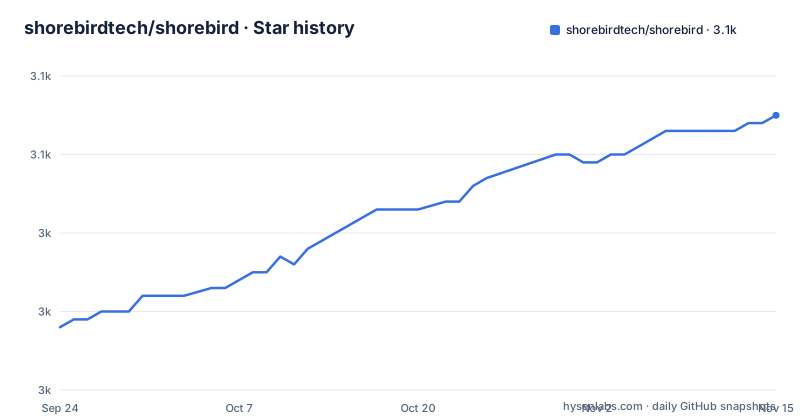
Star history
- shorebirdtech/shorebird3,055 ★ · +27
| Repository | 2026-09-24 | 2026-11-15 |
|---|---|---|
| shorebirdtech/shorebird | 3k | 3.1k |
27 Stars in the last 52 days, measured from the daily GitHub snapshot. Compare with other projects
Editorial analysis
Four of the ten packages are integrations maintained in tree
The package table lists ten, and reading their one-line descriptions shows that four of them are general purpose work rather than product work. One verifies JSON Web Tokens. One talks to Redis. One talks to the payment processor. One is a dependency injection helper built on language zones. Each has its own README and is published as a package, so they are consumable in their own right, and each duplicates something a Dart project would otherwise take from the ecosystem. The rest of the table is closer to the product: the command line tool, the client and protocol libraries that let an application talk to the code push service, and a utility that decides which framework version a project should use. So roughly two fifths of the published surface is plumbing, maintained here because it was easier than depending on it.
Two of the ten packages are servers, not client libraries
Two entries in the same table are described as servers. One intercepts and proxies framework artifact requests, which is a network service sitting in the request path between a build and a device. The other forwards alerts from a cloud provider into a chat channel, which is a webhook receiver. Neither is a library, and both are described as services the command line tool interacts with, which means the repository is not only a published set of Dart packages but also the code for two running processes. That is worth knowing before someone forks this for the client library and discovers a server component in the same tree, and it is also why the artifact proxy package carries a distinct description from everything else in the table.
The recommended test command fails from the directory most people try
The contributing section states outright that there is no script for running tests locally, and then recommends a third-party runner invoked in the packages directory:
very_good test -rWhat follows is the most useful sentence in the file. If you run it at the root instead, the runner discovers packages inside the framework's own cache directory and tries to run the tests there, and some of them fail. So the documented command is correct only in one of two plausible places to type it, and the failure in the other looks like a broken repository rather than a wrong path. The one-paragraph admission is better than most projects manage, and it is also a fair summary of the state of the tooling: the gap is not hidden, it is documented and left open.
Two coverage recipes in one section, one of them tied to one package manager
Coverage is documented twice and the two recipes share nothing. The first tells you to install a coverage tool through a Homebrew command, run the tests with a coverage flag, convert the result into a directory of HTML, and open it:
brew install lcovThe second is a single Dart-native command that runs the tests with coverage enabled and then formats the result through a globally activated package, passing the package configuration file and a flag to honour ignore rules. The first path assumes a macOS machine with a package manager that installs binaries; the second assumes nothing but the Dart tooling already required to work on the repository. Both end in a report uploaded to an external coverage service, and both are presented as instructions rather than as alternatives.
The licence is offered at your option while the metadata records nothing
The licensing section is one of the clearer ones. It says the projects are licensed under the Apache licence, version two, or the MIT licence, at your option, and it names the two files in the repository root that hold them. Both files are in the top level listing, so the claim is checkable, and a separate handbook page is linked to explain why the project licenses this way rather than picking one. What does not match is the metadata: no licence is recorded for the repository at all, which means a package index or an automated scanner reading the metadata finds nothing while a human reading the readme finds two options. For a commercial service that is the difference between a clear answer and no answer.
Release history lives in a file and in tags at the same time
Two things record what changed. The first is the tag list, and it shows a patch number that has reached the hundreds, with three releases in the visible history spread across about two weeks in late September and early October. A cadence like that means the command line tool ships very frequently, which is what a service whose value depends on staying current with the framework it wraps has to do. The second recorder is a release notes file sitting at the root of the repository. So version history lives in both places, and nothing in the readme says which one to read or whether the file is kept current.
Contribution means joining a chat server and nothing else
The contributing section is three paragraphs and the first of them is the whole instruction: if you are interested in contributing, join the project's chat server. There is no mention of an issue tracker, a pull request template, a review process or a code of conduct, and the environment section that follows goes straight to bootstrapping. For a repository with ten published packages and two servers, that is a thin entry point. The file does say the environment needs Dart, and it names one bootstrap script that runs the dependency fetch across every package in the repository, which is at least a single command rather than a list.
The readme has no install command and sends you to a website
The getting started section is one sentence: visit the documentation site to begin. There is no install command anywhere in the file, no example invocation of the command line tool, and no statement of what the tool does beyond what the package table implies. Everything a first-time user needs is on an external site. For a project whose pitch is a command you can add to a build pipeline, that is a notable choice, and it means the repository readme is primarily a package index and a contributor note rather than a document anyone can act on. The rest of the file is consistent with that framing: the package table has a column for each package's own README and defers all detail to them.
Editorial conclusion
Use the command line tool if you are shipping Flutter applications and want to push code without an app store release, and read the versioning section before you depend on the patch cadence. Three things to know. The recommended test command only works from one directory and fails loudly from another, so follow it literally. The licence is dual, offered at your option, with both files in the tree, while nothing is recorded for the licence alongside the repository. And four of the ten published packages are general purpose libraries maintained here rather than consumed, which tells you how much of this repository is infrastructure rather than the product.
Frequently asked questions
what is shorebird flutter
Shorebird is a code push service for Flutter and related tooling for Flutter businesses. The repository is a Dart monorepo of ten packages, and the command line tool is what developers use to interact with the services.
is shorebird open source
The licensing section offers a choice of the Apache licence version two or the MIT licence at your option, and both licence files are in the repository root. Nothing is recorded for the licence alongside the repository itself. A separate handbook page is linked to explain the project's licensing philosophy.
How do I run the shorebird tests?
The readme says there is no script for it yet and recommends running a third-party test runner with a recursive flag from the packages directory. It warns explicitly that running the same command at the repository root makes the runner discover packages inside the framework's own cache and run their tests, some of which fail.
How do I generate a coverage report for shorebird?
Two ways are given. One installs a coverage tool through a Homebrew command, runs the tests with a coverage flag and converts the result to HTML. The other runs the Dart test runner with coverage enabled and formats the result through a globally activated package. Coverage is then uploaded to an external service.
What packages are in the shorebird repository?
Ten, listed in a table: the command line tool, a client and a protocol library for the code push service, a server that intercepts and proxies framework artifact requests, a server that forwards cloud alerts to chat, a utility that resolves which framework version to use, and libraries for token verification, for Redis, for dependency injection built on zones, and for the payment processor.
Official sources
Add this badge to your README
If you maintain this project, the badge below links readers to this analysis and shows its maintenance status from the daily GitHub snapshot. Paste the markdown into your README; add ?metric=license or ?metric=stars to the image URL for a different field.

[](https://hysenlabs.com/projects/shorebirdtech-shorebird)Star history chart for your README
[](https://hysenlabs.com/projects/shorebirdtech-shorebird)Was this useful?