SIGRobotics-UIUC/LeKiwi: Hardware and LeRobot Integration
LeKiwi - Low-Cost Mobile Manipulator
At a glance
- What is it?
- LeKiwi is a low-cost mobile manipulator design built around a Raspberry Pi 5, a three-wheel holonomic base, and a SO-ARM101 arm. It suits robotics researchers who need a physical platform for LeRobot teleoperation, data collection, joint-angle streaming, and camera streaming, but it is a hardware build rather than a turnkey software package.
- Who is it for?
- Researchers should consider LeKiwi when they can source components, print parts, assemble the platform, and connect it to LeRobot. Builders seeking a ready-made robot or a software-only solution should look elsewhere.
- Can I use it commercially?
- Yes. Apache-2.0 is a permissive licence: you can use, modify and sell software built on it, as long as you keep its copyright and licence notices.
- Is it still maintained?
- Yes. The repository last received commits 95 days ago.
- What is it written in?
- GitHub does not report a main language for this repository.
Answers come from the project's GitHub data, last synced on November 7, 2026, and from our analysis. They are not legal advice.
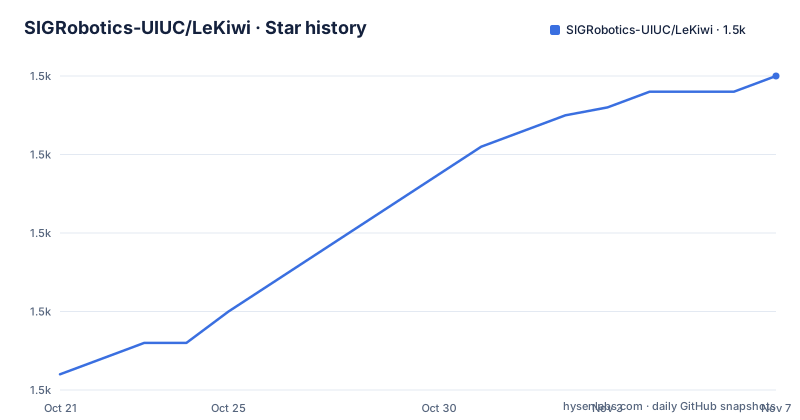
Star history
- SIGRobotics-UIUC/LeKiwi1,510 ★ · +38
| Repository | 2026-10-21 | 2026-11-07 |
|---|---|---|
| SIGRobotics-UIUC/LeKiwi | 1.5k | 1.5k |
38 Stars in the last 17 days, measured from the daily GitHub snapshot. Compare with other projects
Editorial analysis
LeKiwi's mobile-manipulation scope
SIGRobotics-UIUC/LeKiwi addresses the need for an affordable robot that combines mobile movement with an articulated arm. It is aimed at people who want to build and experiment with a physical LeRobot platform rather than operate a commercially integrated mobile manipulator. The repository identifies a Raspberry Pi 5 as the compute platform and a laptop as the destination for streaming. Its mechanical design combines a three-wheel Kiwi drive with omni wheels and a SO-ARM101 robot arm.
The platform is therefore broader than an arm mounted on a fixed desk. Mobile steering changes where the arm can work, while the cameras provide visual information from the workspace and wrist. The repository also includes a URDF directory exported from the Fusion 360 CAD design, which gives simulation or tooling a model that corresponds to the documented hardware. The URDF does not by itself guarantee compatibility with every simulator, but its presence confirms that the designers considered a simulation representation part of the deliverable.
LeKiwi also has a Dynamixel variant. According to the README, that version uses a Koch v1.1 arm, a U2D2 motor controller, and Dynamixel XL430 motors for the mobile base. That variant matters because LeKiwi is not limited to one actuator architecture. However, the repository gives only a short description of the conversion and does not document a complete software setup for that version in the README.
Hardware choices behind the LeKiwi design
The default design uses standardized stacked base plates with 3.5 mm diameter holes spaced 20 mm apart. Based on the repository layout, the design is intended to remain approachable for assembly and modification rather than depend on a single opaque enclosure. The README links the design to the Open Robotic Platform design rules, but it does not claim full certification under those rules. The practical fact is the documented hole size and spacing.
Power differs by configuration. The 12V version calls for a 12v 5A Li-ion battery, while the 5V version calls for a 65W laptop power bank. The README advises beginners to choose the 5V version because it is a little easier to assemble. It associates the 12V version with heavier lifting and identifies a wired LeKiwi configuration as the cheapest option. These are explicit choices rather than interchangeable specifications. A builder must select the version that matches the arm load and available power arrangement.
The sensors are a workspace RGB camera and a wrist RGB camera. That arrangement supports manipulation experiments that need a wider view and a closer view of the end effector. The software goals include streaming joint angles and camera feeds, but the README does not specify camera models, resolutions, frame rates, calibration procedure, or network configuration. Those details need to be checked in the linked LeRobot documentation or in build-specific files before committing to parts.
From bill of materials to LeRobot
The README presents the intended path as a staged hardware build. It directs builders first to BOM.md for the bill of materials, then to 3DPrinting.md for printed parts, Assembly.md for assembly, and finally the LeRobot documentation for getting started. The README contains no shell commands, installation script, package manager, or one-command setup procedure. As a result, there is no verified command to reproduce here, and the first real use begins with reviewing those repository files and following the external LeRobot guide linked by the README.
The BOM is the first practical decision point because the compute, arm, motors, power source, cameras, and mechanical components determine whether the platform can be assembled as intended. The printing guide determines which files from the 3DPrintMeshes directory are relevant, while the assembly guide covers the physical sequence. The repository listing exposes these as separate documents, which also makes it possible to inspect the build without treating the repository as a software installer.
After assembly, the repository points to LeRobot documentation at the LeRobot site. The README's software goals are teleoperation using a controller or laptop WASD with a leader arm, collection of demonstration data, and streaming of joint-angle and camera feeds. It does not document the exact launch command, network address, calibration sequence, or data directory. A first-use tutorial must stop at that boundary rather than invent operational flags or ports.
What LeKiwi's software goals do and do not specify
LeKiwi describes a data path centered on a physical robot and the LeRobot ecosystem. The robot can accept teleoperation input from a controller or from laptop WASD plus a leader arm. Once operating, it is intended to collect data and stream joint-angle and camera information to a laptop. The explicit separation between Raspberry Pi 5 and laptop streaming suggests that the compute unit is attached to the robot while the laptop serves as an external interaction and viewing endpoint.
That arrangement is useful for experiments involving mobile manipulation because the arm, base, and cameras are part of one platform. It also makes LeKiwi different from a conventional desktop manipulator: the base contributes holonomic motion, while the arm contributes articulated manipulation. The repository's URDF export and hardware files indicate a design-oriented project, but the README does not describe a standalone LeKiwi runtime.
The limitation is documentation depth. The README does not state whether teleoperation is implemented through a specific LeRobot script, whether calibration is automatic or manual, what data format is produced, or how streaming is secured. It also does not document recovery after a network interruption, motor fault, camera failure, or interrupted data collection. Engineers should therefore treat LeRobot integration as an implementation task rather than assuming that the repository contains a complete, validated software stack.
Choosing between standard and Dynamixel LeKiwi
The standard LeKiwi design uses a SO-ARM101 arm and the three-wheel Kiwi mobile base described in the README. The Dynamixel LeKiwi directory is presented as a separate version using ROBOTIS components. According to the README, it uses a Koch v1.1 arm, a U2D2 motor controller, and Dynamixel XL430 motors for the mobile base.
The practical difference is actuator and integration architecture, not simply a different brand label. A builder choosing the standard design should follow the SO-ARM101 route and the associated assembly and BOM documentation. A builder choosing the Dynamixel version must account for a different arm, motor controller, and base motors. The README does not provide a full bill of materials, wiring table, firmware procedure, or software command sequence for that variant. Calling the two versions interchangeable would go beyond the available documentation.
The standard design also offers power and mobility choices. The 5V version is presented as easier for first-time robot builders, while the 12V version is associated with heavier objects and a wired variant is described as the cheapest. These choices affect assembly complexity, lifting expectations, and likely integration work. The repository does not provide load ratings, so it would be unsafe to infer a maximum payload from the battery choice alone.
Licensing and maintenance considerations
The repository is distributed under the Apache-2.0 license. That license permits use and modification under its terms, while any distribution, notice, and patent-related obligations should be handled according to the license text itself. The repository also includes CITATION.cff, and the README asks researchers to cite the repository using that metadata when using LeKiwi in research. The citation file is a research attribution aid, not a substitute for reviewing the license when incorporating CAD or other files into a larger system.
The repository is not archived, and its last push was on 2026-08-05. There are no GitHub releases listed, so users should not assume that tagged releases, upgrade notes, or compatibility guarantees are available. Maintenance cost is therefore tied primarily to hardware integration and dependency changes in LeRobot or related components. The README does not specify supported Raspberry Pi images, LeRobot versions, firmware baselines, or a test matrix.
For this kind of project, the main upgrade work may involve replacing printed parts, adapting to actuator changes, or checking whether the documented LeRobot integration still matches the current external documentation. The README provides a Discord channel for questions and feedback, but it does not promise response times or a formal support policy. An adopter should budget time for assembly troubleshooting and software configuration rather than treating the repository as a packaged product with a defined release cadence.
Editorial conclusion
Researchers should consider LeKiwi when they can source components, print parts, assemble the platform, and connect it to LeRobot. Builders seeking a ready-made robot or a software-only solution should look elsewhere. Before adoption, inspect BOM.md, 3DPrinting.md, and Assembly.md to confirm that the mechanical and electrical design fits the intended arm, compute, and power configuration. The project is suitable as an open hardware platform whose first adoption cost is the build and integration work, not a licensed binary package.
Frequently asked questions
What hardware does a standard LeKiwi build use?
The README lists a Raspberry Pi 5, a three-wheel Kiwi holonomic drive with omni wheels, a SO-ARM101 arm, and workspace and wrist RGB cameras. It also offers 5V and 12V power configurations.
How do I start building LeKiwi?
The README gives a four-step path: review BOM.md, follow 3DPrinting.md, use Assembly.md, and then follow the linked LeRobot documentation. It does not provide a one-command installer or a complete software launch procedure.
What is the difference between standard LeKiwi and Dynamixel LeKiwi?
The standard version uses a SO-ARM101 arm and a three-wheel Kiwi base. The Dynamixel version uses a Koch v1.1 arm, a U2D2 motor controller, and Dynamixel XL430 motors for the base.
Official sources
Add this badge to your README
If you maintain this project, the badge below links readers to this analysis and shows its maintenance status from the daily GitHub snapshot. Paste the markdown into your README; add ?metric=license or ?metric=stars to the image URL for a different field.

[](https://hysenlabs.com/projects/sigrobotics-uiuc-lekiwi)Star history chart for your README
[](https://hysenlabs.com/projects/sigrobotics-uiuc-lekiwi)Was this useful?