Linux Command Library: 9137 formatted man pages, offline, on any device
2M+ app downloads, 500k+ monthly website visitors, Linux basics, tips and formatted man pages
At a glance
- What is it?
- Linux Command Library is a Kotlin Multiplatform reference that ships 9137 formatted man pages, thirty categories and sixteen shell tips to Android, iOS, desktop and the web with no network access. It is a lookup table rather than a shell, and the README documents no example invocation for the CLI build.
- Who is it for?
- Adopt Linux Command Library when you read manual pages on a phone, on a tablet or on a machine with no package manager, and when you want 9137 pages grouped into thirty categories rather than hunted down one name at a time. Do not adopt it as documentation for the Linux you administer, because the text is a fixed snapshot and never a query against your own system.
- Can I use it commercially?
- Yes. Apache-2.0 is a permissive licence: you can use, modify and sell software built on it, as long as you keep its copyright and licence notices.
- Is it still maintained?
- Yes. The repository received new commits within the last day.
- What is it written in?
- Mainly Kotlin, according to GitHub's language statistics.
Answers come from the project's GitHub data, last synced on October 23, 2026, and from our analysis. They are not legal advice.
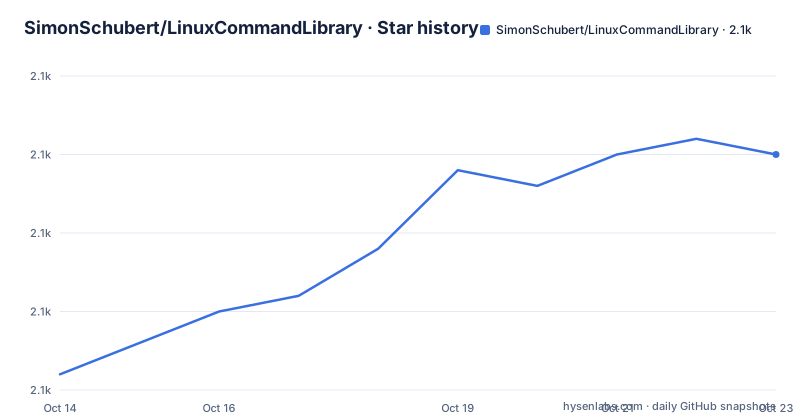
Star history
- SimonSchubert/LinuxCommandLibrary2,080 ★ · +14
| Repository | 2026-10-14 | 2026-10-23 |
|---|---|---|
| SimonSchubert/LinuxCommandLibrary | 2.1k | 2.1k |
14 Stars in the last 9 days, measured from the daily GitHub snapshot. Compare with other projects
Editorial analysis
An offline man page reader built once in Kotlin Multiplatform
The project is written in Kotlin, and the top level of the repository shows how one corpus reaches five targets: `common/`, `android/`, `iosApp/`, `desktopApp/`, `linuxApp/`, `composeApp/`, `viewmodels/` and `cli/` all sit beside `build.gradle.kts` and `settings.gradle.kts`. Page text is authored once in the shared code and shipped everywhere instead of being ported platform by platform. The app holds 9137 manual pages plus a tips layer, and the README states that it works 100% offline, needs no internet connection and carries no tracking software. Native builds are named for Linux, macOS and Windows. Nothing in that layout opens a shell, so nothing in it reports your disk, your processes or your version numbers. Every page reads identically on a phone as on a workstation, which is precisely what you give up by removing the network: the text is a snapshot of documentation, never a query against the machine in front of you.
Homebrew and AUR ship the interface and the CLI apart
The README documents installation for macOS and Arch Linux, and on both systems the desktop interface and the command line reader are different packages. On macOS the interface comes from a cask:
brew install --cask simonschubert/tap/linux-command-libraryThe CLI is a separate formula, which matters if you only want the terminal reader:
brew install simonschubert/tap/linux-command-library-cliArch splits the same way under shorter names:
yay -S lcl-gui-binyay -S lcl-binA `flatpak/` directory sits in the top level, yet no flatpak command appears in the README, so the text alone gives you no way to install that build. Native CLI and GUI binaries for Linux, macOS and Windows are published as downloads, and a CLI screenshot is shown, but the README gives no example invocation and no flag list. You get the package names and no demonstration of what the CLI accepts, and that is the gap worth closing yourself before you rely on `lcl-bin` on a server.
Package ids and test paths still carry the old name
The repository is called Linux Command Library, yet every identifier it ships under still says Bibliotheca. The Play Store entry is `com.inspiredandroid.linuxcommandbibliotheca`, F-Droid serves that same id, the badge artwork is fetched from a `LinuxCommandBibliotheca` repository path, and the Android deeplinking tests live at `android/src/androidTest/java/com/inspiredandroid/linuxcommandbibliotheca/ComposeDeeplinkTests.kt`. Only the distribution names were renamed, which is why `brew install --cask simonschubert/tap/linux-command-library` installs software whose package id still contains the older word. Anyone wiring deep links, writing a packaging recipe or searching a store by identifier has to use the old spelling, while anyone searching by product name has to use the new one. The shared module carries `common/src/commonTest/kotlin/CommonTests.kt` as its only test suite named for common code, and what those unit tests cover is not stated anywhere in the README.
Thirty categories listed against a claim of thirty plus
The content claim is 30+ basic categories, and the list that follows holds exactly thirty names. One-liners, AI tools, System information, System control, System Recovery, Users and Groups, Files and Folders, Input, Printing, JSON, Network, Search and Find, Git, SSH, Video and Audio, Package manager, Text Processing, Compression and Archiving and Backup and Imaging sit side by side, followed by `Hacking tools`, Terminal games, Cryptocurrencies, Shell Scripting, Tmux, Regular Expressions and five separate text editors. The gap between thirty plus and thirty is small. The composition matters more, because the categories are grouped by binary family rather than by job: `Hacking tools` occupies the same shelf as Backup and Imaging, and the editor categories number one per editor rather than one for text editing. That is an index of what ships documentation on a Linux system, not a syllabus. Reading it as a learning path would be a mistake, and browsing it as a lookup table is the intended use.
Sixteen tips that teach shell syntax instead of options
Beneath the categories sits a second list of sixteen tips, and these are short shell notes rather than man page entries. Clear and reset the terminal, List of recent commands, Tab Completion, Temporary aliases, Permanent aliases, Chain commands, Cursor navigation, Redirection and Special characters in commands all cover literacy that no single man page explains as a set. Three are about permissions alone: View file permissions, Modify file permissions and Set file permissions via binary references, where the binary reference form is the one people get wrong. Two cover unattended work, Running commands in the background and `Scheduling tasks with cron`, the only scheduler reference in the whole corpus. None of it is a command you can copy into a shell and run against your own machine. It is explanation, no snippet is attached showing it in use, and the gap between this layer and the man pages above it is the gap between being told and being able to read the source.
One workflow named android builds the CLI and desktop too
Build automation sits in a single file, `.github/workflows/android.yml`, and its name describes only part of the job. That workflow creates a new build carrying an APK, CLI binaries and desktop installers, then uploads an AAB to the Play Store, so one file named after Android also produces the command line reader and the desktop installers. For a Kotlin Multiplatform corpus feeding five targets this is the sensible arrangement, and it explains why the CLI needs its own distribution name at all: the artifact has to be published before a package manager can hand it to you. The rest of the top level supports the same pipeline, with `fastlane/` for store submission, `screenshotTests/` for image checks, `art/` and `icons/` holding the badge artwork the README embeds, and `websiteBuilder/` sitting beside a `Gemfile` and `Gemfile.lock`. What turns `websiteBuilder/` into the site at `linuxcommandlibrary.com` is not explained anywhere in the README.
Where a machine that already has man pages wins
Two surfaces, one project. The offline promise covers the packaged app, while four badges point at the App Store, Google Play, F-Droid and a web edition, with the repository description claiming 2M+ app downloads and 500k+ monthly website visitors. Nothing in the text says whether the browser edition carries the same 9137 pages, so read the offline guarantee as a property of the app and not of the website. That web edition is the fair alternative for anybody reading on a desktop, and the more telling comparison is against a Linux box that already carries its own manual pages. Such a machine answers the same questions locally, stays matched to the binaries actually installed on it, and costs nothing. What this project adds is the opposite property: a categorised snapshot that needs no package manager, runs on a phone with no shell at all, and gives an unfamiliar command a category to be found under. Take it for the phone and for the browsing, and keep your local pages for anything version specific.
Two version naming schemes and what an upgrade costs
Recent history carries two naming schemes side by side. `v4.9.0` on 2026-09-26 and `v4.8.0` on 2026-09-06 follow a plain dotted pattern, while `linux-gui-v4.7.1` on 2026-09-04 prefixes that same numbering with a platform label, so three moves landed inside September 2026 and the middle one is scoped to the Linux interface alone. A plain version sort and a platform-scoped sort therefore disagree with each other, and any upgrade note has to be read against that split. The code is under Apache-2.0 while the copyright of the man pages stays with their respective authors, so shipping an offline copy inside another product raises a question the source licence does not answer on its own; `CHANGELOG.md` is the only file the top level names for the version record. The last push to the default branch master was on 2026-10-06, and the repository is not archived.
Editorial conclusion
Adopt Linux Command Library when you read manual pages on a phone, on a tablet or on a machine with no package manager, and when you want 9137 pages grouped into thirty categories rather than hunted down one name at a time. Do not adopt it as documentation for the Linux you administer, because the text is a fixed snapshot and never a query against your own system. Check first whether the `cli/` build answers the questions you actually have: the README documents a package name and a screenshot, but no example command.
Frequently asked questions
How do I install the Linux Command Library CLI on macOS?
Install it with the project Homebrew formula `brew install simonschubert/tap/linux-command-library-cli`, which is separate from `brew install --cask simonschubert/tap/linux-command-library`, the cask that carries the desktop interface. Both come from the same tap.
Does Linux Command Library need an internet connection?
No. The README states that the app works 100% offline, needs no internet connection and has no tracking software. A separate web edition is published at `linuxcommandlibrary.com`, which of course does need a connection.
What is inside Linux Command Library besides man pages?
The app holds 9137 manual pages, 30+ basic categories and a separate list of sixteen shell tips covering tab completion, aliases, redirection, file permissions and `Scheduling tasks with cron`. The tips are explanations, not runnable snippets.
Which platforms does Linux Command Library build for?
The README names native CLI and GUI binaries for Linux, macOS and Windows, plus Android and iOS apps and a web edition. Documented package installs cover macOS through Homebrew and Arch Linux through AUR.
Why does the Linux Command Library package id still say Bibliotheca?
The Play Store and F-Droid packages are both `com.inspiredandroid.linuxcommandbibliotheca`, and the Android deeplinking tests live under `android/src/androidTest/java/com/inspiredandroid/linuxcommandbibliotheca/ComposeDeeplinkTests.kt`. Only the distribution names use the newer spelling.
Official sources
Add this badge to your README
If you maintain this project, the badge below links readers to this analysis and shows its maintenance status from the daily GitHub snapshot. Paste the markdown into your README; add ?metric=license or ?metric=stars to the image URL for a different field.

[](https://hysenlabs.com/projects/simonschubert-linuxcommandlibrary)Star history chart for your README
[](https://hysenlabs.com/projects/simonschubert-linuxcommandlibrary)Was this useful?