SimplCommerce: a modular monolith storefront whose container build still says .NET 5
A simple, cross platform, modulith ecommerce system built on .NET
At a glance
- What is it?
- SimplCommerce is a C# ecommerce starter that assembles its modules around a single ASP.NET Core WebHost, shipped with SQL Server, PostgreSQL and Docker paths. It is readable and easy to fork, but the container pipeline and the README disagree about the runtime.
- Who is it for?
- Adopt SimplCommerce when you want a readable .NET storefront skeleton and intend to own it: the module boundaries are visible in the source and the setup path is short. Do not adopt it if you need new tags from this year or a container image you can build today without patching it.
- Can I use it commercially?
- Yes. Apache-2.0 is a permissive licence: you can use, modify and sell software built on it, as long as you keep its copyright and licence notices.
- Is it still maintained?
- Yes. The repository last received commits 160 days ago.
- What is it written in?
- Mainly C#, according to GitHub's language statistics.
Answers come from the project's GitHub data, last synced on November 14, 2026, and from our analysis. They are not legal advice.
Star history
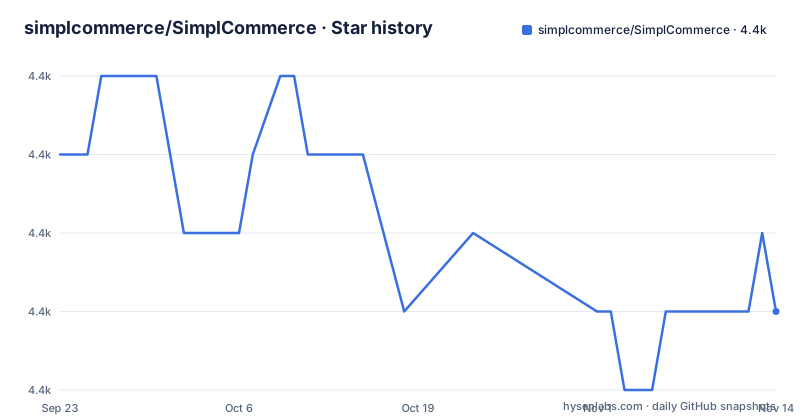
- simplcommerce/SimplCommerce4,412 ★ · -2
| Repository | 2026-09-23 | 2026-11-14 |
|---|---|---|
| simplcommerce/SimplCommerce | 4.4k | 4.4k |
-2 Stars in the last 52 days, measured from the daily GitHub snapshot. Compare with other projects
Editorial analysis
Every module hangs off one WebHost, not one service per module
The whole system boots from a single project: src/SimplCommerce.WebHost. No network boundary between modules appears anywhere in the repository layout. There is no API gateway project, no per-module host, no service discovery. Instead the top level holds src/, test/, SimplCommerce.sln and a global.json (plus one test project, SimplCommerce.Module.WishList.Tests.Controllers), and the WebHost under src/ composes the modules. The word modulith in the project description is doing real work here: monolith, but with modules kept apart in code.
What that buys a reader is legibility. You can open the solution, see the module list, and trace a single request from the controller into the module's handler. The stack behind it is ASP.NET Core with Entity Framework Core for persistence, ASP.NET Identity Core for accounts, and an Angular 1.6.3 front end. That last entry is the detail that should decide your adoption before anything else runs: Angular 1.6.3 is the end-of-life 1.x line, so that front-end code is code you will replace or carry as-is, not extend with current tooling. The store front and the back office are served from the same host, which is why one port and one /Admin path are enough to see both.
MediatR is the seam between modules, so events are the dependency you inherit
Module-to-module wiring goes through MediatR 7.0.0, named in the technologies list as the mechanism for domain events. Nothing else is named as a cross-module channel: no shared service bus, no message broker, no HTTP calls between modules. That is the whole integration architecture. If you write into the Catalog module and want the WishList or Order side to react, you publish an in-process notification and a handler in the other module picks it up.
The practical consequence is that the boundary is a convention rather than a wall. You get a clean dependency list if you respect the convention. You get a hidden coupling chain if a contributor does not. For a team that will fork this code and grow it for two years, that is the line worth writing into a contributing rule early, because the alternative is a codebase where a WishList change silently affects order totals.
MediatR 7.0.0 is also a specific version, named in the README. Moving it later means a migration, and the event handlers it wires are your own code, so there is nothing in the framework to fix for you.
SQL Server and PostgreSQL diverge in three files, and the rewrite happens at build time
Two database paths exist. The default in src/SimplCommerce.WebHost/appsettings.json points at SQL Server:
{
  "DefaultConnection": "Server=.;Database=SimplCommerce;Trusted_Connection=True;TrustServerCertificate=true"
}
Switching to PostgreSQL is not a config change alone. The Dockerfile performs it by rewriting the project file and two source files in place before it compiles: a sed replaces Microsoft.EntityFrameworkCore.SqlServer with Npgsql.EntityFrameworkCore.PostgreSQL, and two more sed calls replace UseSqlServer with UseNpgsql in src/SimplCommerce.WebHost/Program.cs and in src/SimplCommerce.WebHost/Extensions/ServiceCollectionExtensions.cs. Three files, three textual substitutions, no abstraction behind them.
The repository also ships a second Dockerfile, Dockerfile-sqlite, and a StaticData-RO.sql. If you add a provider of your own you follow the same pattern: edit the csproj, edit both call sites, delete the migrations directory (the Dockerfile runs rm src/SimplCommerce.WebHost/Migrations/* and swaps in appsettings.docker.json), then regenerate. The cost is that a provider change is a fork of the wiring code, not a configuration entry, and nothing warns you at build time if you change the connection string but forget one of the two UseNpgsql call sites.
On Windows the schema comes from the Package Manager Console, not from the app
The Windows and SQL Server path is a Visual Studio workflow, and the schema step surprises people. You need SQL Server plus Visual Studio 2022 and .NET 8. You edit the connection string in appsettings.json under src/SimplCommerce.WebHost, then create a database literally named SimplCommerce in your instance or change the Database name to match yours. Build the solution, set SimplCommerce.WebHost as the startup project, then open the Package Manager Console with SimplCommerce.WebHost as the default project and run the schema creation by hand.
The back office credentials are fixed and printed in the README, so anyone who finds a reachable /Admin on a copy of this software owns the store. Change [email protected] and its password before the instance leaves localhost.
On Mac and Linux one shell script does the build, and EF tools must already exist
The non-Windows path swaps Visual Studio for the SDK. You need PostgreSQL, the .NET Core SDK 8.0, and the Entity Framework Core command line tools installed globally:
dotnet tool install --global dotnet-efAfter updating the connection string in appsettings.json in SimplCommerce.WebHost, the build is one script:
sudo ./simpl-build.shOn Ubuntu 18 the README gives sudo bash simpl-build.sh instead. Then start the site from the WebHost directory:
cd src/SimplCommerce.WebHost
dotnet run
The site answers on http://localhost:49206, a fixed port rather than a dynamic one, and the back office is the same /Admin path.
There is also a Docker shortcut, explicitly labelled for testing only:
docker run -p 5000:80 simplcommerce/ci-buildThat image is a CI build artifact, not a supported deployment, and it maps host port 5000 to the container's port 80.
The container build pins the .NET 5 SDK while the README asks for .NET 8
Here is the contradiction worth knowing before you commit a day to this. The README prerequisites say Visual Studio 2022 and .NET 8. The repository Dockerfile opens with FROM mcr.microsoft.com/dotnet/sdk:5.0 and FROM mcr.microsoft.com/dotnet/aspnet:5.0, and installs dotnet-ef at version 5.0.0. global.json sits at the repository root to pin the SDK the build resolves, and the published releases in the repository are tags from 2018, the newest being SimplCommerce 1.0.0-RC dated 2018-06-16.
So the documented developer setup and the image recipe disagree about the runtime generation. Treat the Dockerfile as a starting point to edit, not a working build.
One more cost in that file: it curls a native libwkhtmltox.so binary from a pinned upstream download URL at build time, so an image build needs outbound network access to that host and bakes in a binary you did not compile.
Where nopCommerce and GrandNode differ in approach
The comparison people actually make is against nopCommerce and GrandNode, both far larger in surface area. nopCommerce arrives as a plugin system with a commercial extension marketplace, so third-party code, not the core team, decides how a feature lands, and paid add-ons carry their own licences on top of the platform.
SimplCommerce sits at the other end of that axis. It ships the storefront, the admin, Identity Core accounts and MediatR events, and the README names no plugin marketplace. The cost is that every non-core feature is a change you make and then maintain yourself, and the Angular 1.6.3 front end is part of that burden rather than something a plugin author updates for you. If your plan depends on assembling functionality from paid or third-party modules, this codebase is the wrong starting point. If the plan is to read the whole thing, delete what you do not need and own the rest, the small surface is the argument for it.
Editorial conclusion
Adopt SimplCommerce when you want a readable .NET storefront skeleton and intend to own it: the module boundaries are visible in the source and the setup path is short. Do not adopt it if you need new tags from this year or a container image you can build today without patching it. Before anything else, verify that dotnet ef migrations add completes on your .NET 8 SDK, since the repository Dockerfile still pins the .NET 5 SDK image and version 5.0.0 of the EF tools while the README asks for .NET 8.
Frequently asked questions
Is SimplCommerce still a reasonable .NET ecommerce starter in 2026?
It is readable, self-contained and small enough to read end to end, with one WebHost mounting every module and Entity Framework Core handling persistence. The trade-off is ownership: every change past the starter is yours to maintain.
What database does SimplCommerce support out of the box?
Both, through separate paths. The default connection string in src/SimplCommerce.WebHost/appsettings.json targets SQL Server, and the Dockerfile swaps the provider to PostgreSQL by rewriting the csproj plus UseSqlServer in Program.cs and ServiceCollectionExtensions.cs.
How do I create the SimplCommerce database schema?
In Visual Studio, open the Package Manager Console with SimplCommerce.WebHost as the default project and run Update-Database, after creating a database named SimplCommerce or renaming the Database value in the connection string. On Mac or Linux the path goes through simpl-build.sh and dotnet run instead, with dotnet-ef installed globally.
What are the default SimplCommerce admin login credentials?
The README gives [email protected] with the password 1qazZAQ!, and the back office is reachable at /Admin on the same host as the storefront. Because the account is fixed and documented, it should be changed before the site is reachable by anyone but you.
Can I run SimplCommerce with Docker?
Yes, but the README labels the image as for testing purposes only: docker run -p 5000:80 simplcommerce/ci-build. The Dockerfile itself builds against the .NET 5 SDK image and dotnet-ef 5.0.0, which is older than the .NET 8 the README prerequisites name, so expect to edit it.
Official sources
Add this badge to your README
If you maintain this project, the badge below links readers to this analysis and shows its maintenance status from the daily GitHub snapshot. Paste the markdown into your README; add ?metric=license or ?metric=stars to the image URL for a different field.

[](https://hysenlabs.com/projects/simplcommerce-simplcommerce)Star history chart for your README
[](https://hysenlabs.com/projects/simplcommerce-simplcommerce)Was this useful?