load-grunt-tasks: replace a wall of loadNpmTasks calls with one line
Load multiple grunt tasks using globbing patterns
At a glance
- What is it?
- load-grunt-tasks reads the dependency lists in your package.json and loads every installed grunt plugin whose name matches a glob pattern, so a Gruntfile that listed eleven grunt.loadNpmTasks calls becomes a single require. It also lets you narrow the scan to specific dependency scopes, point at another package.json, or exclude plugins with a negated pattern.
- Who is it for?
- load-grunt-tasks fits a Grunt project whose plugin list grows faster than its Gruntfile, and where new plugins should be picked up automatically by being added to package.json rather than by editing the build file. It does not fit projects on other task runners, and it makes the loaded plugin set implicit, which is a poor trade in a repository where the build file is expected to be readable on its own.
- Can I use it commercially?
- Yes. MIT is a permissive licence: you can use, modify and sell software built on it, as long as you keep its copyright and licence notices.
- Is it still maintained?
- Yes. The repository last received commits 50 days ago.
- What is it written in?
- Mainly JavaScript, according to GitHub's language statistics.
Answers come from the project's GitHub data, last synced on November 7, 2026, and from our analysis. They are not legal advice.
Star history
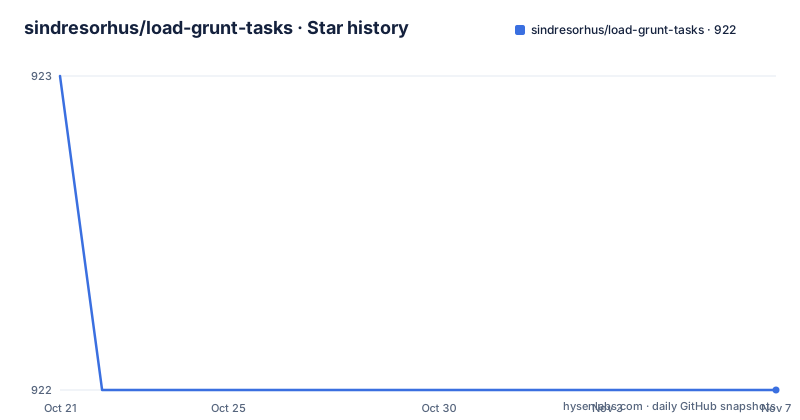
- sindresorhus/load-grunt-tasks922 ★ · -1
| Repository | 2026-10-21 | 2026-11-07 |
|---|---|---|
| sindresorhus/load-grunt-tasks | 923 | 922 |
-1 Stars in the last 17 days, measured from the daily GitHub snapshot. Compare with other projects
Editorial analysis
The problem is a Gruntfile that grows by one line per plugin
Every grunt plugin needs to be registered before its tasks exist, and the built-in way to do that is grunt.loadNpmTasks with the package name. The README shows what that looks like once a project has a dozen plugins: grunt-shell, grunt-sass, grunt-recess, grunt-sizediff, grunt-svgmin, grunt-styl, grunt-php, grunt-eslint, grunt-concurrent and grunt-bower-requirejs, each on its own loadNpmTasks line. The module describes that arrangement as unnecessarily cumbersome, and its replacement as a single call that hands the grunt instance over:
require('load-grunt-tasks')(grunt);The audience is narrow and specific: teams still on Grunt, whose Gruntfile has accumulated a wall of boilerplate. The mechanism is not that the module knows which plugins you want, it derives that list from the dependencies you already declared, so the plugin set and the package manifest cannot drift apart. That coupling is the feature and the risk at the same time.
The dependency list in package.json is the source of truth
The module reads the dependencies, devDependencies, peerDependencies and optionalDependencies sections of your package.json and loads the grunt tasks that match the provided patterns. That default scope is broad on purpose, and it matters in practice, because a grunt plugin is frequently declared as a devDependency but sometimes ends up as a regular dependency, and a shared library might declare one in peerDependencies. The scope option lets you narrow this. Setting it to devDependencies loads only from that section, and setting it to an array loads from several:
require('load-grunt-tasks')(grunt, {scope: ['devDependencies', 'dependencies']});The accepted values are dependencies, devDependencies, peerDependencies, optionalDependencies and bundledDependencies. The default is the first four, which means a project that declares a plugin anywhere other than those four sections will not have it loaded, and a project that lists something like a build tool in dependencies may find it loaded even though it was not intended as a grunt plugin.
Glob patterns, including the negated one
The pattern option controls which packages are loaded, and its default is the pair ['grunt-*', '@*/grunt-*'], which covers classic grunt plugins and the scoped package variants. The type is string or string[], and the matching is done with minimatch glob patterns. Narrowing to the official contrib family is a one line change:
require('load-grunt-tasks')(grunt, {pattern: 'grunt-contrib-*'});Patterns can also be combined and negated. Loading the contrib tasks plus one specific plugin is expressed as a two element array, and excluding a single plugin uses the negate globbing pattern with an exclamation mark:
require('load-grunt-tasks')(grunt, {pattern: ['grunt-contrib-*', '!grunt-contrib-coffee']});This is the option worth understanding, because it is the escape hatch that keeps the automatic approach usable in a project with an exception, such as a plugin that must not be loaded in every environment.
config points at the manifest, requireResolution changes where lookup happens
Two options control where the module looks. The config option takes a string or an object and defaults to the path to the nearest package.json, which it finds by walking up the hierarchy. Setting it to a relative path lets you load tasks from a different manifest than the nearest one:
require('load-grunt-tasks')(grunt, {config: '../package'});The requireResolution option is subtler and, according to the README, changes where dependencies are looked for. Its default is false, which keeps the grunt-like behaviour of loading tasks only in the immediate node_modules directory. Setting it to true traverses up the file hierarchy looking for dependencies the way require() does, which is what you want in a monorepo where a plugin may be hoisted to a root node_modules rather than sitting next to the Gruntfile. The full set of options in use looks like this:
require('load-grunt-tasks')(grunt, {
	pattern: 'grunt-contrib-*',
	config: '../package.json',
	scope: 'devDependencies',
	requireResolution: true
});
With a documented default for every option, the module stays predictable: the only surprise is if your dependency layout differs from what it assumes.
Installing it and dropping it into a Gruntfile
The install is a development dependency, since a grunt plugin is a build-time tool:
npm install --save-dev load-grunt-tasksThe call goes at the top of your Gruntfile, before the tasks are referenced:
// Gruntfile.js
module.exports = grunt => {
	// Load all grunt tasks matching the ['grunt-*', '@*/grunt-*'] patterns
	require('load-grunt-tasks')(grunt);

	grunt.initConfig({});
	grunt.registerTask('default', []);
};
Because the module reads the manifest at load time, adding a plugin to package.json and reinstalling is enough to make its tasks available, with no second edit to the Gruntfile. The package publishes a single file, index.js, and declares grunt as a peer dependency with the range >=1, so the module relies on the host project providing Grunt itself rather than shipping a second copy. The engine requirement is Node >=8, and the package metadata marks the module as side-effect free.
The explicit list is still a valid answer
The honest alternative to this module is the thing it replaced: keeping the grunt.loadNpmTasks calls. The difference in approach is real, not cosmetic. The explicit list makes the build file describe exactly what runs, and a reviewer reading the Gruntfile sees the plugin set without cross-referencing package.json. The glob approach removes that duplication, and the cost is that the Gruntfile no longer tells you what will be loaded. Where that matters, the module still allows a middle position, since the pattern option accepts an explicit array, so a project can list the plugins it cares about and use the negated pattern to exclude one. The other route is to leave Grunt entirely, which is a much larger decision than this module makes, but worth naming because a one line Gruntfile is often the moment a project starts asking whether the task runner still earns its place.
A small module with a long tail of releases
Two limits are worth stating plainly. The first is that the module is Grunt specific, both in name and in behaviour, and it depends on the Grunt task-loading convention, so it does nothing for a project on another runner. The second is that the implicit plugin set, which is the whole appeal, is also the reason a Gruntfile can become hard to read, since a task you did not configure may exist because someone added a dependency. On maintenance, the pattern is the interesting part. The tagged releases are old, v5.0.0 in May 2019 and v5.1.0 in July 2019, and those are the versions available from npm, while the last push to the repository was on 2026-09-18. So the code is being touched without new tags being cut, which is fine for a module this small, since the surface is a handful of options and the dependency list is short, with arrify, multimatch, pkg-up and resolve-pkg. The licence is MIT, with the licence file at the repository root and the same identifier in the package metadata, and the package is marked with sideEffects false so bundlers can drop it when unused.
Editorial conclusion
load-grunt-tasks fits a Grunt project whose plugin list grows faster than its Gruntfile, and where new plugins should be picked up automatically by being added to package.json rather than by editing the build file. It does not fit projects on other task runners, and it makes the loaded plugin set implicit, which is a poor trade in a repository where the build file is expected to be readable on its own. Before adopting it, confirm your plugins are named to match the default patterns, decide whether the dependency scopes you want scanned include peerDependencies and optionalDependencies, and remember that the newest tag is v5.1.0 from 2019-07-31 while the last push was on 2026-09-18.
Frequently asked questions
How do I install load-grunt-tasks?
Run npm install --save-dev load-grunt-tasks. It is a development dependency because grunt plugins are build-time tools, and the module declares grunt >=1 as a peer dependency.
Which grunt plugins does load-grunt-tasks pick up by default?
It scans the dependencies, devDependencies, peerDependencies and optionalDependencies of your package.json and loads every package matching the default patterns ['grunt-*', '@*/grunt-*']. You can narrow that with the scope and pattern options.
How do I exclude a single grunt plugin?
Use the negate globbing pattern with an exclamation mark in the pattern array, for example {pattern: ['grunt-contrib-*', '!grunt-contrib-coffee']}.
What does requireResolution do?
It defaults to false, which keeps the grunt-like behaviour of loading tasks only in the immediate node_modules directory. Setting it to true traverses up the file hierarchy looking for dependencies the way require() does.
Official sources
Add this badge to your README
If you maintain this project, the badge below links readers to this analysis and shows its maintenance status from the daily GitHub snapshot. Paste the markdown into your README; add ?metric=license or ?metric=stars to the image URL for a different field.

[](https://hysenlabs.com/projects/sindresorhus-load-grunt-tasks)Star history chart for your README
[](https://hysenlabs.com/projects/sindresorhus-load-grunt-tasks)Was this useful?