pretty-ms is one function with fifteen options, and the rounding rules are the whole specification
Convert milliseconds to a human readable string: `1337000000` → `15d 11h 23m 20s`
At a glance
- What is it?
- A package that turns milliseconds into a readable duration string, with a number of options for verbosity, precision, units and notation. The documentation is unusually precise about whether a value is floored or rounded, and that precision is the part you need to read before using it in a progress bar.
- Who is it for?
- Adopt pretty-ms if you need to display durations in Node or a browser and want the unit selection and precision handled for you rather than by hand. Do not adopt it if you need calendar aware formatting, because the package deliberately does not support months, since month lengths vary and a duration is not a date.
- Can I use it commercially?
- Yes. MIT is a permissive licence: you can use, modify and sell software built on it, as long as you keep its copyright and licence notices.
- Is it still maintained?
- Yes. The repository last received commits 25 days ago.
- What is it written in?
- Mainly JavaScript, according to GitHub's language statistics.
Answers come from the project's GitHub data, last synced on November 7, 2026, and from our analysis. They are not legal advice.
Star history
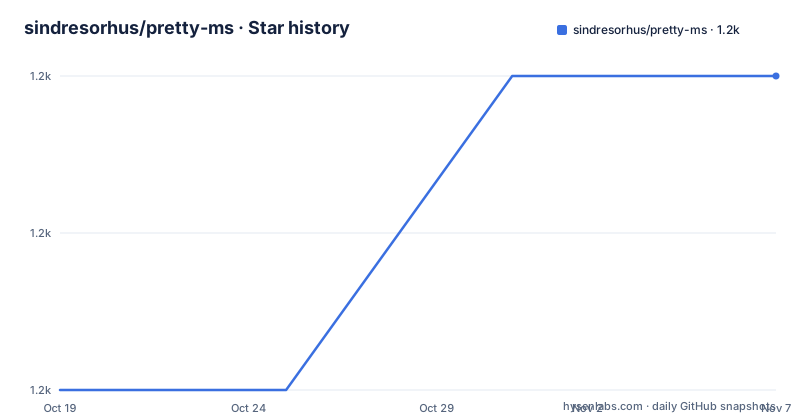
- sindresorhus/pretty-ms1,220 ★ · +2
| Repository | 2026-10-19 | 2026-11-07 |
|---|---|---|
| sindresorhus/pretty-ms | 1.2k | 1.2k |
2 Stars in the last 19 days, measured from the daily GitHub snapshot. Compare with other projects
Editorial analysis
The package is one function and one file
pretty-ms converts milliseconds to a human readable string, with `1337000000` becoming `15d 11h 23m 20s`. The inverse is a separate package, `parse-duration-ms`, and the README points at it for that direction.
The usage example shows the range of inputs it accepts.
import prettyMilliseconds from 'pretty-ms';

prettyMilliseconds(1337000000);
//=> '15d 11h 23m 20s'

prettyMilliseconds(1337000000n);
//=> '15d 11h 23m 20s'

prettyMilliseconds(1337);
//=> '1.3s'

prettyMilliseconds(133);
//=> '133ms'
Both a `number` and a `bigint` are accepted, and the bigint form exists because the exactness matters. The README states that an integer, whether number or bigint, is exact at any size.
The repository is correspondingly small. The top level holds `index.js`, `index.d.ts`, an `index.test-d.ts` for the type tests, `test.js` for the runtime tests, a `package.json`, a `readme.md` and a `license` file, plus the standard editor and repository configuration files.
The package manifest describes the shape of the project. The name is `pretty-ms`, the version is 10.0.0, the type is `module` so it is ESM only, the exports map has a `types` and a `default` pointing at the type declaration and the JavaScript, and `sideEffects` is false so a bundler can tree shake it. The engine requirement is Node 22 or newer, and the published files are just `index.js` and `index.d.ts`.
The test script is `xo && node --test && nz`, which runs the linter, the Node built-in test runner and a size check. The dev dependencies are minimal, with xo for linting and a size check tool, and the xo configuration relaxes two assertion rules for the test file.
The licence is MIT, and the author is Sindre Sorhus. The recent releases are v10.0.0 from 2026-10-14, v9.3.1 from 2026-08-28 and v9.3.0 from 2025-09-15, and the last push to the repository was on 2026-10-14.
The seconds are floored and the milliseconds are rounded
The options that matter most are the two precision ones, and the README is explicit about their different behaviour.
`secondsDecimalDigits` is a number, defaulting to 1, and is the number of digits after the seconds decimal point. The digits are floored, not rounded, so the seconds never round up into the next step. `1999ms` is `1.9s`, and at zero digits it is `1s`, never `2s`.
`millisecondsDecimalDigits` is a number, defaulting to 0, and is the number of digits after the milliseconds decimal point. Here the milliseconds are rounded, not floored, but they never round up to `1000ms`, and a nonzero duration under a second never rounds down to `0ms`, so `999.6ms` is `999ms` and `0.2ms` is `1ms`. The README notes this does not apply with `formatSubMilliseconds`, which floors instead.
The asymmetry is deliberate and it makes sense once you look at the two cases. Flooring the seconds stops a value like 1.999 seconds from displaying as 2.0 seconds, which would read as a different duration than it is. Rounding the milliseconds avoids displaying a nonzero duration as zero, which would be worse.
The `keepDecimalsOnWholeSeconds` option keeps milliseconds on whole seconds, so `13s` becomes `13.0s`, and the README says it is useful when you are showing a number of seconds spent on an operation and do not want the width of the output to change when hitting a whole number. That is a layout concern rather than a semantic one, and it is the kind of thing that only matters once you have put the output in a table.
The `millisecondsDecimalDigits` option is also flagged as useful in combination with `process.hrtime()`, which is the case where you have a fractional millisecond measurement and want to show more than the default zero digits.
How a fractional number is read, and what happens at the extremes
The precision of the input is handled before any formatting, and the README describes it in terms of significant digits.
A fractional number is first rounded to 15 significant digits, the precision of a number, which removes float noise. The examples are precise about the boundary: `0.57 * 100_000`, which is `56999.99999999999`, becomes `57s`, while `999.9999999999999` at 16 digits is `1s`, but `999.99999999999` at 14 digits is `999ms`.
That last pair is a good illustration. A value with 16 significant digits exceeds the precision of a JavaScript number, so it is rounded first and lands on 1000ms, which then becomes 1s. A value with 14 digits is inside the precision and stays as it is.
At the extremes the behaviour changes again, and the reason is arithmetic rather than formatting. From `1e14` milliseconds, about 3170 years, up, no digits are left for the fraction, so the duration is rounded to whole milliseconds. And from `1e15`, about 31700 years, up, it is rounded to the nearest 10 milliseconds.
This is the sort of detail that a rounding library usually leaves unstated, and it is what makes the implementation trustworthy for long durations where a float would have already lost precision.
The options that change the shape of the output
Beyond precision, the options control how many units appear and in what notation.
`compact` is a boolean, defaulting to false, that shows only the first unit, so `1h 10m` becomes `1h`. It also ensures that `millisecondsDecimalDigits` and `secondsDecimalDigits` are both set to 0, which is a sensible coupling because a compact string with a decimal looks odd.
`unitCount` is a number defaulting to Infinity, the number of units to show, and setting `compact` to true overrides it. It is ignored with `colonNotation`.
`verbose` uses full-length units, so `5h 1m 45s` becomes `5 hours 1 minute 45 seconds`.
`separateMilliseconds` shows milliseconds separately, which means they are not included in the decimal part of the seconds.
`formatSubMilliseconds` shows microseconds and nanoseconds, and the values are floored to whole nanoseconds, so a duration under one nanosecond is `0ms`.
`subSecondsAsDecimals` shows sub-second values as decimal seconds, so `900ms` becomes `0.9s`, which the README says is useful for progress indicators where you want consistent unit format to prevent flickering. It is also floored, so `999ms` is `0.9s`, and a duration too small for the seconds field to show, like `50ms` at the default of one decimal digit, stays in milliseconds rather than showing as zero.
`colonNotation` displays time the way a digital watch does, so `5h 1m 45s` becomes `5:01:45`, and it always shows time in at least minutes, so `1s` is `0:01`. Setting it to true overrides `compact`, `formatSubMilliseconds`, `separateMilliseconds` and `verbose`, and it ignores `unitCount` for a good reason: dropping a field would change what the remaining fields mean, since `1:01:01` would become `1:01`, which reads as one minute. Days after a year are padded to three digits to keep the width.
The hiding options are `hideYear`, which shows the hidden year additionally as days at 365 per year, `hideYearAndDays`, which shows both additionally as hours, and `hideSeconds`. A duration under a minute has no coarser unit, so it keeps its seconds rather than showing nothing, and with `colonNotation` the hours are always shown so the fields read as `h:mm`.
Why there are no months, and why rounded differences do not add up
The FAQ section answers two questions that reveal the package's design principles, and both are about refusing to be approximately right.
The first is why the package does not support months. It formats time durations, not calendar dates. Months of 28 to 31 days have variable lengths, which makes duration calculations ambiguous. Years are shown as a fixed 365 days, so they do not account for leap years. The `hideYear` option is the suggested way to show days as the largest unit, since days are always exactly 24 hours. For calendar based formatting the README points at the Temporal API or a date library like date-fns.
That is a considered limitation rather than an omission. A duration and a date are different things, and a library that conflated them would produce a plausible but wrong answer in February.
The second question is why the formatted difference of two values does not match the formatted values.
prettyMilliseconds(3670);        //=> '3.6s'
prettyMilliseconds(5230);        //=> '5.2s'
prettyMilliseconds(5230 - 3670); //=> '1.5s' // Not '1.6s'
The explanation is that this is inherent to displaying rounded numbers, the same reason rounded percentages do not always add up to 100 percent. Values are rounded independently, and rounding does not distribute over subtraction. The README notes that `prettyMilliseconds(5230 - 3670)` correctly represents the true difference, it just will not always match subtracting the two rounded strings by eye.
Both answers are worth reading before you use the library in a place where a user might notice the discrepancy, because the behaviour is correct and the surprise is on the reader's side.
Editorial conclusion
Adopt pretty-ms if you need to display durations in Node or a browser and want the unit selection and precision handled for you rather than by hand. Do not adopt it if you need calendar aware formatting, because the package deliberately does not support months, since month lengths vary and a duration is not a date. Verify first that the flooring and rounding behaviour matches what your interface needs, since the seconds are floored and the milliseconds are rounded, and that the Node version you run satisfies the engine requirement before you take the current major version.
Frequently asked questions
How do I install and use pretty-ms?
Run npm install pretty-ms, then import prettyMilliseconds from 'pretty-ms' and call it with a number or bigint of milliseconds. For example prettyMilliseconds(1337000000) returns '15d 11h 23m 20s'.
Does pretty-ms support months and years correctly?
It does not support months, because the package formats durations rather than calendar dates and month lengths vary. Years are shown as a fixed 365 days and do not account for leap years, and the hideYear option shows days as the largest unit instead.
Why are the seconds floored and the milliseconds rounded?
The seconds digits are floored so a value never rounds up into the next step, 1999ms is 1.9s and never 2s. The milliseconds are rounded so a nonzero duration is never shown as zero, 999.6ms is 999ms and 0.2ms is 1ms.
What does the colonNotation option do?
It displays time the way a digital watch does, so 5h 1m 45s becomes 5:01:45, and it always shows at least minutes so 1s becomes 0:01. It overrides compact, formatSubMilliseconds, separateMilliseconds and verbose, and ignores unitCount because dropping a field would change what the remaining fields mean.
Why does the difference of two formatted durations not match the formatted difference?
Because the values are rounded independently and rounding does not distribute over subtraction, the same reason rounded percentages do not always add up. The difference of the raw numbers is represented correctly, it just does not match subtracting the two rounded strings by eye.
Official sources
Add this badge to your README
If you maintain this project, the badge below links readers to this analysis and shows its maintenance status from the daily GitHub snapshot. Paste the markdown into your README; add ?metric=license or ?metric=stars to the image URL for a different field.

[](https://hysenlabs.com/projects/sindresorhus-pretty-ms)Star history chart for your README
[](https://hysenlabs.com/projects/sindresorhus-pretty-ms)Was this useful?