tesserocr releases the GIL during OCR, but process-wide Tesseract settings are shared between threads
A Python wrapper for the tesseract-ocr API
At a glance
- What is it?
- sirfz/tesserocr is a Cython wrapper over Tesseract's C++ API, not a call to the tesseract command. Wheels bundle the engine, language data comes separately, and its thread-safety rules are spelled out in detail.
- Who is it for?
- Use tesserocr if you run OCR from Python on many images, want a persistent Tesseract instance, and can follow the one-instance-per-worker rule for threads. Skip it if you only need to shell out to the tesseract binary once in a while.
- Can I use it commercially?
- Yes. MIT is a permissive licence: you can use, modify and sell software built on it, as long as you keep its copyright and licence notices.
- Is it still maintained?
- Yes. The repository last received commits 13 days ago.
- What is it written in?
- Mainly Python, according to GitHub's language statistics.
Answers come from the project's GitHub data, last synced on November 24, 2026, and from our analysis. They are not legal advice.
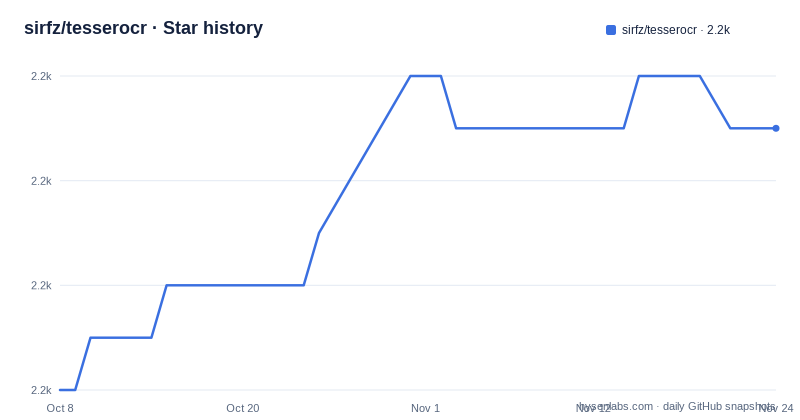
Star history
- sirfz/tesserocr2,181 ★ · +5
| Repository | 2026-10-08 | 2026-11-24 |
|---|---|---|
| sirfz/tesserocr | 2.2k | 2.2k |
5 Stars in the last 47 days, measured from the daily GitHub snapshot. Compare with other projects
Editorial analysis
It links Tesseract's C++ API through Cython instead of calling a binary
tesserocr integrates directly with Tesseract's C++ API using Cython. The README ties two benefits to that choice: simple, readable Pythonic source, and real concurrent execution with Python's threading module, since the GIL is released while Tesseract processes an image.
The wrapper is designed to be Pillow-friendly, and image files work as well. Pillow is optional at build time, needed to support PIL.Image objects, and Cython must be between 3.1.8 and 3.4 to build. The repository includes setup.py, pyproject.toml, a Dockerfile and tesserocr_experiment.pyx, and the setup script sets a minimum Tesseract version of 3.04.00.
A process that calls the Tesseract executable pays for startup on every image. Here one API object stays loaded, and the usage example reuses it across a list of files. The cost is a native dependency chain: the wrapper, Tesseract and Leptonica must be compatible at build and runtime.
Wheels bundle Tesseract, but language data is still your job
Installation from PyPI is one command:
$ pip install tesserocrPre-built wheels for Linux, macOS and 64-bit Windows bundle Tesseract, Leptonica and their runtime dependencies. No separate Tesseract installation is needed to use those wheels. Language data must still be installed separately, as .traineddata files from the tesseract-ocr tessdata repository.
Conda users have another route, the conda-forge channel:
$ conda install -c conda-forge tesserocrThe split matters in practice. A fresh pip install can import fine and still fail to recognize anything until a tessdata directory with the right language files is in place. The README also advises having the correct version of traineddata for the output of tesseract --version, so the files must match the engine rather than just exist.
Building from source needs libtesseract 3.04 and libleptonica 1.71
When no wheel exists for your platform or Python version, pip builds from source. That needs libtesseract at 3.04 or newer and libleptonica at 1.71 or newer. On Debian and Ubuntu the README gives this package line:
$ apt-get install tesseract-ocr libtesseract-dev libleptonica-dev pkg-configA more recent Tesseract may require compiling it yourself, and with several installations present you may need to point LD_LIBRARY_PATH at the right library versions. The setup script tries to detect include and library directories, using pkg-config if available, and you can override them:
$ CPPFLAGS=-I/usr/local/include pip install tesserocrThe other form is `python setup.py build_ext -I/usr/local/include`. Windows source builds have their own file, Windows.build.md. Python 3.9 or newer is required, and Python 2 is no longer supported. The Dockerfile in the repository still starts from python:3.6.5-stretch and builds Tesseract 3.04.01, so it describes an old environment.
TESSDATA_PREFIX or the path argument tells it where the models live
If the tessdata path cannot be detected automatically, set the TESSDATA_PREFIX environment variable or pass the path to PyTessBaseAPI, as in PyTessBaseAPI(path='/usr/share/tessdata'). The directory must contain .traineddata files.
The get_languages function shows what the installation can see:
from tesserocr import get_languages

print(get_languages('/usr/share/tessdata'))  # or any other path that applies to your system
Calling it without arguments prints the tessdata path and the list of available languages, according to the helper example in the README. An empty or unexpected list is the first thing to check when recognition returns nothing.
Setting the path inside code makes a script portable across machines with different layouts, while the environment variable suits containers. The test configuration in pyproject.toml uses the second form, setting TESSDATA_PREFIX to .test-tessdata for the wheel test run, along with OMP_THREAD_LIMIT set to 1.
PyTessBaseAPI reuses one engine across images, and image_to_text is the shortcut
The main class is PyTessBaseAPI. The documented loop opens it in a with statement, sets each image file with SetImageFile, prints GetUTF8Text and prints AllWordConfidences:
from tesserocr import PyTessBaseAPI

images = ['sample.jpg', 'sample2.jpg', 'sample3.jpg']

with PyTessBaseAPI() as api:
    for img in images:
        api.SetImageFile(img)
        print(api.GetUTF8Text())
        print(api.AllWordConfidences())
The api is finalized automatically inside a with block. Otherwise api.End() must be called when it is no longer needed. PyTessBaseAPI exposes several Tesseract API methods, and the README tells you to read their docstrings.
For one-off calls there are helpers: tesserocr.tesseract_version(), tesserocr.get_languages(), tesserocr.image_to_text(image) for a PIL image and tesserocr.file_to_text('sample.jpg') for a path. The advanced examples include GetComponentImages with RIL.TEXTLINE, which returns boxes of text lines.
Use one PyTessBaseAPI per thread, and set globals before starting workers
The README supports free-threaded CPython without enabling the GIL on import. image_to_text and file_to_text can process independent images concurrently. The ownership rules hold with or without the GIL.
First, use a separate PyTessBaseAPI instance per worker. Instances and their iterators have no internal lock, so calling an active instance from another thread, or re-entering it from a signal handler including Clear and End, is not allowed. Second, keep the API alive while using its iterators, since Init, SetImage, Recognize, Clear and End invalidate existing iterators.
Third, some Tesseract parameters, particularly in classify and textord, are process-wide even with separate instances. That covers SetVariable, SetDebugVariable, config files and InitFull variables. Configure them before parallel native work starts. Leptonica's log level and Tesseract's persistent cache are process-wide as well, so set_leptonica_log_level and ClearPersistentCache must run only while no native work is running. For independent settings that must change during OCR, use separate processes.
Ctrl+C reaches OCR only from the main thread and only after recognition unwinds
Recognize, GetUTF8Text, image_to_text and file_to_text use Tesseract's cooperative cancellation to propagate Python signal exceptions, such as KeyboardInterrupt, after recognition unwinds safely. Python handles signals only on the main thread, so interrupting the main thread does not cancel OCR running in a worker.
Layout analysis and other native operations without cancellation checkpoints may delay signal handling until they return. A long page can therefore keep running for a while after you press Ctrl+C.
The consequence for a service: do not rely on a keyboard interrupt to stop worker threads. Give long jobs a process boundary so that a timeout can kill them. The repository's tests directory and tox.ini cover the test setup, and cibuildwheel builds the wheels for manylinux_2_28 on x86_64 and aarch64, musllinux, macOS and Windows.
Releases are frequent and the license is MIT
The latest releases are v2.12.0 on 2026-10-22, v2.11.0 on 2026-08-04 and v2.10.0 on 2026-01-13. The repository is not archived, and the last push, also on 2026-10-22, matches the v2.12.0 release.
The Windows wheel test in pyproject.toml replaces PATH with System32 only, to test the bundled DLLs without access to the build-time native libraries. That is a sign the Windows wheel is expected to run on a machine with no Tesseract installed.
The license is MIT. Tesseract and Leptonica ship inside the wheels, so check their licenses too if you redistribute an application that bundles tesserocr. The README does not discuss those terms.
Editorial conclusion
Use tesserocr if you run OCR from Python on many images, want a persistent Tesseract instance, and can follow the one-instance-per-worker rule for threads. Skip it if you only need to shell out to the tesseract binary once in a while. Before deploying, confirm that your tessdata files match the Tesseract version the wheel bundles, and set TESSDATA_PREFIX explicitly.
Frequently asked questions
How to use tesserocr?
Install it with pip install tesserocr, make sure .traineddata language files are available, then call tesserocr.image_to_text or open PyTessBaseAPI in a with block and call SetImageFile and GetUTF8Text.
Is Tesseract OCR free or paid, and what does tesserocr cost?
tesserocr is MIT licensed and installs from PyPI or conda-forge. The README does not discuss the license or price of Tesseract itself, which the wheels bundle.
Is Tesseract OCR safe to use through tesserocr?
The README makes no safety claim. It documents thread-safety rules: one PyTessBaseAPI instance per worker, and process-wide settings configured before parallel work starts.
Is there a better OCR than Tesseract?
The repository does not compare Tesseract with other OCR engines. It wraps Tesseract's C++ API and reports no accuracy numbers.
Official sources
Add this badge to your README
If you maintain this project, the badge below links readers to this analysis and shows its maintenance status from the daily GitHub snapshot. Paste the markdown into your README; add ?metric=license or ?metric=stars to the image URL for a different field.

[](https://hysenlabs.com/projects/sirfz-tesserocr)Star history chart for your README
[](https://hysenlabs.com/projects/sirfz-tesserocr)Was this useful?